JavaScript async/await Explained: Write Promises Like Normal Code
Learn async and await in JavaScript, how they work with Promises, error handling with try/catch, running tasks one by one or together, and common mistakes.
What you will learn
You have come a long way in this section. You started with callbacks, then learned Promises, which gave you flat chains, one .catch and tools like Promise.all. Promise code is a big step forward, but a chain with many .then() calls still looks different from the normal top to bottom code you wrote in the first lessons.
async/await is the final step. It lets you write Promise code so that it reads like normal code: one line after another, with plain variables and plain try...catch. And it is not a new system. It uses the same Promises underneath, so everything you learned still applies.
In this lesson you will learn:
- what
asyncandawaitdo, and why they exist - what is really happening when a function “waits”
- how to handle errors with
try...catch...finally - the difference between running tasks one by one and together
- how to use
awaitin loops - the common mistakes that catch almost everyone
Why async/await exists
Look at the same story, the food order, written in the three styles you now know:
// 1. Callbacks: a pyramid
placeOrder("Pizza", (error, order) => {
  prepareFood(order, (error, order) => {
    deliver(order, (error, order) => { /* ... */ });
  });
});

// 2. Promise chain: flat, but each step lives in its own function
placeOrder("Pizza")
  .then(prepareFood)
  .then(deliver)
  .then((order) => console.log("Enjoy your " + order.item + "!"));

// 3. async/await: reads like normal code
async function orderFood() {
  const order = await placeOrder("Pizza");
  const prepared = await prepareFood(order);
  const delivered = await deliver(prepared);
  console.log("Enjoy your " + delivered.item + "!");
}
The third version reads like a to-do list. Each step is one line, and each result goes into an ordinary variable that you can use on the next lines. With a chain, a value created in step 1 is hard to use in step 3, because it lives inside a callback. With await, it is just a variable in the same function.
Programmers call this syntactic sugar: it is a sweeter way to write the same thing, not a new power. The Promises are still there, hidden.
The idea: a bookmark in a book
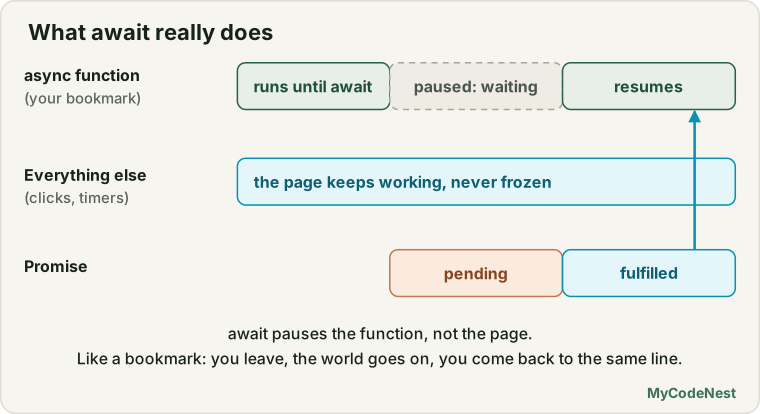
Imagine you are reading a novel, and you ordered a parcel that should arrive today. Reading is your function, and the parcel is a Promise (your tracking page from earlier lessons).
You reach a page where the story says “now wait for the parcel”. So you put a bookmark in the book and go away. You do not sit and stare at the door. While you are away, the world goes on: you cook, you answer messages, you do other chores. When the parcel finally arrives, you come back, open the book exactly at the bookmark, and continue reading, now holding the parcel in your hand.
That is await:
| In the story | In JavaScript |
|---|---|
| Reading the book | An async function running |
| “Wait for the parcel” | await somePromise |
| Putting a bookmark and going away | The function is paused, and JavaScript is free to do other work |
| The parcel arrives | The Promise is fulfilled |
| Continuing from the bookmark with the parcel | The function continues and await gives you the value |
| The parcel is cancelled | The Promise is rejected, and await throws an error |
The most important point: only your book (the function) waits. The rest of your life (the rest of the program and the page) does not stop.
The async keyword
You put async before a function. It does two things:
- It allows you to use
awaitinside the function. - It makes the function always return a Promise.
async function greet() {
  return "Hello";
}

const result = greet();

console.log(result);   // Promise {<fulfilled>: 'Hello'}
result.then((value) => console.log("Value: " + value));
Output:
Promise {<fulfilled>: 'Hello'}
Value: Hello
Even though we returned the plain text "Hello", the function gave back a Promise that is fulfilled with that text. And if the function throws an error, the Promise is rejected:
async function broken() {
  throw new Error("Oops");
}

broken().catch((error) => console.log("Rejected: " + error.message));
Output:
Rejected: OopsYou can use async with every kind of function:
async function a() {}                 // function declaration
const b = async function () {};       // function expression
const c = async () => {};             // arrow function
const user = {
  async load() {}                     // method in an object
};

button.addEventListener("click", async function () {   // as a callback
  // you can use await in here
});
The await keyword
await goes before a Promise. It does this:
- It waits until the Promise is settled (but only pauses the function).
- If the Promise is fulfilled,
awaitgives you the value. - If the Promise is rejected,
awaitthrows the error, sotry...catchcan catch it.
async function showUser() {
  const user = await loadUser(1);   // wait here, then user holds the real object
  console.log("Loaded: " + user.name);
}
Compare it with the Promise version. There is no .then and no callback. The value comes out on the same line, into a normal variable. That fixes the problem from the last lessons, where the result was always trapped inside .then.
There are two rules:
awaitcan only be used inside anasyncfunction. (In modern JavaScript modules, you can also use it at the top level of the file. You will see that in the modules lesson.)- You can
awaitany value. If it is not a Promise, you just get the value back.
await pauses the function, not the page
This is the part that people misunderstand most, so look at it carefully:
function wait(ms) {
  return new Promise((resolve) => setTimeout(resolve, ms));
}

async function run() {
  console.log("A: before await");
  await wait(300);
  console.log("C: after await");
}

console.log("1: start");
run();
console.log("B: main code continues");
Output:
1: start
A: before await
B: main code continues
C: after await
Follow it step by step:
1: startis printed.run()is called. An async function runs like any normal function until the firstawait, soA: before awaitis printed right away.- At
await wait(300), the function pauses and puts its bookmark. Control goes back to the caller. - The main code continues, so
B: main code continuesis printed. The page is not blocked. - After 300 ms the Promise is fulfilled. Like a callback, the rest of the function is scheduled to run (through the event loop you studied before). It continues from the bookmark, and
C: after awaitis printed.
This is the same asynchronous behaviour as always. The only difference is that you wrote it as straight lines.
Decode the code you have already seen
In earlier lessons, you saw async and await in code that you were told to accept for now. You can read all of it now. Here is the example from the error handling lesson:
async function loadUser() {
  try {
    const response = await fetch("https://jsonplaceholder.typicode.com/users/1");

    if (!response.ok) {
      throw new Error(`Server error: ${response.status}`);
    }

    const user = await response.json();
    console.log(user.name);
  } catch (error) {
    console.log("Could not load the user:", error.message);
  } finally {
    console.log("Request finished");
  }
}

loadUser();
Line by line:
async functionmeans this function can useawaitand returns a Promise.await fetch(...)pauses the function until the server answers.fetchreturns a Promise, andawaitgives you theresponse.fetchdoes not reject on a 404 or 500, so we checkresponse.okourselves andthrowan error.await response.json()waits again, because reading the body is also asynchronous, and gives you the real data.catchhandles any error from the steps above: a network failure or the error we threw.finallyalways runs.
The same goes for the other previews. In the browser lesson, the Copy button used async function () with try...catch around await navigator.clipboard.writeText(...), because copying is asynchronous and can be refused. In the FormData lesson, await fetch(...) sent the form data and response.ok checked the answer. You will study fetch fully in its own lesson soon.
Errors: try...catch...finally works again
With callbacks, you learned that try...catch could not catch errors that happen later. With await, it can, because await turns a rejected Promise into a thrown error, inside your function.
Here is the food order with proper error handling:
async function orderFood() {
  try {
    const order = await placeOrder("Pizza");
    const prepared = await prepareFood(order);
    const delivered = await deliver(prepared);
    console.log("Enjoy your " + delivered.item + "!");
  } catch (error) {
    console.log("Error: " + error.message);
  } finally {
    console.log("Order flow finished");
  }
}

orderFood();
Output when everything works:
1. Order placed: Pizza
2. Food prepared for order 101
3. Delivered: Pizza
Enjoy your Pizza!
Order flow finished
Output when the kitchen is closed (prepareFood rejects):
1. Order placed: Pizza
Error: The kitchen is closed
Order flow finished
deliver never ran, the error was printed once, and finally still ran. This is the same behaviour as the Promise chain with .catch and .finally, but it uses the try...catch...finally you already know from the error handling lesson. One block of code can protect many steps.
You can also handle the error outside the async function, because it returns a Promise:
orderFood().catch((error) => console.log("Failed: " + error.message));Both styles are valid. Use try...catch inside when you want to handle the error where it happened, and .catch outside when the caller should decide.
await is .then in disguise
To understand it fully, look at what the code really means. These two functions do exactly the same job:
// With await
async function withAwait() {
  const a = await p1();
  const b = await p2(a);
  return b;
}

// With then
function withThen() {
  return p1().then((a) => p2(a));
}
With await |
With Promises |
|---|---|
const a = await p1(); |
p1().then((a) => ...) |
the lines after await |
the code inside the .then callback |
throw inside the function |
a rejection |
try { ... } catch { ... } |
.catch(...) |
finally { ... } |
.finally(...) |
return value |
the Promise is fulfilled with value |
So async/await does not replace Promises. It is a nicer way to write them. That is why you needed to learn Promises first, and why you can mix both styles when it helps.
One by one, or together?
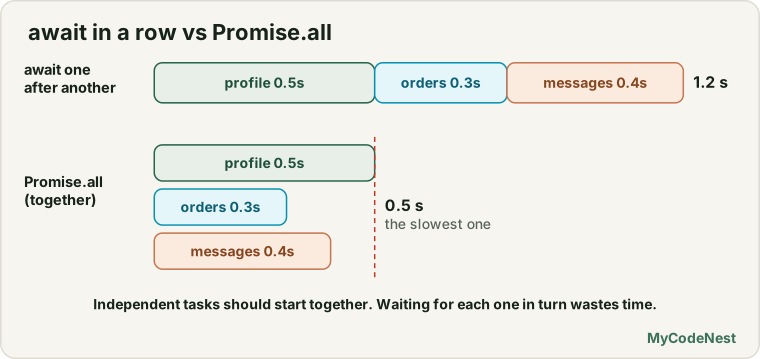
This is the biggest performance mistake with await. Since await makes the function wait, writing several await lines in a row makes the tasks run one after another, even if they do not depend on each other.
A dashboard needs a profile (0.5 seconds), orders (0.3 seconds) and messages (0.4 seconds):
function wait(ms) {
  return new Promise((resolve) => setTimeout(resolve, ms));
}

const getProfile = () => wait(500).then(() => ({ name: "Riya" }));
const getOrders = () => wait(300).then(() => [101, 102, 103]);
const getMessages = () => wait(400).then(() => ["Hi", "Offer", "OTP", "Bill"]);
Version 1: one by one (slow)
async function oneByOne() {
  const profile = await getProfile();     // waits 0.5s
  const orders = await getOrders();       // then waits 0.3s
  const messages = await getMessages();   // then waits 0.4s
  console.log(profile.name, orders.length, messages.length);
}
Total time: about 1.2 seconds (0.5 + 0.3 + 0.4). The orders did not need the profile, but they waited for it anyway.
Version 2: together with Promise.all (fast)
async function together() {
  const [profile, orders, messages] = await Promise.all([
    getProfile(),
    getOrders(),
    getMessages()
  ]);
  console.log(profile.name, orders.length, messages.length);
}
Total time: about 0.5 seconds, the time of the slowest one. This is Promise.all from the last lesson, now combined with await and array destructuring.
Version 3: start first, await later
async function startFirst() {
  const profilePromise = getProfile();     // starts now
  const ordersPromise = getOrders();       // starts now
  const messagesPromise = getMessages();   // starts now

  const profile = await profilePromise;    // now wait for each
  const orders = await ordersPromise;
  const messages = await messagesPromise;

  console.log(profile.name, orders.length, messages.length);
}
Total time: also about 0.5 seconds. Remember that a Promise starts working when it is created. In this version, we create all three first, and only then await them, so all three run at the same time.
The output of the three versions:
One by one: Riya 3 4 took ~1.2s
Together:   Riya 3 4 took ~0.5s
Start first: Riya 3 4 took ~0.5s
A simple rule: use separate await lines when a step needs the result of the previous one. Use await Promise.all([...]) when the tasks are independent. If you want the report of every task even when some fail, use await Promise.allSettled([...]).
await in loops
Loops and await work well together, but you must be careful.
Sequential: for...of with await
When tasks must happen one at a time, for example sending emails in order, use a for...of loop:
async function sendEmail(name) {
  await wait(100);
  console.log("Sent to " + name);
}

async function sendAll() {
  const names = ["Riya", "Aman", "Neha"];

  for (const name of names) {
    await sendEmail(name);   // waits for each one before the next
  }

  console.log("All emails really sent");
}
Output:
Sent to Riya
Sent to Aman
Sent to Neha
All emails really sent
The forEach trap
It is tempting to use forEach with an async callback. It does not work the way you expect:
async function wrong() {
  const names = ["Riya", "Aman", "Neha"];

  names.forEach(async (name) => {
    await sendEmail(name);
  });

  console.log("All emails sent?");   // runs too early!
}
Output:
All emails sent?
Sent to Riya
Sent to Aman
Sent to Neha
forEach does not know about Promises. It starts each async callback and moves on at once, so the line after it runs before any email is sent. Use for...of (one by one) or map with Promise.all (together) instead.
Together: map and Promise.all
async function sendAllTogether() {
  const names = ["Riya", "Aman", "Neha"];

  await Promise.all(names.map((name) => sendEmail(name)));

  console.log("All emails really sent");
}
All three emails go out at the same time, and the last line waits for all of them.
Real use case: a Load button with try, catch and finally
This is the most common async/await code in real pages. It is the same Load button as in the Promises lesson, but now it reads like normal code:
const status = document.getElementById("status");
const loadButton = document.getElementById("load");

loadButton.addEventListener("click", async function () {
  status.textContent = "Loading...";
  loadButton.disabled = true;

  try {
    const profile = await loadProfile();
    status.textContent = "Welcome, " + profile.name;
  } catch (error) {
    status.textContent = "Failed: " + error.message;
  } finally {
    loadButton.disabled = false;   // always runs
  }
});
Notice that the event handler itself is an async function. This is allowed, and it is how you use await inside a click handler.
Real use case: retry with a growing wait
In the timers lesson, you wrote a chained setTimeout to retry something with a longer wait each time. With async/await, a retry becomes a simple loop:
async function retry(task, times) {
  for (let attempt = 1; attempt <= times; attempt++) {
    try {
      return await task(attempt);          // success: return the value
    } catch (error) {
      console.log("Attempt " + attempt + " failed: " + error.message);

      if (attempt === times) {
        throw error;                       // out of attempts: give up
      }

      await wait(attempt * 200);           // wait longer each time
    }
  }
}
Test it with a task that fails twice and then works:
function flakyTask(attempt) {
  return new Promise((resolve, reject) => {
    setTimeout(() => {
      if (attempt < 3) {
        reject(new Error("Server busy"));
      } else {
        resolve("Data on attempt " + attempt);
      }
    }, 100);
  });
}

retry(flakyTask, 5).then((value) => console.log("Success: " + value));
Output:
Attempt 1 failed: Server busy
Attempt 2 failed: Server busy
Success: Data on attempt 3
And if it always fails:
retry(() => Promise.reject(new Error("Always fails")), 2)
  .catch((error) => console.log("Gave up: " + error.message));
Output:
Attempt 1 failed: Always fails
Attempt 2 failed: Always fails
Gave up: Always fails
Try to write this with callbacks or even with a Promise chain, and you will see how much async/await helps. A loop, a try...catch and a wait are all you need.
Real use case: a countdown
In the Promises lesson, a countdown was a challenge. Now it is just a loop:
async function countdown(from) {
  for (let n = from; n >= 1; n--) {
    console.log(n);
    await wait(1000);
  }
  console.log("Go!");
}

countdown(3);
Output (one line every second):
3
2
1
Go!
A preview of the full fetch pattern
Most async/await code you will write calls a server. Here is the complete, professional pattern. You will study every part in the Fetch API lesson:
async function getUser(id) {
  const response = await fetch("https://jsonplaceholder.typicode.com/users/" + id);

  if (!response.ok) {
    throw new Error("Server error: " + response.status);
  }

  return await response.json();
}

async function showUser() {
  try {
    const user = await getUser(1);
    console.log(user.name);
  } catch (error) {
    console.log("Could not load the user:", error.message);
  }
}
Look at how the two functions work together. getUser fetches and throws on a problem. showUser decides what to do about it with try...catch.
Common mistakes
Forgetting await
async function main() {
  const forgot = loadUser(1);             // no await!
  console.log("Forgot await:", forgot.name);
  console.log("forgot is a:", forgot);

  const user = await loadUser(1);
  console.log("With await:", user.name);
}
Output:
Forgot await: undefined
forgot is a: Promise {<pending>}
With await: Riya
Without await, you do not get the value. You get the Promise itself, and forgot.name is undefined. If you see Promise {<pending>} where you expected data, you forgot an await.
return without await inside try
This one is subtle. Look at the two functions:
function failing() {
  return Promise.reject(new Error("Network down"));
}

async function withoutAwait() {
  try {
    return failing();          // returns the Promise without waiting for it
  } catch (error) {
    console.log("withoutAwait: caught inside");
  }
}

async function withAwait() {
  try {
    return await failing();    // waits here, so the error lands in this try
  } catch (error) {
    console.log("withAwait: caught inside");
  }
}
Now call both:
withoutAwait().catch((error) => console.log("withoutAwait: caught OUTSIDE: " + error.message));
withAwait();
Output:
withAwait: caught inside
withoutAwait: caught OUTSIDE: Network down
In withoutAwait, the function leaves the try block before the Promise is rejected, so the catch never sees the error. If you want to catch an error inside the function, use return await inside the try.
Other common mistakes
- Using
awaitoutside anasyncfunction. This is a syntax error:awaitis only valid in async functions. Addasyncto the function. - Awaiting independent tasks one by one. It wastes time. Use
await Promise.all([...]). - Using
forEachwithawait. It does not wait. Usefor...oforPromise.allwithmap. - No
try...catchor.catch. A rejected Promise that nobody handles becomes an unhandled rejection. - Thinking
asyncmakes heavy code fast. Anasyncfunction still runs on the one call stack. A long loop inside it still blocks the page, as you saw in the event loop lesson. - Forgetting that an
asyncfunction returns a Promise. To use its result, you needawait(or.then) at the place where you call it. - Mixing
.thenandawaitin confusing ways. Both work, but choose one style per function so the code stays easy to read.
Practice
- Convert this chain into an
asyncfunction withawait:wait(500) .then(() => { console.log("Step 1"); return wait(500); }) .then(() => { console.log("Step 2"); return wait(500); }) .then(() => console.log("Step 3")); - Predict the output, then run it. Explain why
Bprints beforeC:async function run() { console.log("A"); await wait(200); console.log("C"); } run(); console.log("B"); - Write an
asyncfunctiondouble(n)that returnsn * 2. Call it and print the result in two ways: with.thenand withawaitinside anotherasyncfunction. - Take your
login,loadProfileandloadOrdersfunctions that return Promises from the earlier lessons. Write anasyncfunction that runs them in order and prints the results, with atry...catch...finally. - In question 4, make
loadProfilereject. Check that the error is printed once, thatloadOrdersis skipped, and thatfinallystill runs. - Create three tasks of 300, 400 and 500 ms. Run them one by one and measure the time. Then run them together with
Promise.alland measure again. Explain the difference. - Write
sendAll(names)that sends a fake message to each name, one at a time, withfor...of. Then change it to send all together withmapandPromise.all. - Write the
forEachversion of question 7 and show that the final message prints too early. Explain why in your own words. - In the practice editor, click Load dashboard one by one and Load dashboard together. Write down both times, and change the code so the third version (start first, await later) gives the same time as
Promise.all. - Challenge: Write
retry(task, times)yourself, without looking at the lesson. Test it with a task that fails two times and then works. - Challenge: Write
withTimeout(promise, ms)that usesPromise.raceto reject if the promise takes too long, and use it withawaitinsidetry...catch. - Challenge: Rewrite your callback version of the food order (from the callbacks lesson) in all three styles: callbacks, Promise chain and
async/await. Write two sentences about which one you prefer and why.
Recap
async/awaitis a nicer way to write Promises. It does not replace them.- An
asyncfunction always returns a Promise. A returned value fulfils it, and a thrown error rejects it. awaitcan only be used inside anasyncfunction. It waits for a Promise and gives you its value. If the Promise is rejected,awaitthrows the error.awaitpauses only the function, like a bookmark in a book. The rest of the program and the page keep running.- An
asyncfunction runs normally until the firstawait. - Use
try...catch...finallyto handle errors. One block can protect many steps. - Separate
awaitlines run one by one. To run independent tasks together, start them first and await later, or useawait Promise.all([...]). - Use
for...offor one-by-one loops andmapwithPromise.allfor parallel ones. Never useforEachwithawait. - Common bugs: forgetting
await, awaiting independent tasks in a row, andreturnwithoutawaitinsidetry.
You now have the complete modern toolkit for asynchronous JavaScript: callbacks, Promises, combinators and async/await. Next, you will look at the faster waiting line you have heard about twice in this section, the microtask queue, to understand exactly in what order Promise callbacks and timers run. After that, you will move to HTTP and the fetch API, where all of this becomes real.
If you want to refresh the basics, read the Promises lesson, the Promise combinators lesson and the event loop lesson. For the error basics behind try...catch, see the error handling lesson.
Frequently asked questions
What does the async keyword do?
It marks a function so that it always returns a Promise, and allows you to use await inside it. If the function returns a plain value, it is wrapped in a resolved Promise.
Can I use await outside an async function?
In ES modules (and the top level of modern scripts that are modules), you can use top-level await. In normal scripts and functions, await is only allowed inside an async function.
How do I handle errors with async/await?
Use try...catch around the await. If the awaited Promise rejects, the code jumps to catch. You can add finally for clean-up. An async function you do not wrap should be caught by the caller.
Why is my await in a loop so slow?
Each await waits for the previous one, so the requests run one after another. If they do not depend on each other, start them all and use await Promise.all(promises), so they run at the same time.
Does await block the whole program?
No. It pauses only the async function it is in. While waiting, JavaScript can run other code, handle clicks and update the page. The function continues when the Promise settles.
See also: Fetch API, Microtasks and Macrotasks, AbortController, JavaScript Cheat Sheet