JavaScript Event Loop Explained: Call Stack, Queue and Web APIs
Understand how the JavaScript event loop works with the call stack, Web APIs and the task queue, and why timers and clicks wait, using a simple chai stall.
What you will learn
In the last three lessons, you saw many strange things:
setTimeout(fn, 0)runs after the code that comes below it- a busy JavaScript makes a timer arrive late
- a “Loading…” message does not appear if the work blocks the page
- clicks are ignored while a long task runs
All of these have one explanation: the event loop. In this lesson you will learn the four parts that work together, and then you will follow code step by step like a detective.
You will learn:
- what the call stack is
- what the browser’s Web APIs do for you
- what the task queue is
- what the event loop actually does
- how to keep your page smooth while doing heavy work
The idea first: a one-man chai stall
Imagine a small chai stall run by one man, Raju. He can only do one thing at a time with his hands.
- Raju is JavaScript. One person, one pair of hands. This is what people mean when they say JavaScript is single-threaded: it can do only one thing at a time.
- The task Raju is doing right now, like pouring tea into a cup, is on the call stack.
- The stove can boil many kettles by itself, without Raju standing there. The stove is the browser (Web APIs). When Raju puts a kettle on the stove, he walks away from it.
- When a kettle is ready, it is put on the counter shelf. This shelf is the task queue. The first kettle that was ready stands first in line.
- Raju has a habit: only when his hands are completely free, he looks at the shelf and takes the first kettle. This habit is the event loop.
Now you can already see why setTimeout(fn, 0) is late. The kettle is ready at once, but it waits on the shelf until Raju has finished everything he was doing. And if Raju spends 10 minutes cleaning the stall, every ready kettle waits for 10 minutes. That is blocking.
| Chai stall | JavaScript |
|---|---|
| Raju (one person) | The JavaScript engine (single-threaded) |
| What is in Raju’s hands right now | The call stack |
| The stove with kettles | The browser’s Web APIs (timers, events, network) |
| The shelf of ready kettles | The task queue (also called callback queue) |
| Raju’s habit of checking the shelf when free | The event loop |
Keep this picture in your mind. Now let us look at each part properly.
Part 1: the call stack
The call stack is a list of the functions JavaScript is working on right now. It works like a stack of plates: you put a new plate on top, and you take plates away from the top. The last plate that went on is the first one to come off. We call this last in, first out.
When a function is called, it goes on the top of the stack. When it finishes, it is taken off. If a function calls another function, the new one goes on top, and the first one waits underneath.
function third() {
  console.log("third");
}

function second() {
  console.log("second start");
  third();
  console.log("second end");
}

function first() {
  console.log("first start");
  second();
  console.log("first end");
}

first();
Output:
first start
second start
third
second end
first end
Here is how the stack changes, from the beginning to the end (the top of the stack is written first):
1. first() is called       stack:  first
2. first calls second()    stack:  second, first
3. second calls third()    stack:  third, second, first
4. third finishes          stack:  second, first
5. second finishes         stack:  first
6. first finishes          stack:  (empty)
Notice that first was the first function to start, but it is the last one to finish. It stays on the stack, waiting, while the others do their work above it.
This is the same Call Stack panel you saw in the debugging lesson. When you pause on a breakpoint in DevTools, it shows you this exact list of functions.
The stack has a limit
The stack cannot grow forever. If a function keeps calling itself without stopping (recursion with no end), the plates pile up until the stack is full:
function forever() {
  forever();
}

try {
  forever();
} catch (error) {
  console.log(error.name + ": " + error.message);
}
Output:
RangeError: Maximum call stack size exceededThis is a stack overflow. Notice that try...catch worked here. Why? Because this error is synchronous: it happens while the try block is still running. Only errors that happen later (in a callback) escape it.
The golden rule of the stack
JavaScript can run code only from the top of the call stack. While the stack is busy, nothing else can run.
This is the reason for blocking. A long task sits on the stack, and everything else has to wait.
Part 2: Web APIs, the helpers
Where does the waiting happen when you write setTimeout? Not on the call stack. If JavaScript waited on the stack, nothing else could run.
The waiting is done by the browser. A browser is much more than a JavaScript engine. It also gives JavaScript a set of helper tools called Web APIs:
- Timers:
setTimeout,setInterval - DOM events: clicks, key presses, scrolling
- Network requests:
fetch - and many more
These tools are not part of JavaScript itself. They live in the browser, and JavaScript only talks to them. This is the stove in our story.
When you call setTimeout(fn, 2000):
- The call
setTimeout(...)goes on the stack. - JavaScript hands the job to the browser: “Start a 2 second timer, and remember
fn.” - The call is finished, so it leaves the stack right away. Raju has walked away from the kettle.
- After 2 seconds, the browser says “time is up” and sends
fnto the next place: the task queue.
Part 3: the task queue
The task queue (also called the callback queue) is a waiting line for callbacks that are ready to run. It works like a normal queue at a ticket counter: first in, first out. The one who came first is served first.
Who puts callbacks in the queue?
- a timer that has finished
- a click (or any event) that the user triggered
- a network response that has arrived
All of them go to the same line, in the order they became ready.
Part 4: the event loop
Now the key player. The event loop is a loop that keeps asking one simple question, forever:
“Is the call stack empty? If yes, is there something in the queue? If yes, take the first one and put it on the stack.”
You can imagine it in code like this (this is only the idea, not real code you can run):
// Imagine the browser doing this all day long
while (true) {
  if (callStack.isEmpty() && queue.hasWaitingTasks()) {
    const task = queue.takeFirst();
    callStack.run(task);
  }
}
That is all the event loop does. It does not run your code. It does not wait for timers. It only moves a callback from the queue to the stack, and only when the stack is empty.
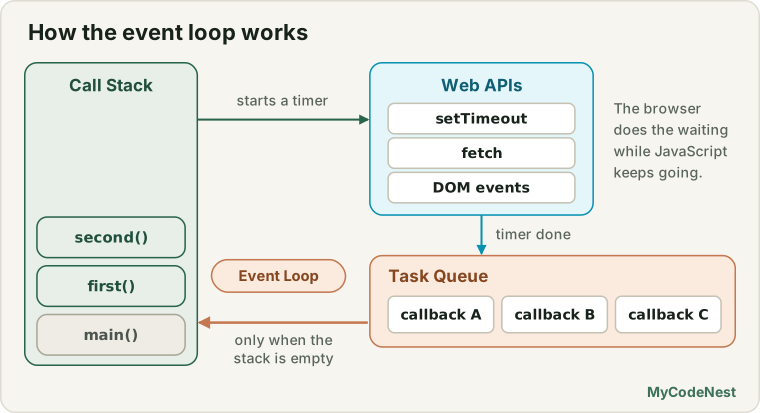
The most important sentence of this lesson:
The event loop moves a callback from the queue to the stack only when the stack is completely empty, which means after all the synchronous code is finished.
Follow the code, step by step
Let us trace a small program. Read it, write down what you think will be printed, and then check:
console.log("Start");

setTimeout(() => console.log("Timer 1"), 0);
setTimeout(() => console.log("Timer 2"), 0);

console.log("End");
Output:
Start
End
Timer 1
Timer 2
Here is exactly what happens:
| Step | What runs | Call stack | Browser (helpers) | Queue | Printed |
|---|---|---|---|---|---|
| 1 | console.log("Start") |
console.log |
Start |
||
| 2 | first setTimeout |
setTimeout |
Timer 1 | ||
| 3 | second setTimeout |
setTimeout |
Timer 1, Timer 2 | ||
| 4 | console.log("End") (the 0 ms timers finish at once and wait on the shelf) |
console.log |
Timer 1, Timer 2 | End |
|
| 5 | Stack is empty. The event loop takes the first task | Timer 1 callback |
Timer 2 | Timer 1 |
|
| 6 | Stack is empty again. The event loop takes the next task | Timer 2 callback |
Timer 2 |
At step 4, the timers are already finished, but their callbacks cannot run yet, because the main code is still on the stack. They wait on the shelf. Only at step 5, when the stack is empty, does the event loop let them in.
The order of timers
Because the queue is first in, first out, you can now predict the order of any timers:
setTimeout(() => console.log("slow 100"), 100);
setTimeout(() => console.log("fast 50"), 50);
setTimeout(() => console.log("zero A"), 0);
setTimeout(() => console.log("zero B"), 0);

console.log("sync");
Output:
sync
zero A
zero B
fast 50
slow 100
The rules:
- All synchronous code runs first (
sync). - Timers join the queue when they finish, so a shorter delay joins earlier.
- Two timers with the same delay stay in the order they were written (
zero A, thenzero B).
Why a busy stack hurts everything
Now you can explain the problems from the earlier lessons.
A late timer. The timer finished, its callback is on the shelf, but Raju is busy:
console.log("1");

setTimeout(() => console.log("2"), 0);

function slowTask() {
  const start = Date.now();
  while (Date.now() - start < 500) {
    // busy for half a second
  }
  console.log("3 (slow task done)");
}

slowTask();
console.log("4");
Output:
1
3 (slow task done)
4
2
The timer was ready after 0 ms, but slowTask kept the stack busy, so 2 had to wait.
Clicks that seem to be ignored. A click is also put in the queue. If the stack is busy, the click waits on the shelf, too. If a user clicks 5 times while a long task runs, those 5 clicks wait in the queue, and they all run quickly after the task finishes. This is why a frozen page often “wakes up” and does many things at once.
The “Loading…” message that never appears. The browser updates the screen between tasks, not in the middle of one. If your task does status.textContent = "Loading..." and then blocks for 2 seconds, the screen cannot be repainted until the task ends. This is what you saw in the sync vs async lesson. The event loop is the reason.
Real use case: keep the page alive during heavy work
What if you really have a heavy job, like adding up a million numbers or processing a big list? If you do it in one go, the stack is busy and the page freezes.
The trick: break the job into small chunks. After each chunk, use setTimeout(..., 0) to schedule the next chunk. That puts the next piece at the end of the queue, so the event loop can handle clicks, timers and screen updates in between.
function sumInChunks(limit, chunkSize, onDone) {
  let sum = 0;
  let i = 1;

  function doChunk() {
    const end = Math.min(i + chunkSize - 1, limit);

    while (i <= end) {
      sum += i;
      i++;
    }

    console.log(Math.round((end / limit) * 100) + "% done");

    if (end < limit) {
      setTimeout(doChunk, 0);   // next chunk goes to the back of the queue
    } else {
      onDone(sum);
    }
  }

  doChunk();
}

setTimeout(() => console.log("Other work ran in between"), 0);
sumInChunks(1000000, 250000, (sum) => console.log("Sum: " + sum));
console.log("Main code finished");
Output:
25% done
Main code finished
Other work ran in between
50% done
75% done
100% done
Sum: 500000500000
See how Other work ran in between managed to run in the middle of the job? That is the whole point: after the first chunk, the stack became empty, the event loop let other tasks in, and only then did the next chunk run.
You can see this difference in the practice editor. Click Heavy work (blocking), and try clicking Click me while it runs. Then do the same with Heavy work (in chunks). In the blocking version, the progress bar does not move and your clicks are counted all at once at the end. In the chunked version, the bar moves smoothly and every click is counted immediately.
Tip: For very heavy work, there is an even better tool called Web Workers, which run your code on a separate worker. You will learn them later in the advanced section.
A hint about what comes next
There is one more detail. There are actually two waiting lines. Besides the normal task queue you learned about, there is a second, faster line, which is used by Promises. The event loop empties that faster line completely before it takes the next normal task. You will study it right after Promises, in the microtasks lesson. For now, remember only the basic loop: stack, helpers, queue, loop.
Common mistakes
- Thinking JavaScript does many things at once. It runs one thing at a time. Only the waiting happens in the browser.
- Thinking
setTimeout(fn, 0)runs immediately. The callback goes to the queue and waits until the stack is empty. - Believing a timer’s delay is exact. It is the time when the callback joins the queue, not when it runs.
- Writing long loops or heavy calculations in one go. They block clicks, timers and screen updates. Split them into chunks.
- Expecting callbacks to run in the order they were started. Callbacks run in the order they become ready.
- Thinking the event loop is code you write. It is part of the browser. You never call it. You only write callbacks and tasks that it will run.
- Writing infinite recursion. It fills the stack and gives
Maximum call stack size exceeded.
Practice
- Without running it, predict the output. Then trace it with a table (stack, browser, queue, printed) like the one in the lesson:
console.log("A"); setTimeout(() => console.log("B"), 0); console.log("C"); setTimeout(() => console.log("D"), 0); console.log("E"); - Predict the output of this code, and explain the order of
3and4:console.log("1"); setTimeout(() => console.log("2"), 100); setTimeout(() => console.log("3"), 0); setTimeout(() => console.log("4"), 50); console.log("5"); - Write three functions,
a,bandc, whereacallsb, andbcallsc. Print a message at the start and at the end of each. Draw the stack on paper at each step. - Open DevTools, put a
debuggerstatement insidec, and look at the Call Stack panel. Does it match your drawing? - In the practice editor, click Heavy work (blocking) and quickly click Click me five times. Write down what you see during the work and right after it. Then repeat with the chunked version and compare.
- Create a function
blockFor(ms)and use it with asetTimeout(..., 100)to show that a timer can run much later than 100 ms. Print the real waited time usingDate.now(). - Challenge: Write
countInChunks(limit, chunkSize)that counts from 1 tolimitin chunks and prints the progress after every chunk. Prove that asetTimeout(..., 0)you set before starting runs between the chunks. - Challenge: Explain the event loop to a friend in 5 sentences, using your own story (not the chai stall).
Recap
- JavaScript is single-threaded: one call stack, one thing at a time.
- The call stack is a list of functions being worked on, last in first out. Code runs only from the top.
- Web APIs (timers, events, network) live in the browser. They do the waiting while JavaScript keeps working.
- When a helper finishes, its callback goes into the task queue, a first in first out waiting line.
- The event loop moves the first task from the queue to the stack, but only when the stack is empty.
- That is why
setTimeout(fn, 0)runs late, why a busy stack makes timers late, why clicks wait, and why the screen does not update during a long task. - Timers run in the order they become ready, and equal delays keep their written order.
- To keep a page alive during heavy work, split the work into small chunks and schedule each with
setTimeout(..., 0). - Promises use a second, faster queue. You will learn it after Promises.
Next, you will meet the tool that solves most callback problems: Promises. Now that you understand the event loop, you will see exactly when and why Promise code runs.
If you want to go back to the basics, read the sync vs async lesson, the timers lesson and the asynchronous callbacks lesson.
Frequently asked questions
What is the event loop?
It is the mechanism that lets single-threaded JavaScript handle asynchronous work. It keeps checking whether the call stack is empty, and if so, takes the next waiting task from the queue and runs it.
What is the call stack?
It is where JavaScript keeps track of the functions being run. When a function is called, it is added on top, and when it returns, it is removed. Too many nested calls cause a “stack overflow” error.
Why does setTimeout(fn, 0) run after the code that follows it?
The callback goes into the task queue, and the event loop only picks it up when the call stack is empty. The rest of your current code runs first, even though the delay is zero.
Where do Web APIs fit in?
Features such as timers, fetch and DOM events are provided by the browser, not the JavaScript engine. The browser does the waiting in the background, and then puts your callback into a queue for the event loop.
Why does a heavy loop freeze the page?
While the loop runs, the call stack is busy, so the event loop cannot run any other tasks, including clicks and rendering. Split long work into chunks, or use a Web Worker.
See also: Microtasks and Macrotasks, Promises, async/await, JavaScript Cheat Sheet