JavaScript Promise.all, allSettled, race and any Explained
Learn Promise.all, allSettled, race and any, when to use each one, and how they link with chaining, callbacks and the event loop.
What you will learn
In the last lesson you learned how one Promise works. But real pages almost never wait for just one thing. A dashboard needs your profile, your orders and your messages. A photo app uploads five pictures. A weather app asks three servers and takes the fastest answer.
JavaScript gives you four built-in tools to work with many Promises at once. They are called Promise combinators, because they combine many Promises into one:
| Tool | Short idea |
|---|---|
Promise.all |
Wait for everyone to succeed |
Promise.allSettled |
Wait for everyone to finish, success or not |
Promise.race |
Take the first one to finish, good or bad |
Promise.any |
Take the first one to succeed |
You will learn what each one does, when to choose it, and how it connects with everything you have learned in this section.
Where we stopped
Remember the dashboard from the callbacks lesson? It needed a profile (0.5 seconds) and orders (0.3 seconds), and we used a counter to know when both were done. We had to write the counter by hand, handle errors by hand, and it was easy to get wrong.
Now you have Promises, so this job should become simple. And it does. But first, one important idea.
Promises start working the moment you create them
When you write wait(500) or loadProfile(), the work starts right then. You do not need .then to start it. .then only decides what to do after it finishes.
This means that to run tasks at the same time, you simply create all the Promises first, one after another, without waiting between them. Compare these two:
function wait(ms) {
  return new Promise((resolve) => setTimeout(resolve, ms));
}

// One after another: the second wait starts only after the first one ends
wait(500)
  .then(() => wait(500))
  .then(() => console.log("One after another took ~1s"));

// Together: both waits start now
Promise.all([wait(500), wait(500)])
  .then(() => console.log("Together took ~0.5s"));
Output:
Together took ~0.5s
One after another took ~1s
Two tasks of half a second each: one after another needs a full second, together needs only half a second. If the tasks do not depend on each other, doing them together saves time.
And remember what you learned in the event loop lesson: JavaScript is not running two things at once. The browser is doing the waiting for both timers at the same time, like two kettles on a stove. JavaScript only reacts when each one is ready.
The idea: several tracking pages
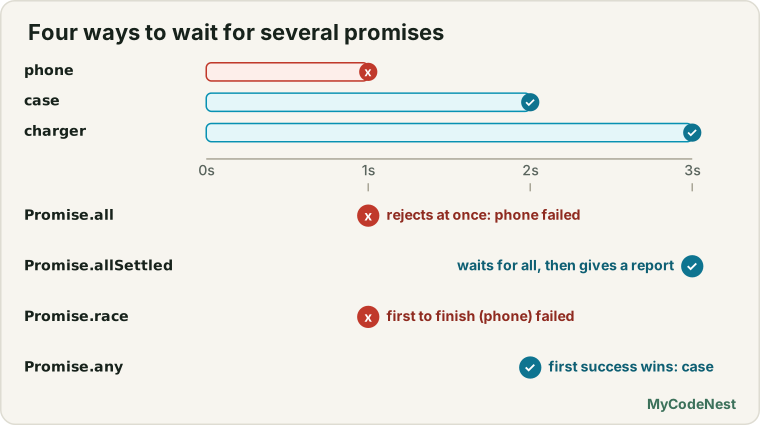
In the last lesson, one order had one tracking page. Now imagine you ordered three things in one shopping session: a phone, a phone case and a charger. You now hold three tracking pages (three Promises). Each can be on the way, delivered or cancelled, and they finish at different times.
You can ask four different questions about them:
| Your question | Tool |
|---|---|
| “Tell me when everything has arrived. But if any order is cancelled, tell me immediately.” | Promise.all |
| “Wait until every order has a final status. Then give me a full report.” | Promise.allSettled |
| “Tell me about whichever order has news first, good or bad.” | Promise.race |
| “Tell me about the first order that is delivered. Ignore cancellations.” | Promise.any |
Keep these four sentences in mind. We will meet each one now.
Promise.all: wait for everyone to succeed
Promise.all takes an array of Promises and gives you back one new Promise.
- If all of them are fulfilled, the new Promise is fulfilled with an array of all the values.
- If any one of them is rejected, the new Promise is rejected at once, with that error.
Here is the dashboard, finally done properly:
function loadProfile() {
  return new Promise((resolve) => setTimeout(() => resolve({ name: "Riya" }), 500));
}

function loadOrders() {
  return new Promise((resolve) => setTimeout(() => resolve([101, 102, 103]), 300));
}

function loadMessages() {
  return new Promise((resolve) => setTimeout(() => resolve(["Hi", "Offer", "OTP", "Bill"]), 400));
}

Promise.all([loadProfile(), loadOrders(), loadMessages()])
  .then(([profile, orders, messages]) => {
    console.log(profile.name + " has " + orders.length + " orders and " + messages.length + " messages");
  });
Output:
Riya has 3 orders and 4 messagesEverything took about 0.5 seconds, the time of the slowest task. No counter, no manual error handling. Notice how we used array destructuring (from the destructuring lesson) to take the three values out of the result array in one line.
The results keep the order of the input
The result array is in the same order as the Promises you gave, not the order in which they finished:
function after(ms, value) {
  return new Promise((resolve) => setTimeout(() => resolve(value), ms));
}

Promise.all([after(400, "slow"), after(100, "fast")])
  .then((values) => console.log(values));
Output:
[ 'slow', 'fast' ]The fast one finished first, but "slow" is still at position 0, because it was first in the array. This is what makes destructuring safe: the first variable always belongs to the first Promise.
Fail fast: one error ends it
If any Promise rejects, Promise.all rejects immediately. It does not wait for the others:
const start = Date.now();

const failing = new Promise((resolve, reject) => {
  setTimeout(() => reject(new Error("Orders failed")), 100);
});

const slow = after(400, "Messages").then((value) => {
  console.log("(Messages still finished later)");
  return value;
});

Promise.all([failing, slow])
  .then((values) => console.log("Got:", values))
  .catch((error) => console.log("Rejected: " + error.message + " after ~0.1s"));
Output:
Rejected: Orders failed after ~0.1s
(Messages still finished later)
Two things to notice:
- The
.catchran after only 0.1 seconds. It did not wait for the slow task. - The slow task was not cancelled. It kept running and finished anyway. A Promise cannot be cancelled once it has started. (Cancelling network requests is the topic of the AbortController lesson later.)
Use Promise.all when you need all the results, and the whole thing is useless if one is missing, such as a dashboard that cannot be shown without all its parts.
A very common pattern: map and Promise.all
Often you have a list of ids and need to load something for each. The array map method (from the array methods lesson) turns each id into a Promise, and Promise.all waits for the whole group:
const names = { 1: "Riya", 2: "Aman", 3: "Neha" };

function loadUser(id) {
  return new Promise((resolve) => {
    setTimeout(() => resolve({ id: id, name: names[id] }), 200);
  });
}

const ids = [1, 2, 3];

Promise.all(ids.map((id) => loadUser(id)))
  .then((users) => console.log(users.map((user) => user.name)));
Output:
[ 'Riya', 'Aman', 'Neha' ]All three users are loaded at the same time, and the answer comes in the original order. Whether the list has 3 ids or 30, the code stays the same.
Promise.allSettled: a full report
Promise.all gives up at the first failure. Sometimes that is not what you want. If you upload 3 files and one fails, you still want to know about the other two.
Promise.allSettled always waits for every Promise to finish. It never rejects. Instead, it gives you an array of report objects, one per Promise:
- on success:
{ status: "fulfilled", value: ... } - on failure:
{ status: "rejected", reason: ... }
function upload(name, ms, shouldFail) {
  return new Promise((resolve, reject) => {
    setTimeout(() => {
      if (shouldFail) {
        reject(new Error(name + " is too large"));
        return;
      }
      resolve(name + " uploaded");
    }, ms);
  });
}

Promise.allSettled([
  upload("photo.jpg", 200, false),
  upload("video.mp4", 300, true),
  upload("notes.pdf", 100, false)
]).then((results) => {
  results.forEach((result) => {
    if (result.status === "fulfilled") {
      console.log("OK:     " + result.value);
    } else {
      console.log("FAILED: " + result.reason.message);
    }
  });

  const failedCount = results.filter((r) => r.status === "rejected").length;
  console.log(failedCount + " of " + results.length + " failed");
});
Output:
OK:     photo.jpg uploaded
FAILED: video.mp4 is too large
OK:     notes.pdf uploaded
1 of 3 failed
Use Promise.allSettled when the tasks are independent and you want the outcome of each: uploading files, sending messages to many people, loading optional widgets on a page. Then you can show “2 of 3 uploaded” and offer a retry for the failed one.
Promise.race: the first one to finish
Promise.race is like a running race. The first runner to cross the line decides the result. It does not matter if the runner finished well or fell down. If the first Promise to settle is fulfilled, you get its value. If it is rejected, you get its error.
The most famous use is a timeout. A request can hang for a very long time. You race it against a timer that rejects after a limit:
function timeout(ms) {
  return new Promise((_, reject) => {
    setTimeout(() => reject(new Error("Timed out after " + ms + " ms")), ms);
  });
}

function request(ms) {
  return new Promise((resolve) => {
    setTimeout(() => resolve("Data from server"), ms);
  });
}

Promise.race([request(200), timeout(500)])
  .then((value) => console.log("Fast request:", value))
  .catch((error) => console.log("Fast request:", error.message));

Promise.race([request(800), timeout(500)])
  .then((value) => console.log("Slow request:", value))
  .catch((error) => console.log("Slow request:", error.message));
Output:
Fast request: Data from server
Slow request: Timed out after 500 ms
A small detail: the _ in (_, reject) is just a variable name. Programmers use it to say “I am not going to use this first parameter”. We only need reject here, but it is the second one, so the first must exist.
As with all, the loser is not cancelled. The slow request is still running in the background. The race only decides which result you use.
Promise.any: the first success
Promise.any is similar to race, but it ignores failures. It waits for the first Promise that is fulfilled. A Promise that fails is simply skipped. It is perfect when you have several ways to get the same thing, and you will take whichever works first, such as asking three mirror servers:
function server(name, ms, ok) {
  return new Promise((resolve, reject) => {
    setTimeout(() => {
      if (ok) {
        resolve(name + " replied");
      } else {
        reject(new Error(name + " is down"));
      }
    }, ms);
  });
}

Promise.any([
  server("Server A", 100, false),   // fails first, but is ignored
  server("Server B", 400, true),
  server("Server C", 250, true)     // first success
]).then((value) => console.log("Winner:", value));
Output:
Winner: Server C repliedServer A finished first, but it failed, so any ignored it. Server C was the first to succeed.
What if all of them fail? Then there is no winner, and Promise.any rejects with a special error called an AggregateError. It carries the list of all the individual errors in its errors property:
Promise.any([
  server("X", 100, false),
  server("Y", 200, false)
]).catch((error) => {
  console.log(error.name + ": " + error.message);
  console.log("Reasons:", error.errors.map((e) => e.message));
});
Output:
AggregateError: All promises were rejected
Reasons: [ 'X is down', 'Y is down' ]
Which one should I use?
all |
allSettled |
race |
any |
|
|---|---|---|---|---|
| Waits for | all to succeed | all to finish | the first to finish | the first to succeed |
| On success gives | array of values | array of report objects | the first result | the first value |
| If one fails | rejects immediately | keeps waiting, reports it | rejects if the first to finish failed | ignores it, keeps waiting |
| Rejects when | any one fails | never | the first finisher fails | all fail (AggregateError) |
| Good for | dashboards, needing every part | uploads, bulk actions | timeouts | fastest mirror, backup servers |
A quick way to decide, using four questions:
- Do I need every result, and is one failure a disaster? Use
all. - Do I want to know what happened to every task, even failures? Use
allSettled. - Do I only care about whoever is first, even if it is a failure (like a timeout)? Use
race. - Do I only care about the first success, and failures can be ignored? Use
any.
How they link with chaining
A combinator returns a normal Promise. That means it fits into a chain like anything else. Here is a very realistic flow: first log in (we need the user), then load the profile and the orders at the same time (they both need the user, but not each other), then show the page:
function wait(ms) {
  return new Promise((resolve) => setTimeout(resolve, ms));
}

function login(name) {
  return wait(200).then(() => {
    console.log("1. Logged in: " + name);
    return { id: 7, name: name };
  });
}

function loadProfile(user) {
  return wait(300).then(() => {
    console.log("2a. Profile loaded");
    return { city: "Delhi" };
  });
}

function loadOrders(user) {
  return wait(200).then(() => {
    console.log("2b. Orders loaded");
    return [101, 102];
  });
}

login("Riya")
  .then((user) => Promise.all([loadProfile(user), loadOrders(user)]))
  .then(([profile, orders]) => {
    console.log("3. Show page: " + profile.city + ", " + orders.length + " orders");
  })
  .catch((error) => console.log("Error: " + error.message))
  .finally(() => console.log("4. Hide the spinner"));
Output:
1. Logged in: Riya
2b. Orders loaded
2a. Profile loaded
3. Show page: Delhi, 2 orders
4. Hide the spinner
Read this slowly, because it shows how the whole section connects:
- Step 1 runs first, because the others need the
user. This is a normal chain. - Steps 2a and 2b run together, inside
Promise.all. Orders finished first (2b), but the result array is still[profile, orders]. - Because we returned the
Promise.all(...)from.then, the chain waits for both. This is the rule from the last lesson: returning a Promise makes the chain wait. - Step 3 receives both results at once, with destructuring.
- One
.catchcovers every step above it, and one.finallyalways runs.
The rule of thumb: use a chain (.then().then()) when a step needs the result of the previous one. Use a combinator when the tasks are independent and can run at the same time.
How the whole section fits together
You have now finished the main journey of this section. Here is the full story in one picture:
Synchronous code
   One slow task BLOCKS the page.
        |
        v
Asynchronous code
   Start now, finish later. The browser does the waiting.
        |
        v
Timers (setTimeout, setInterval)
   The simplest async tools.
        |
        v
Callbacks
   A way to receive the result later.
   Problems: pyramid, repeated error checks, callback called twice.
        |
        v
Event loop
   HOW it all works: call stack, browser helpers, task queue.
        |
        v
Promises
   A value for later. Flat chains, one .catch, always async, settles once.
        |
        v
Promise combinators  <-- you are here
   MANY Promises at once: all, allSettled, race, any.
        |
        v
async/await  (next)
   Write all of the above in a style that looks like normal code.
And here is how each old pain point from the callbacks lesson was solved:
| Old pain point | The tool that solved it |
|---|---|
| A page freezes while waiting | Async code, with the browser doing the waiting |
| Steps in order become a pyramid | Promise chaining |
| Error check repeated at each level | One .catch |
| A counter to wait for many tasks | Promise.all (or allSettled) |
| Waiting too long for one task | Promise.race with a timeout |
| Which of several sources answers first | Promise.race or Promise.any |
Real use case: a dashboard that does not break
Open the practice editor. It has three fake services (Profile, Orders and Messages) and four buttons, one for each combinator. Try these situations, and see how each tool reacts:
| Situation | all |
allSettled |
race |
any |
|---|---|---|---|---|
| Nothing fails | all three values after 1.0s | all three values after 1.0s | Orders after 0.6s | Orders after 0.6s |
| Orders fails | rejected after 0.6s | two values and one FAILED, after 1.0s | rejected after 0.6s | Messages after 0.8s |
| All three fail | rejected after 0.6s | three FAILED, after 1.0s | rejected after 0.6s | “All failed. 3 errors” after 1.0s |
Test each cell of this table yourself. It is the quickest way to feel the difference.
Common mistakes
- Running independent tasks one after another. If tasks do not need each other, start them together with
Promise.all. - Passing functions instead of Promises. Write
Promise.all([loadUser(1), loadUser(2)]), notPromise.all([loadUser, loadUser]). You must call the functions so they return Promises. - Forgetting that
allstops at the first failure. If you need the other results, useallSettled. - Expecting the results in the order of finishing.
allandallSettledkeep the input order. - Expecting a lost Promise to be cancelled. The slower or failed Promises in
all,raceandanystill keep running. - Using
racewhen you need the first success. If the first Promise to finish fails,racefails. Useanyinstead. - Not handling the
anyfailure. When every Promise fails,anyrejects with anAggregateError. Add a.catch. - Forgetting the
.catch. Every combinator can reject (exceptallSettled), so end the chain with.catch. - Using the result outside
.then. Just like with one Promise, the values exist only inside.then.
Practice
- Create three Promises that resolve after 300, 600 and 900 ms with different values. Use
Promise.allto print the array of values, and print how long it took. - Make the first Promise the slowest, and the last one the fastest. Prove that
Promise.allstill returns the values in the input order. - Change one Promise so it rejects after 200 ms. Use
.catchand print the time. Is it 200 ms or 900 ms? Why? - Replace
Promise.allwithPromise.allSettledin question 3. PrintOKorFAILEDfor each task, and the number of failures. - Write
loadUsers(ids)that takes an array of ids and returns a Promise of the list of users. Useids.mapandPromise.all. - Write
withTimeout(promise, ms)that usesPromise.raceto reject if the promise takes longer thanms. Test it with a fast and a slow Promise. - Write three fake servers, and use
Promise.anyto print the first one that succeeds. Then make all three fail, and print every error message fromerror.errors. - Write a chain:
loginfirst, thenPromise.allfor the profile and the orders, then print the result, with one.catchand one.finally. - In the practice editor, fill the 3 by 4 table from the lesson with your own observations, and write one sentence explaining each unexpected cell.
- Challenge: In the sync vs async lesson, you were asked to make two fake downloads (
Video2 seconds,Photo1 second) and printAll downloads finishedafter both. Solve it again withPromise.all, and compare it with your counter solution. - Challenge: Choose the right tool and explain why: (a) show a page only if all its parts are loaded; (b) upload five files and show which failed; (c) ask a main and a backup server and use the first good answer; (d) give up on a request that takes longer than 5 seconds.
Recap
- A combinator takes an array of Promises and returns one Promise.
- Promises start working when created, so create them first to run tasks together. The browser does the waiting at the same time, JavaScript does not run two things at once.
Promise.all: waits for all to succeed. Gives an array of values in the input order. Fails fast on the first rejection.Promise.allSettled: waits for all to finish. Never rejects. Gives report objects withstatus, andvalueorreason.Promise.race: the first one to settle wins, success or failure. Great for timeouts.Promise.any: the first success wins. Failures are ignored. If all fail, it rejects with an AggregateError.- Losing Promises are not cancelled.
- Combinators return normal Promises, so they work inside chains. Use a chain for dependent steps and a combinator for independent ones.
mapplusPromise.allis the classic way to handle a list of items.
You now have all the Promise tools. Next, you will learn async/await, a way of writing all this Promise code so that it reads like the normal top to bottom code you started with. Everything you learned here still works underneath, so none of it is wasted.
If you want to refresh, read the Promises lesson, the asynchronous callbacks lesson and the event loop lesson.
Frequently asked questions
What is the difference between Promise.all and Promise.allSettled?
Promise.all waits for all to succeed, and rejects as soon as one fails. Promise.allSettled waits for every Promise to finish and gives a report of each result, whether it succeeded or failed.
When should I use Promise.race?
Use it when you only care about the first Promise to finish, whether it succeeds or fails. A common use is a timeout, where you race a request against a timer that rejects after a few seconds.
What does Promise.any do?
It returns the first Promise that succeeds, and ignores failures. It rejects only if all of them fail, with an AggregateError. It is handy for trying several sources and using the first good answer.
Do the Promises in Promise.all run in parallel?
They start together, and run at the same time, if they are real asynchronous tasks, such as network requests. The results come back in the same order as the array you passed in.
What happens to the other Promises when Promise.all rejects?
They keep running, because there is no cancel. Promise.all just ignores their results. To actually stop requests, use an AbortController, as you will see later.
See also: async/await, Fetch API, AbortController, JavaScript Cheat Sheet