JavaScript Memory Management: Garbage Collection and Leaks
Learn how JavaScript manages memory: stack and heap, references, reachability, garbage collection, common memory leaks, detached DOM nodes and WeakMap.
What you will learn
You have created thousands of variables, objects, arrays and functions. Every one of them takes memory. In JavaScript you never ask for memory or give it back, because the language does it automatically. That is wonderful, until a page runs for hours and becomes slower and slower, or a browser tab suddenly crashes. Then it is time to understand what is happening behind the curtain.
In this lesson you will learn where values live (stack and heap), what references and reachability mean, how the garbage collector decides what to delete, what a memory leak is, the seven most common leaks (forgotten timers, listeners, closures, caches, detached DOM nodes and more), how to find them with the browser’s Memory tool, and where WeakMap and WeakSet fit in. This is the first lesson of the performance part of the course, and it builds on the WeakMap and WeakSet lesson, which gave you the first small taste of the garbage collector.
The idea in one line
JavaScript automatically frees every value that can no longer be reached from your code. A memory leak happens when something you no longer need is still reachable.
Think of a warehouse with a cleaning team. The team has a map that starts from the main door. Every room they can reach by walking from the door is “in use”. Every room they cannot reach is empty and can be cleared. A leak is a room you forgot about, but with a corridor still leading to it. The team sees the corridor, so they never clear the room.
Where do values live? Stack and heap
JavaScript engines use two main areas of memory. The picture below is a simplified mental model (real engines are cleverer and optimize a lot), but it explains almost everything you need.
| Stack | Heap | |
|---|---|---|
| Holds | Small, simple values: numbers, booleans, and the references (addresses) to objects | Objects, arrays, functions: anything that can grow |
| Speed | Very fast | A bit slower |
| Size | Small, fixed | Large, flexible |
| Cleaned | Automatically, when a function ends | By the garbage collector |
Think of sticky notes on your desk (the stack) and a big warehouse (the heap). A note on your desk holds a short value (like the number 5) or an address of a box in the warehouse. The box itself, the object, lives in the warehouse.
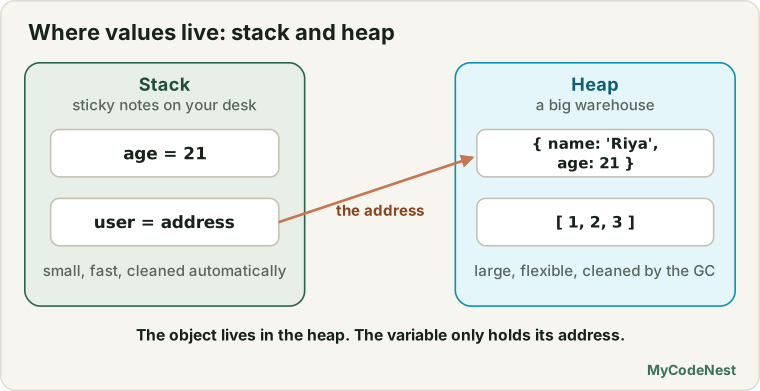
let age = 21;                        // the value 21 lives in the variable
let user = { name: "Riya", age: 21 };  // the OBJECT is in the heap; `user` holds its address
This is the idea from the value vs reference lesson. Copying a number copies the value. Copying an object variable copies only the address:
const first = { count: 1 };
const second = first;      // copy the address, so both names point to the SAME object

second.count = 2;
console.log(first.count);  // 2

let a = 1;
let b = a;                 // copy the value
b = 2;
console.log(a);            // 1
When a function runs, its local variables are created. When it ends, they are normally gone. But the objects they pointed to stay in the heap if something else still points to them. That “if something else still points” is the key to everything that follows.
The life of a value
Every piece of memory has a three-step life:
- Allocate: JavaScript reserves memory when you create something (
{},[],"text", a function). - Use: you read and write it.
- Release: the memory is given back when it is no longer needed.
Steps 1 and 2 happen because of your code. Step 3 is done by the garbage collector. The hard part is that the garbage collector cannot read your mind. It cannot know whether you still plan to use a value. So it uses a strict rule instead: reachability.
References and reachability
An object stays alive as long as it is reachable. A value is reachable if you can get to it by following references, starting from the roots.
The roots are the things that are always alive:
- the global object (
window) and its properties - the local variables of the functions currently running (the call stack)
- variables kept alive by closures (see the closures lesson)
- the DOM tree that is currently on the page
- active timers, event listeners and pending Promises (the browser holds on to their callbacks)
Everything you can reach from a root is alive. Everything else is garbage.
let user = { name: "Riya", address: { city: "Delhi" } };
//  root `user` ──▶ object ──▶ address object   (both reachable)

user = null;
//  root `user` ──▶ nothing
//  the object and its address are now unreachable, so they can be collected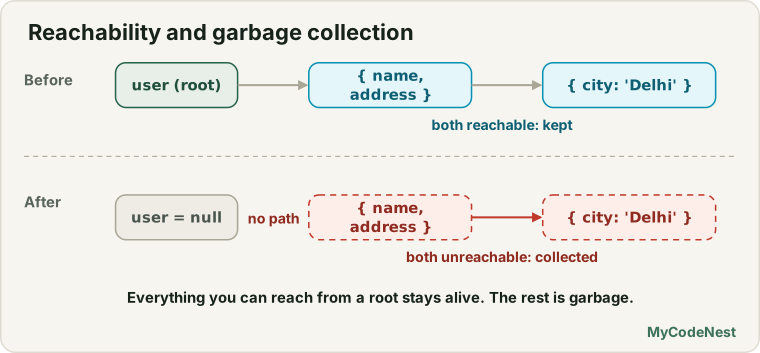
The chain matters. The address object had no variable of its own. It was alive only because the user object pointed to it. When the user object became unreachable, the address went with it.
const team = { leader: { name: "Riya" } };
const leader = team.leader;     // a second path to the leader object

delete team.leader;             // the first path is gone
// The leader object is STILL reachable, through the variable `leader`
Circular references are fine
Two objects that point to each other are not a problem in modern JavaScript, as long as nothing from the outside can reach them:
let parent = { name: "p" };
let child = { name: "c" };

parent.child = child;
child.parent = parent;      // a cycle

parent = null;
child = null;               // the island of two objects is unreachable
// Both are collected, even though they still point to each other
(Old browsers could not clean these up, which is why this “cycles leak” myth is still repeated. Today it is not true.)
How garbage collection works
Modern engines use an idea called mark and sweep:
- Mark: start from the roots and visit every object you can reach, marking each as “alive”.
- Sweep: go through all objects in the heap. Any object that is not marked is garbage, so its memory is freed.
It is exactly the cleaning team with a map: walk from the main door, mark every room you reach, then clear the unmarked ones.
To be fast, engines add more tricks. One is the generational idea: most objects die young (a temporary array inside a function, for example). So the engine keeps new objects in a young area that is cleaned often and quickly, and moves the objects that survive to an old area that is cleaned less often.
What you must remember as a developer:
- You cannot force the garbage collector to run, and you cannot know exactly when it will. (In normal browser code there is no
gc()function.) - Cleaning can cause a tiny pause. Creating huge numbers of short-lived objects in a loop that runs 60 times per second can cause stutter. Reuse values in hot code.
- Setting a variable to
nulldoes not delete the object. It only removes one path to it. The object is collected later, if no other path remains.
What is a memory leak?
A memory leak is memory that your program no longer needs but that is still reachable, so it can never be freed.
In JavaScript, you cannot “forget to free” memory like in some other languages. You leak by forgetting to cut a reference. The signs:
- The page gets slower the longer it stays open.
- The browser tab uses more and more memory (the memory graph climbs like a staircase and never comes back down).
- The page freezes or the tab crashes after hours of use.
Small pages that reload often rarely suffer from this. Single-page apps, dashboards, games and anything that stays open all day are the most at risk.
The seven most common leaks
1. Accidental globals
A variable that is created without let, const or var becomes a property of the global object, which is a root. It lives forever.
function track() {
  history = [];                   // forgot let: now window.history... a global (it even collides with a built-in)
  tracker = new Array(100000);    // a global that is never freed
}
Fix: use "use strict" (modules and classes are strict already) so that this becomes an error, as you learned in the strict mode lesson. Always declare variables.
2. Forgotten timers
A running setInterval keeps its callback alive, and everything the callback uses, as long as it runs.
function startClock(element) {
  setInterval(() => {
    element.textContent = new Date().toLocaleTimeString();   // keeps `element` alive
  }, 1000);
}

startClock(document.getElementById("clock"));
// Later the element is removed from the page... but the timer still runs and holds it
Fix: keep the timer id and stop it when the work is over.
function startClock(element) {
  const id = setInterval(() => {
    element.textContent = new Date().toLocaleTimeString();
  }, 1000);

  return () => clearInterval(id);       // give back a "stop" function
}

const stopClock = startClock(document.getElementById("clock"));
// when you no longer need it:
stopClock();
3. Event listeners that are never removed
A listener is a function that the page keeps for as long as the listener is attached. If you add one every time something happens (for example, every time a panel opens) and never remove it, the listeners pile up, and each one keeps its variables alive.
function openPanel() {
  const data = loadBigData();

  window.addEventListener("resize", () => {   // a NEW listener on every call, never removed
    console.log(data.length);
  });
}
Fix: remove it with removeEventListener, or better, attach it with an AbortSignal (from the AbortController lesson) so that one call removes everything:
let controller = null;

function openPanel() {
  const data = loadBigData();
  controller = new AbortController();

  window.addEventListener("resize", () => {
    console.log(data.length);
  }, { signal: controller.signal });
}

function closePanel() {
  controller.abort();          // removes the listener, so `data` can be freed
  controller = null;
}
You can even use one controller for many listeners. One abort() removes them all.
4. Closures that hold more than they need
A closure keeps the variables it uses alive. If it uses a big array, the whole array stays in memory as long as the closure itself is reachable.
function makeReporter() {
  const hugeData = new Array(1000000).fill("row");

  return function report() {
    return hugeData.length;        // keeps the WHOLE array alive
  };
}

function makeReporterLean() {
  const hugeData = new Array(1000000).fill("row");
  const total = hugeData.length;   // keep only what you need

  return function report() {
    return total;                  // the big array can be collected
  };
}
The closures lesson answered “Do closures cause memory leaks?” with “not by themselves”. This is the exact situation where they can help one along: a long-lived closure that holds large data.
5. Caches and lists that only ever grow
An array, object, Map or Set that you keep adding to, and never remove from, grows forever. Logs, histories, “already seen” lists and caches are the usual suspects.
const cache = {};

function getUser(id) {
  if (!cache[id]) {
    cache[id] = fetchUserSync(id);    // every id stays in memory forever
  }
  return cache[id];
}
Fix: put a limit on it. A simple bounded log:
function createLog(limit) {
  const items = [];

  return {
    add(entry) {
      items.push(entry);

      if (items.length > limit) {
        items.shift();               // drop the oldest
      }
    },
    get items() {
      return [...items];
    }
  };
}

const log = createLog(3);
for (let i = 1; i <= 6; i++) log.add("event " + i);

console.log(log.items);   // ["event 4", "event 5", "event 6"]
And a cache that keeps only the most recently used entries (an LRU cache). A Map remembers the order in which keys were added, which makes it easy:
class LRUCache {
  #limit;
  #map = new Map();

  constructor(limit) {
    this.#limit = limit;
  }

  get(key) {
    if (!this.#map.has(key)) return undefined;

    const value = this.#map.get(key);
    this.#map.delete(key);           // move it to the newest end
    this.#map.set(key, value);
    return value;
  }

  set(key, value) {
    this.#map.delete(key);
    this.#map.set(key, value);

    if (this.#map.size > this.#limit) {
      const oldest = this.#map.keys().next().value;   // the first key = the oldest
      this.#map.delete(oldest);
    }

    return this;
  }

  get size() {
    return this.#map.size;
  }
}

const cache = new LRUCache(2);
cache.set("a", 1).set("b", 2);
cache.get("a");                      // "a" is used, so it is now the newest
cache.set("c", 3);                   // too many: "b" (the oldest) is removed

console.log(cache.get("b"));         // undefined
console.log(cache.size);             // 2
If the keys are objects, a WeakMap is even simpler: the entry disappears by itself when the key object does.
6. Detached DOM nodes
This is the favourite leak of web apps. A detached DOM node is an element that has been removed from the page, but your JavaScript still holds a reference to it. The browser cannot free it, and everything inside it (all its children, their listeners, their data).
const removedItems = [];

function deleteItem(element) {
  element.remove();             // gone from the page...
  removedItems.push(element);   // ...but still in this array, so it stays in memory!
}
You can see the state with isConnected:
const box = document.getElementById("box");

let item = document.createElement("p");
item.textContent = "I will be removed";
box.append(item);

console.log(item.isConnected);   // true  (on the page)

item.remove();

console.log(item.isConnected);   // false (detached)
console.log(item.textContent);   // "I will be removed" (still alive in memory!)

item = null;                     // now nothing holds it: it can be collected
References that cause this often hide in:
- a variable or array that you forgot to clear,
- a
Mapor object used as a lookup table (elementsById[id] = element), - a closure or timer that uses the element,
- a listener on another element (like
window) whose callback mentions the removed element.
Fixes:
- Remove your own references (
item = null,delete lookup[id],array.length = 0) when you remove the element. - If you only want to attach extra data to elements, use a
WeakMap(the “data on DOM elements” use case in the WeakMap lesson). - A removed element that nothing else points to is collected automatically, even if it still has its own listeners. You do not need to remove listeners from an element that is thrown away together with all references to it. The trouble is the outside reference.
7. Subscriptions that are never cancelled
Any “observer” pattern (an event emitter, a store with subscribe, a callback list) keeps every subscriber’s callback alive. If subscribers can join but never leave, the list grows and holds everything they use.
const subscribers = [];

function subscribe(callback) {
  subscribers.push(callback);       // there is no way to leave!
}
Fix: always return an unsubscribe function (you saw the same shape for the timer):
function createEmitter() {
  const handlers = new Set();

  return {
    on(callback) {
      handlers.add(callback);
      return () => handlers.delete(callback);    // call this to unsubscribe
    },

    emit(data) {
      handlers.forEach((callback) => callback(data));
    },

    get count() {
      return handlers.size;
    }
  };
}

const emitter = createEmitter();
const off = emitter.on((data) => console.log("got", data));

emitter.emit(1);            // "got 1"
off();                      // unsubscribe
emitter.emit(2);            // nothing
console.log(emitter.count); // 0
Cleaning up properly: the destroy pattern
When part of your page is created and later removed (a panel, a modal, a “component”), give it a destroy() method that undoes everything it started. One AbortController can remove all listeners, and you stop the timer.
class Widget {
  #timerId = null;
  #controller = null;
  ticks = 0;

  mount(element) {
    this.#controller = new AbortController();
    const { signal } = this.#controller;

    element.addEventListener("click", () => this.ticks++, { signal });
    window.addEventListener("resize", () => console.log("resized"), { signal });

    this.#timerId = setInterval(() => this.ticks++, 1000);
    return this;
  }

  destroy() {
    clearInterval(this.#timerId);        // stop the timer
    this.#controller?.abort();           // remove ALL listeners at once
    this.#timerId = null;
    this.#controller = null;
  }
}

const widget = new Widget().mount(document.body);
// ...later, when the widget is no longer needed:
widget.destroy();
Whatever a component starts (timers, listeners, subscriptions, requests), it must stop in destroy(). This one habit prevents most leaks.
Weak tools for the job
Sometimes you want to link extra data to an object without keeping it alive. That is the job of WeakMap and WeakSet, from the WeakMap and WeakSet lesson:
const clicks = new WeakMap();      // keys are elements; entries vanish with the element

function track(element) {
  clicks.set(element, (clicks.get(element) ?? 0) + 1);
}
Compare the choices:
| Tool | Keeps the key alive? | Use it for |
|---|---|---|
Map / Set |
Yes | Data you control and clean yourself |
WeakMap / WeakSet |
No | Extra data or marks for objects whose life you do not control |
WeakRef |
No | A “maybe still there” reference (advanced) |
WeakRef and FinalizationRegistry (advanced, use rarely)
A WeakRef holds an object without keeping it alive. You get the object back with .deref(), which returns undefined if it has already been collected:
let report = { rows: new Array(1000).fill("data") };
const ref = new WeakRef(report);

console.log(ref.deref() === report);   // true (while it is alive)

report = null;                         // drop the only strong reference

// Later, maybe:
const maybeReport = ref.deref();       // the object, or undefined if it was collected
if (maybeReport) {
  console.log("Still here:", maybeReport.rows.length);
}
A FinalizationRegistry can call a function after an object was collected. But the timing is unpredictable, and the callback may not run at all. Engines are allowed to behave differently, so never put important logic in it, and do not use either feature for correctness. Use WeakMap, explicit destroy() methods and bounded caches first.
Finding a leak with DevTools
You do not have to guess. The browser can show you what is using memory. (You met the DevTools in the debugging lesson.)
Step 1: Notice the problem. Open DevTools > Performance monitor (or the Memory tab). Use your page for a while. If the JS heap size only goes up and never comes down, even after you close panels or navigate inside the app, you probably have a leak.
Step 2: Find what grows (the three snapshot method).
- Open the Memory tab, choose Heap snapshot, and click Take snapshot. (This is snapshot 1, your starting point.)
- Do the action that you think leaks (open and close a panel, 10 times). Click the trash can icon to run a garbage collection first, then take snapshot 2.
- Repeat the action again, and take snapshot 3.
- Select snapshot 3 and choose Objects allocated between Snapshot 1 and Snapshot 2 (or compare view). Objects that keep growing each round are your suspects.
Step 3: See who is holding the memory.
- Type
Detachedin the filter box of a snapshot to list detached DOM nodes. - Click an object and read the Retainers panel at the bottom. It shows the chain of references that keeps the object alive, from a root down to the object. Somewhere in that chain is the reference you forgot to cut.
A quick check in Chrome (this is non-standard and works only in Chrome, so use it only for experiments):
console.log(Math.round(performance.memory.usedJSHeapSize / 1048576) + " MB");A checklist for memory-friendly code
| When you… | Remember to… |
|---|---|
Start a setInterval or a long setTimeout |
Keep the id and clear it |
Add an event listener (especially to window or document) |
Remove it, or use { signal } |
| Remove an element from the page | Drop your own references to it |
| Keep a cache, log or history | Give it a limit (or use a WeakMap) |
Write an observer or subscribe |
Return an unsubscribe function |
| Build a component | Write a destroy() that stops everything it started |
| Use a closure with big data | Keep only the small piece you need |
| Work in hot loops | Avoid creating thousands of temporary objects |
| Write any script | Use strict mode, so no accidental globals |
Real-life use cases
1. A single-page app that opens and closes screens
Each screen has a mount and destroy. Without destroy, every time the user visits the screen the old timers and listeners keep running, and the app gets slower and slower. With destroy, the memory graph stays flat.
2. A live dashboard
A dashboard updates charts every few seconds with setInterval. When the user switches to another tab inside the app, the old chart’s timer must be cleared, and its elements must be released.
3. A search suggestion cache
Keep the last 50 search results in an LRU cache. Users get instant answers for repeated searches, and the cache never grows past 50 entries.
4. Per-element data
Instead of elementData[id] = {...} in an object that never shrinks, use new WeakMap() with the element as the key. When the element goes away, its data goes with it.
Common mistakes
- Thinking
x = nullfrees the object. It cuts only that one path. Other paths may still exist. - Forgetting
clearInterval. A repeating timer lives until the page closes. - Adding a listener on every call (to
window,document, or an element that stays) and never removing it. - Keeping a reference to a removed DOM element in an array, object,
Mapor closure. - Using a
Mapas a cache with no limit. It grows forever. - Subscribing with no way to unsubscribe.
- Creating accidental globals by forgetting
letorconst. - Holding big data in a long-lived closure when you need only a small part of it.
- Believing that circular references leak. Modern engines handle them. The leak is a path from a root.
- Trying to control the garbage collector or building logic on
WeakReforFinalizationRegistry. Their timing is not guaranteed. - Measuring memory only once. Take several snapshots, and compare them.
- Optimizing too early. Most pages do not leak. Measure first, then fix.
Practice
- Make
const a = { n: 1 }; const b = a;. Changeb.nand printa.n. Draw, on paper, the two variables and the one object. - Make
let x = 1; let y = x;. Changeyand printx. Explain why this is different from exercise 1. - Create
let user = { name: "Riya", address: { city: "Delhi" } }. Which objects are unreachable afteruser = null? What if you had also writtenconst addr = user.addressbefore? - Create two objects that point to each other, then set both variables to
null. Explain, in your own words, whether they can be collected. - Write a function that creates an accidental global. Then add
"use strict"and read the error. - Write
startClock(element)with asetInterval, then change it so that it returns a stop function. Stop it after 5 seconds. - Add a
resizelistener towindowevery time a button is clicked. Count how many listeners exist after 5 clicks (log inside the listener and resize the window). Then fix it with{ signal }and oneAbortController. - Write
makeReporter()andmakeReporterLean()from the lesson. Explain what each closure keeps alive. - Write
createLog(limit)and prove that it never holds more thanlimititems. - Write an
LRUCacheclass withget,setandsize. Test that the least recently used entry is removed first. - Create an element, add it to the page, and remove it. Print
isConnectedbefore and after, and check thattextContentstill works. Then set the variable tonull. - Write a
deleteItem(element)that removes the element and its entry from anelementsByIdobject. - Rewrite
elementsByIdso that it uses aWeakMapwith the element as the key. - Write
createEmitter()whereon()returns an unsubscribe function. Subscribe three callbacks, unsubscribe one, and checkcount. - Write a
Widgetclass withmount(element)anddestroy(). Use oneAbortControllerfor two listeners, and one timer. Prove, by logging, that nothing runs afterdestroy(). - Open DevTools > Memory, take a heap snapshot, and type
Detachedin the filter. Create a detached node on purpose, take a second snapshot, and find it. - Challenge: create a page that has a “Open panel” and a “Close panel” button. The panel adds a
resizelistener and a timer. First write it with leaks, then use the three snapshot method to see the growth, then fix it withdestroy(). - Challenge: write a
memoize(fn, limit)that caches results in an LRU cache, and prove that old results are evicted. - Challenge: build a small component system (
create,mount,destroy) that remembers all active components in aSet, and checks that the set is empty when the page is “closed”.
Recap
- JavaScript manages memory automatically. Simple values and references live on the stack. Objects, arrays and functions live in the heap (simplified model). Copying a variable copies the value or the reference, never the whole object.
- A value stays alive while it is reachable from a root: the global object, running functions’ variables, closures, the DOM on the page, and active timers, listeners and Promises.
- The garbage collector uses mark and sweep: mark everything reachable, free the rest. It runs by itself, you cannot force it, and circular references are not a problem. Setting a variable to
nullonly cuts one path. - A memory leak is memory you no longer need that is still reachable. The signs are a slowing page and a climbing memory graph.
- The common leaks: accidental globals, forgotten timers, listeners never removed, closures that hold big data, caches and lists that only grow, detached DOM nodes, and subscriptions that never end.
- The cures: clear timers, remove listeners (or use
{ signal }with oneAbortController), limit caches (bounded log, LRU), return unsubscribe functions, drop references to removed elements, and write adestroy()for every component. WeakMapandWeakSetattach data to objects without keeping them alive.WeakRefandFinalizationRegistryexist but are for rare, advanced needs, and must not be trusted for logic.- Find leaks with the DevTools Memory tab: compare heap snapshots, filter for
Detached, and read the Retainers chain. - Measure first, then fix. Most pages do not leak.
- Next you will learn the Intl API, which formats numbers, dates, lists and plurals for people around the world.
If you want to revisit the basics, read the WeakMap and WeakSet lesson, the value vs reference lesson, the closures lesson and the event listeners lesson.
Frequently asked questions
How does garbage collection work in JavaScript?
The engine finds all objects that can still be reached by following references from the roots (global variables, running functions, the DOM, active timers and listeners). It marks those as alive, and frees everything else. This is called mark and sweep, and it runs automatically at times you cannot control.
What is a memory leak in JavaScript?
It is memory that your program no longer needs but that can still be reached through some reference, so the garbage collector cannot free it. Typical causes are forgotten timers, listeners that are never removed, caches that grow forever, and references to removed DOM elements.
What is a detached DOM node?
It is an element that has been removed from the page, but is still referenced by your JavaScript code (in a variable, array, Map or closure). Because it is still reachable, the browser cannot free it or its children. Remove your references to let it be collected.
Does setting a variable to null free memory?
Not directly. It removes one reference to the object. If no other references remain, the object becomes unreachable and the garbage collector can free it later. If another variable or property still points to it, the object stays alive.
Do circular references cause memory leaks?
No, not in modern JavaScript engines. Objects that only point to each other, and that cannot be reached from any root, are collected together. A leak needs a path from a root, such as a global variable or a running timer.
How do I find memory leaks in my web page?
Use the browser DevTools. Watch the JS heap size in the Performance monitor, then use the Memory tab to take heap snapshots before and after repeating an action, compare them, filter for “Detached” to find detached DOM nodes, and read the Retainers panel to see which references keep an object alive.
When should I use WeakMap instead of Map?
Use a WeakMap when the keys are objects whose life you do not control, such as DOM elements, and you want their extra data to disappear automatically when the objects do. Use a normal Map when you manage the data yourself or need to iterate over it.
See also: WeakMap and WeakSet, Value vs Reference, AbortController, JavaScript Cheat Sheet