JavaScript Promises Explained: States, then, catch and Chaining
Understand why Promises exist, how pending, fulfilled and rejected work, and how to create, chain and handle errors in Promises, with simple real examples.
What you will learn
In the last lesson you saw the pain of callbacks: deep nesting, repeated error checks, callbacks that run twice, and results trapped inside functions. JavaScript has a built-in answer to all of these: the Promise.
By the end of this lesson you will know:
- why Promises were invented
- what a Promise is, and its three states
- how to create a Promise
- how to use one with
.then(),.catch()and.finally() - how chaining turns callback hell into a flat list of steps
- how errors travel through a chain
- how to turn an old callback function into a Promise
- what the
fetch(...).then(...)code you saw earlier really means
This is a big lesson, and it is the most important one in this section. Take your time, and run every example.
Why Promises exist
Let us look again at what callbacks gave us:
| Problem with callbacks | What we want |
|---|---|
| Steps in order become a deep pyramid | A flat list of steps |
The same if (error) check at every level |
One place to handle all errors |
| The callback may run twice, never, or sometimes sync | A guarantee: one result, always async |
| The result is stuck inside a function | A value we can store and pass around |
There is a deeper idea behind these problems. With a callback, you hand your function (your baton) to someone else’s code and hope they use it correctly. You lose control.
A Promise flips this. Instead of giving your baton away, the async function gives you something back: an object that stands for the result that will arrive later. You hold it. You decide what to do with it, and when.
The idea: an online order tracking page
Think of ordering a phone on an online shopping app.
When you press Place order, the phone does not appear in your hand. But you do get something immediately: an order ID with a tracking page. The tracking page is not the phone. It is a placeholder for the phone that will come later.
The tracking page can be in only three situations:
- On the way. Nothing is decided yet.
- Delivered. The phone arrived. The page now holds the result.
- Failed or cancelled. The page now holds a reason, such as “address not found”.
Once the page says “Delivered” or “Cancelled”, it never changes again. A delivered order cannot become “on the way” again.
You also set up notifications:
- “When it is delivered, message me.”
- “If it fails, message me.”
- “Whatever happens, update my app at the end.”
You can even share the tracking page with a friend, and both of you get the same notification.
This is exactly a Promise:
| Online order | JavaScript Promise |
|---|---|
| The tracking page | The Promise object |
| On the way | pending |
| Delivered, with the phone | fulfilled, with a value |
| Failed, with a reason | rejected, with an error |
| “When delivered, message me” | .then(...) |
| “If it fails, message me” | .catch(...) |
| “Whatever happens, update the app” | .finally(...) |
What is a Promise?
A Promise is an object that represents a value that is not ready yet, but will be ready in the future, or will fail.
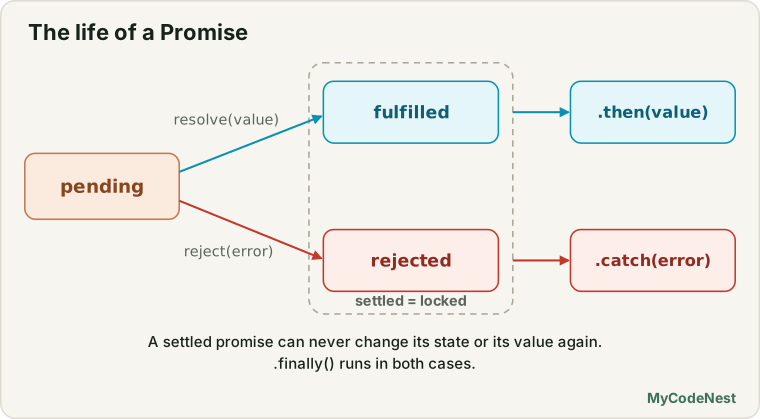
It is always in one of three states:
| State | Meaning | Holds |
|---|---|---|
| pending | Still working. The result is not ready. | nothing yet |
| fulfilled | Finished successfully. | the value |
| rejected | Finished with a failure. | the error (reason) |
When a Promise is fulfilled or rejected, we say it is settled. A settled Promise is locked. It can never change its state or its value again. This is the guarantee callbacks could not give you.
You can see a Promise in the console:
const pending = new Promise(() => {});
const done = Promise.resolve("Hello");

console.log(pending);   // Promise {<pending>}
console.log(done); // Promise {<fulfilled>: 'Hello'}(Promise.resolve("Hello") is a shortcut that gives you a Promise that is already fulfilled with a value.)
Creating a Promise
You create a Promise with new Promise() and give it a function called the executor. The executor receives two helper functions:
resolve(value)marks the Promise as fulfilled, with a valuereject(error)marks the Promise as rejected, with an error
const promise = new Promise((resolve, reject) => {
  // do some work...
  // when it succeeds:  resolve(value)
  // when it fails:     reject(error)
});
The executor runs immediately
This surprises many beginners. The function you give to new Promise does not wait. It runs right away, as normal synchronous code:
console.log("1. Before");

const p = new Promise((resolve) => {
  console.log("2. Inside the executor");
  resolve("done");
});

console.log("3. After");

p.then((value) => console.log("4. then: " + value));
Output:
1. Before
2. Inside the executor
3. After
4. then: done
The executor ran between 1 and 3, but the .then callback ran last. The work starts at once. Only the reaction to the result comes later.
A very useful helper: wait
The simplest Promise is one that finishes after some time. You will write this helper again and again:
function wait(ms) {
  return new Promise((resolve) => setTimeout(resolve, ms));
}

console.log("Start");
wait(500).then(() => console.log("500 ms later"));
console.log("End");
Output:
Start
End
500 ms later
Look at the pattern. setTimeout takes a callback, but wait returns a Promise. The ugly callback is hidden inside the function.
Fulfilling or rejecting: loadUser
Here is the loadUser function from the callbacks lesson, written with a Promise. Notice that there is no callback parameter anymore:
function loadUser(id) {
  return new Promise((resolve, reject) => {
    setTimeout(() => {
      if (id <= 0) {
        reject(new Error("Invalid user id"));   // failure
        return;
      }
      resolve({ id: id, name: "Riya" });        // success
    }, 300);
  });
}

loadUser(1)
  .then((user) => console.log("Loaded: " + user.name))
  .catch((error) => console.log("Failed: " + error.message));

loadUser(-1)
  .then((user) => console.log("Loaded: " + user.name))
  .catch((error) => console.log("Failed: " + error.message));
Output:
Loaded: Riya
Failed: Invalid user id
The function does not use the error-first pattern. It uses resolve for success and reject for failure, and always rejects with an Error object, just as you learned in the error handling lesson.
Only the first call counts
Remember the bug where a callback ran twice and charged a customer twice? A Promise cannot have this bug:
new Promise((resolve, reject) => {
  resolve("first");
  resolve("second");                 // ignored
  reject(new Error("too late"));     // ignored
}).then((value) => console.log(value));
Output:
firstThe first call settles the Promise. Everything after it is ignored. That is the “locked” guarantee in action.
Errors inside the executor
If your executor throws an error, JavaScript catches it for you and rejects the Promise:
new Promise(() => {
  throw new Error("Oops");
}).catch((error) => console.log("Caught: " + error.message));
Output:
Caught: OopsUsing a Promise: then, catch and finally
Creating a Promise is only half of the story. Most of the time, someone else creates the Promise (for example fetch), and you use it. There are three methods for this:
| Method | Runs when | Usually used for |
|---|---|---|
.then(fn) |
the Promise is fulfilled | using the value |
.catch(fn) |
the Promise is rejected | handling the error |
.finally(fn) |
either way, after it settles | cleanup, such as hiding a spinner |
loadUser(1)
  .then((user) => {
    console.log("Loaded: " + user.name);   // gets the value
  })
  .catch((error) => {
    console.log("Failed: " + error.message);   // gets the error
  })
  .finally(() => {
    console.log("Done, success or failure");   // gets nothing
  });
The .finally callback receives no value. Its job is only to run cleanup code.
Promises are always asynchronous
Even if a Promise is already fulfilled, the .then callback never runs immediately. It always waits until the current code is finished:
console.log("A");
Promise.resolve("B").then((value) => console.log(value));
console.log("C");
Output:
A
C
B
Remember the “sometimes sync, sometimes async” bug from the callbacks lesson, with the cache? Promises fix it. Here is the same function with a Promise:
const cache = { 1: { name: "Riya" } };

function getUser(id) {
  if (cache[id]) {
    return Promise.resolve(cache[id]);   // already known, still async for the user
  }
  return new Promise((resolve) => {
    setTimeout(() => resolve({ name: "Unknown" }), 100);
  });
}

console.log("A");
getUser(1).then((user) => console.log("B: " + user.name));
console.log("C");

console.log("---");

console.log("D");
getUser(2).then((user) => console.log("E: " + user.name));
console.log("F");
Output:
A
C
---
D
F
B: Riya
E: Unknown
In both cases, the .then callback runs after the synchronous lines. Cached or not, the order of your code stays predictable.
A small hint: Promise callbacks are even a little more “important” than timers. In this code, the promise callback runs before the timer, even though the timer has a delay of 0:
setTimeout(() => console.log("timeout"), 0);
Promise.resolve().then(() => console.log("promise"));
console.log("sync");
// sync, promise, timeout
The reason is the faster waiting line that was mentioned in the event loop lesson. You will study it in the microtasks lesson. For now, only remember:
.thencallbacks run after the sync code.
Chaining: the main superpower
Here is the feature that makes Promises so useful. .then() returns a new Promise. That means you can attach another .then() to it, and another, forming a chain.
The rule of chaining is simple:
Whatever you return from a
.then()callback becomes the value for the next.then().
Promise.resolve(2)
  .then((n) => n * 2)       // returns 4
  .then((n) => n + 1)       // receives 4, returns 5
  .then((n) => console.log("Result:", n));
Output:
Result: 5Returning a Promise makes the chain wait
If you return a Promise (not a plain value), the chain waits for it to finish before it moves to the next step. This is how we run async steps one after another:
function wait(ms) {
  return new Promise((resolve) => setTimeout(resolve, ms));
}

wait(1000)
  .then(() => {
    console.log("Step 1");
    return wait(1000);       // the chain waits here
  })
  .then(() => {
    console.log("Step 2");
    return wait(1000);
  })
  .then(() => console.log("Step 3"));
Output (one line every second):
Step 1
Step 2
Step 3
Callback hell, fixed
Now remember the food order from the last lesson, where placeOrder, prepareFood and deliver were nested three levels deep. Here is the same story with Promises. Each function now returns a Promise:
function placeOrder(item) {
  return new Promise((resolve) => {
    setTimeout(() => {
      console.log("1. Order placed: " + item);
      resolve({ orderId: 101, item: item });
    }, 200);
  });
}

function prepareFood(order) {
  return new Promise((resolve) => {
    setTimeout(() => {
      console.log("2. Food prepared for order " + order.orderId);
      resolve(order);
    }, 200);
  });
}

function deliver(order) {
  return new Promise((resolve) => {
    setTimeout(() => {
      console.log("3. Delivered: " + order.item);
      resolve(order);
    }, 200);
  });
}

placeOrder("Pizza")
  .then(prepareFood)
  .then(deliver)
  .then((order) => console.log("Enjoy your " + order.item + "!"))
  .catch((error) => console.log("Error: " + error.message));
Output:
1. Order placed: Pizza
2. Food prepared for order 101
3. Delivered: Pizza
Enjoy your Pizza!
Compare it with the callback version:
| Callbacks | Promises | |
|---|---|---|
| Shape | A pyramid pointing right | A flat vertical list |
| Reading order | Inside out | Top to bottom |
| Error handling | if (error) at every level |
One .catch at the end |
| Adding a step | Re-indent and move brackets | Add one .then line |
Notice .then(prepareFood). We passed the function itself, not prepareFood(). The value from the previous step is sent into it automatically. This works because prepareFood takes one parameter (order) and returns a Promise.
The most common chaining mistake: forgetting return
Promise.resolve(2)
  .then((n) => {
    n * 2;                  // the result is calculated, but not returned
  })
  .then((n) => console.log("Forgot return:", n));
Output:
Forgot return: undefinedWithout return, the function returns undefined, so the next step receives undefined. If you write a callback with curly braces { }, always check that you wrote return. (An arrow function without braces, like (n) => n * 2, returns automatically.)
This mistake is even worse with async steps. If you forget to return the inner Promise, the chain does not wait for it, and your steps run in the wrong order.
How errors travel through a chain
Errors in a Promise chain behave in a clever way. When a step fails, JavaScript skips all the .then() steps and jumps to the nearest .catch(). This is how one .catch can handle the failure of any step before it.
Let us make the kitchen fail on purpose:
function prepareFood(order) {
  return new Promise((resolve, reject) => {
    setTimeout(() => {
      reject(new Error("The kitchen is closed"));
    }, 200);
  });
}

placeOrder("Pizza")
  .then(prepareFood)
  .then(deliver)
  .then((order) => console.log("Enjoy your " + order.item + "!"))
  .catch((error) => console.log("Error: " + error.message));
Output:
1. Order placed: Pizza
Error: The kitchen is closed
deliver never ran, and we did not write any extra if (error) code. The error skipped the next steps by itself.
throw works inside .then
In the last lesson you learned that you must not throw inside a callback, because nobody can catch it. Inside a Promise, it is different. If you throw inside a .then, the Promise catches it for you and turns it into a rejection:
Promise.resolve("start")
  .then((value) => {
    console.log("A: " + value);
    throw new Error("Boom");
  })
  .then(() => console.log("B: this is skipped"))
  .catch((error) => {
    console.log("C: caught " + error.message);
    return "recovered";
  })
  .then((value) => console.log("D: " + value))
  .finally(() => console.log("E: finally runs"));
Output:
A: start
C: caught Boom
D: recovered
E: finally runs
Follow the story:
- Step
Aruns and throws an error. - Step
Bis skipped, because the chain is now in the “rejected” state. .catchhandles the error. It returns"recovered", so the chain goes back to normal.- Step
Druns with the recovered value. .finallyruns at the end.
A .catch that returns a value repairs the chain. A .catch that throws again keeps it broken.
Never forget the .catch
If a Promise is rejected and nobody handles it, you get an unhandled rejection. In the browser, you see a red message in the console like Uncaught (in promise) Error: .... In some other environments, it can even stop the program. A good habit: end every chain with a .catch.
What .finally is for
.finally is perfect for cleanup that must happen no matter what. For example, hiding a loading spinner or enabling a button again:
button.disabled = true;

loadUser(1)
  .then((user) => console.log(user.name))
  .catch((error) => console.log(error.message))
  .finally(() => {
    button.disabled = false;   // always runs
  });
Without .finally, you would have to write the same line twice, once in .then and once in .catch.
Decode the code you have already seen
In the URL lesson, you saw this code and were told to accept it for now:
fetch(apiUrl)
  .then(function (response) {
    return response.json();
  })
  .then(function (data) {
    console.log(data);
  });
You can read it now:
fetch(apiUrl)starts a network request and returns a Promise.- The first
.thenreceives theresponsewhen the server replies. It returnsresponse.json(), which is another Promise (reading the body takes time too). Because we returned a Promise, the chain waits for it. - The second
.thenreceives the realdata.
That is chaining, exactly as in this lesson. And one more detail from the error handling lesson: fetch rejects the Promise only when the network itself fails (no internet, for example). A 404 or 500 reply is still a fulfilled Promise, so you check response.ok yourself. You will learn fetch fully in its own lesson.
Also, the await code you saw in the JSON and error handling lessons is the same thing written in a friendlier style. The async/await lesson comes soon.
Turn a callback function into a Promise
You do not have to throw away old callback code. You can wrap it in a Promise. Here is the error-first loadUser from the callbacks lesson, wrapped:
// The old callback version
function loadUserCb(id, callback) {
  setTimeout(() => {
    if (id <= 0) {
      callback(new Error("Invalid user id"));
      return;
    }
    callback(null, { id: id, name: "Riya" });
  }, 200);
}

// The Promise version wraps it
function loadUser(id) {
  return new Promise((resolve, reject) => {
    loadUserCb(id, (error, user) => {
      if (error) {
        reject(error);     // callback got an error, so reject
        return;
      }
      resolve(user);       // callback got a result, so resolve
    });
  });
}

loadUser(1).then((user) => console.log("Loaded: " + user.name));
loadUser(0).catch((error) => console.log("Failed: " + error.message));
Output:
Loaded: Riya
Failed: Invalid user id
The recipe is always the same: call the old function inside the executor, and in its callback use reject when there is an error and resolve when there is a result.
Real use case: a Load button that never gets stuck
This is the most common Promise code in real apps. It shows a loading state, handles success, handles failure, and always enables the button again:
const status = document.getElementById("status");
const loadButton = document.getElementById("load");

loadButton.addEventListener("click", function () {
  status.textContent = "Loading...";
  loadButton.disabled = true;

  loadProfile(false)
    .then(function (profile) {
      status.textContent = "Welcome, " + profile.name;
    })
    .catch(function (error) {
      status.textContent = "Failed: " + error.message;
    })
    .finally(function () {
      loadButton.disabled = false;
    });
});
Open the practice editor and try it with the Make the server fail checkbox on and off. In both cases the button comes back, because of .finally.
The result lives inside .then
There is one thing that did not change since the callbacks lesson. The value is not available on the next line:
let result;

wait(100).then(() => {
  result = "ready";
});

console.log("outside then:", result);   // undefined

wait(200).then(() => console.log("later:", result));
Output:
outside then: undefined
later: ready
The first console.log runs before the Promise is fulfilled. Everything that needs the value must go inside a .then (or after it in the chain). The async/await lesson will give you a way to make this feel more natural.
Common mistakes
- Forgetting
returninside.then. The next step getsundefined, and async steps will not wait. - Using the value outside
.then. It is not ready yet. Put the code inside.then. - Nesting
.theninside.then. This brings back the pyramid. Return the Promise and chain it flat. - No
.catchat the end. A rejection that nobody handles shows up as an unhandled rejection error. - Thinking
.thenruns immediately. It always runs after the current synchronous code. - Thinking the executor is delayed. The function inside
new Promise(...)runs right away. - Rejecting with a plain text. Use
reject(new Error("...")), so you get a message and a stack trace. - Wrapping something that already returns a Promise. If a function already returns a Promise (like
fetch), you do not neednew Promisearound it. - Writing
.then(prepareFood()). Pass the function itself, not its result. - Expecting
fetchto reject on a 404. It only rejects for network failures. Checkresponse.ok.
Practice
- Write a
wait(ms)function that returns a Promise. PrintStart, then use.thento printDoneafter 1 second, and printEndimmediately afterStart. Predict the order first. - Write
isEven(n)that returns a Promise. After 500 ms it should resolve with"even"ifnis even, or reject withnew Error("odd")otherwise. Test it with both kinds of numbers using.thenand.catch. - Predict the output, and then run it:
console.log("1"); new Promise((resolve) => { console.log("2"); resolve(); }).then(() => console.log("3")); console.log("4"); - Start with
Promise.resolve(5). Chain three.thensteps that double the number, add 10, and print the result. - This chain prints
undefinedinstead of20. Find the bug and fix it:Promise.resolve(10) .then((n) => { n * 2; }) .then((n) => console.log(n)); - Take the
login,loadProfileandloadOrdersfunctions from the callbacks lesson practice, and rewrite them so that each returns a Promise. Then run them one after another in a flat chain with one.catch. - In your chain from question 6, make
loadProfilereject. Check that the error message prints once, thatloadOrdersnever runs, and that a.finallystill prints. - Convert your
divideAsync(a, b, callback)from the callbacks lesson intodivide(a, b)that returns a Promise. - In the practice editor, remove the
.finallyblock from the Load button. Turn the Make the server fail checkbox on and click the button. What happens to the button? Why? - Challenge: Write
countdown(from)that printsfrom,from - 1, …,1one per second and then printsGo!. Use yourwaitfunction and return the Promise from each step. - Challenge: Explain Promises to a friend using your own story, not the order tracking page.
Recap
- A Promise is an object that stands for a value that will arrive later. It is like an order tracking page.
- It has three states: pending, fulfilled (with a value) and rejected (with an error). Once settled, it can never change.
new Promise((resolve, reject) => { ... })creates one. The executor runs immediately. Only the firstresolveorrejectcounts.- Use
.then(fn)for success,.catch(fn)for failure and.finally(fn)for cleanup. Their callbacks always run asynchronously. .then()returns a new Promise, so you can chain steps. What youreturngoes to the next step, and returning a Promise makes the chain wait.- An error skips the
.thensteps and jumps to the nearest.catch.throwinside.thenbecomes a rejection. A.catchthat returns a value repairs the chain. - Always end a chain with
.catch, and alwaysreturninside.thenwhen you need the value. - You can wrap an old callback function in a Promise with
resolveandreject. fetchreturns a Promise, sofetch(url).then(...).then(...)is a Promise chain.- Promises solve the callback problems: flat code, one error handler, one result, always async.
Next, you will learn what to do when you have many Promises at the same time: wait for all of them, for the first one, or for the first success, with Promise.all, Promise.allSettled, Promise.race and Promise.any.
For the background of everything here, read the asynchronous callbacks lesson and the event loop lesson. For the error basics, see the error handling lesson.
Frequently asked questions
What are the three states of a Promise?
A Promise is pending at first, and then it becomes either fulfilled (it worked, with a value) or rejected (it failed, with a reason). Once it is fulfilled or rejected, it cannot change again.
What is the difference between .then, .catch and .finally?
.then handles success, .catch handles errors from the chain, and .finally runs at the end in both cases, for clean-up. Each returns a new Promise, which is why you can chain them.
Why does my Promise chain return undefined?
A .then callback must return the value for the next step. If you forget, the next .then receives undefined. This is especially common when you use curly braces in an arrow function.
Is new Promise needed to use Promises?
Not usually. Many APIs, such as fetch, already return Promises. You create your own with new Promise only to wrap older, callback-based code, such as a timer.
What happens if I do not catch a rejected Promise?
You get an “unhandled promise rejection” error in the console, and in Node.js it can end the process in modern versions. Always add a .catch(), or use try...catch with await.
See also: Promise Combinators, async/await, Fetch API, JavaScript Cheat Sheet