JavaScript Iterators: Iterable Protocol, next() and Custom Iterators
Understand JavaScript iterators in depth: the iterable and iterator protocols, Symbol.iterator, next(), return(), lazy sequences and building custom iterators.
What you will learn
In the Symbols lesson you met Symbol.iterator and built a small iterable with next(). You saw that for...of, spread, and destructuring all use it. That was the quick introduction.
This lesson is the full picture. You will learn the two protocols (the rules) that make iteration work, the difference between an iterable and an iterator, why an iterator can be used only once, how return() cleans up when a loop stops early, how to design custom iterators for your own data structures (like a linked list), how to build lazy and infinite sequences, and which built-in tools use iterables. In the next lesson, generators will make all of this much shorter, and this lesson shows you exactly what they are simplifying.
The idea in one line
An iterable is something that can give you an iterator. An iterator is something that gives you values one at a time, until it says it is done.
Think of a book and a bookmark.
- The book (the iterable) holds all the pages. You can read it again and again.
- A bookmark (the iterator) remembers where you are in one reading. Every time you start reading, you take a new bookmark. When you reach the last page, the bookmark has nothing left to give.
Two readers can read the same book at the same time with their own bookmarks, without disturbing each other. That is exactly how iterables and iterators work.
The two protocols
A protocol is just an agreement: “if your object has these methods and behaves like this, other code will know how to use it.” JavaScript has two related protocols.
1. The iterable protocol
An object is iterable if it has a method stored under the key Symbol.iterator. That method takes no arguments and returns an iterator.
const iterable = {
  [Symbol.iterator]() {
    // must return an iterator
  }
};
2. The iterator protocol
An object is an iterator if it has a next() method. Each call to next() returns an object with two properties:
| Property | Meaning |
|---|---|
value |
The current value |
done |
false while there are more values, true when finished |
const iterator = {
  next() {
    return { value: 1, done: false };   // or: { value: undefined, done: true }
  }
};
Putting them together
const playlist = {
  songs: ["A", "B", "C"],

  [Symbol.iterator]() {                // iterable protocol
    let index = 0;
    const songs = this.songs;

    return {                           // returns an iterator
      next() {                         // iterator protocol
        if (index < songs.length) {
          return { value: songs[index++], done: false };
        }
        return { value: undefined, done: true };
      }
    };
  }
};

for (const song of playlist) {
  console.log(song);   // "A", "B", "C"
}
Notice where the state (index) lives: inside [Symbol.iterator](), in a closure (from the closures lesson). Each call creates a fresh index, so each loop has its own bookmark.
| Iterable | Iterator | |
|---|---|---|
| Has | [Symbol.iterator]() |
next() |
| Gives | An iterator | { value, done } objects |
| Reusable? | Yes, each time you get a new iterator | No, it is used up when done |
| Examples | Array, string, Map, Set |
array.values(), map.entries() |
| Analogy | The book | The bookmark |
Doing it by hand
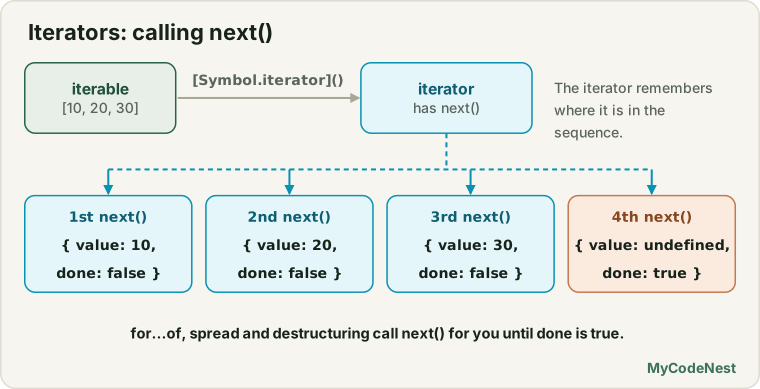
You can walk an iterator yourself, exactly like for...of does:
const iterator = ["a", "b"][Symbol.iterator]();

console.log(iterator.next());   // { value: "a", done: false }
console.log(iterator.next());   // { value: "b", done: false }
console.log(iterator.next());   // { value: undefined, done: true }
console.log(iterator.next());   // { value: undefined, done: true }  (stays finished)
A loop written with while does the same thing as for...of:
const iterator = "hey"[Symbol.iterator]();
let result = iterator.next();

while (!result.done) {
  console.log(result.value);   // "h", "e", "y"
  result = iterator.next();
}
This is exactly what for...of does for you, in fewer lines.
The final value
When done is true, the value can carry a “return value”. But for...of, spread and Array.from ignore it. They stop as soon as done is true.
const odd = {
  [Symbol.iterator]() {
    let i = 0;
    return {
      next() {
        return i < 2 ? { value: i++, done: false } : { value: "END", done: true };
      }
    };
  }
};

console.log([...odd]);   // [0, 1]  ("END" is ignored)
What if the iterator is built wrongly?
JavaScript checks the shape and gives clear TypeErrors:
try {
  for (const x of { [Symbol.iterator]() { return 5; } }) {}
} catch (error) {
  console.log(error.name);   // "TypeError"  (the result must be an object)
}

try {
  for (const x of { [Symbol.iterator]() { return { next() { return 1; } } } }) {}
} catch (error) {
  console.log(error.name);   // "TypeError"  (next() must return an object)
}
Built-in iterators you already use
Many built-in methods return iterators (not arrays):
const array = ["a", "b"];
const map = new Map([["x", 1]]);
const set = new Set([10, 20]);

const a = array.values();      // Array Iterator
const b = array.entries();     // Array Iterator of [index, value]
const c = map.keys();          // Map Iterator
const d = set.values();        // Set Iterator
const e = "hi".matchAll(/./g); // RegExp String Iterator

console.log(Object.prototype.toString.call(a));   // "[object Array Iterator]"
console.log(Object.prototype.toString.call(c));   // "[object Map Iterator]"
console.log(Object.prototype.toString.call(e)); // "[object RegExp String Iterator]"(Object.prototype.toString.call is the method-borrowing trick from the call, apply and bind lesson.)
More built-in iterables you may have met: strings, NodeList from querySelectorAll, URLSearchParams, FormData, and the result of matchAll from the regular expressions lesson.
Strings iterate by character, not by position
A string’s iterator walks over real characters (code points), so emojis count as one:
const text = "A👍";

console.log(text.length);        // 3  (the emoji takes two positions)
console.log([...text].length);   // 2  (the iterator sees two characters)

for (const char of text) {
  console.log(char);             // "A", then "👍"
}
That is the reason [...text].length is the better character count, as the Strings lesson mentioned.
Iterators are iterable too
Built-in iterators have a [Symbol.iterator]() method that returns themselves. This is why you can use them directly in for...of and spread:
const iterator = ["a", "b"].values();

console.log(iterator[Symbol.iterator]() === iterator);   // true

for (const value of iterator) {
  console.log(value);   // "a", "b"
}
Iterators are used up (one-shot)
An iterator moves forward only. It cannot rewind, and when it is done, it stays done.
const letters = ["a", "b", "c"].values();

console.log([...letters]);   // ["a", "b", "c"]
console.log([...letters]);   // []  (nothing left!)
An iterable, on the other hand, gives a new iterator each time, so it can be used again:
const book = ["a", "b", "c"];

console.log([...book]);   // ["a", "b", "c"]
console.log([...book]);   // ["a", "b", "c"]  (a new bookmark each time)
A trap: an object that is its own iterator
You may be tempted to make an object that is both iterable and iterator by returning this:
class Countdown {
  constructor(n) {
    this.n = n;
  }

  [Symbol.iterator]() {
    return this;                // the object is its own iterator
  }

  next() {
    return this.n > 0
      ? { value: this.n--, done: false }
      : { value: undefined, done: true };
  }
}

const timer = new Countdown(3);

console.log([...timer]);   // [3, 2, 1]
console.log([...timer]);   // []  (used up: the state lives on the object)
This works, but it can only be used once, and two loops at the same time would fight over the same n. Prefer the design from the Playlist example: keep the state inside a new iterator object that [Symbol.iterator]() creates every time.
Stopping early: the return() method
What happens if a loop stops before the iterator is done, for example with break? JavaScript politely tells the iterator by calling its optional return() method. This lets it clean up, such as closing a file or a connection.
function createResource() {
  let i = 0;

  return {
    [Symbol.iterator]() {
      return this;
    },

    next() {
      return i < 5
        ? { value: i++, done: false }
        : { value: undefined, done: true };
    },

    return() {
      console.log("Cleaning up!");
      return { value: undefined, done: true };
    }
  };
}

for (const n of createResource()) {
  console.log(n);              // 0, 1, 2
  if (n === 2) break;          // "Cleaning up!"
}
return() is called when the loop ends early because of:
breakreturn(inside a function)- a thrown error
- destructuring that takes only the first few values (
const [a, b] = iterable)
It is not called when the iterator finishes normally (done: true).
const [first, second] = createResource();   // takes two values, then...
// "Cleaning up!"  (the rest of the values were not needed)

console.log(first, second);   // 0 1
Real iterators use this to release things: closing a file, stopping a timer, or releasing a lock.
Lazy and infinite sequences
An iterator creates a value only when you ask. This is called lazy evaluation. An array is eager: all values exist in memory from the start.
That means an iterator can describe a sequence without an end, such as the Fibonacci numbers, and you take only what you need:
const fibonacci = {
  [Symbol.iterator]() {
    let [a, b] = [0, 1];

    return {
      next() {
        const value = a;
        [a, b] = [b, a + b];
        return { value, done: false };    // never done: infinite
      }
    };
  }
};

const firstTen = [];

for (const n of fibonacci) {
  if (firstTen.length === 10) break;      // YOU must stop it
  firstTen.push(n);
}

console.log(firstTen);   // [0, 1, 1, 2, 3, 5, 8, 13, 21, 34]
Warning: never use spread,
Array.from, orfor...ofwithout abreakon an infinite iterator.[...fibonacci]would run forever and freeze the page.
Take only what you need: a take helper
Let us write a small tool that takes the first n values of any iterable, and returns a new iterable:
function take(iterable, count) {
  return {
    [Symbol.iterator]() {
      const iterator = iterable[Symbol.iterator]();
      let taken = 0;

      return {
        next() {
          if (taken >= count) {
            return { value: undefined, done: true };
          }
          taken++;
          return iterator.next();
        }
      };
    }
  };
}

console.log([...take(fibonacci, 8)]);   // [0, 1, 1, 2, 3, 5, 8, 13]
A lazy pipeline: map and filter on iterables
Array methods like map and filter are eager: they process every item and build a new array. With iterators, we can chain steps lazily, so each value goes through the whole chain one at a time:
function map(iterable, fn) {
  return {
    [Symbol.iterator]() {
      const iterator = iterable[Symbol.iterator]();

      return {
        next() {
          const result = iterator.next();
          return result.done ? result : { value: fn(result.value), done: false };
        }
      };
    }
  };
}

function filter(iterable, test) {
  return {
    [Symbol.iterator]() {
      const iterator = iterable[Symbol.iterator]();

      return {
        next() {
          while (true) {
            const result = iterator.next();
            if (result.done || test(result.value)) {
              return result;
            }
          }
        }
      };
    }
  };
}

// The first 5 even-ish doubled Fibonacci numbers: impossible with plain arrays
const result = take(
  filter(
    map(fibonacci, (n) => n * 2),
    (n) => n % 4 === 0
  ),
  5
);

console.log([...result]);   // [0, 4, 16, 68, 288]
With arrays, this would need an infinite array first, which is impossible. With iterators, each step only does the work that is needed.
Writing those helpers by hand is long (that is the cost of this style). That is exactly what generators will fix in the next lesson, and the “newer helpers” section below shows built-in versions.
Designing custom iterators
You can make your own data structures work with for...of, spread, destructuring and more, by adding [Symbol.iterator]().
A linked list
A linked list stores values in connected nodes. It is not an array, so you cannot loop over it. Add an iterator and it becomes iterable:
class LinkedList {
  constructor() {
    this.head = null;
    this.size = 0;
  }

  add(value) {
    const node = { value, next: null };

    if (!this.head) {
      this.head = node;
    } else {
      let current = this.head;
      while (current.next) current = current.next;
      current.next = node;
    }

    this.size++;
    return this;
  }

  [Symbol.iterator]() {
    let current = this.head;                 // each loop gets its own pointer

    return {
      next() {
        if (current) {
          const value = current.value;
          current = current.next;
          return { value, done: false };
        }
        return { value: undefined, done: true };
      }
    };
  }
}

const list = new LinkedList().add("Riya").add("Karan").add("Aman");

for (const name of list) {
  console.log(name);                 // "Riya", "Karan", "Aman"
}

console.log([...list]);              // ["Riya", "Karan", "Aman"]

const [first, ...others] = list;
console.log(first, others);          // "Riya" ["Karan", "Aman"]
console.log(new Set(list).size);     // 3
Because each call creates its own current, you can loop inside another loop over the same list, and they do not disturb each other.
Pages (chunks) of data
function pages(items, size) {
  return {
    [Symbol.iterator]() {
      let start = 0;

      return {
        next() {
          if (start < items.length) {
            const value = items.slice(start, start + size);
            start += size;
            return { value, done: false };
          }
          return { value: undefined, done: true };
        }
      };
    }
  };
}

const products = ["Pen", "Book", "Bag", "Cap", "Bottle"];

for (const page of pages(products, 2)) {
  console.log(page);
}
// ["Pen", "Book"]
// ["Bag", "Cap"]
// ["Bottle"]
Several ways to iterate one object
A class can offer more than one iterator, by adding methods that return iterables, just like Map has keys(), values() and entries():
class Team {
  #members = [];

  add(name, role) {
    this.#members.push({ name, role });
    return this;
  }

  [Symbol.iterator]() {
    return this.#members.map((member) => member.name)[Symbol.iterator]();   // names by default
  }

  roles() {
    return this.#members.map((member) => member.role).values();
  }

  entries() {
    return this.#members.map((member) => [member.name, member.role]).values();
  }
}

const team = new Team().add("Riya", "Designer").add("Karan", "Developer");

console.log([...team]);            // ["Riya", "Karan"]
console.log([...team.roles()]);    // ["Designer", "Developer"]
console.log(new Map(team.entries()).get("Karan"));   // "Developer"
Here we reuse the built-in array iterator (.values()) to avoid writing next() again. The private #members field from the private fields lesson stays hidden, and only the iteration is public.
Who uses iterables?
Once your object is iterable, a lot of JavaScript works with it automatically:
| Feature | Example |
|---|---|
for...of |
for (const x of iterable) {} |
| Spread in arrays | [...iterable] |
| Spread in calls | Math.max(...iterable) |
| Array destructuring | const [a, b] = iterable |
Array.from (with an optional map function) |
Array.from(iterable, (x) => x * 2) |
new Set, new Map |
new Set(iterable), new Map(pairs) |
Object.fromEntries |
Object.fromEntries(pairs) |
Promise.all, Promise.race, Promise.allSettled |
Promise.all(iterableOfPromises) |
yield* |
Delegation (next lesson) |
const list = new LinkedList().add(3).add(1).add(2);

console.log(Math.max(...list));                 // 3
console.log(Array.from(list, (n) => n * 10));   // [30, 10, 20]
console.log(Object.fromEntries(new Map([["a", 1], ["b", 2]])));   // { a: 1, b: 2 }

const tasks = new Set([Promise.resolve("one"), "two"]);
Promise.all(tasks).then((values) => console.log(values));         // ["one", "two"]
Iterable vs array-like
These two ideas are often mixed up:
- Iterable: has
[Symbol.iterator]. Works withfor...ofand spread. - Array-like: has numbered keys and a
length, but no iterator. (The oldargumentsobject is one, as you saw in the call, apply and bind lesson.)
const arrayLike = { 0: "a", 1: "b", length: 2 };

console.log(Array.from(arrayLike));   // ["a", "b"]  (Array.from accepts array-likes)

try {
  console.log([...arrayLike]);        // spread needs an iterable
} catch (error) {
  console.log(error.name);            // "TypeError"
}
Array.from is the safe bridge: it works for both iterables and array-likes.
Newer built-in iterator helpers
Modern JavaScript added iterator helper methods that do what our map, filter and take did, built in, and they are lazy too. They work on iterators (such as array.values()) and on any iterator you convert with Iterator.from(...):
const fibonacci = {
  [Symbol.iterator]() {
    let [a, b] = [0, 1];
    return {
      next() {
        const value = a;
        [a, b] = [b, a + b];
        return { value, done: false };
      }
    };
  }
};

const result = Iterator.from(fibonacci)
  .map((n) => n * 2)
  .filter((n) => n % 4 === 0)
  .take(5)
  .toArray();

console.log(result);   // [0, 4, 16, 68, 288]
Available helpers include map, filter, take, drop, flatMap, reduce, toArray, forEach, some, every and find.
Check support first. These helpers are newer than the rest of this lesson. Recent browsers and Node.js have them, but older ones do not. Before using them in a real project, check the browser support table on MDN or Can I Use, or test with
typeof Iterator === "function" && typeof Iterator.prototype.map === "function". The hand-written approach in this lesson works everywhere.
Real-life use cases
1. Walk a data structure that is not an array
A custom LinkedList, a tree or a graph can become iterable, so the rest of your code can just use for...of, spread and Array.from, without knowing how the data is stored inside.
2. Show data page by page
const items = Array.from({ length: 23 }, (_, i) => "Item " + (i + 1));

let pageNumber = 1;

for (const page of pages(items, 10)) {
  console.log("Page " + pageNumber++ + ": " + page.length + " items");
}
// "Page 1: 10 items"
// "Page 2: 10 items"
// "Page 3: 3 items"
3. A unique ID sequence
const ids = {
  [Symbol.iterator]() {
    let n = 1;
    return { next: () => ({ value: "id-" + n++, done: false }) };
  }
};

const iterator = ids[Symbol.iterator]();

console.log(iterator.next().value);   // "id-1"
console.log(iterator.next().value);   // "id-2"
console.log(iterator.next().value);   // "id-3"
Each next() call gives a new ID. Nothing is created before it is asked for.
4. Read a long text line by line, lazily
function lines(text) {
  return {
    [Symbol.iterator]() {
      let start = 0;

      return {
        next() {
          if (start >= text.length) {
            return { value: undefined, done: true };
          }

          let end = text.indexOf("\n", start);
          if (end === -1) end = text.length;

          const value = text.slice(start, end);
          start = end + 1;
          return { value, done: false };
        }
      };
    }
  };
}

const log = "start\nwarning: slow\nerror: failed\nend";

for (const line of lines(log)) {
  if (line.startsWith("error")) {
    console.log("Found:", line);   // "Found: error: failed"
    break;                         // the rest of the text is never processed
  }
}
split("\n") would build all the lines first. This version stops as soon as it finds what it wants.
5. A resource that cleans itself
function openConnection(name) {
  console.log("Open " + name);
  let i = 0;

  return {
    [Symbol.iterator]() {
      return this;
    },
    next() {
      return i < 3 ? { value: name + " row " + ++i, done: false } : { value: undefined, done: true };
    },
    return() {
      console.log("Close " + name);
      return { value: undefined, done: true };
    }
  };
}

for (const row of openConnection("db")) {
  console.log(row);              // "db row 1"
  break;                         // "Close db"
}
6. Flatten nested data into a simple loop
const folders = [["a.txt", "b.txt"], ["c.txt"], []];

const files = {
  [Symbol.iterator]() {
    const outer = folders[Symbol.iterator]();
    let inner = null;

    return {
      next() {
        while (true) {
          if (inner) {
            const result = inner.next();
            if (!result.done) return result;
            inner = null;
          }

          const next = outer.next();
          if (next.done) return { value: undefined, done: true };
          inner = next.value[Symbol.iterator]();
        }
      }
    };
  }
};

console.log([...files]);   // ["a.txt", "b.txt", "c.txt"]
(The next lesson shows how generators do this in 3 lines.)
Common mistakes
- Forgetting that
[Symbol.iterator]()must return an iterator (an object withnext()), not an array or a value. - Forgetting that
next()must return an object withvalueanddone. Returning a plain value throws aTypeError. - Reusing an iterator. Once it is done, it stays done. Ask the iterable for a new one.
- Making an object its own iterator (
return this) and then looping over it twice, or two loops at the same time. - Keeping the position outside
[Symbol.iterator]()(for example, as a class property). The state is then shared between loops. Create it inside, so each loop gets its own. - Using spread,
Array.fromorfor...ofon an infinite iterator without a limit. The page freezes. - Forgetting
done: trueat the end. The loop never finishes. - Putting a useful value in the final
{ done: true, value }result and expectingfor...ofor spread to use it. They ignore it. - Using
for...ofon a plain object. It has noSymbol.iterator. UseObject.entries(object)or make it iterable. - Using spread on an array-like (
[...arguments]is fine, but[...{ length: 2 }]is not). UseArray.from. - Not writing
return()for iterators that hold resources (files, connections, timers). - Depending on iterator helpers (
Iterator.from(...).map(...)) in code that must run on old browsers, without checking support.
Practice
- Write an object with
[Symbol.iterator]()that returns the numbers 1 to 5 with a hand-writtennext(). Loop over it withfor...of. - Walk the iterator by hand: call
next()five times, then once more, and print each result. - Use a
whileloop withnext()to print every character of a string, withoutfor...of. - Print
Object.prototype.toString.call(...)forarray.values(),map.entries(),set.values()and a string’s iterator. - Prove that
array.values()is used up after one pass: spread it twice and compare the results. - Prove that an array is reusable: spread it twice.
- Check
iterator[Symbol.iterator]() === iteratorfor a built-in iterator. Then check it for your own iterable’s iterator. - Count the characters of
"A👍B"with.lengthand with[...text].length. Explain the difference. - Write a
Countdownclass that returnsthisas its own iterator. Loop over it twice and see the second loop fail. Then redesign it so each loop gets its own iterator. - Write an iterator with a
return()method that logs “Cleaning up”. Trigger it withbreak, with destructuring, and with a thrown error. Then loop to the end and see that it is not called. - Write an infinite iterator of even numbers. Use
for...ofwithbreakto print the first ten. - Write
take(iterable, n)from memory and test it on your infinite iterator. - Write
mapandfilterfor iterables, and chain them withtaketo get the first 5 numbers divisible by 3 and 5 from an infinite counter. - Build a
LinkedListwithaddand an iterator. Usefor...of, spread,Array.fromand destructuring on it. Loop over it inside another loop over the same list. - Write
pages(items, size)and print the pages of a list of 11 items with size 4. - Add an iterator to a class that stores a private array, and also add a
reversed()method that returns an iterator going backwards. - Show that
Array.fromworks on{ length: 2, 0: "a", 1: "b" }but spread does not. - Use
Object.fromEntries,new MapandPromise.allwith your own iterable. - Challenge: write
zip(a, b)that takes two iterables and returns an iterable of pairs[x, y], stopping when the shorter one is done. - Challenge: write
chunk(iterable, size)that works lazily on any iterable, including an infinite one. - Challenge: write
lines(text)from the lesson and use it to find the first line that contains a word. Count how many lines were processed, and prove the loop stopped early. - Challenge (if your browser supports them): rewrite exercise 13 with
Iterator.from(...)helpers and compare the length of the code.
Recap
- The iterable protocol: an object is iterable if it has a
[Symbol.iterator]()method that returns an iterator. The iterator protocol: an iterator has anext()method that returns{ value, done }. - An iterable is like a book (reusable). An iterator is like a bookmark (one pass, then used up). Each
[Symbol.iterator]()call should create a fresh iterator with its own state. - Built-in iterators (
array.values(),map.entries(),str.matchAll()…) are also iterable, because their[Symbol.iterator]()returns themselves. Strings iterate by real characters, so[...text].lengthcounts emojis correctly. return()is an optional method called when a loop stops early (break,return, a thrown error, partial destructuring). Use it to clean up resources.- Iterators are lazy: a value exists only when asked for. This allows infinite sequences. Always limit them (
break,take). - Writing lazy tools like
take,mapandfilterby hand works but is long. Generators (next lesson) remove that boilerplate, and newer iterator helpers (Iterator.from(...).map(...).take(...)) offer built-in versions (check support). - Many features use iterables:
for...of, spread, destructuring,Array.from,Set,Map,Object.fromEntries,Promise.all. Array.fromworks on iterables and array-likes. Spread works only on iterables.- Next you will learn generators: functions that can pause with
yieldand create iterators with almost no code.
If you want to revisit the basics, read the Symbols lesson, the for…in and for…of lesson, the closures lesson and the Map and Set lesson.
Frequently asked questions
What is the difference between an iterable and an iterator?
An iterable is an object with a Symbol.iterator method that returns an iterator, and you can usually loop over it many times (arrays, strings, Maps, Sets). An iterator is the object returned by that method. It has a next() method that gives the values one by one and can be used only once.
What does next() return?
It returns an object with two properties: value (the current value) and done (false while there are more values, true when finished).
Why is my iterator empty the second time I use it?
An iterator is used up after one pass. To loop again, ask the original iterable for a new iterator, for example by using array.values() again, or by looping over the array itself instead of a stored iterator.
When is the iterator's return() method called?
It is called when a loop ends early: with break, return, a thrown error, or destructuring that does not read every value. It is not called when the iterator finishes normally. It is used to clean up resources.
Can an iterator be infinite?
Yes, because values are created only when asked for. Just make sure you stop the loop yourself with break or a helper like take. Spreading or converting an infinite iterator to an array runs forever.
What is the difference between an iterable and an array-like object?
An iterable has [Symbol.iterator] and works with for…of and spread. An array-like object only has numbered keys and a length. Array.from works with both, but spread works only with iterables.
See also: Symbols, for…in and for…of, Closures Explained, JavaScript Cheat Sheet