JavaScript Web Workers: postMessage, Threads and Transferables
Learn JavaScript Web Workers: move heavy work off the main thread with postMessage, terminate, error handling, structured cloning and transferable objects.
What you will learn
JavaScript normally runs on one thread, the main thread. The same thread runs your code, handles clicks, calculates the layout and paints the screen. In the browser performance lesson you learned to split long work into chunks, so the browser gets small breaks. That helps for page updates. But what if the work is a pure calculation that simply takes a long time, such as parsing a huge file, searching in 500,000 records, or processing an image? Chunking makes it complicated, and the work still steals time from the page.
A Web Worker is a better answer: it runs your code on a separate thread, in parallel, while the main thread stays free for the user. In this lesson you will learn how the main thread and a worker talk to each other with postMessage() and message events, what can travel in a message (structured cloning), how to stop a worker with terminate(), how to handle errors, how to move big data without copying it with transferable objects, and when a worker is (and is not) the right tool.
The problem: one thread, one job at a time
Here is a task that takes a noticeable amount of time (about a second or more, depending on your computer): counting the prime numbers up to four million.
function countPrimes(limit) {
  let count = 0;

  for (let n = 2; n <= limit; n++) {
    let isPrime = true;

    for (let d = 2; d * d <= n; d++) {
      if (n % d === 0) {
        isPrime = false;
        break;
      }
    }

    if (isPrime) count++;
  }

  return count;
}

button.addEventListener("click", () => {
  const total = countPrimes(4000000);       // the page is FROZEN until this ends
  console.log(total);
});
While countPrimes runs, the page cannot scroll, buttons do not respond, animations stop, and the browser may even offer to “kill the page”. The event loop lesson explained why: there is only one call stack, and nothing else can run until it is empty.
async and await do not fix this. They only help with waiting (for the network, for a timer). A calculation is not waiting: it is working, and it uses the same thread.
The idea in one line
A Web Worker is a second JavaScript thread. It has its own memory, runs in parallel, and talks to the main thread only by sending messages.
Think of a restaurant. The main thread is the waiter: he talks to the guests (the user), takes orders (clicks) and brings food (updates the screen). If the waiter also has to cook a three-hour stew, the guests wait and get angry. A worker is a cook in the kitchen at the back. The waiter passes an order through a serving hatch (a message), goes back to the guests, and the cook sends the finished dish back through the same hatch (another message). The cook cannot walk into the dining room (the worker cannot touch the page), and the waiter does not share the cook’s kitchen (separate memory). The hatch is the only connection.
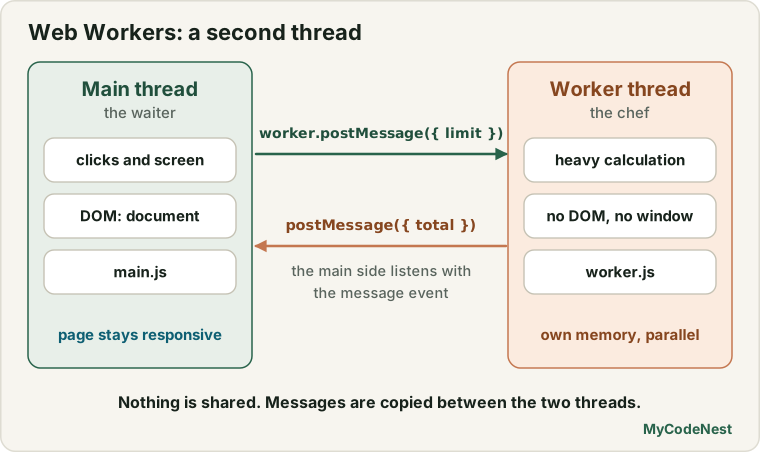
What a worker can and cannot do
| A worker can | A worker cannot |
|---|---|
| Run any JavaScript calculation | Touch the DOM: no document, no window |
Use fetch, timers (setTimeout, setInterval), console, JSON, Math |
Read or change variables of the main thread |
Use structuredClone, crypto, IndexedDB, WebSocket |
Show alerts or change the page directly |
| Import other scripts or modules | Run from a page opened as file:// (it needs a web server) |
| Send and receive messages | Be used on pages from another origin |
Inside a worker, the global object is self (not window). Each worker has its own global scope, its own variables and its own memory. Two threads never share a variable. That is exactly what makes workers safe: there are no “two threads changed the same variable at the same time” bugs, unless you deliberately use the advanced shared memory feature (see the end of the lesson).
This lesson is about the most common kind, the dedicated worker: one worker, owned by the one script that created it. (Other kinds exist: shared workers, and the service workers that power offline apps. They are separate topics.)
Your first worker
You need two files, plus the page. Remember from the modules lesson: the page must be opened through a local web server (not file://), such as the VS Code Live Server extension or npx serve.
my-app/
├── index.html
├── main.js        ← runs on the main thread
└── worker.js      ← runs in the worker
The worker file
// file: worker.js
function countPrimes(limit) {
  let count = 0;

  for (let n = 2; n <= limit; n++) {
    let isPrime = true;

    for (let d = 2; d * d <= n; d++) {
      if (n % d === 0) {
        isPrime = false;
        break;
      }
    }

    if (isPrime) count++;
  }

  return count;
}

self.addEventListener("message", (event) => {
  const limit = event.data.limit;              // the message from the main thread
  const total = countPrimes(limit);            // the slow work happens here

  self.postMessage({ total });                 // send the answer back
});
The main file
// file: main.js
const worker = new Worker("worker.js");

worker.addEventListener("message", (event) => {
  console.log("Primes found:", event.data.total);     // the answer from the worker
});

document.getElementById("startBtn").addEventListener("click", () => {
  worker.postMessage({ limit: 4000000 });             // send the job
  console.log("Job sent. The page is still responsive!");
});<script src="main.js" defer></script>Follow the flow:
new Worker("worker.js")starts a new thread that loads and runsworker.js.worker.postMessage(data)sends a message to the worker.- In the worker, the
messageevent fires, andevent.dataholds what was sent. - The worker does the heavy work, and sends the answer with
self.postMessage(result). - In the main thread, the worker’s
messageevent fires, andevent.dataholds the answer.
main thread                          worker thread
-----------                          -------------
worker.postMessage({limit})  ──────▶  "message" event
(free to do other things)             countPrimes(limit)   (slow, but nobody waits)
"message" event              ◀──────  self.postMessage({total})
While the worker is busy, the main thread is free. A button can still be clicked, and a ticker or animation keeps running. The Practice Editor below the lesson lets you try this: button 1 freezes a ticker, and button 2 does the same job in a worker, and the ticker keeps going.
A path rule: the path in
new Worker("worker.js")is relative to the HTML page, not tomain.js. Ifmain.jsis in ajs/folder andworker.jsis next to it, writenew Worker("js/worker.js").
onmessage or addEventListener?
Both work. The short form assigns a handler (and allows only one):
worker.onmessage = (event) => console.log(event.data);
self.onmessage = (event) => { /* ... */ };
addEventListener("message", ...) lets you add several listeners and remove them with removeEventListener. It is the better habit, as in the event listeners lesson.
What can travel in a message? Structured cloning
A message is not shared. It is copied. The browser uses the structured clone algorithm, the same one behind structuredClone(), which you met in the value vs reference lesson. So changing an object after sending it does not change the copy in the worker:
const settings = { theme: "dark" };
const copy = structuredClone(settings);       // this is what happens to a message

copy.theme = "light";
console.log(settings.theme);                  // "dark": the original is untouched
What can be cloned
Almost every data type: numbers, strings, booleans, null, undefined, BigInt, plain objects, arrays, Date, Map, Set, RegExp, errors, typed arrays and ArrayBuffer, and even circular references:
const message = {
  when: new Date(0),
  tags: new Set(["a", "b"]),
  scores: new Map([["riya", 90]]),
  big: 10n
};

const copy = structuredClone(message);

console.log(copy.when instanceof Date);   // true
console.log(copy.tags.has("a"));          // true
console.log(copy.scores.get("riya"));     // 90
What cannot be cloned (or loses something)
| Value | Result |
|---|---|
| Functions | Throws a DataCloneError |
| DOM nodes (elements) | Throws a DataCloneError |
| Symbols as values | Throws a DataCloneError |
| Class instances | Cloned as a plain object: the prototype and the methods are lost |
| Getters and setters | Replaced by their current values |
| Symbol keys, property descriptors | Dropped |
class Point {
  constructor(x, y) {
    this.x = x;
    this.y = y;
  }

  distance() {
    return Math.hypot(this.x, this.y);
  }
}

const copy = structuredClone(new Point(3, 4));

console.log(copy);                    // { x: 3, y: 4 }
console.log(copy instanceof Point);   // false
console.log(typeof copy.distance);    // "undefined"

try {
  structuredClone({ run() {} });
} catch (error) {
  console.log(error.name);            // "DataCloneError"
}
So send data, not behaviour. If the worker needs a class, import or define it inside the worker, and send only the plain data. If you need an object back, rebuild it on the other side: new Point(data.x, data.y).
Copying costs time
Cloning a small object is instant. Cloning a 50 MB array takes real time and memory, on both sides. For big binary data there is a better way: transferable objects (see below).
Designing your messages
Real workers receive different kinds of jobs. A common design is a message with a type and a payload:
// file: worker.js
const handlers = {
  sum(numbers) {
    return numbers.reduce((total, n) => total + n, 0);
  },

  sort(words) {
    return [...words].sort(new Intl.Collator("en").compare);
  }
};

self.addEventListener("message", (event) => {
  const { id, type, payload } = event.data;

  try {
    if (!handlers[type]) throw new Error("Unknown job type: " + type);

    const result = handlers[type](payload);
    self.postMessage({ id, ok: true, result });
  } catch (error) {
    self.postMessage({ id, ok: false, error: error.message });   // errors become messages
  }
});
Each message carries an id, so that the main thread can match each answer with the question that caused it.
Turn the worker into a Promise-based function
Matching answers by hand gets tedious. Wrap the worker so that each request returns a Promise (the Promises lesson is all you need):
// file: main.js
function createWorkerClient(worker) {
  let nextId = 1;
  const pending = new Map();                      // id -> { resolve, reject }

  worker.addEventListener("message", (event) => {
    const { id, ok, result, error } = event.data;
    const request = pending.get(id);

    if (!request) return;
    pending.delete(id);

    if (ok) request.resolve(result);
    else request.reject(new Error(error));
  });

  worker.addEventListener("error", (event) => {
    for (const request of pending.values()) {     // the worker crashed: fail every waiting request
      request.reject(new Error(event.message));
    }
    pending.clear();
  });

  return {
    request(type, payload) {
      return new Promise((resolve, reject) => {
        const id = nextId++;
        pending.set(id, { resolve, reject });
        worker.postMessage({ id, type, payload });
      });
    },

    terminate() {
      worker.terminate();
    }
  };
}

const client = createWorkerClient(new Worker("worker.js"));

const total = await client.request("sum", [1, 2, 3, 4]);
console.log(total);                                // 10

const sorted = await client.request("sort", ["pear", "apple", "mango"]);
console.log(sorted);                               // ["apple", "mango", "pear"]

try {
  await client.request("unknown", null);
} catch (error) {
  console.log(error.message);                      // "Unknown job type: unknown"
}
Now the worker feels like an async function that happens to run on another thread, and you can use await and Promise.all as you always do.
Progress messages
A worker can send many messages for one job, for example to report progress:
// file: worker.js
self.addEventListener("message", (event) => {
  const { limit } = event.data;
  let count = 0;

  for (let n = 2; n <= limit; n++) {
    let isPrime = true;

    for (let d = 2; d * d <= n; d++) {
      if (n % d === 0) { isPrime = false; break; }
    }

    if (isPrime) count++;

    if (n % 200000 === 0) {
      self.postMessage({ type: "progress", value: n / limit });   // 0 to 1
    }
  }

  self.postMessage({ type: "done", total: count });
});
// file: main.js
const progressBar = document.getElementById("progress"); // a <progress max="100"> element
worker.addEventListener("message", (event) => {
const message = event.data;
if (message.type === "progress") {
progressBar.value = Math.round(message.value * 100);
} else if (message.type === "done") {
console.log("Total:", message.total);
}
});While the worker works, the main thread can update a progress bar, which a frozen page could never do.
Stopping a worker: terminate() and close()
A worker keeps running (and keeps using memory) until you stop it.
worker.terminate(); // from the main thread: stop it immediately// inside worker.js
self.close(); // the worker stops itselfterminate()is abrupt. The worker is killed in the middle of whatever it was doing. No clean-up code runs, and any messages still on the way are lost.- After
terminate(), the worker object is useless. To work again, create a newWorker. - It is also the simplest way to cancel a job that is running a long loop: terminate the worker and start a new one for the next job.
let worker = new Worker("worker.js");

function cancelAndRestart() {
  worker.terminate();                  // cancel the running job
  worker = new Worker("worker.js");    // a fresh worker for the next job
}
Creating a worker costs a little time and memory, so for many small jobs, reuse one worker instead of creating a new one every time, and terminate workers you no longer need. This is the same habit as in the memory management lesson: whatever you start, you stop.
Handling errors
An error inside a worker does not appear in your main try/catch. The worker is a different thread, so you must listen for its error event:
const worker = new Worker("worker.js");

worker.addEventListener("error", (event) => {
  console.log("Worker failed:", event.message);        // what went wrong
  console.log("In file:", event.filename);             // which file
  console.log("At line:", event.lineno);               // which line
});
The error event also fires if the worker script cannot be loaded (a wrong path, a 404, or opening the page from file://). If a worker does nothing and you see no result, check the Console and the Network panel first.
try {
  worker.postMessage({ limit: 100 });
} catch (error) {
  // This catches only problems while SENDING, such as a DataCloneError.
  // It does NOT catch errors that happen inside the worker.
}
There is a second event, messageerror, which fires when a message arrives but cannot be understood (it could not be deserialized):
worker.addEventListener("messageerror", (event) => {
  console.log("A message could not be read");
});
The most robust pattern is the one from the message-design section: catch errors inside the worker with try/catch and send them back as normal messages ({ ok: false, error: "..." }). Keep the error event as the safety net for the unexpected.
Transferable objects: moving data without copying
Copying a big array is slow. For large binary data, JavaScript offers a faster way: transfer it. Instead of making a copy, the memory is handed over to the other thread. The transfer is almost instant, no matter how big the data is.
Think of the difference between a photocopy and handing over the original document. A photocopy takes time, and now there are two papers. Handing over the original is immediate, but you no longer have it.
A tiny introduction to ArrayBuffer
Binary data lives in an ArrayBuffer: a fixed-size block of raw bytes. You look at it through a typed array, which says how to read the bytes:
const buffer = new ArrayBuffer(8);              // 8 raw bytes
const bytes = new Uint8Array(buffer);           // read them as 8 numbers from 0 to 255

bytes[0] = 255;
console.log(bytes);                             // Uint8Array(8) [255, 0, 0, 0, 0, 0, 0, 0]
console.log(buffer.byteLength);                 // 8

const numbers = new Float64Array(1000);         // 1000 decimal numbers (8 bytes each)
console.log(numbers.buffer.byteLength);         // 8000
Common typed arrays are Uint8Array, Uint8ClampedArray (used for image pixels), Int32Array and Float64Array. They are the natural way to hold big lists of numbers, pixels, audio or file data, and they are the usual things you transfer.
Transferring with postMessage
Pass a second argument: an array listing what to transfer.
const pixels = new Uint8ClampedArray(1000 * 1000 * 4);     // a 1000 x 1000 image, 4 bytes per pixel (about 4 MB)

worker.postMessage({ buffer: pixels.buffer }, [pixels.buffer]);   // transfer, do not copy
After this call, the sender no longer owns the memory. The buffer is detached: its byteLength becomes 0, and the typed array becomes empty.
You can see exactly this without a worker, because structuredClone has a matching transfer option:
const buffer = new ArrayBuffer(1024);
console.log(buffer.byteLength);                     // 1024

const moved = structuredClone(buffer, { transfer: [buffer] });

console.log(buffer.byteLength);                     // 0     (the original is now empty)
console.log(moved.byteLength);                      // 1024  (the new owner has the data)
const big = new Float64Array(1000);
const result = structuredClone({ big }, { transfer: [big.buffer] });
console.log(big.length); // 0 (detached)
console.log(result.big.length); // 1000Rules to remember:
- You can transfer an object only once. Trying again throws a
DataCloneError, because it is already gone. - You must not use the buffer after sending it. Its size is
0. - If the worker should give the data back, it transfers it back in its reply.
- Besides
ArrayBuffer, other transferable things areMessagePort,ImageBitmap,OffscreenCanvasand streams. - A typed array is just a view. Transfer its
.buffer.
Example: invert the colours of an image, without copying
// file: worker.js
self.addEventListener("message", (event) => {
  const pixels = new Uint8ClampedArray(event.data.buffer);

  for (let i = 0; i < pixels.length; i += 4) {
    pixels[i] = 255 - pixels[i];               // red
    pixels[i + 1] = 255 - pixels[i + 1];       // green
    pixels[i + 2] = 255 - pixels[i + 2];       // blue
    // pixels[i + 3] is the transparency: leave it
  }

  self.postMessage({ buffer: pixels.buffer }, [pixels.buffer]);   // hand it back
});
// file: main.js
const pixels = new Uint8ClampedArray(1000 * 1000 * 4).fill(200); // a pretend image
const worker = new Worker("worker.js");
worker.addEventListener("message", (event) => {
const result = new Uint8ClampedArray(event.data.buffer);
console.log("First pixel after the worker:", result[0]); // 55 (255 - 200)
});
worker.postMessage({ buffer: pixels.buffer }, [pixels.buffer]);
console.log(pixels.length); // 0 (it was transferred: do not use it here)The 4 MB of pixels moves to the worker and back with no copying.
A word about shared memory: there is an advanced feature,
SharedArrayBufferwithAtomics, where both threads see the same memory at once. It is powerful, but it needs special page security settings and careful programming. For now, messages and transfers are all you need.
Module workers and modern projects
A worker can use import and export (see the modules lesson) if you create it as a module worker:
const worker = new Worker("worker.js", { type: "module" });// file: worker.js
import { countPrimes } from "./math.js";
self.addEventListener("message", (event) => {
self.postMessage({ total: countPrimes(event.data.limit) });
});(The older way for classic workers was importScripts("math.js").)
Projects that use a build tool (like Vite) usually write the path like this, so that the tool can find and bundle the worker. import.meta.url is the address of the current module (you saw it in the modules lesson):
const worker = new Worker(new URL("./worker.js", import.meta.url), { type: "module" });An inline worker (for experiments)
Sometimes you do not have a separate file, for example in a single-file demo or the Practice Editor of this site. You can write the worker code as text, wrap it in a Blob (a file-like object made in memory), make a temporary address for it, and start the worker from that address:
const workerCode = `
  self.addEventListener("message", (event) => {
    self.postMessage(event.data * 2);
  });
`;

const blob = new Blob([workerCode], { type: "text/javascript" });
const url = URL.createObjectURL(blob);
const worker = new Worker(url);

worker.addEventListener("message", (event) => {
  console.log("Answer:", event.data);          // 42
  URL.revokeObjectURL(url);                    // release the temporary address (memory lesson!)
  worker.terminate();
});

worker.postMessage(21);
Some places block this (for example strict page security rules, or sandboxed previews), so for real projects, a separate file is the normal way.
When should you use a worker?
Workers are not free. Starting one takes time and memory, and every message is a copy. Use them when the work is big compared with the cost of sending the data.
| Good jobs for a worker | Not a job for a worker |
|---|---|
| Parsing or searching huge data (a 50 MB JSON or CSV file, 500,000 records) | Anything that needs the DOM (updating the page) |
| Image or audio processing (pixels, filters) | Tiny calculations that take a millisecond |
| Sorting and filtering very large lists | Waiting for the network: fetch is already asynchronous |
| Hashing, compression, encryption | Work whose data is huge but whose calculation is trivial (copying costs more than the work) |
| Simulations, games logic, physics, path finding | Code that must share many live objects with the page |
| Building a search index, syntax highlighting, Markdown rendering |
A simple rule: if a task makes the page freeze for more than about 50 ms, and it does not need the DOM, a worker is a strong candidate. If it is only slow because it touches the DOM, go back to the browser performance lesson (batching and chunking).
| Chunking (previous lesson) | Web Worker | |
|---|---|---|
| Runs on | The main thread (in small slices) | Another thread (in parallel) |
| Can use the DOM | Yes | No |
| Blocks the page | Only briefly, between slices | Never |
| Complexity | Medium | Medium (messages) |
| Best for | Building lots of page elements | Pure heavy calculations |
A pool: using several workers at once
Computers have several cores. navigator.hardwareConcurrency (from the BOM lesson) tells you how many. You can split a big job into parts, give each part to a different worker, and combine the results.
function splitInto(array, parts) {
  const size = Math.ceil(array.length / parts);

  return Array.from({ length: parts }, (_, i) => array.slice(i * size, (i + 1) * size))
    .filter((part) => part.length > 0);
}

function createPool(size, createWorker) {
  const clients = Array.from({ length: size }, () => createWorkerClient(createWorker()));
  let next = 0;

  return {
    run(type, payload) {
      const client = clients[next++ % size];        // take turns
      return client.request(type, payload);
    },

    terminate() {
      clients.forEach((client) => client.terminate());
    }
  };
}

const cores = Math.min(navigator.hardwareConcurrency || 2, 4);        // do not create too many
const pool = createPool(cores, () => new Worker("worker.js"));

const numbers = Array.from({ length: 1000000 }, (_, i) => i + 1);
const parts = splitInto(numbers, cores);

const partialSums = await Promise.all(parts.map((part) => pool.run("sum", part)));
const total = partialSums.reduce((a, b) => a + b, 0);

console.log(total);        // 500000500000
pool.terminate();
(This uses the createWorkerClient and the sum handler from the message design section.) Do not create dozens of workers: each one takes memory, and more workers than cores gives no extra speed.
Real-life use cases
1. A big CSV file
Reading and parsing a 30 MB CSV file on the main thread freezes the page. Do it in a worker and send back the parsed rows (or only the summary):
// file: csvWorker.js
self.addEventListener("message", (event) => {
  const lines = event.data.text.split("\n");
  const [header, ...rows] = lines;
  const columns = header.split(",");

  const records = rows
    .filter((line) => line.trim() !== "")
    .map((line) => {
      const values = line.split(",");
      return Object.fromEntries(columns.map((name, i) => [name, values[i]]));
    });

  self.postMessage({ records });
});
(This simple version does not handle commas inside quotes. Real CSV needs a proper parser, which you would also run in the worker.)
2. Search and filter 200,000 records
Keep the data inside the worker. The page sends only a query (a few bytes), and the worker sends back only the matching ids. Nothing big ever travels.
3. A cancellable heavy search
let worker = null;

function startSearch(query) {
  worker?.terminate();                        // cancel the previous search
  worker = new Worker("searchWorker.js");

  worker.addEventListener("message", (event) => {
    showResults(event.data.results);
  });

  worker.postMessage({ query });
}
Combined with a debounce from the debounce and throttle lesson, the page starts a new search only when the user stops typing, and the old one is cancelled at once.
4. A progress bar for a long job
The worker posts { type: "progress", value } messages (shown above), and the page updates a <progress> element. The user sees the work advance, and can press a Cancel button that calls terminate().
5. Image filters
Send the pixel data to the worker as a transferred buffer, process it, and transfer it back. The page stays smooth even for large photos.
6. Hashing a large file or text
Compute a checksum or compress data in the background, while the upload form still works.
Common mistakes
- Trying to use
documentorwindowin a worker. There is no DOM there. Send the results back and update the page from the main thread. - Opening the page with
file://. Workers (like modules) need a web server. - A wrong path in
new Worker("..."). It is relative to the HTML page, not to your script. Check theerrorevent and the Network panel. - Expecting
postMessageto share variables. It sends a copy. Changing the original afterwards changes nothing in the worker. - Sending functions, DOM nodes or class instances with methods. Functions throw a
DataCloneError, and class instances lose their methods. Send plain data. - Using a buffer after transferring it. Its size is
0. Keep a copy first if you still need it, or wait for it to come back. - Transferring the same object twice. It throws an error.
- Sending huge data back and forth when only a small answer is needed. Keep data in the worker, and send small queries and results.
- Expecting
try/catchin the main thread to catch a worker’s errors. Use the worker’serrorevent, andtry/catchinside the worker. - Forgetting
terminate(). An unused worker keeps its memory (a leak). - Creating a new worker for every tiny job. Reuse one, or use a small pool.
- Creating too many workers. More workers than CPU cores brings no gain and costs memory.
- Using a worker for tiny tasks. The messaging overhead can be bigger than the work.
- Forgetting that messages arrive asynchronously, and trying to use the result right after
postMessage. Wait for themessageevent (or the Promise). - Using
selfcode in the main page orwindowcode in the worker. They are different environments.
Practice
- Write
countPrimes(limit)and run it on the main thread with a button. Add asetIntervalticker on the page, and watch it freeze while the function runs. - Move the function into
worker.js. Send{ limit: 4000000 }frommain.js, and print the answer when themessageevent arrives. Check that the ticker keeps running. - Serve your project with a local server. Then open it with
file://on purpose and read the error. - Put the worker in a subfolder (
js/worker.js) and fix the path. Which path do you write, and relative to what? - Send an object, an array, a
Date, aMapand aSetto a worker, and have it send them back unchanged. Check the types of what comes back. - Try to send an object with a function inside it. Read the error name. Then send only the data and rebuild the behaviour in the worker.
- Create a class
Pointwith a method. Send an instance to a worker, and print what arrives (instanceof,typeofmethod). - Use
structuredCloneto prove that a message is a copy: change the original after “sending”. - Write a worker with
typehandlers (sum,sort,max). Send a job for each type. - Add an
idto every message, and writecreateWorkerClient(worker)so thatrequest(type, payload)returns a Promise. - Use
Promise.allto send three jobs at the same time and wait for all of them. - Send an unknown job type. Make the worker reply with an error message, and make the Promise reject.
- Add progress messages (
{ type: "progress", value }) to your prime counter, and show them in a<progress>element. - Add a Cancel button that calls
terminate()and then creates a fresh worker for the next job. - Make a worker throw an error on purpose. Listen to the
errorevent, and printmessage,filenameandlineno. - Change the worker path to a file that does not exist. What happens? Where do you see it?
- Create a
Uint8Arrayof 1 MB. Send it to a worker normally (copy) and measure the time. Send another one with a transfer and measure again. CheckbyteLengthof the original after each. - Use
structuredClone(buffer, { transfer: [buffer] })to see the detaching without a worker. - Write the image invert worker. Send a
Uint8ClampedArray’s buffer, and transfer it back in the answer. - Try to transfer the same buffer twice and read the error.
- Write
splitInto(array, parts)and sum one million numbers with a pool of workers. Compare with a single worker. - Make a worker that uses
fetchto load JSON from an API, processes it, and sends back only a small summary. - Challenge: build a page with a text box, a large fake data list (100,000 items) kept inside a worker, and a debounced search that sends only the query and shows the matches. Cancel the previous search with
terminate()or an id check. - Challenge: write a worker pool class with
run(type, payload), a queue (when all workers are busy, jobs wait), andterminate(). - Challenge: build a Mandelbrot or Game of Life calculation in a worker, send the pixel buffer back with a transfer, and draw it on a canvas, while a ticker keeps running.
Recap
- JavaScript runs on one main thread. A long calculation freezes the page, and
async/awaitdo not help, because they only handle waiting, not working. - A Web Worker is a separate thread with its own memory that runs in parallel. It has no DOM (
selfis its global object) and cannot share variables with the page. The two sides communicate only with messages. - Create it with
new Worker("worker.js")(the page must come from a web server, and the path is relative to the page). Send withpostMessage(data), receive with themessageevent andevent.data, on both sides. - Messages are copied with the structured clone algorithm (the same as
structuredClone()): numbers, strings, objects, arrays,Date,Map,Set, typed arrays and more work. Functions and DOM nodes throw aDataCloneError, and class instances lose their prototype and methods. Send data, not behaviour. - Design messages with a
type, apayloadand anid, and wrap the worker in a Promise-based client so it feels like anasyncfunction. A worker can send many messages for one job (for example progress). worker.terminate()stops a worker at once (a worker can also callself.close()). Use it to cancel jobs and to free memory, and create a new worker afterwards.- Handle problems with the worker’s
errorevent (message,filename,lineno) andmessageerror, and usetry/catchinside the worker to send errors back as normal messages. The main thread’stry/catchcannot catch them. - Transferable objects (
ArrayBuffer, and others) are moved instead of copied, withpostMessage(message, [buffer]). The sender’s buffer becomes detached (size0). Great for pixels, audio and big binary data. - Workers can be modules (
{ type: "module" }), and projects with build tools usenew Worker(new URL("./worker.js", import.meta.url), { type: "module" }). An inline worker can be made from aBlobfor experiments. - Use workers for heavy pure calculations on big data, not for DOM work or tiny tasks. Reuse workers, keep big data inside the worker, and use a small pool (about
navigator.hardwareConcurrency) for parallel jobs. - You have now reached the end of the core and advanced JavaScript lessons planned so far: from
thisand prototypes, through classes, modules, Proxy and generators, to memory,Intl, performance and workers. The practical Web APIs (clipboard, Intersection Observer, geolocation and more) come next in the course.
If you want to revisit the basics, read the browser performance lesson, the event loop lesson, the value vs reference lesson and the Promises lesson.
Frequently asked questions
What is a Web Worker in JavaScript?
A Web Worker is a script that runs on a separate background thread, in parallel with the main thread. It cannot access the DOM, and it communicates with the page only by sending and receiving messages with postMessage. It is used to run heavy calculations without freezing the page.
Why can't a worker access the DOM?
The DOM is not safe to use from several threads at once, so only the main thread may touch it. A worker sends its results to the main thread in a message, and the main thread updates the page.
How do the main thread and a worker communicate?
Both sides use postMessage() to send a message and the message event to receive one. The data is available in event.data. Messages are copied using the structured clone algorithm, so the two threads never share the same object.
What can I send in a message?
Most data: numbers, strings, booleans, plain objects, arrays, Dates, Maps, Sets, typed arrays and ArrayBuffers. You cannot send functions or DOM elements, and class instances arrive as plain objects without their methods.
What is the difference between copying and transferring data?
By default a message is copied, which takes time for large data and leaves two copies. A transferable object, such as an ArrayBuffer, is moved to the receiver almost instantly, but the sender can no longer use it (its size becomes 0). Pass it in the second argument: postMessage(data, [buffer]).
How do I stop a Web Worker?
Call worker.terminate() from the main thread to stop it immediately, or call self.close() inside the worker. A terminated worker cannot be reused, so create a new one if you need it again.
Why does my worker not start?
The most common reasons are opening the page from file:// instead of a web server, a wrong file path (the path is relative to the HTML page), or an error in the worker script. Check the worker’s error event, the Console, and the Network panel.
Do async and await make code run in parallel?
No. Asynchronous code still runs on the same main thread, and it only avoids blocking while it waits for things like network responses or timers. To run a long calculation in parallel, use a Web Worker.
See also: Browser Performance, Event Loop, Modules, JavaScript Cheat Sheet