JavaScript Microtasks vs Macrotasks: Event Loop Order Explained
Learn how the event loop uses two queues, why Promise callbacks run before timers, how await fits in, and how to predict the exact order of mixed async code.
What you will learn
In the event loop lesson you learned a simple picture: a call stack, the browser’s helpers, and one waiting line. Then, in the event loop and Promises lessons, you saw a strange hint. This code printed in a surprising order:
setTimeout(() => console.log("timeout"), 0);
Promise.resolve().then(() => console.log("promise"));
console.log("sync");

// sync, promise, timeout
Both the timer and the Promise are “later” code, and the timer has a delay of 0. So why does the Promise win? The answer is that I simplified something. The event loop actually has two waiting lines, and this lesson shows you both.
By the end you will be able to:
- explain what a macrotask and a microtask are
- say which kinds of code go into which queue
- know the exact rule the event loop follows
- predict the output order of code that mixes sync code, timers, Promises and
await - avoid a nasty bug where Promise code freezes the page
A quick reminder
From the event loop lesson:
- JavaScript runs code from the call stack, one thing at a time.
- Slow work is handed to the browser’s helpers.
- When a helper finishes, the callback waits in a queue.
- The event loop moves a callback from the queue to the stack, only when the stack is empty.
That picture is correct, but it is missing one detail. Let us add it, using the chai stall again.
The idea: the shelf and the VIP tray
Remember Raju, the one-man chai stall? He has a shelf where ready kettles wait (the task queue). He takes one kettle at a time, only when his hands are free.
Now imagine that Raju also keeps a small VIP tray right next to his hand. The tray holds tiny follow-up notes for the job he is doing right now: “after this tea, add sugar”, “after this, wipe the cup”. These notes are urgent, because they belong to the current job.
Raju follows a strict habit:
- He takes one job from the shelf and finishes it.
- Before anything else, he empties the VIP tray completely. If doing a note creates a new note, that note goes on the tray too, and he does that as well, until the tray is empty.
- Only then does he wipe the counter and let customers see the board (the screen update).
- Then he takes the next job from the shelf.
That is the whole lesson in one story. Now the real names:
| Chai stall | JavaScript |
|---|---|
| The shelf of ready kettles | The macrotask queue (also just called the task queue) |
| A kettle from the shelf | A macrotask |
| The VIP tray | The microtask queue |
| A follow-up note | A microtask |
| Wiping the counter, showing the board | The browser rendering (updating the screen) |
What goes into which queue?
| Macrotasks (the shelf) | Microtasks (the VIP tray) |
|---|---|
setTimeout callbacks |
.then(), .catch() and .finally() callbacks of Promises |
setInterval callbacks |
The code after an await |
User events, like a click handler |
queueMicrotask(fn) callbacks |
| The main script itself (its first run) |
Two things to notice:
- The main script you wrote is itself one macrotask. When it ends, the stack is empty, and the event loop checks the VIP tray.
- A Promise callback is a follow-up note to something that just happened (“when this Promise settles, do this”). That is why Promise callbacks are microtasks.
The rule of the event loop
Here is the full rule, now with both queues. Read it slowly, because everything else in this lesson comes from it:
- Run one macrotask (the main script, a timer callback, a click handler…) until the call stack is empty.
- Run all the microtasks, until the microtask queue is completely empty. This includes new microtasks that are added while running.
- The browser may update the screen.
- Go back to step 1 with the next macrotask.
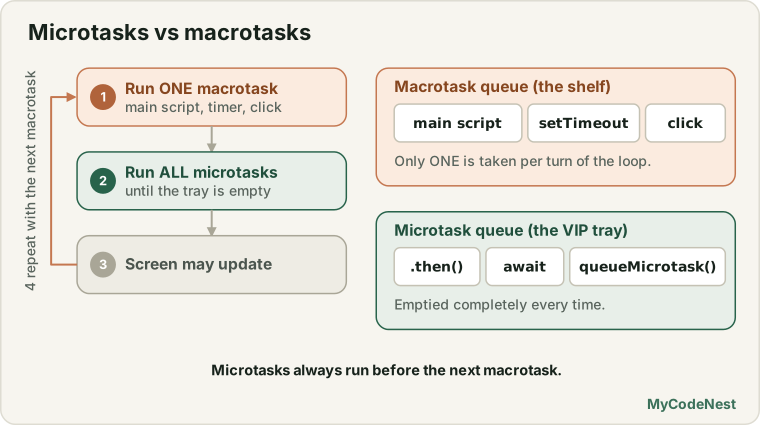
You can imagine the idea in code (again, this is only a picture, not real code you can run):
// The improved idea of the event loop
while (true) {
  const task = macrotaskQueue.takeFirst();    // 1. one macrotask
  run(task);

  while (microtaskQueue.hasTasks()) {         // 2. empty the VIP tray
    run(microtaskQueue.takeFirst());
  }

  maybeUpdateTheScreen();                     // 3. rendering
}
Now let us use the rule.
Follow the code, step by step
console.log("1: sync");

setTimeout(() => console.log("2: timeout"), 0);

Promise.resolve().then(() => console.log("3: promise"));

console.log("4: sync");
Output:
1: sync
4: sync
3: promise
2: timeout
Here is what happens:
| Step | What happens | Macrotask queue | Microtask queue | Printed |
|---|---|---|---|---|
| 1 | The main script (macrotask) starts. console.log("1: sync") |
1: sync |
||
| 2 | setTimeout hands the callback to the browser. The timer ends at once, and its callback goes to the shelf |
timeout | ||
| 3 | The Promise is already fulfilled, so its .then callback goes on the VIP tray |
timeout | promise | |
| 4 | console.log("4: sync"). The main script ends |
timeout | promise | 4: sync |
| 5 | Rule step 2: empty the VIP tray first | timeout | 3: promise |
|
| 6 | Rule step 4: now take the next macrotask | 2: timeout |
There it is. The timer was ready first, but the VIP tray is always emptied before the next shelf item. That is the whole secret behind the hint you saw earlier.
The tray is emptied completely
What if a microtask creates another microtask? The new one goes on the tray too, and it also runs before any macrotask:
setTimeout(() => console.log("timeout"), 0);

Promise.resolve().then(() => {
  console.log("promise 1");

  Promise.resolve().then(() => console.log("promise 2 (added by promise 1)"));
});

console.log("sync");
Output:
sync
promise 1
promise 2 (added by promise 1)
timeout
promise 2 did not exist when the script started. It was created while the tray was being emptied, and Raju did it before touching the shelf. This is exactly what “empty the tray completely” means, and why a long chain of .then().then().then() runs from start to end before any timer gets a turn.
queueMicrotask: put a note on the tray yourself
You do not need a Promise to create a microtask. The function queueMicrotask puts your function straight on the VIP tray:
setTimeout(() => console.log("timeout"), 0);

queueMicrotask(() => console.log("microtask"));

console.log("sync");
Output:
sync
microtask
timeout
In daily work, you will rarely write queueMicrotask directly. But it makes the idea very clear: “run this right after the current code, but before anything else”.
await is a microtask too
In the async/await lesson you learned that await is a bookmark: the function pauses and later continues. Now you can learn how it continues. The code after an await is placed on the VIP tray, just like a .then() callback:
async function run() {
  console.log("A: inside async, before await");
  await null;
  console.log("C: after await");
}

console.log("1: start");
run();
Promise.resolve().then(() => console.log("D: then"));
setTimeout(() => console.log("E: timeout"), 0);
console.log("B: end of main code");
Output:
1: start
A: inside async, before await
B: end of main code
C: after await
D: then
E: timeout
Let us trace it:
1: startis printed.run()starts and printsA(an async function runs normally until the firstawait).- At
await null, the function pauses. The rest of it (C) goes on the VIP tray, first in line. - The
.thencallback (D) goes on the tray, second in line. - The timer callback (
E) goes on the shelf. Bis printed, and the main script ends.- The tray is emptied in order:
C, thenD. - Only then does the shelf get its turn:
E.
So the code after await and a .then() callback are neighbours on the same tray. They are served in the order they were placed.
Microtasks run between timers
The tray is emptied after each macrotask, not only after the main script. So a Promise created inside a timer runs before the next timer:
setTimeout(() => {
  console.log("timer 1");
  Promise.resolve().then(() => console.log("promise inside timer 1"));
}, 0);

setTimeout(() => console.log("timer 2"), 0);
Output:
timer 1
promise inside timer 1
timer 2
Timer 1 is one macrotask. When it finishes, Raju empties the tray (the promise note) before he takes timer 2 from the shelf.
Test yourself: the big puzzle
Here is a puzzle that mixes everything. Write the output on paper before you read the answer:
console.log("A");

setTimeout(() => console.log("B"), 0);

Promise.resolve().then(() => console.log("C"));

(async () => {
  console.log("D");
  await null;
  console.log("E");
})();

queueMicrotask(() => console.log("F"));

setTimeout(() => console.log("G"), 0);

console.log("H");
Output:
A
D
H
C
E
F
B
G
How to get this answer, in four steps:
- Run all the sync code first, top to bottom. That prints
A, thenD(the async function runs until itsawait), and thenH. - Remember who went on the VIP tray, in order: the Promise
.then(C), then the code afterawait(E), thenqueueMicrotask(F). - Remember who went on the shelf, in order: the two timers (
B,G). - Empty the tray, then take the shelf in order:
C,E,F, and thenB,G.
You can use these four steps for any puzzle.
The danger: microtasks can freeze the page
The VIP tray has a very important side effect. Because Raju empties it completely before anything else, a tray that keeps refilling itself stops the shelf, and the screen update, from ever getting a turn.
Look at this code. It runs a loop made of microtasks for 300 ms, while a timer waits:
function microtaskLoop(ms, done) {
  const start = Date.now();

  function step() {
    if (Date.now() - start < ms) {
      Promise.resolve().then(step);   // every step adds a new microtask
    } else {
      done();
    }
  }

  step();
}

setTimeout(() => console.log("timer ran"), 0);
microtaskLoop(300, () => console.log("microtask loop finished"));
console.log("sync end");
Output:
sync end
microtask loop finished
timer ran
The timer was ready after 0 ms, but it had to wait for the whole 300 ms microtask loop. And during all that time, the browser could not update the screen or handle clicks. If the loop never ended, the page would freeze forever.
Compare it with the same loop made of timers (macrotasks):
function timerLoop(ms, done) {
  const start = Date.now();

  function step() {
    if (Date.now() - start < ms) {
      setTimeout(step, 0);            // every step goes to the back of the shelf
    } else {
      done();
    }
  }

  step();
}

setTimeout(() => console.log("timer ran"), 0);
timerLoop(300, () => console.log("timer loop finished"));
console.log("sync end");
Output:
sync end
timer ran
timer loop finished
Now timer ran got its turn in between, because every step of the loop went to the back of the shelf, behind it. And the browser gets a chance to update the screen between the steps.
This links back to the event loop lesson. There you learned to split heavy work into chunks with setTimeout(..., 0). Now you know why it must be setTimeout (a macrotask) and not a Promise: a Promise-based chunk loop gives the page no break at all.
The same is true for await. A loop that only awaits already finished Promises never gives the browser a break:
async function loop() {
  const start = Date.now();
  while (Date.now() - start < 300) {
    await null;     // only a microtask: the browser still gets no break
  }
  console.log("await loop finished");
}

setTimeout(() => console.log("timer ran"), 0);
loop();
console.log("sync end");
Output:
sync end
await loop finished
timer ran
You can feel the difference in the practice editor. Click Microtask loop (2s) and try to click Click me, and watch the progress bar. Then do the same with Timer loop (2s). The work is exactly the same, and only the way the next step is scheduled changes.
Real use case: batching changes
Why did the language designers give us a VIP tray at all? One big reason: microtasks let code run right after the current code, but before the screen is updated. This is perfect for batching: collecting many small changes and applying them once.
let scheduled = false;
const changes = [];

function change(name) {
  changes.push(name);

  if (!scheduled) {
    scheduled = true;

    queueMicrotask(() => {
      console.log("Applying " + changes.length + " changes at once: " + changes.join(", "));
      changes.length = 0;
      scheduled = false;
    });
  }
}

change("color");
change("size");
change("title");
console.log("Done changing");
Output:
Done changing
Applying 3 changes at once: color, size, title
We called change three times, but the work happened only once, after all three calls. Without batching, the page would be updated three times for no reason. Many tools and frameworks use this idea to keep pages fast. And because a microtask runs before the next screen update, the user never sees a half finished page.
The order, as a cheat sheet
When two things are both “later”, ask: which queue?
| Code | Queue | Runs |
|---|---|---|
console.log, normal code |
none | Now, in order |
.then, .catch, .finally |
microtask | After the current macrotask, before the next one |
Code after await |
microtask | Same as .then |
queueMicrotask(fn) |
microtask | Same as .then |
setTimeout(fn, 0) |
macrotask | After all microtasks are done |
setInterval callbacks |
macrotask | Same as setTimeout |
| A user click handler | macrotask | When it is its turn on the shelf |
The same question shows up in this small case:
const wait = (ms) => new Promise((r) => setTimeout(r, ms));

console.log("1");
setTimeout(() => console.log("2 timeout 0"), 0);
wait(0).then(() => console.log("3 wait(0) then"));
Promise.resolve().then(() => console.log("4 promise"));
console.log("5");
Output:
1
5
4 promise
2 timeout 0
3 wait(0) then
4 promise is a microtask, so it goes first. wait(0) is a Promise that is resolved by a timer, so its .then can only run after the timer fires, which means after 2 timeout 0. A Promise is not always a microtask in speed. The .then callback is a microtask only once the Promise is settled. If the Promise waits for a timer, the waiting is a macrotask.
Common mistakes
- Thinking a Promise callback and a timer callback are equal. Promise callbacks (microtasks) always run first.
- Thinking
setTimeout(fn, 0)runs before a Promise. It never does. It waits for the whole microtask queue. - Forgetting that code after
awaitis a microtask. It runs before any pending timer. - Splitting heavy work into Promise chunks. It still freezes the page. Use
setTimeout(a macrotask) between the chunks. - Writing an endless loop of microtasks. The page freezes forever and never updates.
- Forgetting that the main script is a macrotask. The tray is emptied right after it ends.
- Believing that
.thenis always instant. The callback runs only once the Promise is settled. A Promise that waits for a timer or a server still has to wait. - Using microtasks to “give the browser a break”. They do not. Rendering and clicks happen only between macrotasks.
Practice
- Predict the output, then run it:
console.log("A"); setTimeout(() => console.log("B"), 0); Promise.resolve().then(() => console.log("C")); console.log("D"); - Predict the output of this code. Explain why
3is printed before2:console.log("1"); setTimeout(() => console.log("2"), 0); Promise.resolve().then(() => console.log("3")).then(() => console.log("4")); console.log("5"); - Predict the output:
async function a() { console.log("a1"); await null; console.log("a2"); } console.log("start"); a(); console.log("end"); - Write a puzzle of your own that has a sync log, a
setTimeout, a.then, anawaitand aqueueMicrotask. Write down the answer using the four steps, and then run it to check. - Make a
setTimeoutcreate a Promise inside it, and a secondsetTimeoutright after. Show that the Promise callback runs between the two timers. - Use
queueMicrotaskto build abatchhelper like the one in the lesson. Call it 5 times and check that it applies the changes only once. - In the practice editor, click Run the order puzzle. Does the order match the numbers in the log? Then change the code to add one more
setTimeoutand one more.then, and predict the new order first. - In the practice editor, click Microtask loop (2s) and quickly click Click me five times. Then do the same for Timer loop (2s). Write down what happened to the progress bar and to the click counter, and explain why.
- Challenge: Write
microtaskLoopyourself and prove that asetTimeout(..., 0)waits for it. Then change it to usesetTimeoutand prove that the timer runs in between. - Challenge: Explain to a friend, in your own words and with your own story (not the chai stall), why a Promise callback runs before a
setTimeout(..., 0).
Recap
- The event loop has two queues: the macrotask queue (the shelf) and the microtask queue (the VIP tray).
- Macrotasks: the main script,
setTimeout,setInterval, events like clicks. - Microtasks: Promise callbacks (
.then,.catch,.finally), the code afterawait, andqueueMicrotask. - The rule: run one macrotask, then empty the microtask queue completely (including new microtasks added meanwhile), then the browser may update the screen, and then the next macrotask.
- That is why Promise callbacks run before
setTimeout(fn, 0), and why microtasks created inside a timer run before the next timer. - To predict an output: run the sync code first, then the microtasks in order, then the macrotasks in order.
- A Promise is a microtask only once it is settled. If it waits for a timer or a server, the wait itself is not a microtask.
- Microtasks can starve the page. Never chunk heavy work with Promises or
await. UsesetTimeout, so the browser can breathe between the chunks. - Microtasks are great for batching work that should run right after the current code and before the screen updates.
You now understand the engine of asynchronous JavaScript from top to bottom. Next, you will use it for real. First you will learn the basics of HTTP and REST, the language that browsers and servers speak. Then you will learn the Fetch API, where Promises, async/await and the event loop all come together.
If any part felt confusing, revisit the event loop lesson, the Promises lesson and the async/await lesson.
Frequently asked questions
What is the difference between microtasks and macrotasks?
Macrotasks, such as timers and events, are normal tasks, and the event loop runs one at a time. Microtasks, such as Promise callbacks, go in a separate queue that is emptied completely after each task.
Which runs first, setTimeout(fn, 0) or Promise.resolve().then(fn)?
The Promise callback runs first. After the current script finishes, the event loop clears all microtasks, and only then picks the next macrotask, which is the timer callback.
What does queueMicrotask do?
It adds a function to the microtask queue, so it runs right after the current code, before any timer or event. It is useful for small follow-up jobs that must happen before the browser continues.
Can microtasks block the page?
Yes. The queue is emptied fully, so if microtasks keep adding more microtasks forever, the page never gets to render or respond. Avoid endless microtask loops.
Is await a microtask?
The code after an await continues as a microtask once the awaited Promise settles. That is why code after await runs before a pending setTimeout callback, even one with zero delay.
See also: Fetch API, AbortController, Error Handling, JavaScript Cheat Sheet