JavaScript Asynchronous Callbacks: Patterns and Callback Hell
Learn error-first callbacks, running async steps in order or together, why callback hell happens, and the bugs callbacks cause, with simple real examples.
What you will learn
You already know what a callback is, and you know that some callbacks run later. In this lesson you will go deeper into asynchronous callbacks. You will learn:
- how an async function can report errors back to you (the error-first pattern)
- how to run async steps one after another
- why that leads to callback hell, and how to make it a little better
- how to run async tasks at the same time and wait for all of them
- the bugs that callbacks can cause, and how to avoid them
This lesson also explains why Promises were invented. After you feel the pain of callbacks, Promises will feel like a gift.
A quick recap
From the earlier lessons, you know three facts:
- A callback is a function you give to another function, to be called later. (Callbacks lesson)
- In asynchronous code, a task starts now and its result arrives later, in a callback. (Sync vs async lesson)
setTimeoutandsetIntervalare the simplest async tools. (Timers lesson)
Here is the pattern we will keep building on:
function loadUser(id, callback) {
  setTimeout(() => {
    callback({ id: id, name: "Riya" });   // the data is ready, so call back
  }, 500);
}

loadUser(1, (user) => console.log("Loaded: " + user.name));
The timer stands in for something slow, like a server request. The important part is the shape: start the task, and give a function that will receive the result.
The relay race
Picture a relay race. Runner 1 runs and passes the baton to Runner 2. Runner 2 cannot start until the baton arrives. Then Runner 2 passes it to Runner 3, and so on.
In callback code:
- each runner is an async task
- the baton is the callback
- passing the baton is calling the callback
This picture will help you understand every problem in this lesson. A long race is hard to follow. A dropped baton is an error nobody handles. Two batons passed at once is a callback called twice. And two runners in separate lanes, running at the same time, is parallel work.
What if something goes wrong?
Real tasks can fail. The user may not exist, the network may be down, the file may be missing. How does an async function tell you about a failure?
It cannot use throw. In the error handling lesson you learned that try...catch cannot catch an error that happens later, inside a callback. By the time the error happens, the try block is already over. So the error must travel through the callback itself.
The most common convention is called the error-first callback: the callback always receives two things, and the error comes first.
callback(error, result);| Situation | What the function calls |
|---|---|
| Success | callback(null, result) (no error, so null) |
| Failure | callback(error) or callback(error, null) |
Here is loadUser with error handling:
function loadUser(id, callback) {
  console.log("Loading user " + id + "...");

  setTimeout(() => {
    if (id <= 0) {
      callback(new Error("Invalid user id"), null);   // failure
      return;
    }

    callback(null, { id: id, name: "Riya" });         // success
  }, 300);
}

loadUser(-1, function (error, user) {
  if (error) {
    console.log("Failed: " + error.message);
    return;
  }
  console.log("Loaded: " + user.name);
});

loadUser(1, function (error, user) {
  if (error) {
    console.log("Failed: " + error.message);
    return;
  }
  console.log("Loaded: " + user.name);
});
Output:
Loading user -1...
Loading user 1...
Failed: Invalid user id
Loaded: Riya
Both calls start right away, and both results arrive later. The pattern for the person who uses the function never changes:
- Check
errorfirst. - If there is an error, handle it and
return. - Otherwise, use the result.
Why is the error first? So you cannot forget it. The first thing you see in the function is the question “did it fail?”
Tip: Another style gives the function two callbacks: one for success and one for failure, like
loadUser(id, onSuccess, onError). You sawonSuccessandonErrorin the optional chaining lesson. Both styles are fine. The error-first style is popular because it is a single callback with a fixed shape.
Doing steps one after another
Now a real situation. When you order food in an app, three things must happen in order:
- Place the order.
- The restaurant prepares the food.
- The rider delivers it.
Step 2 needs the order from step 1. Step 3 needs the order from step 2. Each step can only start when the previous one passes the baton:
function placeOrder(item, callback) {
  setTimeout(() => {
    console.log("1. Order placed: " + item);
    callback(null, { orderId: 101, item: item });
  }, 200);
}

function prepareFood(order, callback) {
  setTimeout(() => {
    console.log("2. Food prepared for order " + order.orderId);
    callback(null, order);
  }, 200);
}

function deliver(order, callback) {
  setTimeout(() => {
    console.log("3. Delivered: " + order.item);
    callback(null, order);
  }, 200);
}

placeOrder("Pizza", function (error, order) {
  if (error) { console.log("Error: " + error.message); return; }

  prepareFood(order, function (error, order) {
    if (error) { console.log("Error: " + error.message); return; }

    deliver(order, function (error, order) {
      if (error) { console.log("Error: " + error.message); return; }

      console.log("Enjoy your " + order.item + "!");
    });
  });
});
Output:
1. Order placed: Pizza
2. Food prepared for order 101
3. Delivered: Pizza
Enjoy your Pizza!
It works. Each next step is started inside the callback of the previous one, because that is the only place where we know the previous step is done. This is how you force async tasks into an order.
Callback hell
Look at the shape of the code above. Every new step is pushed one level deeper to the right:
placeOrder(..., function () {
    prepareFood(..., function () {
        deliver(..., function () {
            ...
        });
    });
});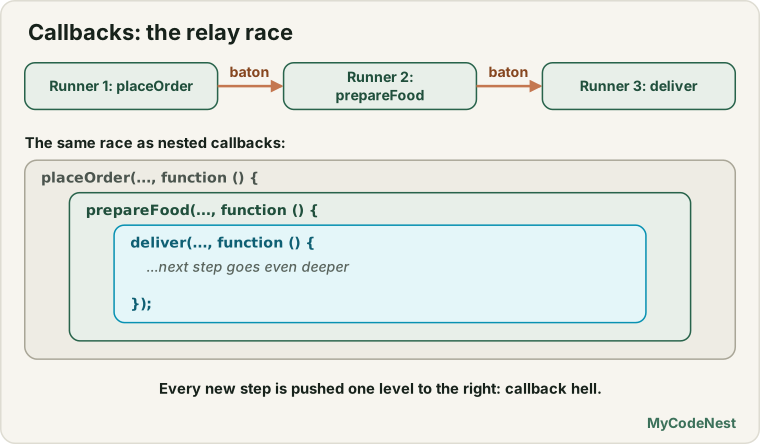
With only 3 steps, it is fine. Real apps have 5, 8 or 10 dependent steps: log in, load the profile, load the orders, load the items, load the reviews… The code becomes a huge arrow pointing right. People call this callback hell or the pyramid of doom.
Why is it a problem? It is not only about ugly shape:
- Hard to read. The real order of events is hidden inside the nesting.
- Repeated error checks. Every level repeats the same
if (error)block. It is easy to forget one. - Hard to change. Adding a step in the middle means re-indenting and moving closing brackets.
- Hard to reuse. The steps are glued to each other by nesting.
- Hard to debug. When something breaks, you must dig through many layers.
Compare it with the relay race: if 15 runners each wait for the baton, you must follow the baton through 15 hands to understand the race.
A small improvement: named functions
You can flatten the pyramid by giving each callback a name, so they are no longer nested. This is the “named or inline” idea from the callbacks lesson:
function handleError(error) {
  console.log("Error: " + error.message);
}

function onDelivered(error, order) {
  if (error) return handleError(error);
  console.log("Enjoy your " + order.item + "!");
}

function onPrepared(error, order) {
  if (error) return handleError(error);
  deliver(order, onDelivered);
}

function onOrdered(error, order) {
  if (error) return handleError(error);
  prepareFood(order, onPrepared);
}

placeOrder("Pizza", onOrdered);
The output is exactly the same as before. The code is flat, and the error handling is in one function. But there is a new cost: to follow the story, you must jump between functions, reading from the bottom upwards. It is a helpful trick for small chains, but it does not solve the real problem. Promises do.
Running tasks at the same time
Sometimes tasks do not depend on each other. A dashboard needs the user’s profile and the user’s orders. You can ask for both at once. Doing them one after another would waste time.
The trick is a counter: count how many tasks are still running. Each callback lowers the counter. When it reaches zero, everyone is done.
function loadProfile(callback) {
  setTimeout(() => callback(null, { name: "Riya" }), 500);
}

function loadOrders(callback) {
  setTimeout(() => callback(null, [101, 102, 103]), 300);
}

function loadDashboard(callback) {
  let remaining = 2;      // two tasks are running
  const data = {};

  function oneDone() {
    remaining--;
    if (remaining === 0) {
      callback(null, data);   // both finished
    }
  }

  loadProfile((error, profile) => {
    data.profile = profile;
    oneDone();
  });

  loadOrders((error, orders) => {
    data.orders = orders;
    oneDone();
  });
}

loadDashboard((error, data) => {
  console.log(data.profile.name + " has " + data.orders.length + " orders");
});
Output:
Riya has 3 ordersBoth tasks start together, so the total time is about 0.5 seconds (the slower one), not 0.8 seconds. In the relay race, this is two runners in separate lanes, and the race ends when both cross the line.
It works, but you must manage the counter by hand, and this example ignores errors. With 5 or 10 tasks it becomes messy. Later in this section you will meet Promise.all, which does exactly this job in one line.
When callbacks go wrong
When you pass a callback to some function, you give your baton to someone else’s code. You trust that they will call it once, at the right time, with the right values. Often they do not. Here are four common bugs.
Bug 1: the callback runs twice
function buggyPay(amount, callback) {
  setTimeout(() => {
    callback(null, "Paid " + amount);
    callback(null, "Paid " + amount);   // oops, called again
  }, 100);
}

buggyPay(500, (error, message) => console.log(message));
Output:
Paid 500
Paid 500
In a real payment app, this could charge the customer twice. A small helper can protect you. It uses a closure to remember if the callback was already called, and rest and spread to pass the arguments along:
function once(fn) {
  let called = false;

  return function (...args) {
    if (called) return;     // ignore later calls
    called = true;
    return fn(...args);
  };
}

function safePay(amount, callback) {
  const safeCallback = once(callback);

  setTimeout(() => {
    safeCallback(null, "Safe: Paid " + amount);
    safeCallback(null, "Safe: Paid " + amount);   // ignored
  }, 100);
}

safePay(500, (error, message) => console.log(message));
Output:
Safe: Paid 500Bug 2: forgetting to return after an error
function divide(a, b, callback) {
  setTimeout(() => {
    if (b === 0) {
      callback(new Error("Cannot divide by zero"));
      // forgot: return;
    }
    callback(null, a / b);
  }, 100);
}

divide(10, 0, (error, result) => {
  if (error) {
    console.log("Error: " + error.message);
    return;
  }
  console.log("Result: " + result);
});
Output:
Error: Cannot divide by zero
Result: Infinity
The function continued after reporting the error, so the callback ran twice: once with the error and once with Infinity (dividing by zero, as you learned in the data types lesson). The fix is the same return you already use in the callback: write return callback(new Error(...)), or put return; on the next line.
Bug 3: sometimes sync, sometimes async
This one is sneaky. Look at a function that uses a cache. If the data is already in the cache, it calls the callback immediately. Otherwise it waits:
const cache = { 1: { name: "Riya" } };

function getUser(id, callback) {
  if (cache[id]) {
    callback(cache[id]);                          // runs NOW (synchronous)
    return;
  }
  setTimeout(() => callback({ name: "Unknown" }), 100);   // runs LATER
}

console.log("A");
getUser(1, (user) => console.log("B: " + user.name));
console.log("C");

console.log("---");

console.log("D");
getUser(2, (user) => console.log("E: " + user.name));
console.log("F");
Output:
A
B: Riya
C
---
D
F
E: Unknown
Same function, same code, but in the first call the callback ran between A and C, and in the second call it ran after F. The order of your program now depends on whether the data was in the cache. This causes bugs that are very hard to find.
The rule: a function should be either always synchronous or always asynchronous. The fix is to make the cached path asynchronous too:
if (cache[id]) {
  setTimeout(() => callback(cache[id]), 0);   // always later
  return;
}
Now the output of the first call is always A, C, B: Riya.
Bug 4: the callback is never called
If the function forgets to call the callback in some path, the “Loading…” message stays on the screen forever, and nobody knows why. Always check that every path, success and failure, calls the callback exactly once.
Why Promises are coming
Let us collect the pain points and see what is needed:
| Problem with callbacks | What we need |
|---|---|
| Deep nesting for steps in order | A flat way to chain steps |
| Error check repeated at every level | One place to handle errors |
| A counter for tasks at the same time | A built-in way to wait for many tasks |
| Callback may run twice, never, or sometimes sync | A guarantee: one result, always async |
| Result “lost” inside callbacks | A value that stands for the future result |
That last row is the big idea of Promises: instead of passing a baton to someone else, the async function hands you back an object that stands for the result that will come. You can pass that object around, chain it and wait for it. But before that, there is one more piece of the puzzle: how does JavaScript manage all these waiting callbacks behind the scenes? That is the event loop, and it comes next.
Common mistakes
- Not checking
errorfirst. If you useresultwithout checking, you may readundefinedornull. - Not returning after calling the callback with an error. The function carries on and calls the callback again.
- Using
try...catcharound async code. It cannot catch errors from a later callback. Pass the error through the callback instead. - Throwing an error inside an async callback. There is nobody to catch it. Call
callback(error)instead. - Calling the callback twice. Check every path. Use a helper like
oncefor important cases. - Mixing sync and async in one function. Always be asynchronous, or always be synchronous.
- Using the result outside the callback. The data is not ready on the next line. Everything that needs it goes inside the callback.
- Nesting everything. If you go deeper than 2 or 3 levels, use named functions or think about a different approach.
- Forgetting the baton. Every path must call the callback exactly once.
Practice
- Write
divideAsync(a, b, callback)that waits 500 ms. Ifbis0, it calls the callback with an error. Otherwise it calls it withnulland the result. Use it correctly, with thereturn. - Write
checkAge(age, callback)that fails with an error ifageis below 18, and succeeds with the text"Allowed"otherwise. Test it with two ages. - Write
getWeather(city, onSuccess, onError)in the two-callback style. It should callonErrorif the city is an empty text. - Create three async functions,
login(name, cb),loadProfile(user, cb)andloadOrders(user, cb), each taking 300 ms. Run them one after another with nested callbacks, and then rewrite the same code using named functions. - Make
loadProfilefail on purpose. Check that the error message is printed once and thatloadOrdersnever runs. - In the practice editor, run the order with the checkbox off, then on. Follow the code and find exactly which line shows the “Sorry” message.
- Copy
loadDashboardand add a third task,loadMessages, that takes 400 ms. Update the counter. How long does the whole dashboard take now? - Challenge: Write a function
once(fn)yourself, without looking at the lesson, and test it by calling a wrapped function three times. - Challenge: Write the cache version of
getUserthat is always asynchronous. Prove it by printingA, calling it, and printingC, for both a cached and an uncached id.
Recap
- An asynchronous callback receives the result of a task that finishes later.
- Async functions cannot
throwto you. They pass errors through the callback using the error-first pattern:callback(error, result). Checkerrorfirst, andreturnafter handling it. - To run steps in order, start the next step inside the previous callback. Too many steps cause callback hell: deep nesting, repeated error checks and code that is hard to change.
- Named functions flatten the code, but you must jump between functions to read the story.
- To run tasks at the same time, use a counter and finish when it reaches zero. It saves time but needs careful hand-written code.
- Callbacks can be called twice, never, or sometimes synchronously. Always call the callback exactly once, and always asynchronously.
- These problems are the reason Promises exist. First, you will learn how JavaScript manages all waiting callbacks, in the event loop lesson.
If a part felt hard, go back to the timers lesson and run the examples with different delays. Seeing the order change is the fastest way to build a feeling for asynchronous code.
Frequently asked questions
What is an asynchronous callback?
It is a function that you pass to something that works in the background, and that gets called when it is done. Examples are the function in setTimeout or an event handler.
What is the error-first callback pattern?
A convention, common in Node.js, where the first argument of the callback is an error (or null), and the result comes next, such as callback(err, data). You check err first, so errors are never ignored.
What is callback hell, and how do I avoid it?
It is a pyramid of nested callbacks, where each step is inside the previous one. You can avoid it by naming and separating functions, and, even better, by using Promises or async/await, which keep steps in a flat list.
Why can't I return a value from an asynchronous callback?
The outer function has already finished before the callback runs, so a return inside the callback goes nowhere useful. Use the result inside the callback, pass another callback, or use a Promise.
Can a callback be called more than once?
It depends on the API. An event handler can run many times, but a setTimeout callback runs once. Be careful when writing your own code, so that a callback is not called twice by mistake.
See also: Promises, The Event Loop, async/await, JavaScript Cheat Sheet