JavaScript Prototypes and the Prototype Chain Explained
Understand JavaScript prototypes: the hidden link between objects, the prototype chain, property lookup, Object.create, __proto__ and instanceof.
What you will learn
Have you ever wondered where map comes from when you write [1, 2, 3].map(...)? You never added a map to your array. Or why every object, even an empty {}, seems to have a toString method?
The answer is prototypes. In this lesson you will learn what a prototype is, how JavaScript looks up a property step by step (the prototype chain), how to create objects that share methods with Object.create, and what __proto__, .prototype and instanceof really mean. This is the idea behind constructor functions and classes, so it is the most important lesson of the OOP section.
The problem: copies everywhere
Suppose you make many user objects, and each has a greet method:
function createUser(userName) {
  return {
    userName: userName,
    greet() {
      console.log("Hi, I am " + this.userName);
    }
  };
}

const riya = createUser("Riya");
const karan = createUser("Karan");

console.log(riya.greet === karan.greet);   // false
false means each user got its own copy of greet. For 2 users it is fine. For 10,000 users, you now have 10,000 identical functions in memory. That is a waste.
What we really want is: keep one greet in one place, and let all users use it. JavaScript does exactly this, with prototypes.
The idea in one line
Every object has a hidden link to another object, its prototype. If JavaScript cannot find a property on the object, it follows the link and looks there.
Think of a student, a teacher and a principal.
- You ask a student: “What is the school’s address?”
- The student does not know, so they ask the teacher.
- The teacher does not know, so they ask the principal.
- The principal knows, and the answer travels back.
You only asked one person, but the question travelled up a chain until someone had the answer. A prototype is that “who do I ask next?” link between objects.
You have been using prototypes all along
const numbers = [10, 20, 30];

console.log(Object.hasOwn(numbers, "map"));   // false: the array does NOT own map
console.log(typeof numbers.map);              // "function": yet it works!
The array numbers has no map of its own. JavaScript asked the array, did not find it, followed the hidden link to Array.prototype (the shared object that holds all array methods), and found map there. Every array in your program shares that one Array.prototype. That is why there is only one copy of map for millions of arrays.
The same happens everywhere:
"hello".toUpperCase();      // found on String.prototype
({}).hasOwnProperty("a");   // found on Object.prototype
Seeing the hidden link
The hidden link is officially written as [[Prototype]]. You cannot write that name in code, but you can read it with Object.getPrototypeOf().
const numbers = [1, 2, 3];

console.log(Object.getPrototypeOf(numbers) === Array.prototype);   // true
Now let us make our own prototype link with Object.create(). It creates a new, empty object whose prototype is the object you give.
const animal = {
  eats: true,
  walk() {
    console.log(this.name + " walks");
  }
};

const dog = Object.create(animal);   // dog's prototype is animal
dog.name = "Bruno";

console.log(dog.name);    // "Bruno" (dog's own property)
console.log(dog.eats);    // true (not on dog: found on animal)
dog.walk();               // "Bruno walks" (walk is on animal)
dog itself only has name. But it can use eats and walk because its hidden link points to animal.
Look at the last line. The walk method lives on animal, but this is dog. Remember the rule from the this lesson: this is the object before the dot (dog.walk()), no matter where the method was found. That is why this.name is "Bruno". This is the whole trick: one shared method, this decides whose data it uses.
const cat = Object.create(animal);
cat.name = "Mimi";

cat.walk();   // "Mimi walks": the same walk, a different this
Property lookup: how JavaScript reads a property
When you write object.property, JavaScript does this:
- Look for
propertyon the object itself. Found? Use it. Stop. - Not found? Look on the object’s prototype.
- Not found? Look on the prototype’s prototype.
- Keep going until it reaches an object whose prototype is
null(the end). - Still not found? The answer is
undefined.
This path is the prototype chain.
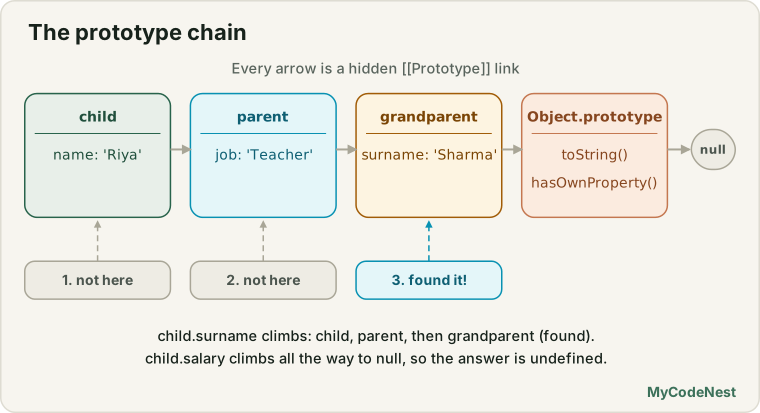
const grandparent = { surname: "Sharma" };
const parent = Object.create(grandparent);
parent.job = "Teacher";

const child = Object.create(parent);
child.name = "Riya";

console.log(child.name);      // "Riya"    (on child)
console.log(child.job);       // "Teacher" (on parent, one step up)
console.log(child.surname);   // "Sharma"  (on grandparent, two steps up)
console.log(child.salary);    // undefined (not anywhere in the chain)
The chain here is:
child -> parent -> grandparent -> Object.prototype -> nullThe closest match wins. If child and parent both had job, JavaScript would use child.job and never look higher.
Every chain ends at Object.prototype
Even the object {} has a prototype. Almost every chain ends with Object.prototype, and then null:
const numbers = [1, 2, 3];

console.log(Object.getPrototypeOf(numbers) === Array.prototype);            // true
console.log(Object.getPrototypeOf(Array.prototype) === Object.prototype);   // true
console.log(Object.getPrototypeOf(Object.prototype));                       // null (the end)
numbers -> Array.prototype -> Object.prototype -> nullThis is why an array has map (from Array.prototype) and hasOwnProperty and toString (from Object.prototype). Arrays inherit from both.
| Value | Its prototype chain |
|---|---|
[1, 2] |
Array.prototype → Object.prototype → null |
"hi" |
String.prototype → Object.prototype → null |
function () {} |
Function.prototype → Object.prototype → null |
{} |
Object.prototype → null |
new Date() |
Date.prototype → Object.prototype → null |
Even a function is an object, with a chain. That is how call, apply and bind from the last lesson work: they live on Function.prototype, so every function can use them.
Own properties vs inherited properties
A property can be own (stored on the object itself) or inherited (found up the chain). You already know the tool to check this from the objects lesson:
const animal = { eats: true };
const dog = Object.create(animal);
dog.name = "Bruno";

console.log(Object.hasOwn(dog, "name"));   // true (own)
console.log(Object.hasOwn(dog, "eats"));   // false (inherited)

console.log("name" in dog);   // true
console.log("eats" in dog); // true (the in operator looks up the whole chain)| Check | Looks at |
|---|---|
Object.hasOwn(obj, "key") |
Only the object’s own properties |
"key" in obj |
The object and its whole chain |
Loops and inheritance
Remember for...in from the for…in and for…of lesson? It also lists inherited enumerable properties. Object.keys does not.
const animal = { eats: true };
const dog = Object.create(animal);
dog.name = "Bruno";
dog.age = 3;

for (const key in dog) {
  console.log(key);   // "name", "age", "eats"  (eats is inherited!)
}

console.log(Object.keys(dog));   // ["name", "age"]  (own only)
To loop over own properties only, use Object.keys, Object.values or Object.entries, or check with Object.hasOwn inside for...in.
Writing and deleting do not go up the chain
Reading goes up the chain. Writing does not. When you assign a value, JavaScript puts it on the object itself. This is called shadowing, because the own property hides (shadows) the inherited one.
const animal = { eats: true };
const dog = Object.create(animal);

dog.eats = false;           // creates an OWN property on dog

console.log(dog.eats);      // false (dog's own property is found first)
console.log(animal.eats);   // true  (animal is untouched)
delete also works only on the object itself. If you delete the own property, the inherited one appears again:
delete dog.eats;

console.log(dog.eats);   // true (back to the inherited value)
A trap: shared objects and arrays
If an inherited property is an object or array, all children share the same one. Changing it (not replacing it) changes it for everyone, because of reference behaviour.
const base = { tags: [] };

const a = Object.create(base);
const b = Object.create(base);

a.tags.push("new");

console.log(b.tags);   // ["new"]  (b is affected too!)
Both a.tags and b.tags are the same array from base. The fix: give each object its own array.
a.tags = [];              // own array for a
b.tags = [];              // own array for b

a.tags.push("new");
console.log(b.tags);      // []  (now they are separate)
The rule: put methods (shared behaviour) on the prototype. Put data that differs per object on the object itself.
__proto__, [[Prototype]] and .prototype: the three names
This is the part that confuses everybody. Three similar names, three different things.
| Name | What it is |
|---|---|
[[Prototype]] |
The hidden link that every object has. It is the real thing. |
__proto__ |
An older, built-in property that lets you read or set that link. |
.prototype |
A normal property that exists only on functions. It is the object that will become the link for objects created with new (next lesson). |
__proto__
__proto__ is a way to see [[Prototype]]:
const animal = { eats: true };
const dog = Object.create(animal);

console.log(dog.__proto__ === animal);                  // true
console.log(Object.getPrototypeOf(dog) === animal);     // true (the same thing)
Both work. But the official advice is: in new code, use Object.getPrototypeOf() to read, and Object.create() to set. __proto__ is old, and it can behave strangely with unusual objects.
There is one place where __proto__ is fine and clear: inside an object literal, to set the prototype when you create the object.
const animal = { eats: true };

const cat = {
  __proto__: animal,
  name: "Mimi"
};

console.log(cat.eats);   // true
.prototype on functions
Every normal function has a prototype property. Do not mix it up with the hidden link:
function Person(userName) {
  this.userName = userName;
}

Person.prototype.hello = function () {
  console.log("Hello, " + this.userName);
};

const riya = new Person("Riya");

riya.hello();   // "Hello, Riya"

console.log(Object.getPrototypeOf(riya) === Person.prototype);   // true
This is only a peek. The next lesson explains new and constructor functions in full. For now, remember the rule:
Person.prototypeis the object that objects created bynew Person()will use as their[[Prototype]]. The function’s own prototype link is something different.
A tiny memory trick: Person.prototype is “the prototype for Person’s children”.
Good to know: arrow functions and shorthand methods have no
.prototypeproperty, because they cannot be used withnew.
instanceof: is this object in the family?
You have already used instanceof in the error handling lessons (error instanceof ValidationError). Now you can understand it.
obj instanceof Person asks: “Is Person.prototype somewhere in the prototype chain of obj?”
function Person(userName) {
  this.userName = userName;
}

const riya = new Person("Riya");

console.log(riya instanceof Person);    // true  (Person.prototype is in riya's chain)
console.log(riya instanceof Object);    // true  (Object.prototype is at the end of every chain)
console.log(riya instanceof Array);     // false

console.log([] instanceof Array);       // true
console.log([] instanceof Object);      // true (arrays are objects too)
You can ask the same question the other way round with isPrototypeOf:
console.log(Person.prototype.isPrototypeOf(riya)); // trueObject.create(null): an object with no prototype
You can create an object with no prototype at all. It inherits nothing, not even toString:
const plain = {};
const bare = Object.create(null);

console.log("toString" in plain);   // true  (inherited from Object.prototype)
console.log("toString" in bare);    // false (nothing inherited)
This is useful for a pure dictionary, where any word could be a key. Look at this bug with a normal object:
const counts = {};
const words = ["apple", "constructor", "apple"];

for (const word of words) {
  counts[word] = (counts[word] || 0) + 1;
}

console.log(counts.constructor);
// A messy string: counts["constructor"] started as an inherited function, not 0
The word "constructor" already exists on every normal object (inherited), so the count starts wrongly. With Object.create(null), there is nothing inherited, so it works:
const safeCounts = Object.create(null);

for (const word of words) {
  safeCounts[word] = (safeCounts[word] || 0) + 1;
}

console.log(safeCounts.constructor);   // 1
console.log(safeCounts.apple);         // 2
Good to know: for a real dictionary, a Map is usually the cleanest answer, and it has none of these problems.
Changing the prototype later, and built-in prototypes
Prototypes are live
Because objects only link to their prototype, a change to the prototype is seen by everyone linked to it, even objects that already exist.
const animal = { eats: true };
const dog = Object.create(animal);

console.log(dog.sleeps);   // undefined

animal.sleeps = true;      // add to the prototype later

console.log(dog.sleeps);   // true
This is powerful, and also a reason for care.
Do not change built-in prototypes
You could add a method to Array.prototype and every array in the program gets it:
Array.prototype.last = function () {
  return this[this.length - 1];
};

console.log([1, 2, 3].last());   // 3
It works, but it is a bad habit. The new property becomes enumerable, so it shows up in for...in over every array in your whole program. It can clash with another library, or with a future version of JavaScript that adds a method with the same name. (Modern JavaScript already has array.at(-1) for this exact job.) Use your own helper functions instead.
Object.setPrototypeOf
There is a function to change an existing object’s prototype: Object.setPrototypeOf(obj, newProto). It works, but it is slow and makes engines’ optimisations harder. Prefer Object.create(proto) to choose the prototype at creation time.
Real-life use cases
1. Share methods between many objects
const userMethods = {
  greet() {
    return "Hi, I am " + this.userName;
  },
  isAdult() {
    return this.age >= 18;
  }
};

function createUser(userName, age) {
  const user = Object.create(userMethods);   // link to the shared methods
  user.userName = userName;                  // own data
  user.age = age;
  return user;
}

const riya = createUser("Riya", 21);
const karan = createUser("Karan", 16);

console.log(riya.greet());      // "Hi, I am Riya"
console.log(karan.isAdult());   // false
console.log(riya.greet === karan.greet);   // true: one copy, shared!
Compare this with the problem at the top. Now greet === greet is true. There is only one function in memory, no matter how many users you create.
2. Settings with defaults
A prototype is a natural “fallback” system. User settings sit on top, defaults sit underneath:
const defaults = { theme: "light", language: "en", fontSize: 16 };

const userSettings = Object.create(defaults);
userSettings.theme = "dark";        // the user changed only this

console.log(userSettings.theme);      // "dark"  (own)
console.log(userSettings.language);   // "en"    (from defaults)
console.log(userSettings.fontSize);   // 16      (from defaults)

console.log(JSON.stringify(userSettings));   // {"theme":"dark"}  (only own properties)
That last line is useful: when you save to storage, only what the user actually changed is saved. (JSON, from the JSON lesson, only includes own properties.)
3. Find where a property really lives
A small tool to see the chain in action. It walks up the chain and tells you which object owns a property:
function findOwner(obj, key) {
  let current = obj;

  while (current !== null) {
    if (Object.hasOwn(current, key)) {
      return current;
    }
    current = Object.getPrototypeOf(current);
  }

  return null;
}

const numbers = [1, 2, 3];

console.log(findOwner(numbers, "length") === numbers);              // true (own)
console.log(findOwner(numbers, "map") === Array.prototype);         // true
console.log(findOwner(numbers, "hasOwnProperty") === Object.prototype);   // true
console.log(findOwner(numbers, "banana"));                          // null
4. Print the whole chain
function showChain(obj) {
  const names = [];
  let current = obj;

  while (current !== null) {
    names.push(current.constructor ? current.constructor.name : "(no constructor)");
    current = Object.getPrototypeOf(current);
  }

  return names.join(" -> ");
}

console.log(showChain([]));              // "Array -> Object"
console.log(showChain(new Date()));      // "Date -> Object"
console.log(showChain(function () {}));  // "Function -> Object"
5. A chain of three levels (role system)
const person = {
  describe() {
    return this.name + " (" + this.role + ")";
  }
};

const employee = Object.create(person);
employee.role = "Employee";
employee.work = function () {
  return this.name + " is working";
};

const manager = Object.create(employee);
manager.role = "Manager";
manager.approve = function () {
  return this.name + " approved the request";
};

const asha = Object.create(manager);
asha.name = "Asha";

console.log(asha.describe());   // "Asha (Manager)"  (describe from person, role from manager)
console.log(asha.work());       // "Asha is working" (from employee)
console.log(asha.approve());    // "Asha approved the request" (from manager)
Notice that asha.role is "Manager": the closest match wins, so manager.role hides employee.role.
Common mistakes
- Mixing up
.prototypeand__proto__..prototypeexists on functions and is a plan for future children.__proto__(or[[Prototype]]) is the actual link of an object. - Expecting a write to change the prototype.
dog.eats = falsecreates a new own property ondog. It does not changeanimal. - Putting arrays or objects on a prototype and mutating them. All children share the same one. Give each object its own.
- Using
for...inand being surprised by inherited keys. UseObject.keysor checkObject.hasOwn. - Using
obj.hasOwnProperty("key")on an object that may have no prototype (Object.create(null)). UseObject.hasOwn(obj, "key"). - Using a normal
{}as a dictionary for any user-provided words. Keys like"constructor"or"toString"already exist. UseObject.create(null)or aMap. - Changing built-in prototypes like
Array.prototypeorObject.prototype. It affects every object in the program and can break other code. - Making a chain that loops (A’s prototype is B and B’s prototype is A). JavaScript throws a
TypeError. - Thinking
instanceofchecks “who created it”. It only checks whether the prototype is somewhere in the chain. - Using
Object.setPrototypeOfeverywhere. Choose the prototype when you create the object withObject.create.
Practice
- Create
animalwith a propertyeats: trueand a methoddescribe(). CreatedogwithObject.create(animal), addname, and calldog.describe(). - Print
Object.hasOwn(dog, "eats")and"eats" in dog. Explain the difference in your own words. - Add
bark()todog. Create a second objectcatfromanimalwith its ownname. Show thatdog.describe === cat.describe. - Write
dog.eats = false. What isanimal.eatsnow? Thendelete dog.eatsand read it again. What do you see? - Create
grandparent,parent,childwithObject.create. Read a property that exists only ongrandparentthroughchild. - Use
Object.getPrototypeOfto walk the chain of an array. How many steps untilnull? - Use
for...inoverdogand print every key. Then useObject.keys(dog). Why are the results different? - Reproduce the shared array bug (
tags: []on a prototype). Then fix it so each object has its own array. - Create a
defaultsobject and auserSettingsobject linked to it. Change one setting and useJSON.stringifyto see what is saved. - Create
bare = Object.create(null). Check"toString" in bare. Then count the words of a sentence withbareand with{}, using the word"constructor". - Write
findOwner(obj, key)from memory. Test it with an array, a string and a function. - Test
instanceofwith an array, a function and a plain object againstArray,FunctionandObject. Explain each result using the chain. - Challenge: write
isInChain(obj, proto)that returnstrueifprotois anywhere in the chain ofobj, without usinginstanceoforisPrototypeOf. - Challenge: build a 3-level chain
person → employee → manager, then useshowChainto print each object’s chain. - Challenge: use
callfrom the previous lesson to runArray.prototype.mapon a string. Then explain which prototype object you borrowed from.
Recap
- Every object has a hidden link,
[[Prototype]], to another object. This link is the prototype. - When you read a property, JavaScript checks the object, then its prototype, then the prototype’s prototype, until it reaches
null. This path is the prototype chain. The closest match wins. - Most chains end with
Object.prototype. That is why every object hastoStringandhasOwnProperty, and why arrays have bothmapandtoString. - Methods like
map,toUpperCaseand evencallare not copied to each value. They live once on a shared prototype (Array.prototype,String.prototype,Function.prototype). Object.create(proto)makes a new object linked toproto.Object.getPrototypeOf(obj)reads the link. Prefer these to__proto__andObject.setPrototypeOf.- Reading goes up the chain. Writing and deleting only affect the object itself (shadowing).
- Shared methods go on the prototype. Data that differs per object, especially arrays and objects, goes on the object itself.
thisinside a shared method is the object before the dot, so one method can serve many objects..prototypebelongs to functions: it is the plan for the objects created withnew.__proto__and[[Prototype]]are the actual links of objects.instanceofchecks if a function’s.prototypeis in an object’s chain.Object.hasOwnchecks only own properties,inchecks the whole chain.Object.create(null)makes a prototype-free object, a safe dictionary. Do not modify built-in prototypes.- Next you will learn constructor functions: the
newkeyword, a tidy way to create many objects that share a prototype.
If you want to revisit the basics, read the objects lesson, the this keyword lesson, the value vs reference lesson and the call, apply and bind lesson.
Frequently asked questions
What is a prototype in JavaScript?
A prototype is an object that another object is linked to. If a property or method is not found on the object itself, JavaScript looks for it on the prototype, then on the prototype’s prototype, and so on. This lets many objects share the same methods without copying them.
What is the prototype chain?
It is the series of linked prototypes JavaScript follows when it looks up a property. It goes from the object, to its prototype, to that object’s prototype, and ends at null. For most objects, the last real object in the chain is Object.prototype.
What is the difference between __proto__ and prototype?
proto (the hidden [[Prototype]] link) is on every object and points to its prototype. prototype is a property that exists only on functions. It is the object that will be used as the prototype for objects created with new on that function.
Does JavaScript copy methods from the prototype to each object?
No. The object only holds a link. The method stays in one place on the prototype, and every linked object uses it through the chain. That is why prototypes save memory, and why changing a prototype affects all objects linked to it.
Why do all objects have a toString method?
Because almost every object’s chain ends at Object.prototype, and that object has toString, hasOwnProperty and a few other methods. Objects inherit them through the chain unless they were created with Object.create(null).
Should I use __proto__?
In new code, use Object.getPrototypeOf() to read and Object.create() to choose a prototype. proto is an older feature. You will still see it in old code and in tutorials, and it is fine to use it inside an object literal to set a prototype.
See also: Call, Apply and Bind, Objects, Value vs Reference, JavaScript Cheat Sheet