JavaScript Proxy Explained: get, set, has and Interception
Learn JavaScript Proxy with simple examples: traps like get, set, has, deleteProperty, apply and construct, plus validation, defaults and reactive state.
What you will learn
In the last lesson you learned property descriptors, getters and setters, and the Reflect API. With a getter or setter you can run code when a property is read or written. But there is a limit: you must write one for each property name you already know.
What if you want to react to any property, even one that does not exist yet? What if you want to know when someone checks a key with in, deletes a key, lists the keys, or calls a function? For that, JavaScript has the Proxy. In this lesson you will learn what a Proxy is, how its traps (get, set, has, deleteProperty, ownKeys, apply, construct) work, how Reflect is its perfect partner, and how to build real things: validation, default values, read-only objects, logging, and reactive state.
The idea in one line
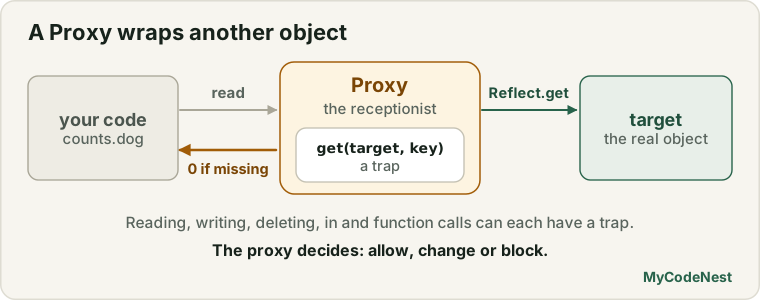
A Proxy wraps another object and lets you intercept what happens to it: reading, writing, deleting, checking, calling and more.
Think of a receptionist at a company. Visitors do not walk straight to the manager. They talk to the receptionist, who decides: “Yes, go in”, “Please sign here first”, or “Sorry, not allowed.” The receptionist is the proxy. The manager is the target. The receptionist’s rules are the handler.
Your first Proxy
const target = { name: "Riya" };

const handler = {};   // no rules yet

const proxy = new Proxy(target, handler);

console.log(proxy.name);   // "Riya"  (passes straight through)

proxy.age = 21;
console.log(target.age);   // 21      (the write also reached the target)
new Proxy(target, handler) takes two things:
| Part | What it is |
|---|---|
| target | The real object (or function) that is wrapped |
| handler | An object that holds the traps, the functions that intercept operations |
With an empty handler, the proxy just forwards everything to the target. Now let us add a rule. A trap is a method in the handler whose name says which operation it catches.
const user = { name: "Riya", age: 21 };

const loud = new Proxy(user, {
  get(target, key) {
    console.log("Reading " + String(key));
    return target[key];
  }
});

console.log(loud.name);
// "Reading name"
// "Riya"
Important points:
- You must use the proxy (
loud), not the original (user). Operations on the original skip the traps. - The proxy is a different object from the target:
proxy === targetisfalse.
The get trap: intercept reading
get(target, key, receiver) { ... }| Parameter | Meaning |
|---|---|
target |
The wrapped object |
key |
The property name (a string, or a symbol) |
receiver |
The object the property was read from (usually the proxy). It is the this for getters (the same idea as the receiver in Reflect.get) |
Whatever the trap returns is what the reader gets.
Default values for missing keys
Without a proxy, a missing key gives undefined. With a proxy you can give a default. This makes a word counter very easy:
const counts = new Proxy({}, {
  get(target, key, receiver) {
    return Reflect.has(target, key) ? Reflect.get(target, key, receiver) : 0;
  }
});

const words = "the cat and the hat and the bat".split(" ");

for (const word of words) {
  counts[word]++;           // missing words start at 0, so ++ works
}

console.log(counts.the);    // 3
console.log(counts.and);    // 2
console.log(counts.dog);    // 0   (never seen: default)
Without the proxy, counts[word]++ would produce NaN for a new word (undefined + 1), and you would need the || 0 trick every time.
Catch typos: throw on unknown keys
function strict(object) {
  return new Proxy(object, {
    get(target, key, receiver) {
      if (!Reflect.has(target, key)) {
        throw new ReferenceError("Unknown setting: " + String(key));
      }
      return Reflect.get(target, key, receiver);
    }
  });
}

const settings = strict({ theme: "dark", language: "en" });

console.log(settings.theme);       // "dark"

try {
  console.log(settings.thme);      // a typo
} catch (error) {
  console.log(error.message);      // "Unknown setting: thme"
}
A normal object would quietly return undefined for the typo, and the bug would appear much later.
Careful with symbols: the
keycan be a symbol, for example whenconsole.logor a loop looks forSymbol.iterator. A throwinggettrap can break such tools. UseString(key)when you build text, and think about whether to let symbols pass.
Why use Reflect inside a trap?
You saw Reflect.get(target, key, receiver) above, instead of target[key]. Reflect does the normal, default behaviour, including the correct this for getters. The rule of thumb: inside a trap, do your special work, then use the matching Reflect method for the default part.
The set trap: intercept writing
set(target, key, value, receiver) { ... }A set trap must return true when the write is accepted. If it returns false (or nothing, which is undefined), then in strict mode (and always in modules and classes) JavaScript throws a TypeError:
"use strict";

const broken = new Proxy({}, {
  set(target, key, value) {
    target[key] = value;
    // forgot to return true!
  }
});

try {
  broken.name = "Riya";
} catch (error) {
  console.log(error.name);      // "TypeError"
  console.log(error.message);   // "'set' on proxy: trap returned falsish for property 'name'"
}
This is one of the most common beginner mistakes. Always finish a set trap with return true (or return Reflect.set(...), which returns true or false).
Validation
This is where Proxy beats a normal setter: it validates all properties, even ones added later.
function validated(object, rules) {
  return new Proxy(object, {
    set(target, key, value, receiver) {
      const rule = rules[key];

      if (rule && !rule(value)) {
        throw new RangeError("Invalid value for " + String(key) + ": " + value);
      }

      return Reflect.set(target, key, value, receiver);   // true on success
    }
  });
}

const user = validated({ name: "Riya", age: 20 }, {
  age: (v) => Number.isInteger(v) && v >= 0 && v <= 120,
  name: (v) => typeof v === "string" && v.trim() !== ""
});

user.age = 21;                     // fine
console.log(user.age);             // 21

try {
  user.age = -5;
} catch (error) {
  console.log(error.message);      // "Invalid value for age: -5"
}

try {
  user.name = "";
} catch (error) {
  console.log(error.message);      // "Invalid value for name: "
}
You can compare this with the validated setters in the classes lesson. A proxy keeps the validation outside the object, so the same rules can protect any object.
Reactive state: run code when something changes
function reactive(object, onChange) {
  return new Proxy(object, {
    set(target, key, value, receiver) {
      const oldValue = target[key];
      const ok = Reflect.set(target, key, value, receiver);

      if (oldValue !== value) {
        onChange(key, oldValue, value);
      }

      return ok;
    }
  });
}

const state = reactive({ count: 0 }, (key, oldValue, newValue) => {
  console.log(key + " changed: " + oldValue + " -> " + newValue);
});

state.count++;      // "count changed: 0 -> 1"
state.count = 1;    // nothing (the value did not change)
state.count = 10;   // "count changed: 1 -> 10"
This is the core idea behind the reactivity of modern frameworks such as Vue 3: when a value is written, the page is updated.
The has trap: intercept the in operator
has(target, key) { ... } // must return true or falseIt runs when someone writes key in proxy.
const range = new Proxy({}, {
  has(target, key) {
    const n = Number(key);
    return n >= 1 && n <= 10;
  }
});

console.log(5 in range);    // true
console.log(11 in range);   // false
console.log(0 in range);    // false
Here range is an empty object, but it answers in as if it holds the numbers from 1 to 10.
Hide “private-looking” keys
const account = new Proxy({ owner: "Riya", _pin: 1234 }, {
  has(target, key) {
    return !String(key).startsWith("_") && Reflect.has(target, key);
  }
});

console.log("owner" in account);   // true
console.log("_pin" in account);    // false
(This only hides it from in. To fully hide it, you also need get and ownKeys. See below.)
The deleteProperty trap: intercept delete
deleteProperty(target, key) { ... } // return true if allowedconst protectedUser = new Proxy({ id: 1, nickname: "Ria" }, {
deleteProperty(target, key) {
if (key === "id") {
console.log("You cannot delete the id");
return false; // refuse
}
return Reflect.deleteProperty(target, key);
}
});
delete protectedUser.nickname; // allowed
console.log(protectedUser.nickname); // undefined
try {
delete protectedUser.id; // refused
} catch (error) {
console.log(error.name); // "TypeError" (in strict mode)
}As with set, returning false throws a TypeError in strict mode, and is silently ignored in normal mode.
The ownKeys trap: intercept listing keys
ownKeys runs when something lists the keys: Object.keys, Object.getOwnPropertyNames, Reflect.ownKeys, for...in, JSON.stringify and the spread operator. It must return an array of keys.
const hidden = new Proxy({ name: "Riya", _password: "secret", _token: "abc" }, {
  ownKeys(target) {
    return Reflect.ownKeys(target).filter((key) => !String(key).startsWith("_"));
  },

  has(target, key) {
    return !String(key).startsWith("_") && Reflect.has(target, key);
  },

  get(target, key, receiver) {
    if (String(key).startsWith("_")) return undefined;
    return Reflect.get(target, key, receiver);
  }
});

console.log(Object.keys(hidden));        // ["name"]
console.log(JSON.stringify(hidden));     // {"name":"Riya"}
console.log({ ...hidden });              // { name: "Riya" }
console.log("_password" in hidden);      // false
console.log(hidden._password);           // undefined
All three traps (ownKeys, has, get) work together, so the underscore keys are hidden from every angle. (They are still on the target, so anyone who holds the original object can read them. A proxy hides things only from people who use the proxy.)
The apply trap: intercept function calls
A Proxy can wrap a function too. The apply trap runs when the proxy is called.
apply(target, thisArg, args) { ... }It gets the function, the this that was used, and an array of the arguments. This is just like the call/apply parameters from the call, apply and bind lesson.
Log and count calls
function add(a, b) {
  return a + b;
}

let callCount = 0;

const tracedAdd = new Proxy(add, {
  apply(target, thisArg, args) {
    callCount++;
    console.log("Calling add with", args);
    const result = Reflect.apply(target, thisArg, args);
    console.log("Result:", result);
    return result;
  }
});

tracedAdd(2, 3);
// "Calling add with [2, 3]"
// "Result: 5"

console.log(callCount);   // 1
Memoize: remember results
function memoize(fn) {
  const cache = new Map();

  return new Proxy(fn, {
    apply(target, thisArg, args) {
      const key = JSON.stringify(args);

      if (cache.has(key)) {
        return cache.get(key);                       // answer from memory
      }

      const result = Reflect.apply(target, thisArg, args);
      cache.set(key, result);
      return result;
    }
  });
}

let work = 0;

const slowSquare = memoize((n) => {
  work++;                  // pretend this is slow
  return n * n;
});

console.log(slowSquare(9));   // 81  (calculated)
console.log(slowSquare(9));   // 81  (from the cache)
console.log(work);            // 1
The construct trap: intercept new
When the proxy is a class or constructor function, the construct trap runs on new.
construct(target, args, newTarget) { ... } // must return an objectclass User {
constructor(name) {
this.name = name;
}
}
let created = 0;
const TrackedUser = new Proxy(User, {
construct(target, args, newTarget) {
created++;
console.log("Creating user:", args[0]);
return Reflect.construct(target, args, newTarget);
}
});
const riya = new TrackedUser("Riya");
const karan = new TrackedUser("Karan");
console.log(created); // 2
console.log(riya instanceof User); // trueHere Reflect.construct does the real work of new (the four steps from the constructor functions lesson).
You can also use it to limit instances, for example to allow only one:
let theOnlyOne = null;

const Singleton = new Proxy(class Settings {}, {
  construct(target, args, newTarget) {
    if (!theOnlyOne) {
      theOnlyOne = Reflect.construct(target, args, newTarget);
    }
    return theOnlyOne;
  }
});

console.log(new Singleton() === new Singleton());   // true
All the traps and their Reflect partners
Every trap matches one Reflect method, with the same name and the same arguments (the Reflect methods you saw in the last lesson). That is exactly why Reflect was made.
| Trap | Catches | Default with Reflect |
|---|---|---|
get(target, key, receiver) |
proxy.key, proxy[key] |
Reflect.get(target, key, receiver) |
set(target, key, value, receiver) |
proxy.key = value |
Reflect.set(target, key, value, receiver) |
has(target, key) |
key in proxy |
Reflect.has(target, key) |
deleteProperty(target, key) |
delete proxy.key |
Reflect.deleteProperty(target, key) |
ownKeys(target) |
Object.keys, for...in, JSON.stringify, spread |
Reflect.ownKeys(target) |
getOwnPropertyDescriptor(target, key) |
Object.getOwnPropertyDescriptor |
Reflect.getOwnPropertyDescriptor(target, key) |
defineProperty(target, key, descriptor) |
Object.defineProperty |
Reflect.defineProperty(target, key, descriptor) |
getPrototypeOf(target) |
Object.getPrototypeOf, instanceof |
Reflect.getPrototypeOf(target) |
setPrototypeOf(target, proto) |
Object.setPrototypeOf |
Reflect.setPrototypeOf(target, proto) |
isExtensible(target) |
Object.isExtensible |
Reflect.isExtensible(target) |
preventExtensions(target) |
Object.preventExtensions |
Reflect.preventExtensions(target) |
apply(target, thisArg, args) |
proxy(...) call |
Reflect.apply(target, thisArg, args) |
construct(target, args, newTarget) |
new proxy(...) |
Reflect.construct(target, args, newTarget) |
You do not have to write all of them. A trap you leave out simply uses the default behaviour.
Rules a Proxy cannot break (invariants)
A Proxy is powerful, but it cannot lie about things the target has locked. For example, if a property is non-writable and non-configurable (the switches from the last lesson), the get trap must return the real value:
"use strict";

const locked = Object.freeze({ price: 100 });

const liar = new Proxy(locked, {
  get() {
    return 999;      // a lie
  }
});

try {
  console.log(liar.price);
} catch (error) {
  console.log(error.name);   // "TypeError"
}
JavaScript checks these rules so that a proxy cannot break the guarantees of Object.freeze.
A Proxy you can switch off: Proxy.revocable
Proxy.revocable(target, handler) gives you a proxy and a revoke function. After you call revoke(), the proxy stops working forever. This is useful to give temporary access.
const { proxy, revoke } = Proxy.revocable({ secret: 42 }, {});

console.log(proxy.secret);   // 42

revoke();                    // access is over

try {
  console.log(proxy.secret);
} catch (error) {
  console.log(error.name);   // "TypeError" (the proxy has been revoked)
}
Gotchas you should know
1. A proxy is not the target
proxy === target is false. If you store objects in a Map or Set, or compare them with ===, the proxy and the original count as different objects.
2. Private fields and built-in objects break
Private # fields and some built-ins (Map, Set, Date) need this to be the real object, not a proxy. Calling their methods through a proxy throws a TypeError:
class Account {
  #balance = 100;

  get balance() {
    return this.#balance;
  }
}

const wrapped = new Proxy(new Account(), {});

try {
  console.log(wrapped.balance);    // the getter runs with this = the proxy
} catch (error) {
  console.log(error.name);         // "TypeError"
}
The fix: make the getter and the methods run with the real target as this. You can do it in a get trap with Reflect.get(target, key, target) and bind (from the first lesson of this section):
const safe = new Proxy(new Account(), {
  get(target, key) {
    const value = Reflect.get(target, key, target);   // receiver is the real object
    return typeof value === "function" ? value.bind(target) : value;
  }
});

console.log(safe.balance);   // 100
The same trick fixes new Proxy(new Map(), ...) and new Proxy(new Date(), ...).
3. Proxies are shallow
A proxy only watches the top level. If state.user.name = "x" changes a nested object, your set trap does not run, because the write happens on the inner object. To watch nested objects, return another proxy from get:
function deepReadOnly(object) {
  return new Proxy(object, {
    get(target, key, receiver) {
      const value = Reflect.get(target, key, receiver);
      return value && typeof value === "object" ? deepReadOnly(value) : value;
    },
    set() {
      throw new TypeError("This object is read-only");
    },
    deleteProperty() {
      throw new TypeError("This object is read-only");
    }
  });
}

const config = deepReadOnly({ db: { host: "localhost", ports: [3000, 3001] } });

console.log(config.db.host);   // "localhost"

try {
  config.db.host = "other";    // blocked, even though it is nested
} catch (error) {
  console.log(error.message);  // "This object is read-only"
}

try {
  config.db.ports.push(3002);  // blocked as well
} catch (error) {
  console.log(error.message);  // "This object is read-only"
}
4. Array methods trigger many traps
Arrays are objects, so push makes several writes (the new index, and then length). A logging trap will see each of them:
const log = [];

const list = new Proxy([], {
  set(target, key, value, receiver) {
    log.push(String(key) + " = " + value);
    return Reflect.set(target, key, value, receiver);
  }
});

list.push("apple");

console.log(log);   // ["0 = apple", "length = 1"]
5. A little slower
Every operation through a proxy goes through your handler, so it is slower than a plain object. For normal use, that is fine. Avoid proxies in hot loops that run millions of times.
Proxy vs the other tools
| Need | Best tool |
|---|---|
| Validate or compute one known property | Getter and setter (get / set) |
| Make a property read-only or hidden from loops | Object.defineProperty or Object.freeze |
| Truly private data in a class | Private # fields |
| React to any property, including ones that do not exist yet | Proxy |
Intercept in, delete, key listing, function calls or new |
Proxy |
| Logging, caching, access control around an existing object or function | Proxy |
Start with the simplest tool. Use a Proxy when you really need to catch unknown keys or other operations.
Real-life use cases
1. A form model that validates itself
function createFormModel() {
  const rules = {
    email: (v) => /^\S+@\S+\.\S+$/.test(v),
    age: (v) => Number.isInteger(v) && v >= 18
  };

  const errors = {};

  const model = new Proxy({}, {
    set(target, key, value, receiver) {
      if (rules[key] && !rules[key](value)) {
        errors[key] = "Invalid " + key;
      } else {
        delete errors[key];
      }
      return Reflect.set(target, key, value, receiver);
    }
  });

  return { model, errors };
}

const { model, errors } = createFormModel();

model.email = "riya@mail";
model.age = 15;
console.log(errors);   // { email: "Invalid email", age: "Invalid age" }

model.email = "[email protected]";
console.log(errors);   // { age: "Invalid age" }
2. Negative array indexes
Many languages let you write array[-1] for the last item. A Proxy can add that to JavaScript:
function withNegativeIndex(array) {
  return new Proxy(array, {
    get(target, key, receiver) {
      if (typeof key === "string" && /^-\d+$/.test(key)) {
        key = String(target.length + Number(key));   // -1 becomes length - 1
      }
      return Reflect.get(target, key, receiver);
    }
  });
}

const letters = withNegativeIndex(["a", "b", "c", "d"]);

console.log(letters[0]);    // "a"
console.log(letters[-1]);   // "d"
console.log(letters[-2]);   // "c"
console.log(letters.length);   // 4
3. An API client with automatic methods
A get trap can create methods on demand. Any name becomes a call:
function createApi(baseUrl) {
  return new Proxy({}, {
    get(target, name) {
      if (typeof name !== "string") return undefined;

      return async (id) => {
        const resource = name.replace(/^get/, "").toLowerCase();   // "getUsers" -> "users"
        const url = baseUrl + "/" + resource + (id ? "/" + id : "");

        const response = await fetch(url);

        if (!response.ok) {
          throw new Error("Request failed with status " + response.status);
        }

        return response.json();
      };
    }
  });
}

const api = createApi("https://jsonplaceholder.typicode.com");

const users = await api.getUsers();     // fetches /users
const post = await api.getPosts(1);     // fetches /posts/1
You never wrote getUsers or getPosts. The proxy invented them.
4. A debug logger that traces everything
function trace(object, label = "object") {
  return new Proxy(object, {
    get(target, key, receiver) {
      const value = Reflect.get(target, key, receiver);

      if (typeof value === "function") {
        return (...args) => {
          console.log(label + "." + String(key) + "(" + args.join(", ") + ")");
          return value.apply(target, args);
        };
      }

      console.log("read " + label + "." + String(key));
      return value;
    },

    set(target, key, value, receiver) {
      console.log("write " + label + "." + String(key) + " = " + value);
      return Reflect.set(target, key, value, receiver);
    }
  });
}

const cart = trace({
  items: 0,
  add(n) { this.items += n; }
}, "cart");

cart.add(2);
// "cart.add(2)"
Notice that value.apply(target, args) uses the real target as this, so there is no extra noise from the inner writes. (This is apply from the call, apply and bind lesson.)
5. A safe “enum”
function createEnum(values) {
  return new Proxy(Object.freeze({ ...values }), {
    get(target, key, receiver) {
      if (typeof key === "string" && !Reflect.has(target, key)) {
        throw new ReferenceError("Unknown enum value: " + key);
      }
      return Reflect.get(target, key, receiver);
    }
  });
}

const Status = createEnum({ PENDING: "pending", DONE: "done" });

console.log(Status.DONE);       // "done"

try {
  Status.DOEN;                  // a typo
} catch (error) {
  console.log(error.message);   // "Unknown enum value: DOEN"
}
6. A page that updates when data changes
const output = document.getElementById("counterText");

const state = new Proxy({ count: 0 }, {
  set(target, key, value, receiver) {
    const ok = Reflect.set(target, key, value, receiver);
    output.textContent = target.count;       // update the page
    return ok;
  }
});

document.getElementById("plusBtn").addEventListener("click", () => {
  state.count++;
});
You change data, and the screen follows. You never write the update code in the click handler.
Common mistakes
- Using the original object instead of the proxy. Operations on the target skip all traps.
- Forgetting
return truein asettrap. In strict mode (and in modules and classes) you get aTypeError. - Forgetting to return a value in a
gettrap. The reader getsundefinedfor everything. - Writing
target[key] = valueand returning nothing instead ofreturn Reflect.set(...). - Not using
Reflectfor the default behaviour. Getters then get the wrongthis, and the code behaves differently with inheritance. - Throwing from a
gettrap for symbol keys likeSymbol.iterator, which breaksconsole.log, spread and loops. Let symbols pass. - Using
proxy === targetand expectingtrue. - Wrapping an object that has
#private fields, or aMap,SetorDate, without binding methods to the target. You get aTypeError. - Expecting a proxy to see nested changes. Return another proxy for nested objects.
- Trying to lie about frozen or non-configurable properties. JavaScript throws a
TypeError. - Hiding keys only with
has. Also handlegetandownKeys. - Putting a Proxy in a hot loop or using it where a simple getter would do.
- Forgetting that an
ownKeystrap must return an array of strings and symbols.
Practice
- Create a proxy with an empty handler around
{ name: "Riya" }. Read and write through it, and check the original. Printproxy === target. - Add a
gettrap that logs every key that is read, and returns the real value withReflect.get. - Build a word counter with a
gettrap that returns0for unknown words. Count the words in a sentence. - Build a
strict(object)proxy that throws aReferenceErrorfor unknown keys. Test it with a typo. - Add a
settrap that only allows numbers for the keyage. Try a string, then a negative number. Then removereturn trueand read the error in strict mode. - Write a
validated(object, rules)function from the lesson and protect an object with two rules. - Write
reactive(object, onChange)and log every change. Check that writing the same value does not log. - Write a
hastrap that makesinwork for the numbers 1 to 100 on an empty object. - Write a
deletePropertytrap that blocks deleting theidkey. - Use
ownKeys,hasandgettogether to hide every key that starts with_. Test withObject.keys,JSON.stringify, spread andin. - Wrap a function with an
applytrap that counts calls and logs the arguments. - Write
memoize(fn)with anapplytrap and aMap. Prove that the slow function runs only once for the same argument. - Wrap a class with a
constructtrap that counts how many objects were created. - Create a
Proxy.revocable, use it, callrevoke(), and read the error. - Wrap an object with a
#private field, see theTypeError, and fix it with agettrap that uses the target asthisand binds functions. - Build
withNegativeIndex(array)so thatarray[-1]is the last item. - Log the writes made by
array.push("x")through asettrap. Explain why there are two. - Challenge: write
deepReadOnly(object)and prove that nested objects and arrays cannot be changed. - Challenge: build a small reactive store with
subscribe(callback). Everysetcalls all subscribers. Connect it to a button and a text on the page. - Challenge: write
createApi(baseUrl)that turnsapi.getUsers()andapi.getPosts(1)into the rightfetchURLs. Test the URLs by logging them first, before you send real requests. - Challenge: write a Proxy that gives an object default values from another object, like the settings system from the prototypes lesson, but using only a
gettrap.
Recap
- A Proxy wraps a target with a handler of traps:
new Proxy(target, handler). You must use the proxy, not the target. A proxy is not equal to its target. - A trap you do not write uses the default behaviour. Inside a trap, use the matching
Reflectmethod for the default part. getcatches reading (default values, error on unknown keys, computed values).setcatches writing (validation, reactivity) and must returntrue.hascatchesin.deletePropertycatchesdelete.ownKeyscatches key listing (Object.keys,for...in,JSON.stringify, spread). Combineget,hasandownKeysto hide keys.applycatches function calls (logging, caching).constructcatchesnew(counting, singletons).- A Proxy cannot break the invariants of frozen or non-configurable properties.
Proxy.revocablegives a proxy that you can switch off. - Gotchas: private
#fields and built-ins likeMapandDateneed the real target asthis. Proxies are shallow (return nested proxies). Array methods trigger several traps. Proxies are slightly slower. - Use the simplest tool first (getter,
defineProperty,freeze, private fields). Use a Proxy to catch unknown keys and other operations. - Next you will learn iterators: the rules that let
for...of, spread and destructuring work with your own data.
If you want to revisit the basics, read the property descriptors and Reflect lesson, the classes lesson, the call, apply and bind lesson and the constructor functions lesson.
Frequently asked questions
What is a Proxy in JavaScript?
A Proxy is an object that wraps another object (or function) and lets you intercept operations on it, such as reading, writing, deleting, checking with in, listing keys, calling and creating with new. You define the interceptors, called traps, in a handler object.
What is a trap?
A trap is a method in the handler object that catches one kind of operation. For example, the get trap catches property reads and the set trap catches property writes. If you do not define a trap, that operation works normally on the target.
Why must a set trap return true?
Because the return value tells JavaScript whether the write succeeded. If it returns a falsy value, then in strict mode (including modules and classes) JavaScript throws a TypeError. Returning Reflect.set(…) is the easiest correct way.
What is the difference between a Proxy and a getter or setter?
A getter or setter works for one property name that you define in advance. A Proxy can intercept any property, including ones that do not exist yet, and also operations like in, delete, key listing, function calls and new.
Why do I get a TypeError when I use a Proxy with a class that has private fields?
Private fields only work when this is the real object. Through a proxy, methods and getters run with this set to the proxy, which does not have the private field. Fix it by running them with the target as this, for example with Reflect.get(target, key, target) and bind(target).
Are Proxies used in real projects?
Yes. The reactivity system of Vue 3 is built on Proxy, and Proxies are also used for validation layers, access control, logging, caching and mock objects in tests. For everyday code, simpler tools are often enough.
See also: Property Descriptors and Reflect, Classes, Call, Apply and Bind, JavaScript Cheat Sheet