JavaScript Class Inheritance: extends, super and Overriding
Learn JavaScript class inheritance with extends and super: reuse code, override methods, build custom errors, and choose between inheritance and composition.
What you will learn
In the classes lesson you built blueprints for objects. But what if you need a second blueprint that is almost the same as the first, with just a few differences? A Dog and a Cat both have a name and can eat. Copying the same code into both classes is a bad idea.
Inheritance solves this. One class can extend another, receive all its data and methods for free, and then add or change only what is different. In this lesson you will learn extends, super, method overriding, how inheritance is just the prototype chain you already know, how to write custom errors (you have copied this pattern before, now you will understand every line), and when not to use inheritance.
The idea in one line
class Child extends Parentmeans: “Child is a Parent, plus some extras.”
Think of a family. A child inherits eye colour from a parent without doing anything. But the child can also learn new skills, and can do some things in their own way. The child is still part of the family.
In code: a Dog is an Animal. It inherits everything an animal has, adds dog-only things like breed, and may change how some things work, like how it speaks.
extends: your first child class
class Animal {
  constructor(name) {
    this.name = name;
  }

  eat() {
    return this.name + " is eating";
  }

  speak() {
    return this.name + " makes a sound";
  }
}

class Dog extends Animal {
  // nothing here yet
}

const bruno = new Dog("Bruno");

console.log(bruno.name);      // "Bruno"           (set by the Animal constructor)
console.log(bruno.eat());     // "Bruno is eating" (inherited method)
console.log(bruno.speak());   // "Bruno makes a sound"
Dog is empty, yet it works. The word extends gave Dog everything from Animal. The parent is also called the base class or superclass. The child is the subclass or derived class.
If a subclass has no constructor, JavaScript quietly writes this for you, which passes all arguments to the parent:
constructor(...args) {
  super(...args);
}super(): calling the parent constructor
Usually a child needs extra data of its own. Then you write a constructor in the child, and you must call super(...) to run the parent’s constructor.
class Dog extends Animal {
  constructor(name, breed) {
    super(name);          // 1. let Animal set up name
    this.breed = breed;   // 2. then add Dog's own data
  }
}

const bruno = new Dog("Bruno", "Labrador");

console.log(bruno.name);    // "Bruno"
console.log(bruno.breed);   // "Labrador"
Two strict rules about super()
- In a child class’s constructor, you must call
super()before you usethis. - You can call
super()only once.
class Cat extends Animal {
  constructor(name) {
    // this.name = name;     // ReferenceError: you must call super() first!
    super(name);
  }
}
Why? In a child class, the new object is created by the parent. Until super() runs, this does not exist yet. That is the reason for the error:
class Broken extends Animal {
  constructor(name) {
    try {
      this.name = name;
    } catch (error) {
      console.log(error.name);   // "ReferenceError"
    }
    super(name);
  }
}

new Broken("x");
Easy rule: in a child constructor, first line =
super(...).
Method overriding
A child can replace a parent’s method by writing a method with the same name. This is called overriding.
class Animal {
  constructor(name) {
    this.name = name;
  }

  speak() {
    return this.name + " makes a sound";
  }
}

class Dog extends Animal {
  speak() {
    return this.name + " says Woof!";
  }
}

class Cat extends Animal {
  speak() {
    return this.name + " says Meow!";
  }
}

console.log(new Animal("Thing").speak());   // "Thing makes a sound"
console.log(new Dog("Bruno").speak());      // "Bruno says Woof!"
console.log(new Cat("Mimi").speak());       // "Mimi says Meow!"
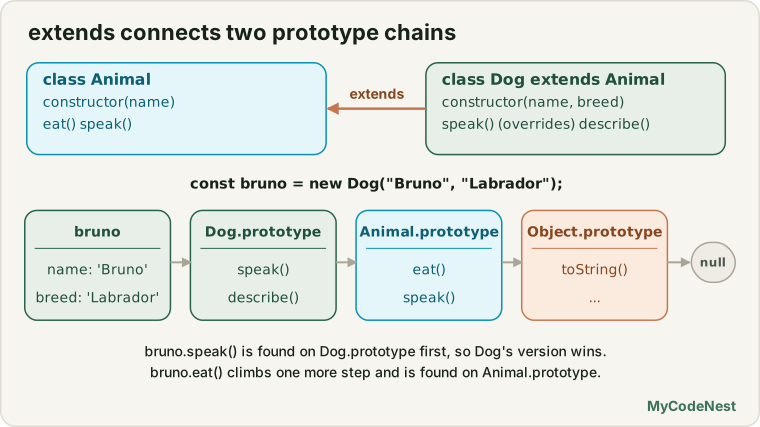
Same method name, different behaviour in each class. JavaScript uses the closest version, which is exactly the property lookup you know from the prototypes lesson.
super.method(): extend instead of replace
Often you do not want to throw the parent’s version away. You want to use it and add something. Use super.methodName():
class Animal {
  constructor(name) {
    this.name = name;
  }

  describe() {
    return "I am " + this.name;
  }
}

class Dog extends Animal {
  constructor(name, breed) {
    super(name);
    this.breed = breed;
  }

  describe() {
    return super.describe() + ", a " + this.breed;   // parent's text + extra
  }
}

console.log(new Dog("Bruno", "Labrador").describe()); // "I am Bruno, a Labrador"| Syntax | Meaning |
|---|---|
super(args) |
Call the parent’s constructor (only inside the child’s constructor) |
super.method(args) |
Call the parent’s version of a method |
Even inside super.describe(), this is still the dog, so this.name is "Bruno". That is the this rule at work: super.describe() runs the parent’s code, for the current object.
Inheritance is the prototype chain
There is no new magic here. extends just connects two prototype chains for you. Compare with the long, manual version from the constructor functions lesson:
// The old way: 4 manual steps
function Student(userName, course) {
  Person.call(this, userName);                            // 1. like super(...)
  this.course = course;
}
Student.prototype = Object.create(Person.prototype);      // 2. link the chain
Student.prototype.constructor = Student;                  // 3. repair constructor

// The class way
class Student extends Person {
  constructor(userName, course) {
    super(userName);
    this.course = course;
  }
}
Check the chain yourself:
class Animal {}
class Dog extends Animal {}

const bruno = new Dog();

console.log(Object.getPrototypeOf(bruno) === Dog.prototype);               // true
console.log(Object.getPrototypeOf(Dog.prototype) === Animal.prototype);    // true
console.log(Object.getPrototypeOf(Animal.prototype) === Object.prototype); // true
bruno -> Dog.prototype -> Animal.prototype -> Object.prototype -> nullAnd instanceof works along the chain:
console.log(bruno instanceof Dog);      // true
console.log(bruno instanceof Animal);   // true  (Animal.prototype is in the chain)
console.log(bruno instanceof Object);   // true
console.log(new Animal() instanceof Dog);   // false (a parent is not a child)
Polymorphism: one call, many behaviours
Because every child can override speak(), you can treat different objects the same way, and each does its own thing. This is called polymorphism (“many forms”).
class Shape {
  area() {
    return 0;
  }

  describe() {
    return this.constructor.name + " with area " + this.area().toFixed(2);
  }
}

class Circle extends Shape {
  constructor(radius) {
    super();
    this.radius = radius;
  }

  area() {
    return Math.PI * this.radius ** 2;
  }
}

class Rectangle extends Shape {
  constructor(width, height) {
    super();
    this.width = width;
    this.height = height;
  }

  area() {
    return this.width * this.height;
  }
}

const shapes = [new Circle(3), new Rectangle(4, 5), new Shape()];

shapes.forEach((shape) => console.log(shape.describe()));
// "Circle with area 28.27"
// "Rectangle with area 20.00"
// "Shape with area 0.00"
Look at describe(). It is written once, in Shape. It calls this.area(), and this is a circle or a rectangle, so each shape’s own area runs. The code that uses the shapes does not need to know which kind each one is. That is the real power of inheritance.
Static methods are inherited too
Static methods (from the last lesson) are inherited by the child class, because extends also links the classes themselves:
class Animal {
  static kingdom() {
    return "Animalia";
  }
}

class Dog extends Animal {}

console.log(Dog.kingdom());                        // "Animalia"
console.log(Object.getPrototypeOf(Dog) === Animal);   // true
Inside a static method, this is the class that you called it on. This makes a neat factory that works for every child:
class Model {
  static create(...args) {
    return new this(...args);   // this is the class before the dot
  }
}

class User extends Model {
  constructor(userName) {
    super();
    this.userName = userName;
  }
}

const riya = User.create("Riya");

console.log(riya instanceof User);   // true (not just Model)
To extend a static method, use super.method() inside a static method too.
Getters and setters are inherited
A child receives the parent’s getters and setters. It can also override them, and read the parent’s version with super.property:
class Person {
  constructor(firstName, lastName) {
    this.firstName = firstName;
    this.lastName = lastName;
  }

  get fullName() {
    return this.firstName + " " + this.lastName;
  }
}

class Doctor extends Person {
  get fullName() {
    return "Dr. " + super.fullName;
  }
}

console.log(new Person("Riya", "Sharma").fullName);   // "Riya Sharma"
console.log(new Doctor("Riya", "Sharma").fullName);   // "Dr. Riya Sharma"
Custom errors: now you understand every line
In the error handling lesson and the fetch lesson you copied this pattern. Now it is plain inheritance:
class ValidationError extends Error {
  constructor(message, field) {
    super(message);              // let Error store the message (and the stack trace)
    this.name = "ValidationError";   // change the label shown in errors
    this.field = field;          // our own extra data
  }
}

try {
  throw new ValidationError("Email is required", "email");
} catch (error) {
  console.log(error.name);                       // "ValidationError"
  console.log(error.message);                    // "Email is required"
  console.log(error.field);                      // "email"
  console.log(error instanceof ValidationError); // true
  console.log(error instanceof Error);           // true (still a real Error)
}
extends Errormakes it a real error: it has amessage, a stack trace and works withthrowandcatch.super(message)runs theErrorconstructor.- Because it is an
Error,error instanceof Erroristrue, and everycatchblock that handles errors still works.
Build a family of errors with a shared parent:
class AppError extends Error {
  constructor(message) {
    super(message);
    this.name = this.constructor.name;   // automatically "NotFoundError", "HttpError"...
  }
}

class NotFoundError extends AppError {
  constructor(item) {
    super(item + " was not found");
    this.item = item;
  }
}

class HttpError extends AppError {
  constructor(status) {
    super("Request failed with status " + status);
    this.status = status;
  }
}

function handle(error) {
  if (error instanceof NotFoundError) return "Not found: " + error.item;
  if (error instanceof HttpError) return "Server problem: " + error.status;
  if (error instanceof AppError) return "App problem: " + error.message;
  return "Unknown problem";
}

console.log(handle(new NotFoundError("User")));   // "Not found: User"
console.log(handle(new HttpError(500)));          // "Server problem: 500"
console.log(handle(new AppError("Oops")));        // "App problem: Oops"
console.log(handle(new TypeError("x")));          // "Unknown problem"
Tip: check the most specific class first (
NotFoundError), and the general parent (AppError) last. EveryNotFoundErroris also anAppError, so the order matters.
Extending built-in classes
You can extend other built-in classes too, such as Array:
class NumberList extends Array {
  sum() {
    return this.reduce((total, n) => total + n, 0);
  }
}

const list = NumberList.from([10, 20, 30]);

console.log(list.sum());                  // 60
console.log(list.length);                 // 3 (all array features work)
console.log(list instanceof Array);       // true
console.log(list.map((n) => n * 2) instanceof NumberList);   // true: map gives a NumberList
It is handy, but use it with care: your class inherits every array method, even ones that do not make sense for it.
Inheritance or composition?
Inheritance is powerful, but it is often overused. Ask this question first:
Is it truly an “is-a” relationship? Or is it a “has-a” relationship?
- A
Dogis anAnimal. Inheritance fits. - A
Carhas anEngine. A car is not an engine. Use composition: store one object inside another.
class Engine {
  constructor(horsepower) {
    this.horsepower = horsepower;
    this.running = false;
  }

  start() {
    this.running = true;
    return "Engine started (" + this.horsepower + " HP)";
  }
}

class Car {
  constructor(model) {
    this.model = model;
    this.engine = new Engine(150);   // a Car HAS an Engine
  }

  drive() {
    return this.engine.start() + ", " + this.model + " is moving";
  }
}

console.log(new Car("Swift").drive());   // "Engine started (150 HP), Swift is moving"
Inheritance (extends) |
Composition (store an object) |
|---|---|
“is-a”: Dog is an Animal |
“has-a”: Car has an Engine |
| Child depends strongly on the parent | Parts are loosely connected and easy to swap |
| Deep chains become hard to follow | Stays flat and clear |
| Good for a small, real hierarchy | Good for combining abilities |
A good rule: keep inheritance shallow (one or two levels), and prefer composition when you are unsure.
Real-life use cases
1. Notifications (email, SMS) that share one send flow
class Notification {
  constructor(to, message) {
    this.to = to;
    this.message = message;
  }

  format() {
    return this.message;
  }

  send() {
    return "Sending to " + this.to + ": " + this.format();
  }
}

class EmailNotification extends Notification {
  constructor(to, message, subject) {
    super(to, message);
    this.subject = subject;
  }

  format() {
    return "[" + this.subject + "] " + this.message;
  }
}

class SmsNotification extends Notification {
  format() {
    return this.message.slice(0, 20);   // SMS must be short
  }
}

const list = [
  new EmailNotification("[email protected]", "Your order has shipped", "Order update"),
  new SmsNotification("9999999999", "Your order has shipped, arriving tomorrow")
];

list.forEach((n) => console.log(n.send()));
// "Sending to [email protected]: [Order update] Your order has shipped"
// "Sending to 9999999999: Your order has shipp"
send() is written once. Each child changes only format().
2. Employees and managers (payroll)
class Employee {
  constructor(name, baseSalary) {
    this.name = name;
    this.baseSalary = baseSalary;
  }

  get salary() {
    return this.baseSalary;
  }
}

class Manager extends Employee {
  constructor(name, baseSalary, bonus) {
    super(name, baseSalary);
    this.bonus = bonus;
  }

  get salary() {
    return super.salary + this.bonus;   // parent's value + bonus
  }
}

const staff = [new Employee("Karan", 40000), new Manager("Asha", 60000, 15000)];

const total = staff.reduce((sum, person) => sum + person.salary, 0);
console.log(total);   // 115000
3. Error types for a form
class FormError extends Error {
  constructor(message, field) {
    super(message);
    this.name = "FormError";
    this.field = field;
  }
}

function validate(data) {
  if (!data.email) throw new FormError("Email is required", "email");
  if (data.password.length < 8) throw new FormError("Password is too short", "password");
  return true;
}

try {
  validate({ email: "[email protected]", password: "123" });
} catch (error) {
  if (error instanceof FormError) {
    console.log("Show message under the " + error.field + " field: " + error.message);
  } else {
    throw error;   // not ours: let it go
  }
}
4. UI components with a shared base
class Component {
  constructor(text) {
    this.element = document.createElement(this.tag());
    this.element.textContent = text;
  }

  tag() {
    return "div";
  }

  mount(parent) {
    parent.append(this.element);
    return this;
  }
}

class Heading extends Component {
  tag() {
    return "h3";
  }
}

class Button extends Component {
  tag() {
    return "button";
  }

  onClick(callback) {
    this.element.addEventListener("click", callback);
    return this;
  }
}

new Heading("Welcome").mount(document.body);
new Button("Click me").onClick(() => console.log("Clicked!")).mount(document.body);
Each child decides which tag to use. The shared base class knows how to build and mount the element.
Common mistakes
- Forgetting
super()in a child constructor that has its own constructor. You get aReferenceError. - Using
thisbeforesuper(). Always callsuper(...)first. - Calling
super()twice, or outside a constructor. - Not passing the right arguments to
super(...), so the parent’s properties becomeundefined. - Overriding a method and forgetting the parent’s work. If the parent’s version does important setup, call it with
super.method(). - Using inheritance for “has-a”. A
Caris not anEngine. Use composition. - Making very deep chains (A → B → C → D → E). They are hard to read and change. Keep them shallow.
- Changing a parent method and forgetting that every child is affected immediately (prototypes are live).
- Checking
instanceofin the wrong order. Check the specific child before the general parent. - Forgetting
this.name = ...in a custom error. The error will print as the genericError. - Expecting a child to read the parent’s “private” data. Everything is public so far. You will learn how to hide data in the next lesson.
Practice
- Write an
Animalclass withname,eat()andspeak(). WriteDogandCatclasses that extend it, without a constructor. Check that both havename. - Override
speak()inDogandCat. Put aDog, aCatand a plainAnimalin an array and callspeak()on each withforEach. - Give
Dogits own constructor with abreed. Usesuper(name)correctly. - Move
this.breed = breed;abovesuper(name)on purpose and read the error. Then fix it. - Add a
describe()method toDogthat usessuper.describe()fromAnimaland adds the breed. - Prove the chain: use
Object.getPrototypeOfto walk from a dog up tonulland print each step. - Print
dog instanceof Dog,dog instanceof Animal,dog instanceof Objectandnew Animal() instanceof Dog. Explain each result. - Check what a child with no constructor does: print the arguments that reach the parent’s constructor.
- Make a
Shapeparent witharea()returning 0, andSquareandTrianglechildren. Print the area of an array of shapes in one loop. - Add a static method to the parent and call it on the child. Then make a static
createthat usesnew this(). - Write a
Personwith afullNamegetter, and aTeacherthat returns"Prof. " + super.fullName. - Create your own
ValidationErrorwith afieldproperty. Throw it, catch it, and checkinstanceof ValidationErrorandinstanceof Error. - Create
AppError,NotFoundErrorandNetworkError. Write a function that returns a different message for each, checking the most specific first. - Build
Carwith anEngineusing composition. Explain whyextendswould be wrong. - Challenge: build
Vehicle,CarandElectricCar.ElectricCaroverridesfuelInfo()and usessuper.fuelInfo()in its answer. - Challenge: write a
Stack extends Arraywithpeek(). Then explain, in your own words, why aStackthat stores an array inside (composition) might be a better design. - Challenge: write a
Componentbase class and three children for a small page (heading, paragraph, button) in the Practice Editor, each overriding onlytag().
Recap
- Inheritance lets one class reuse another:
class Child extends Parent. The child gets the parent’s methods, getters, setters and static methods. super(args)calls the parent’s constructor. In a child constructor, call it first, before usingthis, and only once. If the child has no constructor, JavaScript callssuper(...args)for you.- Overriding means writing a method with the same name in the child. The closest version wins.
super.method()calls the parent’s version, andthisis still the current object. - Inheritance is the prototype chain:
child → Child.prototype → Parent.prototype → Object.prototype → null.instanceofchecks the chain. The classes themselves are also linked, which is why static methods are inherited. - Polymorphism: code can call the same method on many kinds of objects, and each does its own version.
- Custom errors use
extends Error,super(message)andthis.name = .... A family of errors with a shared parent lets you check specific types first. - You can extend built-ins such as
ErrorandArray, but do it carefully. - Use inheritance for “is-a” relationships and keep chains shallow. For “has-a”, use composition: store an object inside another.
- So far, everything is public: any code can read and change any property. Next you will learn private fields (
#) and more about static members, to protect the inside of your classes.
If you want to revisit the basics, read the classes lesson, the constructor functions lesson, the prototypes lesson and the error handling lesson.
Frequently asked questions
What does extends do in JavaScript?
It makes one class inherit from another. The child class gets all the methods, getters, setters and static methods of the parent, and can add new ones or override existing ones. Under the hood, it links the prototype chains of the two classes.
What does super() do?
Inside a child class constructor, super(…) calls the parent’s constructor so the parent can set up its part of the object. You must call it before using this. Outside the constructor, super.method() calls the parent’s version of a method.
Why do I get "Must call super constructor before accessing this"?
In a child class, the object is created by the parent’s constructor. If you use this before calling super(…), the object does not exist yet. Make super(…) the first line of the constructor.
What is method overriding?
It means defining a method in a child class with the same name as one in the parent. When you call it on a child object, the child’s version runs. You can still reach the parent’s version with super.methodName().
When should I use composition instead of inheritance?
Use inheritance when the child truly “is a” kind of the parent, like a Dog is an Animal. Use composition when one thing “has a” part, like a Car has an Engine. When you are not sure, composition is usually the more flexible choice.
Why should custom errors extend Error?
Because then they are real errors: they have a message and stack trace, work with throw and catch, and pass instanceof Error. You can also give them extra data, like a status code or a field name, and check their type with instanceof.
See also: Classes, Prototypes, Error Handling, JavaScript Cheat Sheet