JavaScript Constructor Functions and the new Keyword Explained
Learn constructor functions in JavaScript: how new works step by step, instance properties vs prototype methods, new.target and building real objects.
What you will learn
In the last lesson you learned that objects can share methods through a prototype, and you built linked objects by hand with Object.create. That works, but it takes a few lines every time.
JavaScript has a tidy shortcut for the same job: the constructor function and the new keyword. You have already used it many times without knowing how it works: new Date(), new Map(), new Error(), new Promise(). In this lesson you will learn exactly what new does, how to write your own constructors, and which things belong on each object and which belong on the prototype.
The problem: making many similar objects
Suppose you want many Product objects. You could write each one by hand:
const pen = { title: "Pen", price: 20 };
const bag = { title: "Bag", price: 800 };
const book = { title: "Book", price: 350 };
This works for 3 products. But if you want to add a method, or to be sure every product has the same shape, you need a blueprint.
Think of a cookie cutter. The cutter is not a cookie. It is the shape that makes cookies. Each cookie is a separate object, but they all have the same shape. A constructor function is a cookie cutter for objects.
You could use a factory function (a function that returns a new object), like the one from the last lesson:
function createProduct(title, price) {
  return {
    title: title,
    price: price,
    describe() {
      return this.title + " costs " + this.price;
    }
  };
}
It works, but every product gets its own copy of describe, and nothing tells us “this object is a Product”. A constructor function fixes both.
The idea in one line
A constructor function is a normal function that is called with
newto build and return a new object.
Your first constructor function
function Person(userName, age) {
  this.userName = userName;
  this.age = age;
}

const riya = new Person("Riya", 21);
const karan = new Person("Karan", 25);

console.log(riya);                // Person { userName: "Riya", age: 21 }
console.log(karan.userName);      // "Karan"
Notice three things:
- The function name starts with a capital letter (
Person). This is a convention that tells everyone: “call me withnew”. - Inside, we use
thisto attach properties. There is noreturnand no{}object. - We call it with the word
newin front.
Where does this come from? That is exactly what new does for us. Let us open it up.
What new does, step by step
When you write new Person("Riya", 21), JavaScript does four things:
- Creates a brand-new, empty object.
- Links that object’s prototype to
Person.prototype(the hidden link from the last lesson). - Runs
Personwiththisset to the new object. - Returns the new object (unless the function returns a different object).
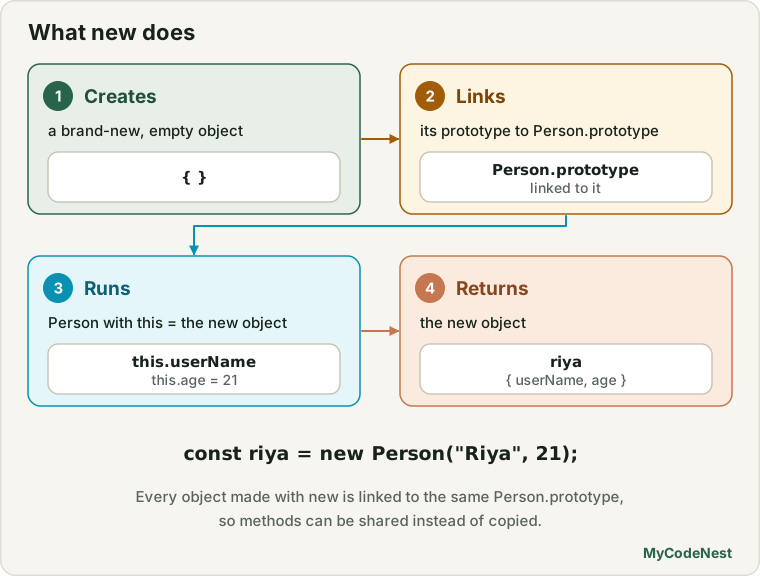
You already know every tool needed to write this yourself. Here is a small version of new:
function myNew(Constructor, ...args) {
  const obj = Object.create(Constructor.prototype);   // steps 1 and 2
  const result = Constructor.apply(obj, args);        // step 3: this = obj
  return result instanceof Object ? result : obj;     // step 4
}

function Person(userName, age) {
  this.userName = userName;
  this.age = age;
}

const riya = myNew(Person, "Riya", 21);

console.log(riya.userName);                            // "Riya"
console.log(riya instanceof Person);                   // true
console.log(Object.getPrototypeOf(riya) === Person.prototype);   // true
Look at how the lessons connect:
Object.create(Constructor.prototype)is from the prototypes lesson.Constructor.apply(obj, args)is from the call, apply and bind lesson. It is howthisbecomes the new object. (This is the “new” rule ofthisthat was waiting in the this lesson table.)...argsis a rest parameter, andinstanceofis the check from the prototypes lesson.
So new is not magic. It is Object.create + apply + a return rule, in one word.
Instance properties: data for each object
The properties you set with this.something = ... inside the constructor are called instance properties. An instance is just an object created from a constructor. Each instance has its own copy:
function Counter() {
  this.count = 0;
}

const a = new Counter();
const b = new Counter();

a.count = 5;

console.log(a.count);   // 5
console.log(b.count);   // 0 (b has its own count)
Use instance properties for data that is different for every object: names, prices, scores, and also arrays and objects that must not be shared.
function Student(userName) {
  this.userName = userName;
  this.marks = [];           // every student gets a NEW array
}

const s1 = new Student("Riya");
const s2 = new Student("Karan");

s1.marks.push(90);

console.log(s1.marks);   // [90]
console.log(s2.marks);   // []  (separate arrays, no sharing bug)
The constructor runs once for each new, so each object gets a fresh array. This is exactly the fix for the shared-array bug you saw in the last lesson.
Prototype methods: behaviour shared by all
Methods should live on Constructor.prototype, so there is one copy for all instances.
function Person(userName, age) {
  this.userName = userName;
  this.age = age;
}

Person.prototype.greet = function () {
  return "Hi, I am " + this.userName;
};

Person.prototype.isAdult = function () {
  return this.age >= 18;
};

const riya = new Person("Riya", 21);
const karan = new Person("Karan", 16);

console.log(riya.greet());      // "Hi, I am Riya"
console.log(karan.isAdult());   // false

console.log(riya.greet === karan.greet);   // true: one shared function
Two important points:
thisinsidegreetis the object before the dot (riyaorkaran), so one function serves everyone.- Write these methods with a normal
function. An arrow function would not get the rightthis.
Do not put methods inside the constructor
You can write the method inside the constructor, but then every object gets its own copy. That brings back the memory problem from the last lesson:
function BadDog(name) {
  this.name = name;
  this.bark = function () {            // a NEW function for every dog
    return this.name + " says woof";
  };
}

const d1 = new BadDog("Bruno");
const d2 = new BadDog("Tommy");

console.log(d1.bark === d2.bark);   // false: two separate copies
Compare with the prototype version, where d1.bark === d2.bark is true.
Instance properties (this.x = ...) |
Prototype methods (Constructor.prototype.x = ...) |
|
|---|---|---|
| Where stored | On each object | Once, on the prototype |
| Best for | Data that differs per object | Behaviour (methods) |
| Memory | One copy per object | One copy in total |
| Check with | Object.hasOwn(obj, "x") is true |
Object.hasOwn(obj, "x") is false |
You can add methods one by one, as above. Do not replace the whole prototype object before reading the warning below.
The constructor property
Every function’s default prototype object has a property called constructor that points back to the function:
function Person(userName) {
  this.userName = userName;
}

const riya = new Person("Riya");

console.log(Person.prototype.constructor === Person);   // true
console.log(riya.constructor === Person);               // true (found through the chain)
console.log(riya.constructor.name);                     // "Person"
riya has no own constructor. JavaScript finds it on Person.prototype, up the chain. It is handy to see “which blueprint made this?”.
A trap: replacing the whole prototype
If you replace Person.prototype with a new object, you throw away the default one, and its constructor link:
function Car() {}

Car.prototype = {
  drive() {
    return "Driving...";
  }
};

const car = new Car();

console.log(car.drive());                 // "Driving..."
console.log(car.constructor === Car);     // false! It is Object
Why? The new prototype is a plain object, with no own constructor, so JavaScript finds Object.prototype.constructor. Fix it by adding constructor back:
Car.prototype = {
  constructor: Car,
  drive() {
    return "Driving...";
  }
};
Or simply add methods one by one (Car.prototype.drive = ...), which is safest for beginners.
Forgetting new: a classic bug
A constructor is just a normal function. If you forget new, it runs as a plain function:
function Person(userName) {
  this.userName = userName;
}

const riya = Person("Riya");   // forgot new!

console.log(riya);   // undefined (the function returns nothing)
What happened to this? Remember the rules from the this lesson:
- In normal mode,
thiswaswindow, so you quietly created a global variablewindow.userName. Silent and dangerous. - In strict mode,
thisisundefined, so you get aTypeError: Cannot set properties of undefined. Loud and helpful.
Protect your constructor with new.target
Inside a function, new.target tells you if it was called with new. It is the function itself when new was used, and undefined when it was called normally:
function Person(userName) {
  if (!new.target) {
    return new Person(userName);   // called without new: fix it for the user
  }
  this.userName = userName;
}

const riya = Person("Riya");     // works even without new

console.log(riya.userName);      // "Riya"
console.log(riya instanceof Person);   // true
You can also throw an error instead, if you prefer to be strict:
function Person(userName) {
  if (!new.target) {
    throw new Error("Person must be called with new");
  }
  this.userName = userName;
}
Good to know: the capital letter is only a convention. JavaScript does not check it. Any normal function can be called with
new.
What if the constructor returns something?
Normally a constructor returns nothing, and new gives back the new object. But if you return something, the rule is:
- Return an object (including an array or function):
newgives you that object instead. - Return a primitive (a number, string…): it is ignored, and you get the new object.
function A() {
  this.x = 1;
  return { y: 2 };        // an object: this wins
}

function B() {
  this.x = 1;
  return 42;              // a primitive: ignored
}

console.log(new A());   // { y: 2 }
console.log(new B());   // B { x: 1 }
This is the “unless the function returns a different object” part of step 4. In normal code, do not return anything from a constructor.
Which functions can be constructors?
| Function type | Can use new? |
|---|---|
Normal function |
Yes |
Arrow function () => {} |
No. new throws TypeError: ... is not a constructor |
Object method shorthand { run() {} } |
No |
async function |
No |
const Person = (userName) => {
  this.userName = userName;
};

new Person("Riya");   // TypeError: Person is not a constructor
An arrow function has no this of its own and no prototype, so it cannot work as a blueprint. Always use a normal function for constructors.
The built-in constructors you already use
Now you can see that these are constructor functions too:
const now = new Date();             // Date.prototype has getFullYear, toISOString...
const ids = new Set([1, 2, 2]);     // Set.prototype has add, has, delete...
const lookup = new Map();           // Map.prototype has get, set...
const failure = new Error("Oops");  // Error.prototype has message, name...
const wait = new Promise((resolve) => resolve());   // Promise.prototype has then, catch...

console.log(now instanceof Date);          // true
console.log(ids.has === new Set().has);    // true: methods are shared on Set.prototype
Exactly the same idea as your own Person: the data is on each object, and the methods are on the prototype. Now date.getFullYear() is no longer a mystery: it is found on Date.prototype.
Properties on the constructor itself (static properties)
A function is also an object, so you can attach properties to the constructor itself. They belong to the blueprint, not to each instance. These are usually called static properties and methods. You already use many: Array.isArray(), Object.keys(), Date.now(), Promise.all().
function Student(userName) {
  this.userName = userName;
  Student.total++;          // count every student created
}

Student.total = 0;          // a property on Student itself

Student.compare = function (a, b) {   // a "static" helper
  return a.userName.localeCompare(b.userName);
};

new Student("Riya");
new Student("Karan");
new Student("Aman");

console.log(Student.total);   // 3

const people = [new Student("Zoya"), new Student("Aman")];
people.sort(Student.compare);
console.log(people[0].userName);   // "Aman"
Note that instances do not inherit these: riya.total is undefined. Call them on Student.
Private data with a closure (an old technique)
Everything set with this.x is public. If you want a value that outsiders cannot touch, you can keep it in a closure inside the constructor:
function BankAccount(owner, startBalance) {
  this.owner = owner;
  let balance = startBalance;            // private: only the functions below can see it

  this.deposit = function (amount) {
    balance += amount;
    return this;
  };

  this.getBalance = function () {
    return balance;
  };
}

const account = new BankAccount("Riya", 1000);
account.deposit(500);

console.log(account.getBalance());   // 1500
console.log(account.balance);        // undefined (cannot be reached from outside)
The trade-off: these methods are created for every account (no sharing), because they must live inside the constructor to see the closure. Modern JavaScript has a cleaner way, private fields with #, which you will learn later in the OOP section.
A peek at inheritance, the old way
With what you know, you can already make one blueprint extend another. This is how inheritance was written before classes. It is a bonus, and the next lessons make it much easier.
function Person(userName) {
  this.userName = userName;
}

Person.prototype.greet = function () {
  return "Hi, I am " + this.userName;
};

function Student(userName, course) {
  Person.call(this, userName);   // run Person's setup on THIS new student
  this.course = course;
}

Student.prototype = Object.create(Person.prototype);   // link the chains
Student.prototype.constructor = Student;               // repair the constructor link

Student.prototype.study = function () {
  return this.userName + " is studying " + this.course;
};

const riya = new Student("Riya", "JavaScript");

console.log(riya.greet());                // "Hi, I am Riya" (from Person.prototype)
console.log(riya.study());                // "Riya is studying JavaScript"
console.log(riya instanceof Student);     // true
console.log(riya instanceof Person);      // true
Look at the pieces: Person.call(this, userName) is from the call lesson, and Object.create(Person.prototype) is from the prototypes lesson. The chain is:
riya -> Student.prototype -> Person.prototype -> Object.prototype -> nullThat is a lot of manual work. The upcoming classes lessons give you a short, clear syntax for exactly this.
Real-life use cases
1. A product with a discount and a nice text form
function Product(title, price) {
  this.title = title;
  this.price = price;
}

Product.prototype.withDiscount = function (percent) {
  return this.price - (this.price * percent) / 100;
};

Product.prototype.toString = function () {
  return this.title + " - Rs. " + this.price;
};

const bag = new Product("Bag", 800);

console.log(bag.withDiscount(25));   // 600
console.log(`Today: ${bag}`);        // "Today: Bag - Rs. 800"
JavaScript calls toString automatically when an object is used inside a template string. Because we defined it on the prototype, every product gets it.
2. A stack (last in, first out)
function Stack() {
  this.items = [];   // each stack gets its own array
}

Stack.prototype.push = function (value) {
  this.items.push(value);
  return this;
};

Stack.prototype.pop = function () {
  return this.items.pop();
};

Stack.prototype.peek = function () {
  return this.items[this.items.length - 1];
};

Stack.prototype.size = function () {
  return this.items.length;
};

const history = new Stack();
history.push("page1").push("page2").push("page3");   // push returns this: chaining

console.log(history.peek());   // "page3"
console.log(history.pop());    // "page3"
console.log(history.size());   // 2
This is how a browser’s Back button history can be modelled.
3. A tiny event system (on and emit)
function Emitter() {
  this.listeners = {};
}

Emitter.prototype.on = function (eventName, callback) {
  if (!this.listeners[eventName]) {
    this.listeners[eventName] = [];
  }
  this.listeners[eventName].push(callback);
  return this;
};

Emitter.prototype.emit = function (eventName, data) {
  const list = this.listeners[eventName] || [];
  list.forEach(function (callback) {
    callback(data);
  });
};

const chat = new Emitter();

chat.on("message", function (text) { console.log("Got: " + text); });
chat.on("message", function (text) { console.log("Length: " + text.length); });

chat.emit("message", "Hello!");
// "Got: Hello!"
// "Length: 6"
It uses an object of arrays, callbacks and this, all things you have learned. Many real libraries work like this.
4. A shopping cart with method chaining
function Cart() {
  this.items = [];
}

Cart.prototype.add = function (name, price, qty) {
  this.items.push({ name: name, price: price, qty: qty || 1 });
  return this;
};

Cart.prototype.total = function () {
  return this.items.reduce(function (sum, item) {
    return sum + item.price * item.qty;
  }, 0);
};

const cart = new Cart();
cart.add("Pen", 10, 5).add("Notebook", 60, 2).add("Bag", 450);

console.log(cart.total());   // 620
5. A timer that keeps its own state
function Stopwatch() {
  this.seconds = 0;
  this.timerId = null;
}

Stopwatch.prototype.start = function () {
  const self = this;                      // keep this for the callback
  this.timerId = setInterval(function () {
    self.seconds++;
    console.log("Seconds: " + self.seconds);
  }, 1000);
};

Stopwatch.prototype.stop = function () {
  clearInterval(this.timerId);
};

const watch = new Stopwatch();
watch.start();
setTimeout(function () { watch.stop(); }, 3500);   // prints 1, 2, 3 and stops
Using const self = this, or an arrow function, or bind (from the first lesson of this section), keeps this safe inside the timer callback.
Common mistakes
- Forgetting
new. In normal mode you silently create global variables. Use strict mode or anew.targetcheck. - Using an arrow function as a constructor. It throws
TypeError: ... is not a constructor. Use a normalfunction. - Using an arrow function for prototype methods and then reading
this. Usefunction () { ... }. - Defining methods inside the constructor (
this.method = function () {}) when many objects will be created. Put them on the prototype. - Putting arrays or objects on the prototype and then mutating them. They are shared by all instances. Create them inside the constructor (
this.items = []). - Replacing
Constructor.prototypewith an object literal and losingconstructor. Addconstructor: Constructor, or add methods one by one. - Adding methods to the prototype after creating objects and expecting nothing to change. Prototypes are live, so existing objects see the new methods immediately.
- Returning a value from a constructor by accident. Returning an object replaces the new object.
- Forgetting that static properties are not inherited.
Student.totalworks,riya.totaldoes not. - Writing the constructor name in lowercase. It works, but it breaks the convention and confuses readers.
Practice
- Write a constructor
Book(title, author, price)that sets three properties. Create three books withnew. - Add a prototype method
describe()that returns"<title> by <author>". Create two books and check thatbook1.describe === book2.describe. - Use
Object.hasOwnto prove thattitleis an own property anddescribeis not. - Add a prototype method
applyDiscount(percent)that returns the new price without changing the original. - Forget
newon purpose. Check what happens in normal mode and in strict mode (add"use strict"at the top). Then protect the constructor withnew.target. - Write
Counterwithcountand prototype methodsincrease,decrease,reset. Create two counters and prove they are independent. - Write
Student(userName)with amarksarray and a methodaddMark(value). Add a methodaverage()usingreduce. Prove that two students do not share the array. - Reproduce the “arrow function constructor” error and read the message.
- Replace a prototype with an object literal, check
obj.constructor, then fix it. - Add
Student.totaland increase it in the constructor. Print how many students you created. - Write the
Stackfrom the lesson, plus a methodisEmpty(). Use it to check balanced brackets in a string like"(a[b]{c})". - Write your own
myNew(Constructor, ...args)from memory. Test it with yourBookconstructor. - Challenge: build
AnimalandDogwith the old inheritance pattern (Animal.call(this, ...)andObject.create(Animal.prototype)). Makedog.speak()work, and print the prototype chain. - Challenge: write a
Queue(first in, first out) withenqueue,dequeueandsize. - Challenge: extend the
Emitterwith anoff(eventName, callback)method that removes a listener, and aoncemethod that runs a listener only one time.
Recap
- A constructor function is a normal function, named with a capital letter, that is called with
newto build objects. new Person(...)does 4 things: creates an empty object, links it toPerson.prototype, runsPersonwiththisset to that object, and returns it (unless you return a different object).- Properties set with
this.x = ...in the constructor are instance properties: each object has its own copy. Use them for data, especially arrays and objects. - Methods go on
Constructor.prototype: one shared copy for all instances, found through the prototype chain. Use normal functions, not arrows. instance instanceof ConstructoristruewhenConstructor.prototypeis in the chain.instance.constructorpoints back to the constructor.- If you replace
Constructor.prototypewith an object literal, addconstructorback. - If you forget
new,thisiswindow(normal mode) orundefined(strict mode). Guard withnew.target. - Arrow functions cannot be constructors.
Date,Map,Set,ErrorandPromiseare all constructor functions. Their methods live on their prototypes.- Properties on the constructor itself (
Student.total,Array.isArray) are static: they belong to the blueprint, not the instances. - Inheritance can be done by hand with
Parent.call(this, ...)andObject.create(Parent.prototype), but it is long. Classes give you the same thing in a clean, readable syntax. - Next you will learn classes: a modern way to write constructors, methods, getters, setters and static members, built on exactly what you learned here.
If you want to revisit the basics, read the prototypes lesson, the call, apply and bind lesson, the this keyword lesson and the closures lesson.
Frequently asked questions
What is a constructor function in JavaScript?
It is a regular function used with the new keyword to create objects of the same kind. Inside it, this refers to the new object, so you use it to set the object’s own properties. By convention, its name starts with a capital letter.
What does the new keyword do?
It creates a new empty object, links it to the constructor’s prototype, runs the constructor with this set to that object, and returns the object. If the constructor returns a different object, that one is returned instead.
Why put methods on the prototype instead of inside the constructor?
Methods inside the constructor are created again for every object, which wastes memory. Methods on the prototype exist once and are shared by all instances through the prototype chain.
What happens if I forget new?
The function runs as a normal function. In normal mode, this becomes window, so you may create global variables by accident. In strict mode, this is undefined and you get a TypeError. You can protect against it with new.target.
Can I use an arrow function as a constructor?
No. Arrow functions have no this of their own and no prototype, so new throws a TypeError. Always use a normal function declaration or expression.
Are constructor functions still used now that we have classes?
You will write classes in most new code, but classes are built on constructor functions and prototypes. Understanding them helps you debug, read older code and use built-ins like Date and Map with confidence.
See also: Prototypes and the Prototype Chain, Call, Apply and Bind, Closures Explained, JavaScript Cheat Sheet