JavaScript call, apply and bind: Control this Explicitly
Master this in depth with call, apply and bind: set this by hand, borrow methods, fix lost this in callbacks and see how bind works inside.
What you will learn
In the this keyword lesson you learned that this is decided by how a function is called, and that a method can lose its this. You also saw a small promise: “bind, call and apply get a full lesson later.”
This is that lesson. You will learn how to set this by hand with call, apply and bind. You will learn how to borrow a method from another object, how to fix a lost this for good, and how bind works inside (you can already understand it, because you know closures).
A quick recap: how this is decided
Before we take control of this, let us list the ways JavaScript decides it. There are four rules, plus the arrow function exception:
| Rule | Example | this is |
|---|---|---|
| Default | show() |
window in normal mode, undefined in strict mode |
| Implicit (the dot) | user.show() |
The object before the dot |
| Explicit (this lesson) | show.call(user) |
Whatever you pass in |
new (a later lesson) |
new Show() |
A brand-new object |
| Arrow function | () => this |
Not its own. It uses the this of the code around it |
Until now, JavaScript chose this for you. With explicit binding, you choose.
The idea in one line
call,applyandbindlet you say: “run this function, and use THIS object asthis.”
Think about a pen. A pen belongs to nobody. Whoever holds it, writes. If Riya holds it, Riya writes. If Karan holds it, Karan writes. A function that uses this is like that pen: it is not tied to one owner. call, apply and bind are the ways you hand the pen to someone.
All three are methods that every function has.
call(): run it now, with this set
call runs the function immediately. The first argument is the this you want. The other arguments are the function’s normal arguments, one by one.
function introduce(city, hobby) {
  console.log("I am " + this.userName + " from " + city + ", I like " + hobby);
}

const riya = { userName: "Riya" };
const karan = { userName: "Karan" };

introduce.call(riya, "Delhi", "painting");   // "I am Riya from Delhi, I like painting"
introduce.call(karan, "Pune", "chess");      // "I am Karan from Pune, I like chess"
Same function, two different this. Notice that introduce is not a method of riya or karan. We did not write riya.introduce. We just told the function who this is.
The pattern:
functionName.call(thisValue, arg1, arg2, arg3);call with no extra arguments
function sayName() {
  console.log(this.userName);
}

sayName.call({ userName: "Riya" }); // "Riya"apply(): the same, but arguments in an array
apply does exactly what call does. The only difference: the arguments go in one array.
introduce.apply(riya, ["Delhi", "painting"]); // "I am Riya from Delhi, I like painting"functionName.apply(thisValue, [arg1, arg2, arg3]);A trick to remember
- Call = Comma separated arguments
- Apply = Array of arguments
Why would you ever need apply?
When your arguments are already in an array. Before the spread operator existed, this was the way to use an array with a function that wants separate values:
const marks = [72, 95, 88, 64];

console.log(Math.max.apply(null, marks));   // 95
Today, spread does the same job and is easier to read:
console.log(Math.max(...marks)); // 95Good to know:
Math.maxdoes not usethisat all, so we passnullas the first argument. When the function ignoresthis,nullis the usual placeholder.
So in modern code, apply is used less. But you will meet it in older code and in libraries, so you must be able to read it. And when you need to pass this and an array, apply is still the right tool. (In fact fn.call(obj, ...array) also works today.)
bind(): do not run it now, make a new function
call and apply run the function now. bind does not run it. It returns a new function where this is locked to the object you give.
function introduce(city, hobby) {
  console.log("I am " + this.userName + " from " + city + ", I like " + hobby);
}

const riya = { userName: "Riya" };

const riyaIntro = introduce.bind(riya);   // nothing is printed yet

riyaIntro("Delhi", "painting");           // "I am Riya from Delhi, I like painting"
riyaIntro("Mumbai", "cooking");           // "I am Riya from Mumbai, I like cooking"
riyaIntro is a new function. Wherever you pass it, whoever calls it, this is riya. Think of it as a pen with Riya’s name permanently engraved.
bind fixes the lost this problem
This is the problem from the last lesson. A method passed as a callback loses its object:
const counter = {
  count: 0,
  increase() {
    this.count++;
    console.log("count is", this.count);
  }
};

setTimeout(counter.increase, 500);   // "count is NaN" (this is not counter)
bind solves it:
setTimeout(counter.increase.bind(counter), 500); // "count is 1"bind can lock the first arguments too
Anything you pass to bind after this is saved as the first arguments. You supply the rest later. This is called partial application.
function multiply(a, b) {
  return a * b;
}

const double = multiply.bind(null, 2);   // a is fixed to 2
const triple = multiply.bind(null, 3);   // a is fixed to 3

console.log(double(5));    // 10  (2 * 5)
console.log(triple(5));    // 15  (3 * 5)
We did not care about this here, so we passed null. We only wanted to pre-fill the first argument. It is like a “preset” button.
function log(level, message) {
  console.log("[" + level + "] " + message);
}

const logError = log.bind(null, "ERROR");
const logInfo = log.bind(null, "INFO");

logError("Payment failed");    // "[ERROR] Payment failed"
logInfo("User logged in");     // "[INFO] User logged in"
A bound function cannot be re-bound
Once this is locked by bind, nothing can change it. Not call, not apply, not another bind:
function whoAmI() {
  return this.userName;
}

const asRiya = whoAmI.bind({ userName: "Riya" });

console.log(asRiya());                            // "Riya"
console.log(asRiya.call({ userName: "Karan" }));  // "Riya" (call is ignored)
console.log(asRiya.bind({ userName: "Aman" })()); // "Riya" (second bind is ignored)
The first bind wins, forever.
call vs apply vs bind
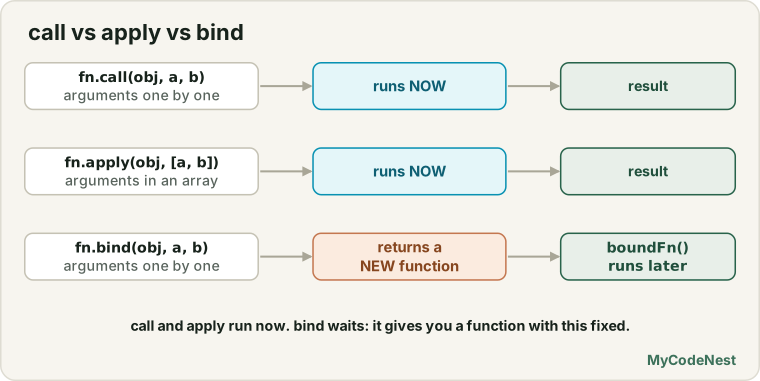
| Runs now? | How arguments are given | Returns | |
|---|---|---|---|
fn.call(obj, a, b) |
Yes | One by one | The function’s result |
fn.apply(obj, [a, b]) |
Yes | In an array | The function’s result |
fn.bind(obj, a, b) |
No | One by one (can be partial) | A new function |
How to choose:
- Want to run it right now with a custom
this? Usecall(orapplyif your arguments are in an array). - Want to run it later (callback, timer, event listener) with a fixed
this? Usebind.
Which this wins? The order of power
What if two rules fight? For example, a function is bound and called with a dot.
function show() {
  return this.label;
}

const a = { label: "A", show };
const b = { label: "B" };

console.log(a.show());                  // "A"  implicit (the dot)
console.log(a.show.call(b));            // "B"  explicit beats implicit

const boundToA = show.bind(a);
console.log(boundToA.call(b));          // "A"  bind beats call
From the strongest to the weakest:
new(a later lesson) can even beatbindbind(locked forever)call/apply(explicit, for one call)- The dot (
object.method()) - Default (
windoworundefined)
And arrow functions sit outside this list. They have no this of their own, so none of these can change them.
call, apply and arrow functions
Because an arrow function has no this, call, apply and bind cannot change it. The arrow keeps the this of the place where it was written. (call and apply can still pass normal arguments to it. Only this is ignored.)
function makeGreeter() {
  const arrow = () => this.userName;   // this comes from makeGreeter
  return arrow;
}

const greeter = makeGreeter.call({ userName: "Riya" });

console.log(greeter());                          // "Riya"
console.log(greeter.call({ userName: "Karan" })); // "Riya" (the arrow ignores call)
Here, makeGreeter.call(...) sets this to Riya’s object. The arrow function remembers that this, like a closure remembers variables. Calling it with call later changes nothing.
This is why you should not use an arrow function when you want to set this yourself.
What if you pass null or undefined?
When you do not care about this, you pass null (or undefined). What happens depends on the mode:
| Mode | this inside the function |
|---|---|
| Normal (sloppy) mode | null / undefined becomes the global object (window) |
| Strict mode | It stays exactly null / undefined |
function showThis() {
  "use strict";
  return this;
}

console.log(showThis.call(null));      // null
console.log(showThis.call("hello"));   // "hello" (stays a plain string in strict mode)
For a function that does not use this, like Math.max or multiply, it does not matter. For a function that does use this, always pass the real object.
Method borrowing
A method does not have to stay with its own object. With call, one object can borrow a method from another, if the method only needs a few properties to exist.
const robot = {
  name: "R2",
  speak() {
    console.log(this.name + " says beep");
  }
};

const dog = { name: "Bruno" };

robot.speak.call(dog);   // "Bruno says beep"
dog has no speak method, but it borrowed one for a moment. Nothing was copied. The method ran with dog as this.
The most famous borrowing: array methods on array-likes
Some values look like arrays (they have numbered positions and a length) but are not real arrays, so they do not have map, filter and friends. Examples: a string, and the older arguments object.
Real arrays get their methods from a shared object called Array.prototype. (The next lesson explains what this object is. For now, think of it as the shelf where all array methods are kept.) You can take a method from that shelf and run it on something else:
const arrayLike = { 0: "a", 1: "b", 2: "c", length: 3 };

const upper = Array.prototype.map.call(arrayLike, function (item) {
  return item.toUpperCase();
});

console.log(upper); // ["A", "B", "C"]console.log(Array.prototype.join.call("hello", "-")); // "h-e-l-l-o"Here is the old way people turned arguments into a real array:
function sum() {
  const args = Array.prototype.slice.call(arguments);   // real array
  return args.reduce(function (total, n) { return total + n; }, 0);
}

console.log(sum(1, 2, 3, 4));   // 10
Good to know: today you would write
function sum(...numbers)(a rest parameter) or useArray.from(arrayLike). Both are cleaner. But method borrowing is still how you read a lot of existing code, and the idea is useful for your own objects too.
Borrowing for a reliable type check
You saw in the Symbols lesson that Object.prototype.toString.call(value) gives a label. That is method borrowing too, and it is a trusted way to find the real type, because typeof is weak (typeof null is "object", and typeof [] is also "object").
function typeOf(value) {
  return Object.prototype.toString.call(value).slice(8, -1);
}

console.log(typeOf([]));            // "Array"
console.log(typeOf(null));          // "Null"
console.log(typeOf(new Date()));    // "Date"
console.log(typeOf(/abc/));         // "RegExp"
console.log(typeOf(42));            // "Number"
console.log(typeOf({}));            // "Object"
toString gives text like "[object Array]". slice(8, -1) cuts off "[object " at the start and "]" at the end.
How bind works inside
bind feels like magic, but you can build a small version yourself. You only need two things you already know: a closure and apply.
function myBind(fn, thisArg, ...presetArgs) {
  return function (...laterArgs) {
    return fn.apply(thisArg, [...presetArgs, ...laterArgs]);
  };
}

function introduce(city, hobby) {
  console.log(this.userName + " | " + city + " | " + hobby);
}

const riyaIntro = myBind(introduce, { userName: "Riya" }, "Delhi");
riyaIntro("painting");   // "Riya | Delhi | painting"
Step by step:
myBindreceives the function, thethisto use, and any preset arguments.- It returns a new function. That new function remembers
fn,thisArgandpresetArgs(this is a closure). - When you finally call it, it runs the original with
apply, using the rememberedthisand the preset arguments first, then the new ones.
That is why this is locked: it lives inside the closure, and nobody outside can reach it. (The real bind has a few more details, but this is the heart of it.)
Real-life use cases
1. Fix this for event listeners
const counter = {
  count: 0,
  onClick() {
    this.count++;
    console.log("count is", this.count);
  }
};

const button = document.getElementById("boundBtn");

button.addEventListener("click", counter.onClick.bind(counter));
Without bind, the listener would run onClick with this as the button, and this.count would be wrong. With bind, this is always counter.
2. Remove a bound listener correctly
bind makes a new function every time. So you must store it, or removeEventListener will not find it.
const handler = counter.onClick.bind(counter);

button.addEventListener("click", handler);
button.removeEventListener("click", handler);    // works: same function

// Wrong: two different bound functions
button.addEventListener("click", counter.onClick.bind(counter));
button.removeEventListener("click", counter.onClick.bind(counter));   // does NOT remove
3. Preset functions (a logger with a prefix)
function log(prefix, message) {
  console.log(prefix + " " + message);
}

const logApi = log.bind(null, "[API]");
const logDb = log.bind(null, "[DB]");

logApi("Request started");    // "[API] Request started"
logDb("Connection opened");   // "[DB] Connection opened"
4. One function, many objects
function describe(currency) {
  return this.title + " costs " + currency + this.price;
}

const book = { title: "JS Basics", price: 350 };
const course = { title: "Web Dev", price: 2999 };

console.log(describe.call(book, "₹"));     // "JS Basics costs ₹350"
console.log(describe.call(course, "₹"));   // "Web Dev costs ₹2999"
5. Use call to pass this to a callback
Many array methods, like forEach, accept a second argument for this. It is the same idea as call:
const logger = {
  prefix: "[LOG]",
  print(message) {
    console.log(this.prefix + " " + message);
  }
};

["start", "end"].forEach(logger.print, logger);
// "[LOG] start"
// "[LOG] end"
6. Share a method between two objects without copying
const stopwatch = {
  seconds: 90,
  format() {
    const m = Math.floor(this.seconds / 60);
    const s = this.seconds % 60;
    return m + "m " + s + "s";
  }
};

const video = { seconds: 3725 };

console.log(stopwatch.format());             // "1m 30s"
console.log(stopwatch.format.call(video));   // "62m 5s"
7. Bind with a delay (fix setTimeout)
const quiz = {
  question: "What is 2 + 2?",
  timeUp() {
    console.log("Time is up for: " + this.question);
  }
};

setTimeout(quiz.timeUp.bind(quiz), 1000);   // after 1 second: "Time is up for: What is 2 + 2?"
When to use which tool (quick guide)
| Situation | Best choice |
|---|---|
Run now with a different this |
call |
| Run now, arguments already in an array | apply (or call with spread) |
| Pass a method as a callback | an arrow wrapper () => obj.method() or bind |
| Pre-fill some arguments | bind |
| Borrow a method from a built-in | call on the method |
An arrow wrapper (() => obj.method()) and bind both fix this. The wrapper is shorter and easy to read. bind is better when you want a ready-made function you can store, pass around or pre-fill.
Common mistakes
- Writing
fn.call(obj)()orfn.bind(obj)and expecting it to have run.callruns at once and returns the result.bindonly returns a function. Call it yourself:fn.bind(obj)(). - Forgetting that
binddoes not run the function. WritingsetTimeout(fn.bind(obj), 1000)is correct, but writingfn.bind(obj);alone does nothing. - Passing an array to
call.fn.call(obj, [1, 2])sends one argument (the array). Useapply, orfn.call(obj, ...array). - Passing separate values to
apply.fn.apply(obj, 1, 2)throws an error. The second argument must be an array. - Expecting
call,applyorbindto change an arrow function’sthis. They cannot. Use a normal function. - Trying to re-bind a bound function. The first
bindwins forever. - Calling
.bind(obj)insideaddEventListenerand again inremoveEventListener. Eachbindgives a new function. Store it in a variable. - Binding in a loop or on every render when it is not needed. Each
bindcreates a new function. - Forgetting that
bindcan pre-fill arguments, and being surprised when the first argument of the new function is “missing”. - Passing
nullto a function that usesthis. In normal mode,thisbecomeswindow. In strict mode, you get aTypeError.
Practice
- Write
function sayHi(greeting) { console.log(greeting + ", " + this.userName); }. Call it withcallfor two different objects. - Do the same with
apply, passing the arguments in an array. - Use
bindto createriyaHiandkaranHi, and call each one twice. - Use
Math.max.apply(null, array)andMath.min.apply(null, array). Then rewrite both with spread. - Write
multiply(a, b). Usebindto createdoubleandtriple. - Build a
counterobject withcountandincrease(). Passcounter.increasetosetTimeoutand see the bug. Fix it withbind, then fix it again with an arrow wrapper. - Borrow
Array.prototype.joinwithcallto join the letters of a string with" | ". - Write
typeOf(value)usingObject.prototype.toString.call. Test it with 8 different values, includingnull, an array, a function and a date. - Prove that a bound function cannot be re-bound: bind it to one object, then try
calland anotherbindwith a second object. - Write an arrow function that uses
this, call it withcall, and explain why nothing changed. - In the Practice Editor, click both buttons. Why does one of them show a different
count? Fix the first one. - Challenge: write your own
myBind(fn, thisArg, ...presetArgs)from memory, without looking at the lesson. - Challenge: write your own
myCall(fn, thisArg, ...args). Hint: temporarily putfnonthisArgas a property, call it with the dot, then delete the property. - Challenge: attach and remove an event listener that uses a bound method. Prove that it really stops running after
removeEventListener.
Recap
call,applyandbindlet you choosethisyourself. This is called explicit binding. Every function has these three methods.fn.call(obj, a, b)runs the function now, with arguments one by one.fn.apply(obj, [a, b])runs the function now, with arguments in an array. (Call = Comma, Apply = Array.)fn.bind(obj, a)does not run it. It returns a new function withthislocked, and it can pre-fill the first arguments (partial application).- A bound function’s
thiscannot be changed again. - Arrow functions ignore
call,applyandbindforthis. - Method borrowing lets one object use another’s method. This is how
Array.prototype.map.call(...)works on array-likes, and howObject.prototype.toString.call(value)gives a reliable type. - To fix a lost
thisin a callback or timer: usebind, or an arrow wrapper. bindis a closure that remembersthisand usesapply. You can write a small version yourself.- Next you will learn prototypes: the hidden links between objects that explain where methods like
map,toStringandhasOwnPropertyreally come from.
If you want to revisit the basics, read the this keyword lesson, the closures lesson, the destructuring, spread and rest lesson and the event listeners lesson.
Frequently asked questions
What is the difference between call, apply and bind?
All three set this. call and apply run the function immediately: call takes arguments one by one, apply takes them in an array. bind does not run the function. It returns a new function with this (and optionally some arguments) locked in.
When should I use bind?
Use it when a function will be called later by someone else, such as in setTimeout, an event listener or a callback, and it must keep a specific this. It is also useful to pre-fill arguments and create a more specific version of a function.
Can I change this of an arrow function with call?
No. An arrow function has no this of its own, so call, apply and bind cannot change it. It always uses the this of the code where it was written. Use a normal function if you need to set this.
Why do I pass null as the first argument?
When the function does not use this, such as Math.max or a plain multiply(a, b), you still have to give call, apply or bind a first argument. null means “I do not care about this”. If the function does use this, pass the real object.
Is apply still useful now that we have spread?
Mostly you can use fn.call(obj, ...array) or fn(...array) instead. But apply is very common in older code and libraries, so you should be able to read it.
See also: The this Keyword, Closures Explained, Callbacks and Higher-Order Functions, JavaScript Cheat Sheet