HTTP and REST Basics: Methods, Status Codes and Headers Explained
Learn how browsers and servers talk with HTTP: requests, responses, GET and POST, status codes, headers, JSON bodies and REST API design, in simple words.
What you will learn
Almost every real website talks to a server. Your browser asks for a page, for a list of products, for your profile, or sends a login form. All of this happens through a common language called HTTP. Before you write code that calls servers with fetch, you need to understand that language. Otherwise, codes like 404, words like POST, and errors like “CORS” will look like magic.
You have already seen small pieces of it in earlier lessons:
- In the URL lesson, you built a URL for an API request.
- In the FormData lesson, you sent data to a server with
POST. - In the error handling lesson, you checked
response.ok. - In the debugging lesson, you looked at the Network panel and a short table of status codes.
In this lesson you will put all these pieces together. You will learn:
- what HTTP, a request and a response are
- the five main methods:
GET,POST,PUT,PATCHandDELETE - what status codes mean, and how to read them quickly
- what headers and a body are
- what REST means, and how a good API is designed
- why you sometimes see a CORS error
The idea: a library
Imagine a big library. You (the client) walk up to the counter. Behind it sits a librarian (the server) who knows where every book is kept.
You do not walk into the storeroom yourself. You write your wish on a slip, hand it over, and wait for the librarian to answer. Every visit follows the same pattern:
- You hand over a request slip.
- The librarian does the work and gives you a response.
Here is the whole library mapped to the web:
| In the library | On the web |
|---|---|
| You, with a slip | The client (your browser or your JavaScript code) |
| The librarian and the books | The server and its data |
| The address of a book (“shelf Books, number 7”) | The URL |
| What you want to do (read, add, replace, remove) | The method (GET, POST, …) |
| Notes on the slip (“I read English”, “here is my member card”) | The headers |
| The form or book you hand in | The body |
| The librarian’s answer (“here it is”, “we have no such book”) | The status code |
Keep this library in mind. It will explain every new word in this lesson.
What is HTTP?
HTTP (HyperText Transfer Protocol) is the set of rules that clients and servers follow to talk to each other. A protocol is just an agreed way of speaking, like the fixed format of a request slip. Everyone follows the same format, so any browser can talk to any server in the world.
Two facts about HTTP are very important:
- Request and response. The client always speaks first (the request). The server answers (the response). The server never starts the conversation on its own.
- Every request is separate. After the answer, the librarian forgets you. The next time you come, you are a new visitor, unless you show your member card again. We say HTTP is stateless. You will see why this matters when we talk about headers.
You have seen HTTPS in the address bar, with a padlock. It is HTTP with encryption, which means that nobody on the way (for example someone on the same Wi-Fi) can read or change the messages. Always use https:// for real sites.
What happens when you call an API?
When your code asks a server for data, this is the journey, step by step:
- Your code builds a request: a method, a URL, maybe some headers and a body.
- The browser finds the server’s address. A name like
api.example.comis turned into a number address (this is called DNS, the phone book of the internet). - The browser connects to the server (safely, if it is HTTPS).
- The browser sends the request.
- The server does its work, for example it reads a database, and sends back a response: a status code, headers and a body.
- The browser gives the response to your JavaScript. And here is the link to the previous lessons: this takes time, so it is asynchronous, and
fetchgives you a Promise for the response.
The request
A request has four parts:
| Part | What it is | Example |
|---|---|---|
| Method | What you want to do | GET |
| URL | Which resource you want | https://api.example.com/users/7?lang=en |
| Headers | Extra information about the request | Accept: application/json |
| Body | The data you send (not always) | {"name":"Riya"} |
You already know the parts of a URL from the URL lesson: the origin (https://api.example.com), the path (/users/7) and the query string (?lang=en). The path says which resource, and the query string adds options like filters.
Here is what a simple request really looks like when it travels over the network. This is plain text:
GET /users/7 HTTP/1.1
Host: api.example.com
Accept: application/json
The first line has the method (GET), the path (/users/7) and the HTTP version. The following lines are the headers. This request has no body.
A request that sends data is a bit longer:
POST /users HTTP/1.1
Host: api.example.com
Content-Type: application/json

{"name":"Riya","city":"Delhi"}
After the headers there is an empty line, and then the body. The Content-Type header tells the server how to read the body: here, as JSON. (Your browser adds many more headers by itself, but these are the ones that matter to you.)
The methods
The method tells the server what you want to do. There are five you must know. They match the four basic actions of almost every app, called CRUD: Create, Read, Update, Delete.
| Method | In the library | Action | Has a body? |
|---|---|---|---|
GET |
“Please show me book 7.” | Read data | No |
POST |
“Please add this new book.” | Create something new | Yes |
PUT |
“Replace book 7 completely with this one.” | Replace a whole record | Yes |
PATCH |
“Fix just the title of book 7.” | Update a part of a record | Yes |
DELETE |
“Remove book 7.” | Delete a record | Usually no |
A few more details that help you choose:
GETonly reads. It must never change anything on the server. This is why a browser is happy to repeat aGETrequest any time, and why search engines can openGETlinks safely. It also meansGEThas no body. If you need to send information, use the URL query string.POSTcreates. Sending the samePOSTtwice usually creates two records. For example, double clicking “Place order” can place two orders.PUTvsPATCH.PUTsends the whole new version of the record. Anything you leave out can be erased.PATCHsends only the fields you want to change. If you only want to change a phone number,PATCHis the right tool.DELETEremoves. After it, the record is gone.
Is it safe to repeat?
Sometimes a request is sent twice by mistake (a slow network, a double click). So it is useful to know which methods are safe to repeat:
| Method | Repeat it twice, and… |
|---|---|
GET |
Nothing changes. Always safe. |
PUT |
The record ends up the same. Safe to repeat. |
DELETE |
The record is gone either way. (The second time you may get a 404, but the result is the same.) |
POST |
Not safe. You may create two records. |
PATCH |
Depends on what the change is. |
This is why good apps disable the submit button after the first click, just like you did with button.disabled = true in the earlier async lessons.
The response
After the request, the server answers. A response has three parts:
HTTP/1.1 200 OK
Content-Type: application/json; charset=utf-8
Cache-Control: max-age=3600

{"id":7,"name":"Riya","city":"Delhi"}| Part | What it is | In the example |
|---|---|---|
| Status | A number and a short phrase that tells how it went | 200 OK |
| Headers | Extra information about the response | Content-Type: application/json |
| Body | The actual data | {"id":7,"name":"Riya",...} |
The status is the librarian’s quick answer. It is the first thing you should look at.
Status codes
The status code is a three digit number. You do not need to memorise hundreds of them. The first digit tells you the whole story:
| Range | Group | Meaning in the library | Whose side? |
|---|---|---|---|
1xx |
Information | “One moment, working on it.” | (rare, you can ignore these) |
2xx |
Success | “Done. Here you go.” | Everything is fine |
3xx |
Redirect | “That book moved to another shelf.” | Go to a different URL |
4xx |
Client error | “Your request has a problem.” | Your side (the request is wrong) |
5xx |
Server error | “Our system broke.” | Their side (the server is broken) |
A simple way to remember: 2 = good, 4 = you made a mistake, 5 = the server made a mistake.
Here are the codes you will meet again and again:
| Code | Name | In the library | What to do |
|---|---|---|---|
200 |
OK | “Here is the book.” | Use the data |
201 |
Created | “Added. Here is your receipt.” | The new record was created (answer to a POST) |
204 |
No Content | “Done. Nothing to hand back.” | Success with an empty body (often after DELETE) |
301 / 302 |
Moved | “It is on another shelf now.” | The browser follows to the new URL |
304 |
Not Modified | “Your copy is still the latest.” | The browser uses its saved copy |
400 |
Bad Request | “I cannot understand your slip.” | Check the data you sent |
401 |
Unauthorized | “Show your member card.” | You are not logged in, or your token is missing or wrong |
403 |
Forbidden | “Members only, and you are not allowed.” | You are logged in, but you do not have permission |
404 |
Not Found | “We have no such book.” | Wrong URL, wrong id, or the record is gone |
405 |
Method Not Allowed | “You cannot do that to this shelf.” | Wrong method for this URL |
409 |
Conflict | “That already exists.” | For example, an email that is already registered |
422 |
Unprocessable | “The slip is readable, but the content is wrong.” | A validation error, such as an empty required field |
429 |
Too Many Requests | “Too many visits today.” | You are being rate limited. Slow down and try later |
500 |
Internal Server Error | “Our system broke.” | The bug is on the server |
502 / 503 / 504 |
Bad Gateway / Unavailable / Timeout | “The library is busy, closed or too slow.” | Try again later |
You saw a short version of this table in the debugging lesson. Now each line has a story behind it.
401 vs 403
These two are confused all the time:
401: “I do not know who you are.” You are not logged in, or the token is missing.403: “I know who you are, but you are not allowed.” You are logged in as a normal user, but you are trying to open the admin page.
A 200 is not always “all good”
Be careful: a few APIs return 200 and put an error inside the body, like {"success": false, "message": "Invalid code"}. Always read the API’s documentation, and check both the status and the data.
Headers
Headers are extra notes attached to a request or a response. Each one is a name and a value: Name: value. They carry information about the message, not the main data.
Common request headers
| Header | What it says | Example |
|---|---|---|
Content-Type |
The format of the body you send | application/json |
Accept |
The format you want back | application/json |
Authorization |
Who you are (your “member card”) | Bearer eyJhbGciOi... |
User-Agent |
Which browser or program is asking | Mozilla/5.0 ... |
Common response headers
| Header | What it says | Example |
|---|---|---|
Content-Type |
The format of the body you receive | application/json; charset=utf-8 |
Cache-Control |
How long the answer may be saved | max-age=3600 |
Location |
Where to go next (used with redirects and 201) |
/users/8 |
Access-Control-Allow-Origin |
Which sites may read this response (more on this later) | * |
Content-Type and JSON
Content-Type is the most useful header. It tells the receiver how to read the body:
Content-Type |
The body is… |
|---|---|
application/json |
JSON text, like {"name":"Riya"} |
text/html |
A web page |
text/plain |
Plain text |
multipart/form-data |
A form with fields and files (this is what FormData sends) |
Remember the JSON lesson: JSON is the format that almost every API uses. When you send JSON, you turn the object into text with JSON.stringify and set Content-Type: application/json. When you receive JSON, you turn the text into an object with JSON.parse (or response.json(), which you will use in the next lesson).
Authorization and “stateless”
Since the server forgets you after every request, how does it know that you are logged in? You show your member card on every request. The card is usually a token, a long secret text that the server gave you when you logged in. You send it in the Authorization header:
GET /profile HTTP/1.1
Host: api.example.com
Authorization: Bearer eyJhbGciOi...
If the token is missing or wrong, you get a 401.
Safety tip: Never put secret keys or passwords in your front-end JavaScript. Everything in the browser can be read by anyone through DevTools. Also never put passwords in the URL, because URLs are saved in history and server logs. Send them in the body, over HTTPS.
REST: a tidy way to design an API
When many programmers design APIs in their own way, every API feels different. REST is a popular set of ideas that makes web APIs tidy and predictable. An API that follows these ideas is called a REST API (or “RESTful”).
The core ideas are simple:
- Everything is a resource, like
users,posts,orders. Think of them as shelves in the library. - Each resource has a URL.
/usersis the whole shelf./users/7is one book on it. - The URL is a noun, and the method is the verb. The URL says what, and the HTTP method says what to do with it. You do not need a verb in the URL.
- Each request is separate (stateless). It carries everything the server needs, like the token.
- Data usually travels as JSON.
Here is how a REST API for users looks:
| What you want | Method and URL | Body | Typical status |
|---|---|---|---|
| List all users | GET /users |
no | 200 |
| Get user 7 | GET /users/7 |
no | 200, or 404 if missing |
| Create a user | POST /users |
the new user | 201 |
| Replace user 7 | PUT /users/7 |
the full user | 200 |
| Change part of user 7 | PATCH /users/7 |
only the changed fields | 200 |
| Delete user 7 | DELETE /users/7 |
no | 200 or 204 |
| List the orders of user 7 | GET /users/7/orders |
no | 200 |
Good and bad URLs
Compare a REST style with a style that puts verbs in the URL:
| Not RESTful | RESTful |
|---|---|
GET /getAllUsers |
GET /users |
GET /getUser?id=7 |
GET /users/7 |
POST /createUser |
POST /users |
POST /users/7/update |
PATCH /users/7 |
GET /deleteUser?id=7 |
DELETE /users/7 |
The last row is not only ugly, it is dangerous. A GET link that deletes data can be triggered by a search engine, by a browser pre-loading links, or by an image tag on another site.
Filtering, sorting and pages
For options, the API uses the query string, exactly like in the URL lesson (filters and pagination):
GET /users?city=Delhi&sort=name&page=2&limit=20This means: “users in Delhi, sorted by name, the second page, 20 per page”. The path stays the same (/users), and only the options change.
The whole round trip
Let us follow two complete conversations. Read them like a story.
Creating a user (success)
Client:  POST /users                       (Content-Type: application/json)
         {"name":"Riya","city":"Delhi"}

Server:  201 Created
         {"id":8,"name":"Riya","city":"Delhi"}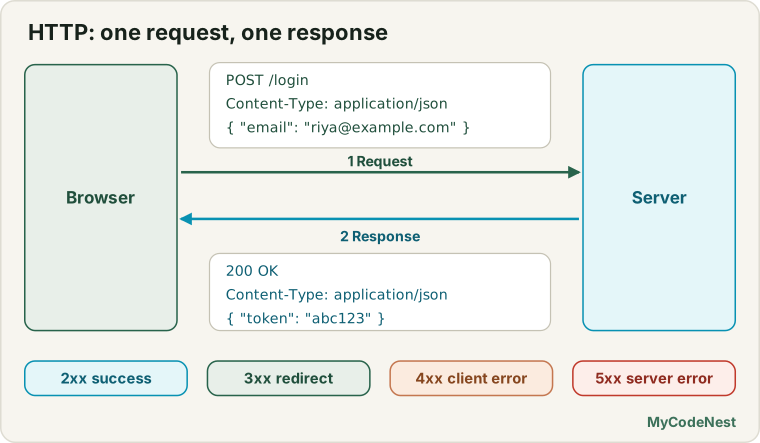
Opening a user who does not exist
Client:  GET /users/9999

Server:  404 Not Found
         {"message":"User not found"}
A login flow with a token (this shows why headers matter):
1. Client:  POST /login   {"email":"[email protected]","password":"..."}
   Server:  200 OK        {"token":"abc123"}

2. Client:  GET /profile                         (no token yet)
   Server:  401 Unauthorized

3. Client:  GET /profile   Authorization: Bearer abc123
   Server:  200 OK        {"name":"Riya"}

4. Client:  GET /admin     Authorization: Bearer abc123
   Server:  403 Forbidden                        (logged in, but not an admin)
You now know every word in these conversations.
A first look with fetch
You will learn fetch fully in the next lesson. But to connect everything, here is a small taste. The three things you should look at first in any response are the status, whether it was ok, and the Content-Type:
async function check() {
  const response = await fetch("https://jsonplaceholder.typicode.com/posts/1");

  console.log("status:", response.status);                       // 200
  console.log("ok:", response.ok);                               // true
  console.log("type:", response.headers.get("content-type"));    // application/json; ...

  const data = await response.json();
  console.log(data.title);
}

check();
response.ok is simply true for any status from 200 to 299, and false for all others.
And here is a very important fact that you already met in the error handling lesson. fetch does not treat a 404 or a 500 as an error. The Promise is still fulfilled, and you check the status yourself. Only a real network failure (no internet, the server is not reachable) makes the Promise reject. In a test with a practice server, the results were:
GET /posts/1     -> status 200, ok = true
GET /posts/9999  -> status 404, ok = false   (the code did NOT throw)
No server at all -> the Promise rejected with "TypeError: fetch failed"
Why is this so? In the library story: if the librarian says “we have no such book”, you did get an answer. The conversation worked perfectly. Only when the library is closed or unreachable do you get no answer at all.
Why do I see a CORS error?
Sooner or later you will see a red error in the console that mentions CORS, like the one in the debugging lesson table. It confuses everybody, so let us understand it now.
Your page lives on one website (say mysite.com). It asks a server on another website (say api.other.com) for data. The server answers, but the browser protects the user: it will only hand the answer to your JavaScript if the server says it is allowed. The server says this with a response header:
Access-Control-Allow-Origin: https://mysite.com(or *, which means “any site is allowed”).
In library terms: the librarian will happily answer, but the library’s security guard (the browser) stops the book at the door unless the librarian’s note says “this reader’s club is allowed”.
Some important facts:
- CORS is a browser rule. The server did answer. The browser refuses to give the answer to your code.
- You cannot fix it in your JavaScript. The fix is on the server, which has to send the right header. Or you call a server that already allows your site, like the practice API in this lesson.
- For some requests (for example
POSTwith JSON), the browser first sends a small question called a preflight, using the methodOPTIONS: “Are you going to allow this?” You can see it in the Network panel. - A “CORS error” with no status code often just means that the server did not send the allow header. In DevTools, look at the Console message and at the Network panel.
Look at it in DevTools
The best way to learn HTTP is to watch it. Here is how:
- Open any website, open DevTools and go to the Network panel.
- Reload the page and use the Fetch/XHR filter to see only API calls.
- Click a request and look at each tab: Headers (method, URL, status, request headers, response headers), Payload (the body you sent) and Preview / Response (the body you received).
- Look at the Status column. Every code you learned in this lesson is there, and DevTools shows failed requests in red.
You can do the same with the HTTP Explorer in the practice editor. Open DevTools and its Network panel before you click the buttons, and each click will appear as a request.
Real use case: what do I check first?
When a feature “does not work”, the status code tells you where to look. Use this table as a quick decision guide:
| What you see | What it probably means | Where to look first |
|---|---|---|
| No request at all in the Network panel | The code did not run, or it crashed before the request | The Console and your event handler |
| Red request with no status (failed, CORS or offline) | A network problem, a wrong domain, or a missing CORS header | The URL, your connection, the Console message |
400 or 422 |
You sent wrong or missing data | The Payload tab and the API documentation |
401 |
No token, or an expired token | The Authorization header |
403 |
Logged in, but not allowed | The user’s permissions |
404 |
Wrong URL or id | Spelling, path, and the id in the URL |
405 |
Wrong method | GET vs POST for that URL |
429 |
Too many requests | Slow down, add a delay, try later |
500 and above |
The server has a bug or is down | Not your code. Report it or try later |
200 but the page is wrong |
The data is not what you expect | The Response tab, and the property names in your code |
Common mistakes
- Sending a body with
GET.GEThas no body. Use the query string. - Forgetting
Content-Type: application/jsonwhen you send JSON. The server may not understand the body. - Forgetting
JSON.stringify. A body must be text. A plain object will not work. - Using
GETto change or delete data. UsePOST,PUT,PATCHorDELETE. - Mixing up
PUTandPATCH.PUTreplaces the whole record. UsePATCHfor a partial change. - Thinking
fetchthrows on a404or500. It does not. Checkresponse.okorresponse.status. - Assuming
200always means success. Some APIs report errors inside the body. - Putting secrets in front-end code, or passwords in the URL. Anyone can read them.
- Trying to “fix CORS” in the front-end. The server must allow your site.
- Sending
POSTtwice by accident. Disable the button after the first click. - Ignoring
429. It means “slow down”. Do not retry in a tight loop.
Practice
- Match each status code to its meaning:
201,204,301,401,403,404,422,429,500. Write a one line library story for each. - For each case, say whether the client or the server is probably at fault, and why: (a)
404, (b)500, (c)400, (d)503. - Write the raw text of a request that gets the second page of users from Delhi, 10 per page, from
https://api.example.com. - Write the raw text of a request that creates a note with a title and a text, with a JSON body. Say which status code you expect.
- Choose the right method for each: (a) log in, (b) show a user’s profile, (c) change only a user’s phone number, (d) replace a whole address record, (e) delete an account, (f) add a product to a cart.
- Design the REST URLs for a to-do app: list all todos, get one, create one, rename one, mark one as done, delete one, and list only the unfinished ones.
- Find the problem in each URL and rewrite it in REST style:
GET /getAllProducts,POST /products/5/delete,GET /removeProduct?id=5. - In the HTTP Explorer, click every button and fill in a table with the method, the URL, the status and
response.ok. Explain whyPOSTgives a different status fromGET. - In the Explorer, click GET /posts/9999. Did anything crash? What does
response.oksay? Connect this with what you learned aboutfetchand errors. - Open the Network panel, click POST /posts in the Explorer, and find the request method, the request headers, the Payload and the Response. Write down the
Content-Typeof both. - Challenge: Describe, step by step, the full round trip when you press “Add to cart”: the method, the URL, the headers (including the token), the body and three different responses (
201,401and422). - Challenge: Design a small REST API for a library: books, members and borrowings. List at least 8 endpoints with method, URL and the status codes you expect.
- Challenge: Explain
401and403to a friend with your own story, not the library.
Recap
- HTTP is the language of the web. The client sends a request, the server sends a response. Every request is separate (stateless).
- A request has a method, a URL, headers and sometimes a body. A response has a status code, headers and a body.
- The methods:
GETreads,POSTcreates,PUTreplaces,PATCHchanges a part,DELETEremoves.GETnever changes data and has no body. - Status codes: 2xx success, 3xx redirect, 4xx the request has a problem, 5xx the server has a problem. Remember
200,201,204,301,400,401,403,404,422,429and500. - Headers carry extra information.
Content-Typetells how to read the body, andAuthorizationcarries your token. - JSON is the usual body format:
JSON.stringifyto send it, andJSON.parse(orresponse.json()) to read it. - REST uses nouns in URLs (
/users/7), methods as verbs, query strings for filters and pages, and JSON for data. fetchdoes not reject on a404or500. Checkresponse.ok. It rejects only on a network failure.- A CORS error is a browser rule. The server must allow your site with
Access-Control-Allow-Origin. - Use the Network panel to watch real requests. Read the status first.
- Never put secrets in front-end code, and never put passwords in a URL. Use HTTPS.
Now that you know the language, you are ready to speak it. In the next lesson, the Fetch API, you will write the real code: GET and POST requests, headers, JSON bodies and proper error handling, with everything from this whole section (Promises, async/await and the event loop) working together.
If you want to go back, read the URL lesson, the JSON lesson, the async/await lesson and the debugging lesson.
Frequently asked questions
What is the difference between GET and POST?
GET asks for data, and puts any parameters in the URL, so it should not change anything. POST sends data in the body to create something or run an action. Never send passwords in a GET URL.
What do the HTTP status codes mean?
Codes beginning with 2 mean success (200 OK, 201 Created), 3 means redirect, 4 means a client error (400 Bad Request, 401 Unauthorized, 404 Not Found), and 5 means a server error (500).
What is a REST API?
It is a style of designing web APIs around resources, which are identified by URLs, such as /users/42, and using standard HTTP methods: GET to read, POST to create, PUT or PATCH to update and DELETE to remove.
What are HTTP headers?
They are extra information sent with a request or response, such as Content-Type (the data format), Authorization (credentials) and Cache-Control. Headers describe the message, while the body carries the data.
What is the difference between PUT and PATCH?
PUT usually replaces a whole resource with the data you send. PATCH changes only the fields you send. Not every API follows this exactly, so read the documentation of the one you are using.
See also: Fetch API, FormData, AbortController, JavaScript Cheat Sheet