What Is React? A Beginner's Introduction to React
Learn what React is, why developers use it to build user interfaces, how components work, and how React differs from plain JavaScript DOM code.
What you will learn
You already know how to build a page with HTML, style it with CSS and make it interactive with JavaScript. That is enough for a small website. But as a page grows, with dozens of buttons, lists, forms and messages that all change at different times, plain JavaScript becomes hard to manage. React was created to solve exactly this problem.
In this lesson you will learn what React is, why so many teams use it, how it differs from changing the page with the DOM yourself, and what components are. You will not write a React project yet. The next lesson sets one up.
What is React?
React is a JavaScript library for building user interfaces (UIs). A user interface is everything a person sees and uses on a screen: buttons, menus, forms, lists, cards and messages.
A few facts to start with:
- React was created at Facebook and released as open source in 2013. Today it is one of the most widely used tools for building websites and web apps.
- React is written in JavaScript. You write your UI with JavaScript and a special markup called JSX, which looks like HTML. (JSX has its own lesson soon.)
- React is a library, not a full framework. It focuses on one job: describing and updating the UI. For other jobs, such as page navigation (routing), you add other tools. You will meet them later in this course.
- This course uses React 19. The latest stable version at the time of writing is 19.3.
Good to know: React runs in the browser, and the browser still shows normal HTML and CSS. React does not replace them. React is a smarter way to create and update that HTML.
Why do we need React?
Imagine you build a shopping page. The page has a product list, a search box, a cart icon with a number, and a “Add to cart” button on each product. When a user clicks one button, several things must change at once:
- The cart number goes up.
- The button text changes to “Added”.
- The total price changes.
- A small “Item added” message appears and later disappears.
With plain JavaScript you must find each element in the DOM and update it yourself. If you forget one, the page shows wrong information. The more features you add, the easier it is to forget something. React helps with three big problems:
| Problem in plain JavaScript | How React helps |
|---|---|
| You must update every changed element by hand | You describe what the UI should look like, and React updates the page |
| The page and your data go out of sync | The UI is always built from your current data |
| Big pages become one huge file of code | You split the page into small, reusable components |
Plain JavaScript versus React
Let us compare the same small feature: a like button that shows a counter.
With plain JavaScript (the DOM way). You write HTML, then write JavaScript that finds the elements and changes them step by step. (See the DOM introduction and changing content lessons if you need a refresher.)
<button id="like-btn">Likes: 0</button>let likes = 0;
const button = document.getElementById("like-btn");
button.addEventListener("click", function () {
likes = likes + 1;
button.textContent = "Likes: " + likes;
});You told the browser how to do each step: find the button, listen for a click, change the number, then change the text.
With React. You describe what the button should show, based on the current number. React takes care of updating the page.
import { useState } from "react";

function LikeButton() {
  const [likes, setLikes] = useState(0);

  return <button onClick={() => setLikes(likes + 1)}>Likes: {likes}</button>;
}
Do not worry about useState or onClick yet. You will learn both properly in later lessons. For now, notice the difference in thinking:
- Plain JavaScript is imperative: “Find this element. Change this text. Add this class.”
- React is declarative: “When the number of likes is 5, the button shows
Likes: 5.” React works out the steps.
For one button the difference looks small. For a page with fifty interactive parts, it is the difference between code you can understand and code you are afraid to touch.
Components: the heart of React
React builds a UI from small, independent pieces called components. A component is a JavaScript function that returns a piece of UI.
Think of LEGO bricks. You do not carve a castle from one big block. You build small bricks (a door, a window, a tower) and assemble them. If you need ten windows, you use the same window brick ten times.
A component works the same way. Look at an online shop:
ShopPage
├── Header
│   ├── Logo
│   ├── SearchBox
│   └── CartIcon
├── ProductList
│   ├── ProductCard
│   ├── ProductCard
│   └── ProductCard
└── Footer
Every name in this tree is a component. Notice that ProductCard appears three times. You write it once and reuse it for every product. If you later want to change how a product looks, you edit one place, and every card updates.
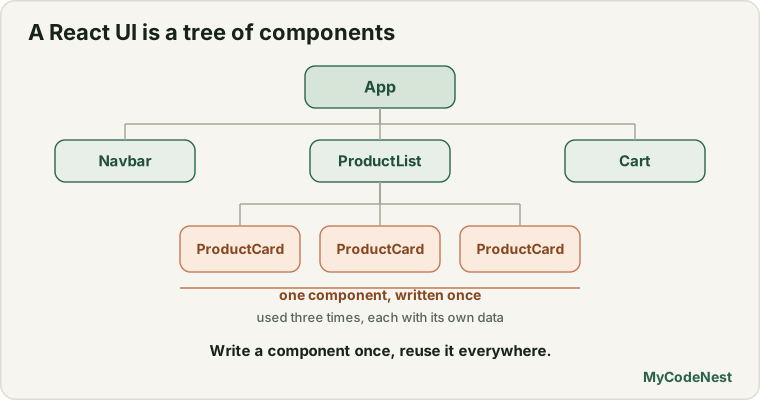
This is the main idea behind React:
Build small components, then combine them to build the whole page.
A component in React code looks like this. (You will write your own in the first component lesson.)
function Greeting() {
  return <h1>Hello, welcome to React!</h1>;
}
It is a normal JavaScript function. The only special thing is that it returns something that looks like HTML.
A real-world example
Here is a page you probably use every day: a social media feed. Without any code, think about how you would split it into components:
Navbar: the top bar with logo and search.Post: one post with a photo, a caption and a like button.LikeButton: lives inside everyPost.CommentListandComment: the comments under a post.Sidebar: suggested friends.
Each part has one clear job. A developer can work on LikeButton without touching Navbar. The same Post component displays your post, your friend’s post and a stranger’s post. Only the data changes.
This is also why React is popular for large products. Many developers can work on different components at the same time, and the code stays organised.
How React shows your UI in the browser
At a high level, three things happen:
- You write components that describe the UI.
- React builds the page from them and puts it inside one element in your HTML file, usually
<div id="root"></div>. - When your data changes, React works out what changed and updates only those parts of the page.
That last step is important. React does not rebuild the whole page every time. It updates only the small parts that need to change, which keeps pages fast. You will see how this works in the project lessons.
When is React a good choice?
React is a great fit when your page:
- has many interactive parts that change over time (dashboards, forms, chat, shopping carts, editors),
- shows data that comes from a server and updates often,
- has parts you want to reuse in many places,
- is built by a team, or will grow for months or years.
React is not needed for everything. A simple page with a few paragraphs and one contact form works perfectly well with HTML, CSS and a little JavaScript. Choose the simplest tool that solves the problem.
What you should know before starting React
React is JavaScript. The better you know JavaScript, the easier React feels. Before moving on, check that you are comfortable with these topics:
| Topic | Why React needs it | Lesson |
|---|---|---|
| HTML elements and attributes | JSX looks like HTML | Elements and tags |
| CSS basics (classes, selectors) | You will style your components | CSS introduction |
| Variables and functions | Components are functions | Functions |
| Arrow functions | Used everywhere in React code | Arrow functions |
Arrays and map() |
Used to show lists | map, filter, reduce |
| Objects and destructuring | Used to read props and data | Destructuring |
Modules (import and export) |
Every React file uses them | Modules |
| Events | Buttons, inputs and forms | Events |
You do not have to master everything. If one of these feels weak, read that lesson quickly and come back. The JavaScript Cheat Sheet is also a handy reference while you learn.
What you will learn in this course
The MyCodeNest React course starts with the basics and finishes with real applications. Here is the path in plain steps:
- Getting started: set up a project, understand its files, and write your first component.
- Building blocks: JSX, props, lists and conditional rendering.
- Interactivity: events, state and forms.
- Hooks and data: effects, refs, context, reducers, and loading data from APIs.
- Real apps: routing for multi-page apps, security and login, performance, the newest React 19 features, testing, accessibility and deployment.
- Projects: small to large applications that bring everything together.
Every lesson has the same shape: a simple explanation, a small example, common mistakes, practice questions and a recap.
Common mistakes
- Thinking React is a new language. React is a JavaScript library. Almost everything you write in React is normal JavaScript.
- Thinking React replaces HTML and CSS. The browser still renders HTML and CSS. You will still use both, so keep practising them.
- Skipping JavaScript fundamentals. Beginners who rush into React often get stuck on things like
map(), destructuring orimport. A short revision first saves a lot of time. - Confusing React with similar names. React Native builds mobile apps. Next.js and Remix are frameworks built on top of React. Learn React first; the others make much more sense afterwards.
- Only watching, never typing. You learn React by building. Type every example yourself, change it, and break it on purpose.
Practice
Read the questions, think, and write your answers in a notebook or a text file. You do not need to install anything for this lesson.
-
In your own words, explain what React is in one or two sentences. Is it a language, a library or a framework?
-
Name three problems that React helps with compared with updating the DOM by hand.
-
Look at this plain JavaScript. The user clicks the button three times. What does the page show, and why is the text in the page not changing?
let count = 0; const button = document.getElementById("btn"); button.addEventListener("click", function () { count = count + 1; console.log(count); }); -
Explain the difference between imperative and declarative UI code. Give one example sentence of each in everyday life (for example, giving directions to a taxi driver versus telling them the destination).
-
Choose a website you use often, such as a video site or an online store. List five components you can see on one page, and draw a simple component tree for it.
-
In your tree from question 5, which components appear more than once? Why is it useful to write them only once?
-
For each project, say whether React is a good choice or probably too much: (a) a one-page personal biography, (b) a team task board with live updates, (c) a printable restaurant menu, (d) a dashboard with charts and filters.
-
Open the JavaScript Cheat Sheet and find three topics from the prerequisites table above. Which one do you feel least confident about? Plan to revise it before the next lesson.
Recap
- React is a JavaScript library for building user interfaces. It was created at Facebook and is now used worldwide.
- React is declarative: you describe what the UI should look like for the current data, and React updates the page.
- A UI is built from components: small, reusable pieces that you combine like LEGO bricks.
- React solves problems of manual DOM updates: pages out of sync, repeated code and huge files.
- React is a library, not a full framework. You add other tools, like a router, when you need them.
- You need solid HTML, CSS and JavaScript basics first, especially functions, arrays, objects and modules.
- Next you will install Node.js and create your first React project with Vite.
Frequently asked questions
Is React a framework or a library?
React is officially a library. It focuses on building user interfaces and leaves other decisions, such as routing and data loading, to you. In practice, people often use React together with other tools, or inside a framework such as Next.js, to get a complete setup.
Do I need to know JavaScript before learning React?
Yes. React is written in JavaScript, so you need the basics: variables, functions, arrays, objects, map(), destructuring and modules. You do not need advanced topics such as prototypes or generators. If you can build a small page with JavaScript events and DOM changes, you are ready.
Is React hard to learn for beginners?
React has a few new ideas, such as components, props and state, but each one is small. The difficulty usually comes from missing JavaScript basics, not from React itself. Learn one idea at a time, type the examples yourself and build small projects, and it becomes comfortable quickly.
Does React replace HTML, CSS and JavaScript?
No. React builds on all three. Your components produce HTML elements, you style them with CSS, and the logic is JavaScript. React simply gives you a better way to organise and update them.
What is the difference between React and React Native?
React builds user interfaces for the web. React Native uses the same ideas to build mobile apps for Android and iOS. This course covers React for the web. The concepts you learn here carry over to React Native later.
Why not just use plain JavaScript?
You can, and for small pages you should. Plain JavaScript is a good choice for a simple site. React becomes valuable when a page has many parts that change, when you want reusable components, or when a team works on the same project.
See also: JavaScript Introduction, DOM Introduction, JavaScript Modules, JavaScript Cheat Sheet