Test React Components with Vitest and Testing Library
Master component testing in React with Vitest and React Testing Library: render components, query by role, fire user events, and test async UI.
What you will learn
Testing gives you the confidence to refactor code, upgrade dependencies, and ship features without manually clicking through every button on your website. In modern React development, Vitest (a fast, Vite-native test runner) paired with React Testing Library (@testing-library/react) is the industry standard for component testing.
React Testing Library adheres to a guiding principle:
“The more your tests resemble the way your software is used, the more confidence they can give you.”
In this lesson, you will learn:
- How to configure Vitest,
jsdom, and@testing-library/reactin a Vite React project. - Why testing user-visible behavior is superior to testing component internal implementation details.
- How to query DOM elements using accessible roles (
getByRole,queryByRole,findByRole). - How to simulate realistic user interactions with
@testing-library/user-event. - How to test asynchronous state updates, loading spinners, and conditionally rendered alerts.
Setting up Vitest in a Vite React project
Because Vite already bundles your application using ES modules, Vitest reuses the exact same Vite configuration, plugins, and transforms, making test runs practically instantaneous.
1. Install dependencies
npm install -D vitest jsdom @testing-library/react @testing-library/jest-dom @testing-library/user-event2. Configure vite.config.js
Add the test block to your Vite configuration. Note the triple-slash directive at the top so TypeScript and IDEs recognise the test configuration field:
/// <reference types="vitest" />
import { defineConfig } from 'vite';
import react from '@vitejs/plugin-react';

export default defineConfig({
  plugins: [react()],
  test: {
    globals: true,
    environment: 'jsdom',
    setupFiles: './src/test/setup.js',
    css: false,
  },
});
3. Setup file (src/test/setup.js)
Create a setup file that loads custom Jest-DOM matchers like toBeInTheDocument() and toHaveTextContent() before every test suite runs:
import '@testing-library/jest-dom/vitest';
import { cleanup } from '@testing-library/react';
import { afterEach } from 'vitest';

// Automatically clean up rendered DOM trees after each test
afterEach(() => {
  cleanup();
});
4. Add test scripts to package.json
{
  "scripts": {
    "test": "vitest",
    "test:run": "vitest run",
    "test:coverage": "vitest run --coverage"
  }
}
Testing behavior vs testing implementation
Historically, testing libraries like Enzyme encouraged developers to test internal implementation details: checking whether a component’s internal state variable isOpen was true, or verifying whether a specific child component class was instantiated.
This led to fragile tests that broke whenever internal code was refactored, even though the user interface continued working perfectly.
React Testing Library changes this approach:
- Do not test state variables or private methods.
- Do not query by CSS classes (
.btn-primary) or component names. - Do test what the user sees on screen (labels, headings, buttons).
- Do interact with the component the same way a real user does (clicking, typing, pressing Tab).
Writing your first component test
Let’s test an accessible counter component that increments, decrements, and shows a warning when reaching zero:
// src/components/Counter.jsx
import { useState } from 'react';

export function Counter({ initialCount = 0 }) {
  const [count, setCount] = useState(initialCount);

  return (
    <section aria-labelledby="counter-heading">
      <h2 id="counter-heading">Interactive Counter</h2>
      <p aria-live="polite">Current count: <strong>{count}</strong></p>
      {count === 0 && <p role="status">Count is at zero</p>}

      <div style={{ display: 'flex', gap: '8px' }}>
        <button onClick={() => setCount(c => c - 1)}>Decrement</button>
        <button onClick={() => setCount(0)}>Reset</button>
        <button onClick={() => setCount(c => c + 1)}>Increment</button>
      </div>
    </section>
  );
}
Now let’s write the test suite in src/components/Counter.test.jsx:
// src/components/Counter.test.jsx
import { describe, it, expect } from 'vitest';
import { render, screen } from '@testing-library/react';
import userEvent from '@testing-library/user-event';
import { Counter } from './Counter';

describe('Counter component', () => {
  it('renders initial heading and zero status', () => {
    render(<Counter initialCount={0} />);

    // Verify heading
    expect(screen.getByRole('heading', { name: /interactive counter/i })).toBeInTheDocument();

    // Verify count value
    expect(screen.getByText(/current count:/i)).toHaveTextContent('0');

    // Verify conditional zero badge
    expect(screen.getByRole('status')).toHaveTextContent('Count is at zero');
  });

  it('increments count when clicking increment button', async () => {
    const user = userEvent.setup();
    render(<Counter initialCount={2} />);

    const incrementButton = screen.getByRole('button', { name: /increment/i });
    await user.click(incrementButton);

    expect(screen.getByText(/current count:/i)).toHaveTextContent('3');
    // Ensure the zero status message is absent
    expect(screen.queryByRole('status')).not.toBeInTheDocument();
  });

  it('decrements and resets count accurately', async () => {
    const user = userEvent.setup();
    render(<Counter initialCount={5} />);

    const decrementButton = screen.getByRole('button', { name: /decrement/i });
    const resetButton = screen.getByRole('button', { name: /reset/i });

    await user.click(decrementButton);
    expect(screen.getByText(/current count:/i)).toHaveTextContent('4');

    await user.click(resetButton);
    expect(screen.getByText(/current count:/i)).toHaveTextContent('0');
    expect(screen.getByRole('status')).toHaveTextContent('Count is at zero');
  });
});
The Query Priority: getBy, queryBy, and findBy
React Testing Library provides three variants of every query. Choosing the right variant is essential:
| Query Type | No Match | Exactly 1 Match | Multiple Matches | Async / Waits? | Typical Use Case |
|---|---|---|---|---|---|
getByRole |
Throws Error | Returns Element | Throws Error | No | Elements that should exist immediately on render |
queryByRole |
Returns null |
Returns Element | Throws Error | No | Asserting that an element does NOT exist (expect(...).not.toBeInTheDocument()) |
findByRole |
Throws Error (after timeout) | Returns Promise | Throws Error | Yes (up to 1000ms default) | Elements appearing after an async operation (fetch, timeout) |
Query hierarchy recommendation
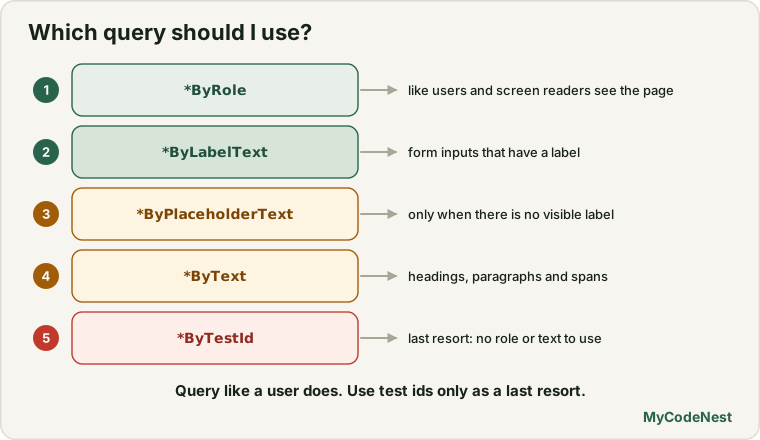
Always prefer querying in this order:
*ByRole: e.g.,screen.getByRole('button', { name: /submit/i }). This mirrors how assistive technologies and users see the page.*ByLabelText: Ideal for form inputs associated with<label>elements.*ByPlaceholderText: Only when input lacks a visible label.*ByText: For non-interactive headings, paragraphs, and spans.*ByTestId: Last resort (data-testid="user-avatar"), when semantic roles or texts do not apply.
Simulating user events: @testing-library/user-event
Avoid using fireEvent.click() from @testing-library/react for complex interactions. fireEvent simply dispatches a synthetic DOM event without triggering browser side effects (such as focus, blur, mouse hover, or keyboard typing sequences).
Always use @testing-library/user-event:
// src/components/SearchForm.jsx
import { useState } from 'react';

export function SearchForm({ onSearch }) {
  const [query, setQuery] = useState('');

  const handleSubmit = (e) => {
    e.preventDefault();
    if (!query.trim()) return;
    onSearch(query.trim());
  };

  return (
    <form onSubmit={handleSubmit} aria-label="Search articles">
      <label htmlFor="search-input">Search topic</label>
      <input
        id="search-input"
        type="search"
        value={query}
        onChange={(e) => setQuery(e.target.value)}
        placeholder="e.g. React hooks"
      />
      <button type="submit">Search</button>
    </form>
  );
}
Testing the form with mock functions:
// src/components/SearchForm.test.jsx
import { describe, it, expect, vi } from 'vitest';
import { render, screen } from '@testing-library/react';
import userEvent from '@testing-library/user-event';
import { SearchForm } from './SearchForm';

describe('SearchForm', () => {
  it('calls onSearch with trimmed query text upon submission', async () => {
    const handleSearch = vi.fn();
    const user = userEvent.setup();

    render(<SearchForm onSearch={handleSearch} />);

    const input = screen.getByLabelText(/search topic/i);
    const submitButton = screen.getByRole('button', { name: /search/i });

    // Type into input
    await user.type(input, '  react vitest  ');
    await user.click(submitButton);

    expect(handleSearch).toHaveBeenCalledTimes(1);
    expect(handleSearch).toHaveBeenCalledWith('react vitest');
  });

  it('does not submit when the input is empty or blank', async () => {
    const handleSearch = vi.fn();
    const user = userEvent.setup();

    render(<SearchForm onSearch={handleSearch} />);
    const submitButton = screen.getByRole('button', { name: /search/i });

    await user.click(submitButton);
    expect(handleSearch).not.toHaveBeenCalled();
  });
});
Testing asynchronous UI and loading states
When components load data or toggle visibility after a promise resolves, use findBy* queries or waitFor():
// src/components/UserProfile.jsx
import { useState, useEffect } from 'react';

export function UserProfile({ fetchUser }) {
  const [user, setUser] = useState(null);
  const [loading, setLoading] = useState(true);

  useEffect(() => {
    let active = true;
    fetchUser().then((data) => {
      if (active) {
        setUser(data);
        setLoading(false);
      }
    });
    return () => { active = false; };
  }, [fetchUser]);

  if (loading) return <div role="status">Loading profile...</div>;

  return (
    <article>
      <h2>{user.name}</h2>
      <p>{user.email}</p>
    </article>
  );
}
Testing the asynchronous flow:
// src/components/UserProfile.test.jsx
import { describe, it, expect, vi } from 'vitest';
import { render, screen } from '@testing-library/react';
import { UserProfile } from './UserProfile';

describe('UserProfile', () => {
  it('displays loading indicator then renders user information', async () => {
    const mockUser = { name: 'Amina Khan', email: '[email protected]' };
    const fetchUser = vi.fn().mockResolvedValue(mockUser);

    render(<UserProfile fetchUser={fetchUser} />);

    // Initially loading
    expect(screen.getByRole('status')).toHaveTextContent(/loading profile/i);

    // Asynchronously awaits the user profile header to appear
    const heading = await screen.findByRole('heading', { name: 'Amina Khan' });
    expect(heading).toBeInTheDocument();
    expect(screen.getByText('[email protected]')).toBeInTheDocument();

    // Verify loading spinner is gone
    expect(screen.queryByRole('status')).not.toBeInTheDocument();
  });
});
Common mistakes
1. Using getBy* to test that an element does not exist
// Incorrect: getByRole throws an error immediately if the element is not found!
expect(screen.getByRole('status')).not.toBeInTheDocument();

// Correct: queryByRole returns null without throwing, allowing assertion
expect(screen.queryByRole('status')).not.toBeInTheDocument();
2. Forgetting await on userEvent actions
Every action in userEvent (like user.click() or user.type()) returns a Promise. Forgetting await causes tests to finish before events resolve:
// Incorrect:
user.click(submitButton);
expect(handleSubmit).toHaveBeenCalled();

// Correct:
await user.click(submitButton);
expect(handleSubmit).toHaveBeenCalled();
3. Overusing waitFor() when findBy* suffices
// Redundant: and verbose
await waitFor(() => {
  expect(screen.getByRole('alert')).toBeInTheDocument();
});

// Correct: Clean and idiomatic
expect(await screen.findByRole('alert')).toBeInTheDocument();
Practice
- Configure Vitest and
@testing-library/reactin your Vite application and write a test to verify your root<App />component mounts without throwing. - Build a
<PasswordInput />component with a toggle button to switch betweentype="password"andtype="text". Write tests verifying that clicking the button changes the input type and aria-pressed attributes. - Test a modal dialog component: assert that clicking an “Open Modal” button brings the dialog into the DOM, and pressing the Escape key removes it.
- Create a component that receives an
onConfirm(id)callback prop. Test that clicking the “Delete” button calls the prop with the correct item ID. - Write a test for a filtered list component: verify that typing into the filter input immediately reduces the number of rendered
<li>elements.
Recap
- Vitest shares Vite’s build pipeline and plugin ecosystem, providing lightning-fast test execution.
- React Testing Library prioritizes testing user behavior and accessible contracts rather than internal component state.
- Use
getByRolefor present elements,queryByRolefor asserting non-existence, andfindByRolefor asynchronous elements. - Use
@testing-library/user-eventto simulate realistic typing, mouse clicks, and keyboard focus changes. - Mock external callbacks and async functions using Vitest’s built-in
vi.fn()utility.
Frequently asked questions
Why use Vitest instead of Jest?
In a Vite-powered React project, Vitest uses the exact same configuration, ES module resolution, and CSS modules plugins as Vite. Jest requires complex Babel/ts-jest configurations and transformer pipelines to support Vite features. Vitest is faster, simpler to maintain, and supports Jest-compatible APIs.What is the difference between `screen.getByRole` and `screen.getByText`?
`getByRole` finds elements by their accessible role in the accessibility tree (like `button`, `heading`, `checkbox`, `navigation`), which mirrors how screen readers and users perceive elements. `getByText` only matches string content and ignores element semantics.How can I test components that use React Router or Context?
Components that rely on Router hooks or Context providers must be wrapped in those providers during render. You can provide a custom `wrapper` option to `render(Should I test my custom hooks directly or through a component?
If the hook is simple, testing the component that uses it is usually preferable. For complex, reusable custom hooks, use `renderHook` from `@testing-library/react` (`const { result } = renderHook(() => useMyHook())`).See also: