React Context: Share Data Without Prop Drilling
Learn React Context: create a context, provide a value, read it with useContext, build a theme and user provider, and avoid re-render and overuse problems.
What you will learn
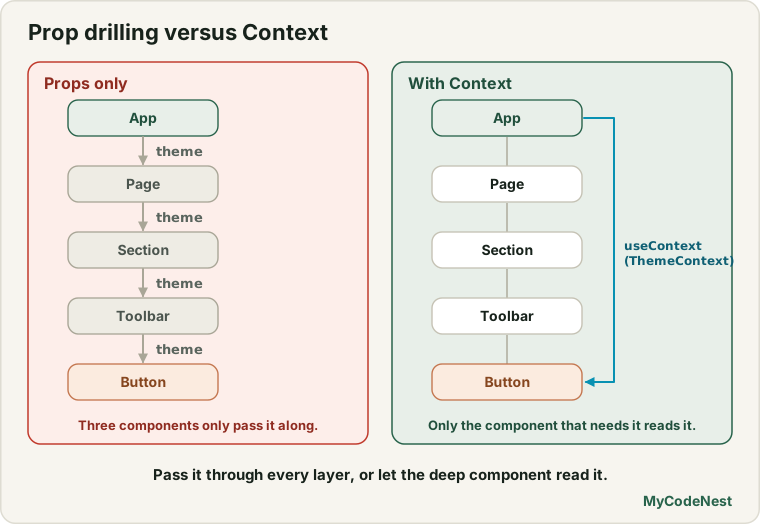
You now know how to share data between components: lift the state up and pass it down as props. This works well, until the component that needs the data is far away from the component that owns it. Then you must pass the same prop through many components in between, even though they do not use it. This is called prop drilling, and it is tedious and noisy.
Context solves it. It lets a component make a value available to every component below it, however deep, without passing props through each layer. In this lesson you will learn how to create a context, provide a value, read it with useContext, build a real theme provider and a “current user” provider, combine context with a reducer, and avoid the common traps.
You should know lifting state up and useReducer.
The problem: prop drilling
Suppose a page has a theme ("light" or "dark"), and a small button deep in the tree needs it:
App (owns the theme)
└── Page
    └── Section
        └── Toolbar
            └── ThemedButton   ← needs the theme
With props only, App passes theme to Page, which passes it to Section, which passes it to Toolbar, which passes it to ThemedButton. Page, Section and Toolbar do not care about the theme. They only forward it. Each new piece of shared data multiplies the problem.
The solution in three steps
Context has three steps: create, provide, consume.
Step 1: create the context
import { createContext } from 'react';

export const ThemeContext = createContext("light");
createContext takes a default value. It is used when a component reads the context but no provider above it supplied a value. Put the context in its own file (for example src/ThemeContext.js) so any component can import it.
Step 2: provide a value
Wrap part of your tree in the context, and give it a value:
<ThemeContext value="dark">
  <Page />
</ThemeContext>
Every component inside <Page />, at any depth, can now read "dark".
React 19 note: you write
<ThemeContext value="dark">directly. In older code and tutorials you will see<ThemeContext.Provider value="dark">. That form still works in React 19, and we tested it, but you no longer need the.Provider.
Step 3: consume the value
Any component below can read it with the useContext Hook:
import { useContext } from 'react';
import { ThemeContext } from './ThemeContext.js';

function Label({ id }) {
  const theme = useContext(ThemeContext);
  return <p>{id}: {theme}</p>;
}
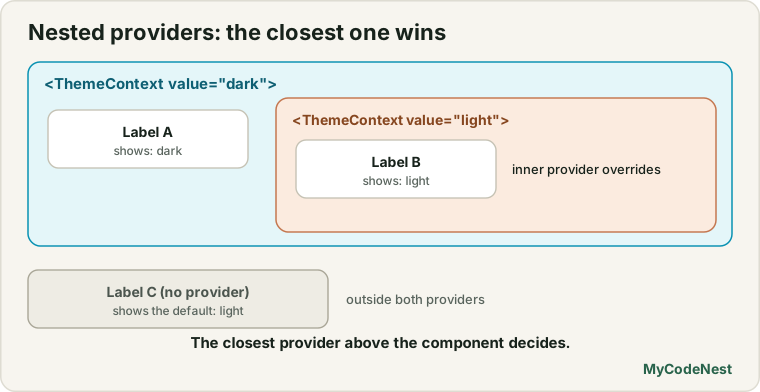
useContext(ThemeContext) returns the value from the closest provider above the component.
What the tests showed
We rendered Label in different situations:
| Situation | Label shows |
|---|---|
| No provider anywhere above it | light (the default value) |
Inside <ThemeContext value="dark"> |
dark |
An outer provider says dark, an inner provider says light |
outer label: dark, inner label: light |
The last row shows that the closest provider wins. You can nest providers to override the value for one part of the page, such as a dark sidebar inside a light page.
A real example: a theme provider
A context becomes useful when its value can change. The usual pattern is a provider component that holds the state and shares it:
import { createContext, useState } from 'react';

export const ThemeContext = createContext("light");

export function ThemeProvider({ children }) {
  const [theme, setTheme] = useState("light");

  return (
    <ThemeContext value={theme}>
      <button onClick={() => setTheme(theme === "light" ? "dark" : "light")}>
        Toggle theme
      </button>
      {children}
    </ThemeContext>
  );
}
Use it by wrapping the app:
function App() {
  return (
    <ThemeProvider>
      <Page />
    </ThemeProvider>
  );
}
Notice that ThemeProvider takes children, so everything inside it can read the theme. And any component deep inside, with no props passed through Page, Section or Toolbar, can do:
function ThemedButton() {
  const theme = useContext(ThemeContext);
  return <button className={"btn btn--" + theme}>Save</button>;
}
In our test, we put a consumer two levels deep, with a section in between that passed no props. Clicking Toggle theme changed the deep consumer from light to dark. When the state in the provider changes, React re-renders every component that reads that context, with the new value.
A second example: the current user
Another classic use of context is “who is logged in?”, because many components need it: the header, the profile page, a “Delete” button that only the owner should see. Let us build a small, simplified version. (A real login needs a server. We build that in the authentication lesson. For now we only look at the pattern.)
import { createContext, useContext, useState } from 'react';

const AuthContext = createContext(null);

export function AuthProvider({ children }) {
  const [user, setUser] = useState(null);

  const value = {
    user,
    login: (name) => setUser({ name }),
    logout: () => setUser(null),
  };

  return <AuthContext value={value}>{children}</AuthContext>;
}

export function useAuth() {
  const context = useContext(AuthContext);
  if (context === null) {
    throw new Error("useAuth must be used inside an AuthProvider");
  }
  return context;
}
Two things are worth noticing:
- The value is an object with the data (
user) and the functions to change it (login,logout). Anything that reads the context gets all three. - We wrapped
useContextin our own function,useAuth. This is a custom Hook (the topic of the next lesson). It makes the usage shorter and adds a helpful error: if someone usesuseAuthoutside anAuthProvider, they get a clear message instead of a confusingundefinederror. We tested it, and the error appears exactly as written.
Now two separate components can use it:
function Header() {
  const { user, login, logout } = useAuth();

  return (
    <header>
      {user ? (
        <>
          <span>Hi {user.name}</span>
          <button onClick={logout}>Log out</button>
        </>
      ) : (
        <button onClick={() => login("Aisha")}>Log in</button>
      )}
    </header>
  );
}

function Profile() {
  const { user } = useAuth();
  return <p>{user ? "Profile of " + user.name : "Please log in"}</p>;
}

function App() {
  return (
    <AuthProvider>
      <Header />
      <Profile />
    </AuthProvider>
  );
}
The page starts with a Log in button and Please log in. Click Log in, and both components update: the header says Hi Aisha, and the profile says Profile of Aisha. Click Log out, and both go back. Header and Profile never pass any props to each other. They share the user through context.
Context with a reducer
Context and useReducer work very well together. A common pattern puts the state in one context and the dispatch function in a second one, so components that only dispatch do not depend on the data:
import { createContext, useContext, useReducer } from 'react';
import { todoReducer } from './todoReducer.js';

const TodosContext = createContext(null);
const TodosDispatchContext = createContext(null);

export function TodosProvider({ children }) {
  const [todos, dispatch] = useReducer(todoReducer, []);

  return (
    <TodosContext value={todos}>
      <TodosDispatchContext value={dispatch}>
        {children}
      </TodosDispatchContext>
    </TodosContext>
  );
}

export function useTodos() {
  return useContext(TodosContext);
}

export function useTodosDispatch() {
  return useContext(TodosDispatchContext);
}
Any component can then call const todos = useTodos() to read, and const dispatch = useTodosDispatch() to change, without any props. We tested a small version: adding a todo and toggling one updated both a counter and a list that were rendered in different components, with no props between them.
How context updates work
When the value of a context changes, React re-renders every component that reads it with useContext. This is how the deep button updated.
There is one trap: React decides if a value “changed” by comparing it with the previous one (Object.is). A primitive (string, number, boolean) is equal when its content is equal. An object you create in the component is a new object on every render.
We tested this with a provider that has its own unrelated state:
function Provider({ children }) {
  const [other, setOther] = useState(0);
  const value = { mode: "light" };          // a new object on every render
  return <ThemeContext value={value}>{children}</ThemeContext>;
}| What the provider passes | Provider re-renders for an unrelated reason | Did the consumer re-render? |
|---|---|---|
The string "light" |
Yes | No |
A new { mode: "light" } object each render |
Yes | Yes (wasted work) |
With a new object every time, every consumer re-renders whenever the provider does, even though nothing meaningful changed. For small apps this is fine. For big apps, you can keep the value stable (with useMemo, covered in the performance lessons), or split data into several smaller contexts, like the two todo contexts above.
When should you use context?
Context is great for data that many components at different levels need and that changes rarely:
- the current theme
- the current user (and whether they are logged in)
- the current language (locale)
- app-wide settings
It is not the answer to every problem. Before reaching for context, try these first:
- Just pass props. Passing a prop through two or three levels is fine, and it makes the data flow easy to follow.
- Use composition. If a prop goes through layers that do not use it, you can often pass the finished component down as
childreninstead (see the children lesson). For example,<Layout><UserMenu user={user} /></Layout>avoids passinguserthroughLayout.
Use context when those do not fit, or when the data is truly “global”.
Common mistakes
1. Reaching for context too early. For one or two levels, props are simpler and clearer.
2. Putting everything in one giant context. Every consumer re-renders when anything inside changes. Keep contexts focused (theme, user, todos).
3. Creating a new object as the value on every render. All consumers re-render each time. Keep the value stable, or pass primitives.
4. Forgetting the provider. Without it, components get the default value (such as null), and you see errors like Cannot read properties of null. A custom Hook that throws a clear error helps a lot.
5. Reading a context from the wrong place. useContext gives the value from the closest provider above the component. A provider that sits below, or beside, does nothing.
6. Using useContext in the same component that renders the provider. The component reads the value from above itself, so it would not see the value it provides. Put the consumers inside.
7. Mutating the context value. Treat it like state: never change it directly. Update the state in the provider.
8. Using context for fast-changing data such as the position of the mouse. Every consumer re-renders on every change.
Practice
- Create a
ThemeContextwith the default"light". Build aLabelthat shows the theme, and render it without a provider. What does it show? - Wrap the
Labelin<ThemeContext value="dark">. Then nest a second provider with"light"around a second label. What does each label show, and why? - Build a
ThemeProviderwith a Toggle theme button. Put aThemedButtonthree levels deep (with two components in between that receive no props). Check that it updates. - Predict, then check: In
ThemeProvider, what happens if you readuseContext(ThemeContext)in the same component that renders<ThemeContext value={theme}>? What does it return? - Build the
AuthProvideranduseAuthHook with aHeaderand aProfile. Log in and out, and check that both components update. - Debug:
useAuthreturnsnulland the app crashes withCannot read properties of null. What is the most likely cause? - Debug: All consumers re-render every time the provider’s unrelated state changes. The provider has
value={{ user, login }}. Explain why, and suggest two ways to improve it. - Take the to-do app with
useReducerand movetodosanddispatchinto aTodosProvider, withuseTodosanduseTodosDispatchHooks. MakeTodoFooterread what it needs from context instead of props.
Recap
- Prop drilling means passing props through components that do not use them. Context solves it.
- Three steps:
createContext(default), wrap with<MyContext value={...}>, read withuseContext(MyContext). - In React 19 you write
<MyContext value>directly.<MyContext.Provider>still works. - The default value is used when there is no provider. The closest provider above wins, so providers can be nested.
- A provider component with state, taking
children, is the usual pattern for theme and user. - Combine with
useReducerusing two contexts: one for the state and one fordispatch. - When the value changes, every consumer re-renders. A new object on every render counts as a change. Keep the value stable or split contexts.
- Use context for theme, user, locale and settings. Try props and composition first.
- Next you will learn custom Hooks, which let you reuse stateful logic such as
useAuth,useToggleanduseLocalStorage.
Frequently asked questions
What is React Context used for?
It lets a component share a value with all the components below it without passing props through every level. It is typically used for app-wide data such as the theme, the current user, the language and settings.
What is prop drilling?
It is the situation where you pass a prop through several layers of components that do not use it, only to reach a deeply nested component that does. A little is normal. When it becomes painful, composition or context can help.
Do I still need .Provider in React 19?
No. In React 19 you can render the context object itself as the provider: <ThemeContext value="dark">. The older <ThemeContext.Provider value="dark"> form still works in existing code.
Does context replace state?
No. Context only shares a value. The value itself usually comes from useState or useReducer inside a provider component. Context moves the data around, and state is what changes it.
Why do all my components re-render when the context changes?
Every component that calls useContext for that context re-renders when its value changes. If you create a new object as the value on every render, React sees a change each time. Keep the value stable, pass primitives, or split the data into smaller contexts.
Is context a replacement for Redux or other state libraries?
For many small and medium apps, context plus useReducer is enough. Larger apps with complex shared state or special needs sometimes use an external state library. A later lesson compares these options.
See also: Lifting State Up, useReducer in React, Children and Composition, Build a To-Do List App