End-to-End Testing React Apps with Playwright
Master end-to-end testing in React with Playwright: configure headless browsers, test authentication and CRUD flows, and debug tests with UI mode.
What you will learn
While unit and integration tests run inside an artificial simulated DOM (jsdom), End-to-End (E2E) testing runs your application inside actual Chromium, Firefox, and WebKit browser engines. E2E tests interact with your real production bundle, real CSS stylesheets, real cookies, and navigation history just like a living human user.
Playwright by Microsoft has become the industry standard for E2E testing due to its rock-solid auto-waiting, built-in trace inspector, multi-tab testing, and cross-browser support.
In this lesson, you will learn:
- Where E2E testing fits within the testing pyramid alongside unit and integration tests.
- How to set up and configure Playwright in a Vite React project.
- How to write deterministic tests using Playwright’s user-facing
locatorAPI. - How to test complete end-to-end workflows (user login, local storage persistence, and CRUD creation).
- How to use Playwright’s UI Mode and Trace Viewer to debug flaky tests visually.
The Testing Pyramid: Unit vs Integration vs E2E
A healthy automated test suite balances three layers:
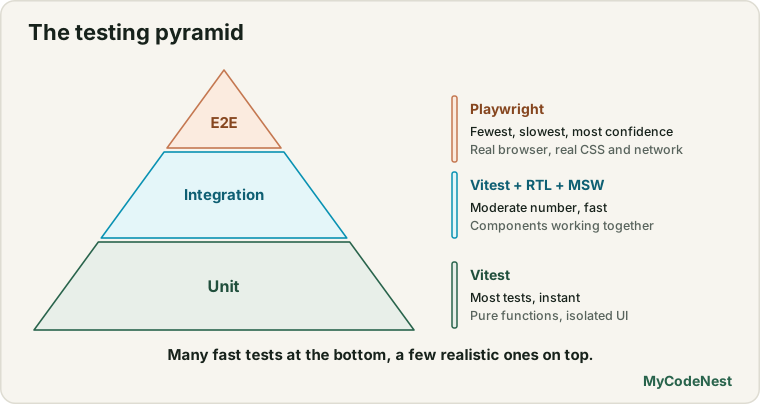
| Dimension | Unit / Integration (Vitest) | End-to-End (Playwright) |
|---|---|---|
| Environment | Node.js + jsdom (simulated DOM) |
Real Chromium, Firefox, WebKit browsers |
| Speed | Milliseconds per test | Seconds per test |
| CSS & Layout | Ignored (no layout or paint engine) | Full layout, bounding boxes, element visibility |
| Network & Cookies | Mocked in-process | Real network, Service Workers, cross-origin cookies |
| Best suited for | Edge cases, form validation rules, UI states | Critical business flows (sign up, checkout, onboarding) |
Installing and configuring Playwright
To install Playwright in your Vite project:
npm init playwright@latestThis interactive CLI command installs @playwright/test and downloads browser binaries. It generates a playwright.config.js configuration file in your project root.
Recommended playwright.config.js for Vite:
// playwright.config.js
import { defineConfig, devices } from '@playwright/test';

export default defineConfig({
  testDir: './e2e',
  fullyParallel: true,
  retries: process.env.CI ? 2 : 0,
  workers: process.env.CI ? 1 : undefined,
  reporter: 'html',
  use: {
    baseURL: 'http://localhost:5173',
    trace: 'on-first-retry',
    screenshot: 'only-on-failure',
  },
  projects: [
    {
      name: 'chromium',
      use: { ...devices['Desktop Chrome'] },
    },
    {
      name: 'firefox',
      use: { ...devices['Desktop Firefox'] },
    },
    {
      name: 'webkit',
      use: { ...devices['Desktop Safari'] },
    },
  ],
  // Automatically spin up your Vite dev server before running tests
  webServer: {
    command: 'npm run dev',
    url: 'http://localhost:5173',
    reuseExistingServer: !process.env.CI,
    timeout: 120000,
  },
});
Notice the webServer block: Playwright automatically launches npm run dev, waits for the port to become healthy, runs the tests, and tears down the server when complete.
Writing your first E2E test
Let’s test a complete navigation and user login flow. Create a test file in e2e/auth.spec.js:
// e2e/auth.spec.js
import { test, expect } from '@playwright/test';

test.describe('Authentication and Dashboard Access', () => {
  test('redirects unauthenticated user to login and authenticates successfully', async ({ page }) => {
    // 1. Visit protected dashboard page
    await page.goto('/dashboard');

    // 2. Expect redirect to /login
    await expect(page).toHaveURL(/.*login/);
    await expect(page.getByRole('heading', { name: /welcome back/i })).toBeVisible();

    // 3. Fill in email and password
    await page.getByLabel(/email address/i).fill('[email protected]');
    await page.getByLabel(/password/i).fill('SecurePassword123!');

    // 4. Submit login form
    await page.getByRole('button', { name: /sign in/i }).click();

    // 5. Verify redirection to dashboard and welcome message
    await expect(page).toHaveURL(/.*dashboard/);
    await expect(page.getByRole('heading', { name: /dashboard/i })).toBeVisible();
    await expect(page.getByText(/logged in as developer@example.com/i)).toBeVisible();
  });

  test('displays validation error on invalid credentials', async ({ page }) => {
    await page.goto('/login');

    await page.getByLabel(/email address/i).fill('[email protected]');
    await page.getByLabel(/password/i).fill('wrongpassword');
    await page.getByRole('button', { name: /sign in/i }).click();

    // Verify error banner appears
    const errorMessage = page.getByRole('alert');
    await expect(errorMessage).toBeVisible();
    await expect(errorMessage).toContainText(/invalid email or password/i);
  });
});
Playwright Auto-Waiting and Locators
One of Playwright’s biggest strengths over older tools like Selenium or Cypress is actionability auto-waiting.
When you write await page.getByRole('button').click(), Playwright automatically waits for all of the following conditions before executing the click:
- The element is attached to the DOM.
- The element is visible (
displayis notnone,visibilityis nothidden). - The element is stable (not currently animating or sliding across the screen).
- The element receives mouse events (not covered by a transparent modal backdrop or loader).
- The element is enabled (not disabled via
disabledattribute).
This completely eliminates flaky tests caused by sleep(1000) or arbitrary setTimeout calls.
Recommended Playwright locators:
// Best: query by user-facing accessible role
page.getByRole('button', { name: 'Save Changes' });
page.getByRole('heading', { level: 1, name: 'Analytics' });

// Correct: Form inputs by accessible label
page.getByLabel('Username');

// Correct: Text matches
page.getByText('Item removed successfully');

// Warning: Use data-testid only when no semantic role exists
page.getByTestId('profile-card');
Testing a complete CRUD journey: Note Manager
Let’s write a test that creates a note, verifies its appearance in a list, edits its content, and finally deletes it:
// e2e/notes-crud.spec.js
import { test, expect } from '@playwright/test';

test.describe('Notes CRUD Workflow', () => {
  test.beforeEach(async ({ page }) => {
    // Navigate to the app root before each test
    await page.goto('/notes');
  });

  test('creates, edits, and deletes a note', async ({ page }) => {
    const uniqueTitle = `Note ${Date.now()}`;

    // 1. CREATE NOTE
    await page.getByRole('button', { name: /new note/i }).click();
    await page.getByLabel(/note title/i).fill(uniqueTitle);
    await page.getByLabel(/note content/i).fill('This is a test note created via Playwright.');
    await page.getByRole('button', { name: /save note/i }).click();

    // Assert note exists in the list
    const noteCard = page.locator('article').filter({ hasText: uniqueTitle });
    await expect(noteCard).toBeVisible();

    // 2. EDIT NOTE
    await noteCard.getByRole('button', { name: /edit/i }).click();
    await page.getByLabel(/note title/i).fill(`${uniqueTitle} (Updated)`);
    await page.getByRole('button', { name: /save note/i }).click();

    // Assert updated text appears
    await expect(page.getByText(`${uniqueTitle} (Updated)`)).toBeVisible();

    // 3. DELETE NOTE
    // Handle browser confirm dialog if your app uses window.confirm()
    page.once('dialog', (dialog) => dialog.accept());
    await noteCard.getByRole('button', { name: /delete/i }).click();

    // Assert note is removed from the DOM
    await expect(page.getByText(`${uniqueTitle} (Updated)`)).not.toBeVisible();
  });
});
Running and debugging tests
Playwright provides three primary running modes:
1. Headless terminal run (ideal for CI/CD)
npx playwright test2. Interactive UI Mode (best for local development)
npx playwright test --uiUI Mode opens an interactive GUI where you can step through tests timeline by timeline, watch the DOM update live, inspect network requests, and edit locators with live pickers.
3. Trace Viewer (for diagnosing test failures)
When a test fails, Playwright records a comprehensive zip file containing snapshots, console logs, and network traffic:
npx playwright show-trace test-results/.../trace.zipCommon mistakes
1. Hardcoding page.waitForTimeout(3000)
// Incorrect: Flaky and slows down your test pipeline
await page.waitForTimeout(3000);
expect(await page.locator('.modal').isVisible()).toBe(true);

// Correct: Use Playwright's web-first assertions which auto-retry
await expect(page.getByRole('dialog')).toBeVisible();
2. Using fragile CSS or XPath selectors
// Incorrect: Breaks on any CSS class rename or Tailwind refactor
await page.locator('div.container > form > div:nth-child(2) > button.bg-blue-500').click();

// Correct: Semantic, resilient, accessible
await page.getByRole('button', { name: /submit/i }).click();
3. Running destructive tests against production databases
E2E tests create and delete real records. Always configure your E2E test suite to run against a dedicated test database or seed fresh mock fixtures before the test run starts.
Practice
- Install Playwright in your Vite React app using
npm init playwright@latestand verify that the sample test passes. - Write an E2E test verifying that clicking your navigation bar links correctly switches between the
/,/about, and/contactroutes. - Test a dark/light theme toggle: verify that clicking the theme button toggles the
darkclass on the<html>or<body>element. - Test a shopping cart or wishlist: add an item from a list, navigate to the cart page, verify the item count is
1, and remove it. - Launch Playwright UI mode using
npx playwright test --uiand inspect the step-by-step action timeline for your test.
Recap
- E2E tests verify that the compiled production bundle, real browser engine, styling, and navigation function correctly from the user’s perspective.
- Playwright provides fast, cross-browser automation across Chromium, WebKit, and Firefox with auto-waiting on all actions.
- Use
page.getByRole()and semantic locators rather than brittle CSS or XPath selectors. - Playwright’s
webServerconfig option automatically manages your Vite development server during test runs. - Debug complex test failures visually with Playwright UI Mode and the Trace Viewer.
Frequently asked questions
How many E2E tests should a React project have?
Keep E2E tests focused on high-value, critical paths (user sign up, checkout, authentication, core dashboard flows). Aim for 10-20 comprehensive E2E tests for an entire web application, while leaving hundreds of edge cases to faster unit and integration tests.Can Playwright intercept network requests like MSW?
Yes. Playwright includes built-in network routing via `page.route('**/api/users', route => route.fulfill({ json: [...] }))`. You can either mock backend responses directly in Playwright or test against a running staging server.Does Playwright work with React Server Components or SSR frameworks?
Yes. Because Playwright interacts with the real rendered browser DOM over the Chrome DevTools Protocol, it is completely agnostic to whether your React app is CSR (Vite), SSR (Next.js/Remix), or static HTML (Astro).How can I save authentication state so I don't have to log in on every test?
Playwright supports `storageState`. You can log in once in a `global-setup.js` script, save the resulting cookies and localStorage to a JSON file, and configure your projects to reuse that `storageState`.See also: