memo, useMemo and useCallback: Measure Before You Optimise
Master React memoisation: understand React.memo, useMemo, and useCallback, avoid premature optimisation, and learn when caching actually helps performance.
What you will learn
In How React Renders, you learned the fundamental golden rule of React rendering: when a parent component re-renders, all of its child components re-render by default.
In 95% of web applications, React’s default re-rendering is blazingly fast. Re-rendering a component that outputs a few HTML tags takes fractions of a millisecond. However, developers often panic and prematurely sprinkle useMemo, useCallback, and React.memo everywhere, accidentally making their code harder to read, more bug-prone, and sometimes even slower!
In this lesson, you will learn:
- Exactly how
React.memo,useMemo, anduseCallbackwork and how they differ. - Why object and function reference equality breaks memoisation.
- How to measure real component render times using the React DevTools Profiler before making changes.
- Why premature memoisation has a tangible cost (memory overhead and shallow comparisons).
- The rare, legitimate scenarios where memoisation is actually necessary.
The Three Memoisation Tools
React provides three distinct APIs for caching work across renders:
| API | What it Caches | When to Use It |
|---|---|---|
React.memo(Component) |
Skips re-rendering a Component if its props have not changed | Heavy child components whose parents re-render often with the exact same props |
useMemo(fn, deps) |
Caches the result of a calculation (value, array, object) | Expensive in-memory data transformations (e.g. sorting or filtering thousands of items) |
useCallback(fn, deps) |
Caches a function definition across renders | Passing callbacks to a child component that is wrapped in React.memo |
Let’s dissect each one carefully.
1. Skipping Re-renders with React.memo
By default, if a parent component updates its state, all children re-render, even if their props are identical:
// Parent
function CounterApp() {
  const [count, setCount] = useState(0);

  return (
    <div>
      <button onClick={() => setCount(c => c + 1)}>Increment: {count}</button>
      {/* Even though BigChart's title never changes, it re-renders on EVERY count click! */}
      <BigChart title="Sales Analytics" />
    </div>
  );
}
To prevent BigChart from re-rendering when count updates, wrap it in React.memo:
import { memo } from 'react';

export const BigChart = memo(function BigChart({ title }) {
  console.log("BigChart rendered!");
  // ...expensive SVG or canvas rendering...
  return <div><h3>{title}</h3></div>;
});
React.memo performs a shallow comparison of the new props against the previous props:
- If all props are identical (
prevProps === nextProps), React skips renderingBigChartentirely and reuses the previous virtual DOM result. - If any prop has changed, React renders
BigChartnormally.
The Reference Equality Trap!
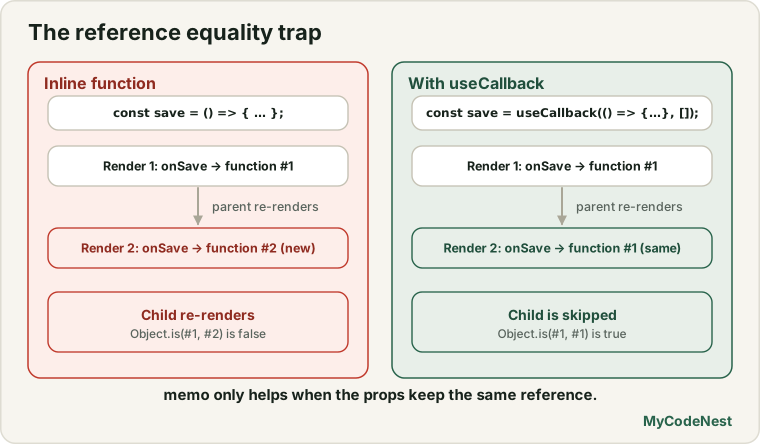
Look closely at this subtle bug that breaks memoisation:
function Parent() {
  const [count, setCount] = useState(0);

  // Warning: Object created fresh on EVERY render:
  const config = { theme: "dark", animate: true };

  // Warning: Function created fresh on EVERY render:
  function handleClick() {
    console.log("clicked");
  }

  return (
    <div>
      <button onClick={() => setCount(c => c + 1)}>+</button>
      {/* React.memo FAILS completely here! */}
      <BigChart config={config} onClick={handleClick} />
    </div>
  );
}
In JavaScript, {} does not equal {}:
({ theme: "dark" } === { theme: "dark" }); // false! (different memory references)
(() => {}) === (() => {});                 // false! (different function instances)
Because Parent creates a new config object and a new handleClick function on every click, React.memo sees “new props” every single time, rendering the memoisation completely useless!
This is where useMemo and useCallback come into play.
2. Caching Calculations with useMemo
useMemo tells React to cache the return value of a calculation between renders:
import { useMemo } from 'react';

const cachedValue = useMemo(() => calculateValue(a, b), [a, b]);
Legitimate Use Case 1: Stabilizing Object References for React.memo
We can fix the reference trap from the previous section:
function Parent() {
  const [count, setCount] = useState(0);

  // Caches the object reference until theme changes
  const config = useMemo(() => ({
    theme: "dark",
    animate: true,
  }), []);

  return <BigChart config={config} />;
}
Now config retains the exact same memory address across renders, allowing React.memo on BigChart to succeed.
Legitimate Use Case 2: Expensive Computations
If you have a dataset with thousands of entries and you sort, filter, or perform mathematical transformations:
function ReportViewer({ transactions, selectedCategory }) {
  // Only re-calculates when transactions or selectedCategory changes
  const categoryTotal = useMemo(() => {
    console.time("calc");
    const total = transactions
      .filter((t) => t.category === selectedCategory)
      .reduce((sum, t) => sum + t.amount, 0);
    console.timeEnd("calc");
    return total;
  }, [transactions, selectedCategory]);

  return <div>Total: ${categoryTotal}</div>;
}
3. Caching Functions with useCallback
useCallback caches a function definition across renders:
import { useCallback } from 'react';

const cachedFn = useCallback(() => {
  doSomething(a, b);
}, [a, b]);
useCallback(fn, deps) is literally shorthand for:
useMemo(() => fn, deps)We use useCallback to prevent functions from breaking React.memo on children:
import { useState, useCallback, memo } from 'react';

// Memoised child button
const DeleteButton = memo(function DeleteButton({ onDelete, itemId }) {
  console.log("DeleteButton rendered for item:", itemId);
  return <button onClick={() => onDelete(itemId)}>Delete</button>;
});

export function ItemList({ items }) {
  const [selected, setSelected] = useState(null);

  // Correct: Keeps the same function reference across renders
  const handleDelete = useCallback((id) => {
    api.deleteItem(id);
  }, []);

  return (
    <div>
      {items.map((item) => (
        <div key={item.id}>
          <span>{item.name}</span>
          <DeleteButton onDelete={handleDelete} itemId={item.id} />
        </div>
      ))}
    </div>
  );
}
The Hidden Cost of Memoisation
Why not wrap every function in useCallback and every component in memo?
- Memory Overhead: Every
useMemoanduseCallbackstores an array of dependencies and a cached reference in JavaScript memory. - Comparison Overhead: On every render, React must iterate through the dependency array and compare each element (
Object.is). - Developer Frustration: Stale closures and missing dependencies frequently cause subtle bugs.
Rule of Thumb: If a component renders in under 1 millisecond (which 95% of components do), memoisation does not make it faster—the comparison code can actually make it slower!
How to Measure Before You Optimise
Never guess where bottlenecks are. Measure first.
- Install the official React Developer Tools extension in Chrome.
- Open Chrome DevTools -> Switch to the Profiler tab.
- Click the Gear icon -> Check “Record why each component rendered while profiling”.
- Click the blue Record circle.
- Interact with your app (type in a box, click a button).
- Stop recording.
The Profiler displays a flamegraph showing:
- Which components rendered.
- Exactly how many milliseconds each component took.
- Why it rendered (e.g. “Parent component rendered” or “Hook 1 changed”).
If a component rendered in 0.2ms, leave it alone. If a component took 45ms, memoisation is justified!
Common mistakes
1. Wrapping simple primitives in useMemo
// Incorrect: Pointless: string concatenation takes 0.00001ms
const fullName = useMemo(() => `${firstName} ${lastName}`, [firstName, lastName]);

// Correct: Fast and clean:
const fullName = `${firstName} ${lastName}`;
2. Using useCallback on a button with no React.memo
// Incorrect: Useless: Native <button> is NOT wrapped in React.memo!
// It will re-render anyway whenever the parent renders.
const handleClick = useCallback(() => setOpen(true), []);
return <button onClick={handleClick}>Open</button>;
3. Omitting dependencies from the dependency array
Always list every reactive value used inside useMemo or useCallback. Omitting dependencies creates stale closures where functions read outdated state from 10 renders ago.
Practice
- In a sample React app, open React DevTools Profiler and record a render. Find the slowest component in the flamegraph.
- Create a list of 100 items with a child
ItemRowcomponent. Verify in console logs that all rows re-render when a parent counter changes. - Wrap
ItemRowinReact.memoand verify that rows no longer re-render when the counter updates. - Pass an un-memoised object prop to
ItemRowand observe howReact.memobreaks. Fix it usinguseMemo. - Pass an inline arrow function
onClick={() => ...}toItemRowand observe how it breaks. Fix it usinguseCallback. - Explain why
useCallback(fn, deps)is identical touseMemo(() => fn, deps).
Recap
React.memoskips re-rendering a component if its props have not changed by shallow comparison.useMemocaches the return value of an expensive calculation or stabilizes object references.useCallbackcaches a function reference to avoid breakingReact.memoon children.- In JavaScript,
{}and() => {}create new references on every render, which breaks shallow prop equality. - Always profile first using React DevTools before optimizing.
- In the next lesson, you will discover the React Compiler: React’s groundbreaking tool that automates memoisation so you rarely have to write
useMemooruseCallbackby hand!
Frequently asked questions
Does React.memo do a deep comparison of props?
No. By default, React.memo performs a shallow comparison (===) on each prop. You can pass a custom comparator as a second argument: memo(Component, (prevProps, nextProps) => ...) if you need deep comparison, though this is rarely recommended due to CPU cost.
Why does React recommend the eslint-plugin-react-hooks rule?
The react-hooks/exhaustive-deps ESLint rule automatically detects missing variables in dependency arrays, preventing subtle stale closure bugs where functions use outdated state.
Can useMemo replace useEffect for side effects?
No. useMemo runs during the render phase and must be a pure calculation with no side effects (no DOM changes, no API calls, no timers). Side effects belong in useEffect or React Actions.
Will memoisation keep values in memory forever?
React caches only the most recent value for the current component instance. It does not maintain an infinite cache history; when inputs change, the previous cached value is discarded for garbage collection.
What is the React Compiler's stance on useMemo and useCallback?
The React Compiler analyzes JavaScript semantics at build time and automatically memoises values, objects, and functions, rendering manual useMemo and useCallback calls largely unnecessary in modern projects.
See also: How React Renders, useTransition and useDeferredValue, Custom Hooks in React