useTransition and useDeferredValue: Keep the UI Responsive
Master React concurrent features with useTransition and useDeferredValue: prioritize user input, deprioritize heavy renders, and eliminate typing lag.
What you will learn
Have you ever typed into a search filter on a website and felt the input freeze, stutter, or drop characters? This common problem happens when a single keystroke triggers an expensive computational task—such as filtering and re-rendering 5,000 list items. In standard JavaScript, CPU execution blocks the main browser thread: until the long render finishes, the browser cannot paint the newly typed character inside the input.
In How React Renders, you learned that React batches state updates synchronously.
In this lesson, you will master React’s Concurrent Features:
- The difference between urgent updates (typing, clicking) and non-urgent transitions (filtering, rendering large graphs).
- How to keep user input fluid using
useTransitionandstartTransition. - How to defer expensive re-renders with
useDeferredValuewhen you do not control the state directly. - How to style pending transitions with loading spinners or visual opacity changes.
- When to reach for transitions versus debouncing and throttling.
Urgent vs Non-Urgent Updates
In modern web applications, state updates fall into two natural categories:
- Urgent updates: Direct user interactions where delays feel like a bug:
- Typing into a text input.
- Selecting a dropdown item.
- Clicking a checkbox or radio button.
- Hovering over buttons.
- Transition updates: Indirect view updates where users naturally expect a slight delay:
- Filtering a table with 2,000 items based on search text.
- Switching tabs in a complex dashboard.
- Re-sorting a large dataset.
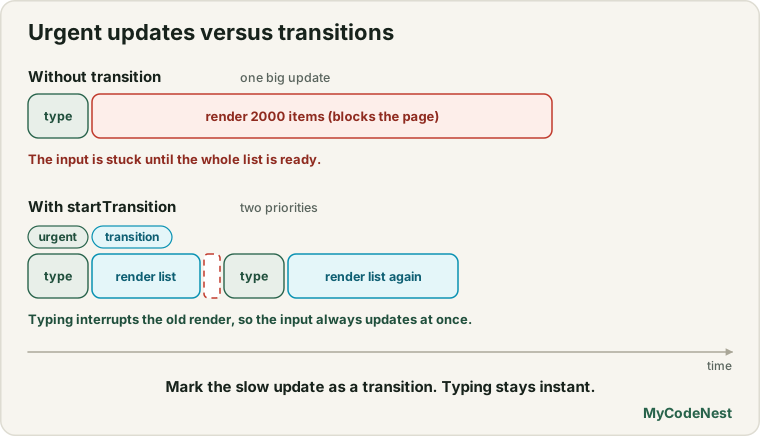
Before React 18 and 19, all updates had equal priority. If you ran setQuery(text) and setFilteredList(results) together, the heavy calculation blocked the input box from typing smoothly.
React’s concurrent engine allows you to tell React: “Keep the input update urgent, but treat the list calculation as a non-urgent transition.”
Smoothing State with useTransition
The useTransition hook lets you mark a state update as a transition:
import { useTransition } from 'react';

const [isPending, startTransition] = useTransition();startTransition(callback): Wraps any state setter function to mark it as low-priority.isPending: A boolean indicating whether the low-priority transition is still rendering.
The Problem in Action (Without useTransition)
function BadSearch({ items }) {
  const [query, setQuery] = useState("");

  function handleChange(e) {
    // Both updates execute synchronously: input freezes!
    setQuery(e.target.value);
  }

  const filtered = items.filter(item => item.name.includes(query));

  return (
    <div>
      <input value={query} onChange={handleChange} />
      <HeavyList items={filtered} />
    </div>
  );
}
If HeavyList takes 100ms to render, typing 5 characters locks the browser for half a second.
The Solution: Prioritizing with useTransition
We split the urgent text state from the transition query state:
import { useState, useTransition } from 'react';

export function ResponsiveSearch({ allProducts }) {
  // 1. Urgent state: purely for what is displayed inside the input
  const [inputVal, setInputVal] = useState("");

  // 2. Transition state: used to filter the heavy list
  const [filterQuery, setFilterQuery] = useState("");

  // 3. useTransition hook
  const [isPending, startTransition] = useTransition();

  function handleInputChange(event) {
    const text = event.target.value;

    // A. Urgent: Update input immediately
    setInputVal(text);

    // B. Non-urgent: Calculate list in the background
    startTransition(() => {
      setFilterQuery(text);
    });
  }

  // Filter based on the transition state
  const filteredProducts = allProducts.filter((product) =>
    product.name.toLowerCase().includes(filterQuery.toLowerCase())
  );

  return (
    <div className="search-widget">
      <div className="input-row">
        <input
          type="search"
          placeholder="Filter 10,000 products..."
          value={inputVal}
          onChange={handleInputChange}
        />
        {isPending && <span className="spinner-subtle" aria-hidden="true" />}
      </div>

      {/* Dim the previous list slightly while the new one renders */}
      <div className={`list-wrapper ${isPending ? "list-updating" : ""}`}>
        <ProductGrid products={filteredProducts} />
      </div>
    </div>
  );
}
What happens when the user types rapidly:
- User types
'a'.inputValupdates immediately.filterQuerybegins rendering in the background. - Before the background render finishes, the user types
'b'. - React interrupts and discards the unfinished render for
'a', instantly paints'ab'in the input box, and starts rendering the new list for'ab'. - The typing stays at 60 frames per second with zero lag!
Deferring Values with useDeferredValue
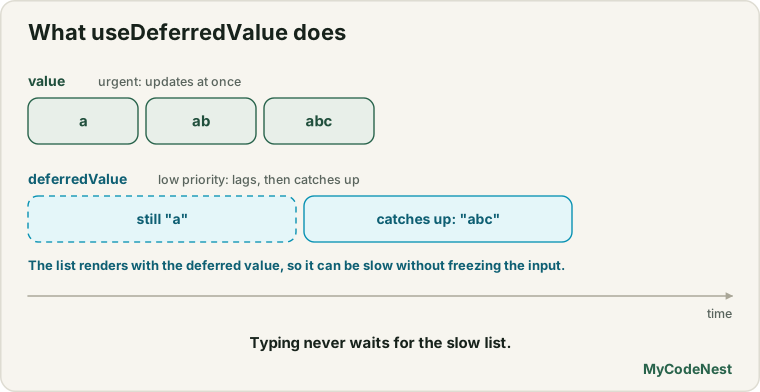
What if the query value comes to you as a prop from a parent component, and you cannot call startTransition on the setter directly?
React provides useDeferredValue:
import { useDeferredValue } from 'react';

const deferredValue = useDeferredValue(value, initialValue?);
useDeferredValue accepts any value (string, object, array) and returns a “deferred” copy of that value that lags behind urgent renders:
import { useDeferredValue } from 'react';

export function ProductList({ searchQuery, allProducts }) {
  // `searchQuery` updates immediately
  // `deferredQuery` updates as a low-priority transition
  const deferredQuery = useDeferredValue(searchQuery);

  // Is the UI currently lagging behind the latest user input?
  const isStale = searchQuery !== deferredQuery;

  const filtered = allProducts.filter((p) =>
    p.name.toLowerCase().includes(deferredQuery.toLowerCase())
  );

  return (
    <div style={{ opacity: isStale ? 0.6 : 1, transition: 'opacity 0.2s' }}>
      <p>{filtered.length} products found</p>
      <ul>
        {filtered.map((item) => <li key={item.id}>{item.name}</li>)}
      </ul>
    </div>
  );
}
When to choose which:
- Use
useTransitionwhen you have access to the state setter function (setSomething) and want explicit control overisPending. - Use
useDeferredValuewhen you receive a value via props, or when using third-party inputs where you only have the resulting value.
useTransition vs Debounce / Throttle
In JavaScript Performance: Debounce and Throttle, you learned how to delay function execution using setTimeout.
How do transitions differ from debouncing?
| Feature | Debounce (setTimeout) |
useTransition |
|---|---|---|
| Mechanism | Arbitrary time delay (e.g., wait 300ms) | CPU-aware concurrent interrupt |
| Speed on fast devices | Unnecessarily waits 300ms even if render takes 2ms | Renders immediately if CPU has idle capacity |
| Speed on slow mobile | If render takes 600ms, 300ms delay still drops frames | Automatically yields to user touches and gestures |
| Interruption | Cannot abort ongoing render work | Discards stale render work on the fly |
Best Practice: Use Debouncing when making network requests to a server (
fetch) to avoid hitting API rate limits. UseuseTransitionfor local in-memory rendering and DOM updates!
Styling the Transition State
Never leave users guessing whether a click or keypress registered. Use the isPending boolean to provide graceful visual feedback:
/* Dim the old results slightly while the new result calculates */
.list-updating {
  opacity: 0.65;
  filter: grayscale(30%);
  pointer-events: none;
  transition: opacity 0.15s ease;
}
By dimming the list instead of showing a blank screen or full skeleton, the user can continue reading the previous content while the update finishes smoothly.
Common mistakes
1. Wrapping text input values in startTransition
Never put the input field’s own state inside startTransition:
// Incorrect: Makes the input itself feel laggy!
startTransition(() => {
  setText(e.target.value);
});
Always update the input state immediately, and use a second state variable or useDeferredValue for the heavy component.
2. Passing async functions to standard startTransition without Actions
In standalone client transitions, startTransition(callback) expects a synchronous callback that triggers state setters. (Async transitions are specifically supported in React 19 Actions and <form action={...}>).
3. Using transitions when a component just needs memoisation
If a component re-renders slowly simply because it is re-rendering needlessly on every parent tick, fix the unnecessary re-render with proper props or memoisation first (covered in the next lesson) before reaching for transitions.
Practice
- Generate a mock array of 2,000 text items (
Array.from({ length: 2000 }, (_, i) => ({ id: i, text: 'Item ' + i }))). Build a filter input and verify the lag without transitions. - Add
useTransitionto separate the input value from the filtered query. Notice how the input stays completely smooth while typing. - Add a CSS visual indicator: when
isPendingis true, reduce the list opacity to0.5and display a small loading badge. - Refactor the component to use
useDeferredValueinstead ofuseTransition. Compare how both achieve the same responsiveness with different APIs. - In Chrome DevTools Performance tab, throttle your CPU to 6x slowdown. Test typing in the input with and without
useTransition. - Explain in your own words why debouncing is ideal for API calls while
useTransitionis ideal for client-side filtering.
Recap
- Urgent updates (typing, clicking) must paint immediately to keep interfaces responsive.
useTransitionmarks heavy calculations and state updates as non-urgent background transitions.- React can interrupt a pending transition if the user provides newer input, ensuring zero dropped frames.
useDeferredValueachieves the same concurrency benefits for props and values without needing access to state setters.- Use debouncing for network
fetchcalls; use transitions for in-memory rendering performance. - Next, you will master component memoisation: when to use
memo,useMemo, anduseCallback, and when not to!
Frequently asked questions
Does useTransition run on a Web Worker or separate thread?
No. All React rendering runs on the browser’s single main thread. useTransition uses cooperative multitasking: React renders a small slice of work, checks if the browser has pending user inputs, yields to the browser if needed, and resumes work.
Can useTransition be used for tab navigation?
Yes! Switching tabs in complex dashboards is one of the premier use cases for useTransition. Wrapping the active tab setter in startTransition allows the current tab to stay visible and responsive until the new tab finishes rendering.
What is initialValue in useDeferredValue(value, initialValue)?
React 19 added an optional initialValue argument to useDeferredValue. When specified, the component uses initialValue during the very first render and defers rendering the actual value to the background.
Will useTransition help if the calculation itself takes 5 seconds?
No. If an algorithm takes 5 full seconds of pure JavaScript computation (like matrix multiplication), it will still freeze the thread. Heavy mathematical computations should be moved to a Web Worker or precomputed on a server.
Can I have multiple useTransition hooks in the same component?
Yes. You can declare multiple transitions to track the pending status of different independent widgets separately.
See also: How React Renders, JavaScript Performance: Debounce and Throttle, Code Splitting with lazy and Suspense