Rendering Strategies: CSR, SSR, SSG and Hydration
Understand modern React rendering: CSR, SSR, SSG, hydration, React Server Components (RSC), and React 19 prerender and resume APIs.
What you will learn
When you build a standard React project with Vite, you are creating a Single-Page Application (SPA) that runs entirely in the user’s browser. While this provides fast, fluid transitions after the initial bundle loads (as explored in Single-Page Applications and Client-Side Routing), it also introduces trade-offs: large initial JavaScript downloads, slower First Contentful Paint (FCP) on mobile networks, and search engine optimization (SEO) challenges.
Modern web engineering employs multiple rendering architectures to balance initial page speed, interactivity, and infrastructure cost.
In this lesson, you will learn:
- How Client-Side Rendering (CSR), Server-Side Rendering (SSR), and Static Site Generation (SSG) differ in execution and timing.
- What Hydration is and how
hydrateRootbreathes life into server-generated HTML. - Why Hydration Mismatch Errors occur in React 19 and how to debug and prevent them.
- How React Server Components (RSC) eliminate server-only code from browser bundles.
- How modern static build tools like Astro use Islands Architecture to achieve near-zero JavaScript overhead.
- How React 19’s server APIs (
prerenderinreact-dom/static) power static and streaming generation.
The Rendering Strategy Matrix
| Strategy | Where HTML is Created | When it is Created | Best Used For | Key Trade-offs |
|---|---|---|---|---|
| CSR (Client-Side Rendering) | User’s browser | On page load via JavaScript | Authenticated dashboards, SaaS tools, internal portals | Blank screen until JS loads, weaker initial SEO |
| SSR (Server-Side Rendering) | Node.js / Edge server | Dynamically on every HTTP request | E-commerce with live stock, personalized user feeds | Ongoing server hosting costs, TTFB tied to backend latency |
| SSG (Static Site Generation) | Build server (CI/CD) | Once ahead of time during build | Documentation, technical blogs, marketing landing pages | Site rebuild required to publish new articles |
| ISR / Hybrid (Incremental Static) | Server / Build | Build time + background revalidation | Massive catalogs with thousands of pages | Caching complexity, eventual consistency windows |
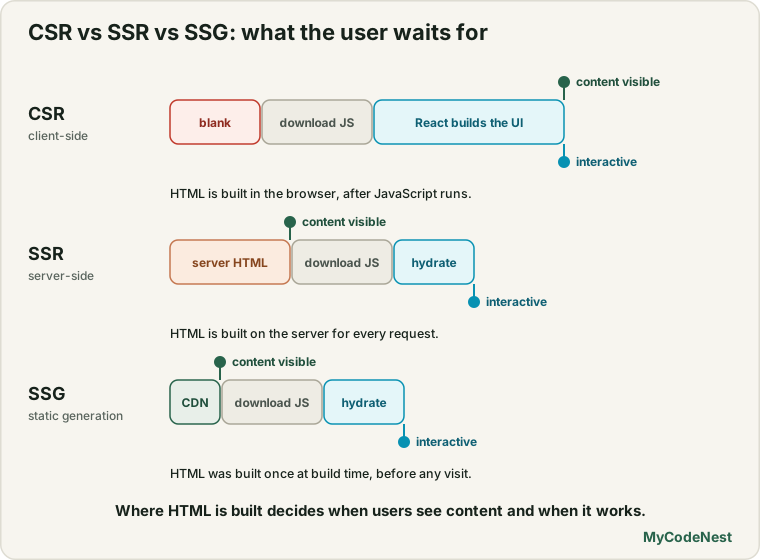
1. Client-Side Rendering (CSR)
In a standard Vite React setup, the web server hosts a nearly empty HTML file:
<!DOCTYPE html>
<html lang="en">
  <head>
    <meta charset="UTF-8" />
    <title>My React App</title>
  </head>
  <body>
    <!-- Initially blank! -->
    <div id="root"></div>
    <script type="module" src="/src/main.jsx"></script>
  </body>
</html>
The browser downloads this lightweight HTML shell, sees the <script> tag, fetches the compiled bundle, executes React, mounts the component tree using createRoot, and finally sends network requests to fetch data:
// Browser execution in main.jsx
import { createRoot } from 'react-dom/client';
import App from './App';

const container = document.getElementById('root');
const root = createRoot(container);
root.render(<App />);
The CSR Lifecycle
Browser                 Web Server (CDN)             Backend API
   |                           |                          |
   |--- 1. GET /dashboard ---->|                          |
   |<-- Empty HTML Shell ------|                          |
   |                           |                          |
   |--- 2. GET /bundle.js ---->|                          |
   |<-- React + App Code ------|                          |
   |                                                      |
   | [React mounts tree & starts rendering UI]            |
   |                                                      |
   |--- 3. GET /api/user-data --------------------------->|
   |<-- Returns JSON Response ----------------------------|
   |                                                      |
   v [UI updates with final data]
Pros: Minimal server hosting costs (static assets served directly from global CDNs like Cloudflare Pages, Netlify, or Vercel), zero backend runtime to maintain, and fast subsequent page transitions.
Cons: Slower Time to Interactive on low-end devices, blank screen delay during initial load, and search engine bots must execute JavaScript to crawl page content.
2. Static Site Generation (SSG)
In Static Site Generation, React components are executed ahead of time during the project’s build step. The build tool evaluates the data and outputs ready-to-serve HTML files directly to disk.
Real-World Example: MyCodeNest (Astro + Static Output)
This very documentation and blog platform (MyCodeNest) is built using Static Site Generation. During the astro build process, every markdown lesson is parsed, rendered into static .html files, and saved into the dist/ directory:
dist/
├── index.html
└── blogs/
    ├── react-usestate-basics/index.html
    └── react-rendering-strategies-csr-ssr-ssg/index.html
When a reader navigates to a lesson on MyCodeNest:
- The browser receives the complete, pre-rendered HTML immediately.
- The user sees text, code snippets, and layout within milliseconds (near-perfect First Contentful Paint).
- Search engines crawl 100% of the content without executing any client-side JavaScript.
- Hosting is extraordinarily cheap and durable on global edge CDNs.
3. Server-Side Rendering (SSR) & Hydration
Server-Side Rendering executes React components on a Node.js or Edge runtime on every user request. This ensures dynamic data (like user-specific recommendations or real-time inventory counts) is baked directly into the initial HTML response.
What is Hydration?
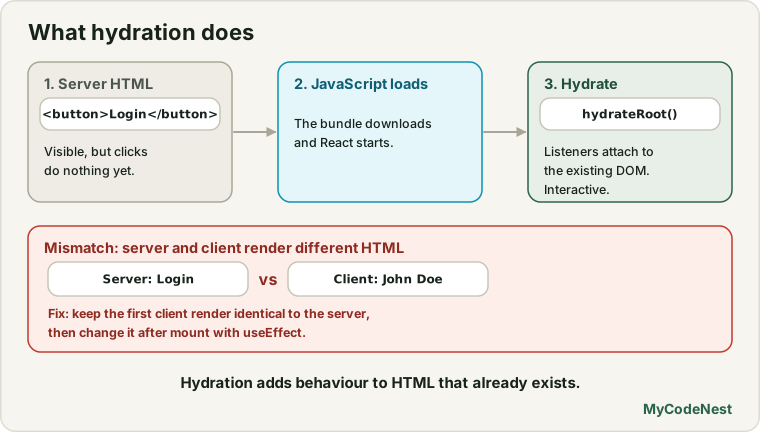
When SSR or SSG sends pre-rendered HTML to the browser, that HTML is purely visual markup; it has no attached JavaScript event listeners. Clicking a button does nothing.
Hydration is the process where React in the browser inspects the existing DOM nodes produced by the server and attaches event listeners, state, and effects to make the page interactive.
In React, hydration is handled by hydrateRoot from react-dom/client:
import { hydrateRoot } from 'react-dom/client';
import App from './App';

// React adopts the existing server DOM and attaches event listeners
hydrateRoot(document.getElementById('root'), <App />);
The Hydration Mismatch Error in React 19
If the HTML generated on the server does not match the initial render in the browser, React 19 detects a discrepancy and logs a Hydration Mismatch Error:
Uncaught Error: Hydration failed because the server-rendered HTML didn't match the client.
As a result this tree will be replaced with client-rendered content:
- <span>Server: Login</span>
+ <span>Client: John Doe</span>
Common causes of hydration mismatches:
- Using browser-only APIs (
window,localStorage,navigator) during the initial component render (these do not exist on the server). - Rendering timestamps with
new Date()or relative times likeDate.now(). - Invalid HTML nesting (such as placing a
<div>inside a<p>or a<tr>outside a<tbody>), which the browser DOM parser automatically rearranges before React hydrates.
Fix: Keep the initial server and client render identical. Defer client-only values until after mounting using useEffect:
import React, { useState, useEffect } from 'react';

export function CurrentTime() {
  const [mounted, setMounted] = useState(false);

  useEffect(() => {
    // Runs ONLY in the browser after initial hydration
    setMounted(true);
  }, []);

  if (!mounted) {
    // Matches the static server render exactly
    return <span>Loading time...</span>;
  }

  return <span>{new Date().toLocaleTimeString()}</span>;
}
Modern Innovations: React Server Components (RSC)
Introduced in React 19 and adopted by full-stack frameworks like Next.js (App Router), React Server Components (RSC) represent a paradigm shift in how React components execute:
- Server Components: Execute only on the server. Their code, dependencies, and database libraries (like Prisma or Postgres drivers) are never downloaded by the browser, drastically reducing client bundle sizes.
- Client Components: Standard interactive React components (marked with the
'use client'directive) that execute on both server and client to provide state, effects, and interactivity.
// ProductPage.jsx (Server Component - runs ONLY on server)
import db from '@/lib/db';
import { AddToCartButton } from './AddToCartButton'; // Client Component

export default async function ProductPage({ params }) {
  // Direct database query without an extra REST API endpoint!
  const product = await db.products.findUnique({ where: { id: params.id } });

  return (
    <article className="product-view">
      <h1>{product.name}</h1>
      <p>{product.description}</p>
      {/* Interactive client component handles click state */}
      <AddToCartButton productId={product.id} />
    </article>
  );
}
React 19 Server APIs: prerender in react-dom/static
In React 19, React introduced modernized static generation APIs in react-dom/static:
prerender(react-dom/static): Designed for static build tools and SSG frameworks. Unlike legacy synchronous methods,prerenderreturns a Promise that waits for data inside<Suspense>boundaries to finish loading before returning the final static HTML stream.prerenderToNodeStream/resume: Powers Partial Prerendering (PPR), allowing a static page shell to be generated ahead of time while dynamic holes stream in upon user request.
Common mistakes
1. Accessing window or localStorage directly in component body
// Incorrect: Crashes on server during SSR or SSG!
function UserGreeting() {
  const name = localStorage.getItem('user_name'); // Window is undefined on Node.js!
  return <h1>Hello {name}</h1>;
}
During SSR or SSG, the code runs in Node.js or a build environment where window and localStorage do not exist. Always access browser APIs inside useEffect or guard them with typeof window !== 'undefined'.
2. Invalid HTML nesting causing hydration errors
// Incorrect: Browser HTML parser automatically closes <p> before <div>!
<p>
  <div>This causes an immediate hydration error!</div>
</p>
The browser’s native parser rejects block elements inside <p> tags. It mutates the DOM before React hydrates, resulting in an unrecoverable hydration mismatch.
3. Choosing SSR when SSG is sufficient
Setting up full-stack Node.js servers for a simple blog or documentation site adds hosting costs, server maintenance, and cold-start latency. If your content changes only when new code or markdown is committed, SSG is faster, cheaper, and more secure.
Practice
- Inspect the network waterfall of a client-rendered Vite app using Chrome DevTools and measure the time delay between the initial HTML download and component mounting.
- Intentionally trigger a hydration mismatch in a local component by rendering
Math.random()directly in the JSX, and observe the error logged in the browser console. - Fix the hydration mismatch from exercise 2 using the
useEffectmounting guard pattern. - Compare the bundle size of a client-rendered date formatting component versus a server-rendered component where the date library stays on the server.
- Create a decision table for a fictional project with a marketing homepage, an e-commerce catalog, and an authenticated user dashboard, assigning the ideal rendering strategy to each.
Recap
- Client-Side Rendering (CSR) serves a blank HTML shell; the browser downloads JavaScript to build the DOM and fetch data.
- Static Site Generation (SSG) compiles HTML ahead of time during the build step, delivering instant FCP and optimal SEO (e.g. MyCodeNest via Astro).
- Server-Side Rendering (SSR) compiles HTML on every incoming request, ensuring fresh dynamic data at the cost of server compute.
- Hydration attaches event listeners to pre-rendered HTML; hydration mismatches occur when client and server initial outputs differ.
- React Server Components (RSC) and React 19 static APIs (
prerender) enable zero-bundle server logic and streaming hybrid rendering.
Frequently asked questions
Can I do SSR with a standard Vite React project?
Vite has low-level SSR primitives (vite.ssrLoadModule), but setting up routing, asset manifests, streaming, and hydration manually requires significant tooling. For production SSR or RSC, developers typically choose dedicated frameworks like Next.js, Remix (React Router v7), or Astro.
Why does Astro use "Islands Architecture" instead of full-page hydration?
Full-page hydration requires the browser to parse and hydrate every element on the screen, even static headers, footers, and articles. Astro’s Islands Architecture only hydrates interactive components (marked with directives like client:load or client:visible), shipping zero JavaScript for static content.
Are React Server Components the same as Server-Side Rendering (SSR)?
No. SSR outputs HTML strings for any component on the page. RSC allows components to run exclusively on the server without ever being included in client JavaScript bundles. You can combine RSC with SSR to get fast initial HTML plus zero-bundle-size server components.
What is "Time to First Byte" (TTFB) vs "First Contentful Paint" (FCP)?
TTFB is the time it takes the browser to receive the first byte of data from the web server. FCP is the time it takes the browser to render the first piece of DOM content (text or image) on the screen. SSG yields the fastest TTFB and FCP because files are served directly from global CDN memory.
How do search engine crawlers handle CSR vs SSG?
Modern Googlebot can execute JavaScript, but it queues JS rendering in a two-stage process that can delay indexing by days or weeks. SSG and SSR deliver complete HTML immediately, ensuring 100% of content is indexed instantly without relying on crawler JavaScript execution.
See also: React Component Patterns, Deploy a React App, Single-Page Applications and Client-Side Routing