Component Identity and State Preservation: Position, Type and Keys
Learn when React keeps or resets state: how position, component type and keys define identity, how remounting works, and how to avoid nested component bugs.
What you will learn
Here is a question that surprises many React developers: where does state actually live? It does not live inside your function, because the function runs again on every render. It does not live in the JSX you wrote. React keeps state for you, and it attaches it to a position in the tree.
In this lesson you will learn how React decides if a component is “the same one as before” (so its state is preserved) or “a new one” (so its state is reset). This is called component identity. You will see what position, type and key do, how to reset state on purpose, and how to avoid a nasty bug caused by defining a component inside another component.
Everything here builds on reconciliation. Each result below comes from a real test.
State belongs to a position in the tree
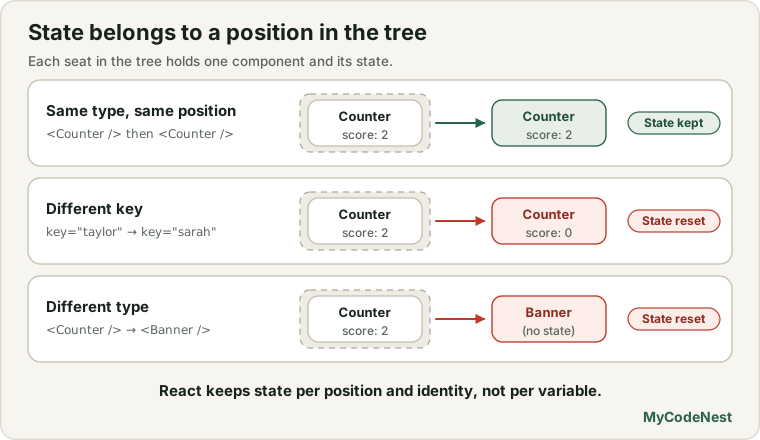
Imagine every component on the page as a seat in a theatre. React remembers who is sitting in each seat, and the state belongs to that seat, not to the person. As long as the same kind of component stays in the same seat, its state stays. If a different kind of component takes the seat, or the seat is emptied, the state is thrown away.
The words React uses:
- Mount: a component appears in the tree for the first time. Its state is created.
- Update: the same component stays, with new props. Its state is kept.
- Unmount: a component is removed from the tree. Its state is destroyed.
Let us use this counter in all the examples:
import { useState } from 'react';

function Counter({ person }) {
  const [score, setScore] = useState(0);

  return (
    <div>
      <h3>{person}'s score: {score}</h3>
      <button onClick={() => setScore(score + 1)}>+1</button>
    </div>
  );
}
Case 1: same type, same position, state is preserved
function Game() {
  const [isTaylor, setIsTaylor] = useState(true);

  return (
    <div>
      {isTaylor ? <Counter person="Taylor" /> : <Counter person="Sarah" />}
      <button onClick={() => setIsTaylor(!isTaylor)}>Next player</button>
    </div>
  );
}
Click +1 twice, so Taylor has 2 points. Then click Next player. The page shows:
Sarah's score: 2Sarah inherited Taylor’s score. Why? In both branches of the ternary, React sees a Counter in the same position. It is the same type at the same seat, so React thinks “this is the same component, with new props”. It keeps the state (2) and keeps the same DOM node. Only the person prop changed.
Sometimes that is exactly what you want. But for a game with two players, it is a bug.
Case 2: a different key means a different identity
To tell React “this is a different counter”, give each one a different key:
{isTaylor ? (
  <Counter key="taylor" person="Taylor" />
) : (
  <Counter key="sarah" person="Sarah" />
)}
Now click +1 twice, then Next player. The page shows:
Sarah's score: 0Sarah starts fresh. The keys differ, so React treats them as two different components: it unmounts Taylor’s counter (the state is destroyed and the DOM node removed) and mounts a new one for Sarah. A test confirmed that the heading’s DOM node was also replaced.
This shows that key is not only for lists. A key tells React which component is which, anywhere in the tree.
Case 3: a different type means a reset
If the component type changes, the old subtree is removed and a new one is created:
{show ? <Counter person="Taylor" /> : <Banner />}With the score at 2, click the toggle. The counter is replaced by the banner. The counter was unmounted, so its state is gone. Click the toggle again: the counter returns, and shows
Taylor's score: 0The score did not come back, because the new counter is a new instance. The same thing happens when you change only the wrapper around a stateful component:
{fancy
  ? <section><Counter person="Taylor" /></section>
  : <div><Counter person="Taylor" /></div>}
Going from div to section changes the type at that position, so everything inside is replaced. A test confirmed it: the score went from 2 to 0 after the wrapper changed from div to section, even though the Counter itself never changed.
Rule: do not change the type of a wrapper element around a component whose state you want to keep.
Case 4: conditional rendering and empty slots
What about {showHint && <p>Hint</p>} placed before a component?
function Page() {
  const [showHint, setShowHint] = useState(true);

  return (
    <div>
      {showHint && <p>Hint</p>}
      <Counter person="Taylor" />
      <button onClick={() => setShowHint(!showHint)}>Toggle hint</button>
    </div>
  );
}
Click +1 once, then toggle the hint off. The score stays at 1. Why? When showHint is false, the expression gives false, and React still reserves a slot for it. The Counter stays in its second slot. So the position of Counter does not change, and its state is kept.
Remember: false, null and undefined still occupy a place in the tree. That is what keeps things stable.
Case 5: two components at two positions are separate
Two copies of the same component in different positions each have their own state:
<Counter person="Taylor" />
<Counter person="Sarah" />
Click the first one twice and the second once, and you get scores 2 and 1. The state belongs to the position, so they never interfere with each other. This is why you can reuse a component many times.
Resetting state with a key
You can use identity on purpose to reset a component. Here is a message draft form. When the recipient changes, the draft should start empty:
function Draft({ user }) {
  const [text, setText] = useState("");

  return (
    <div>
      <h3>Message to {user}</h3>
      <textarea value={text} onChange={(e) => setText(e.target.value)} />
    </div>
  );
}

function Messenger() {
  const [user, setUser] = useState("Taylor");

  return (
    <div>
      <Draft key={user} user={user} />
      <button onClick={() => setUser(user === "Taylor" ? "Sarah" : "Taylor")}>
        Switch
      </button>
    </div>
  );
}
Type Hi there to Taylor, then click Switch. The heading says Message to Sarah and the textarea is empty.
Without key={user}, the same test shows the heading changing to Message to Sarah while the textarea still contains Hi there. The draft meant for Taylor would be sent to Sarah by mistake. With the key, changing the user changes the component’s identity, so React starts a fresh instance.
This is the recommended way to reset state when some identity changes, such as a different user, document or product. It is much simpler than writing code to clear every field by hand.
The nested component bug
Now the most common identity bug. It happens when you define a component inside another component:
function Form() {
  const [text, setText] = useState("");

  function Field() {                        // defined inside Form: a mistake
    return <input />;
  }

  return (
    <div>
      <input value={text} onChange={(e) => setText(e.target.value)} />
      <Field />
    </div>
  );
}
Type something into the second input (the one made by Field). Then type a letter into the first input. The second input becomes empty, and in a real browser it also loses focus.
Why? Every time Form renders, it runs the line function Field() {...} again and creates a brand new function. React compares the types: the old Field function and the new one are different functions, so they are different types. According to the rules of reconciliation, a different type means a replacement. React destroys the old input and creates a new one. A test confirmed that the DOM node was replaced.
The fix is to define the component at the top level, outside every other component:
function Field() {
  return <input />;
}

function Form() {
  const [text, setText] = useState("");

  return (
    <div>
      <input value={text} onChange={(e) => setText(e.target.value)} />
      <Field />
    </div>
  );
}
Now Field is a single function that never changes, so the same input is kept. The typed text stays. In the test, the DOM node was not replaced.
Rule: never define a component inside another component. Always define components at the top level of the file.
Keys and list items
You already learned the same thing from the list side: with key={index}, state belongs to the position, so after reversing a list, a typed note stays in the first row, not with its item. With key={item.id}, the state goes with the item. The identity rules are the same as everywhere else, so keys in lists are just one use of a bigger idea.
A summary of the rules
| What happens at a position | State | DOM |
|---|---|---|
| Same component type, same key (or no key) | Kept | Same nodes, updated |
| Same type, different key | Reset | New nodes |
| Different type | Reset | New nodes |
| Component removed, then added back later | Reset (it is a new instance) | New nodes |
| Same component in two different positions | Separate state for each | Separate nodes |
Common mistakes
1. Expecting state to follow a prop. If you switch the person prop on a counter, the score stays. Use a key if you want a fresh start.
2. Defining a component inside another component. It resets its state and DOM on every render. Define components at the top level.
3. Changing a wrapper element by accident. Wrapping a stateful component in div in one branch and section in another resets it.
4. Using key={Math.random()}. A new identity on every render means constant resets and lost focus.
5. Using the index as a key in a changing list. State stays attached to the position instead of the item.
6. Writing code to reset every field by hand. Use a key tied to the identity (like the user’s id) instead.
7. Expecting state to survive a conditional unmount. If a component disappears from the tree, its state is destroyed. Keep the state in a parent if it must survive, or keep the component rendered and hide it with CSS. (A later lesson on Activity shows a React way to hide UI while preserving its state.)
Practice
- Build the
Gameexample with twoCounterbranches and no keys. Increase Taylor’s score and switch to Sarah. What score does Sarah have? Then add the keys and test again. - Predict, then check: A page shows
{show ? <Counter /> : <p>Nothing</p>}. Click the counter to 3, hide it, then show it again. What is the score? - Create a
Messengerwith a draft textarea and a Switch button, with and withoutkey={user}. Compare what happens to the typed text. - Debug: A learner defines
function Row()inside theTablecomponent, and typing in a row’s input loses focus after every letter. Explain why and show the fix. - A profile page shows
<ProfileEditor userId={id} />. When the user selects another profile, the editor still shows the old unsaved edits. Fix it with one prop. - Predict, then check: In
<div>{showHint && <p>Hint</p>}<Counter /></div>, does hiding the hint reset the counter? Explain with the idea of slots. - Render two
Countercomponents in a row. Click the first twice and the second once. Why are the scores independent? - Open React DevTools. Find a component with state, and look at its state while you trigger a re-render. Then cause an unmount (for example with a conditional) and watch what happens to the state when it returns.
Recap
- State belongs to a position in the tree, not to your function or your JSX.
- Same type at the same position: state is kept. Different type or different key: state is reset and the DOM node is replaced.
keyis not only for lists. Use it on any component to tell React which one it is, for example<Draft key={user} />resets the draft when the user changes.false,nullandundefinedkeep a slot, so conditional rendering does not shift other components.- Never define a component inside another component. It becomes a new type on every render and loses state and focus.
- Changing a wrapper element around a stateful component resets it.
- Index keys tie state to position. Stable id keys tie it to the item.
- Next you will build a second project that applies derived data and lifted state.
Frequently asked questions
Where is React state stored?
React stores it internally, linked to the component’s position in the tree, not inside your function. That is why the value survives re-renders even though the function runs again. When the component unmounts, React discards that stored state.
Why does my state not reset when I change a prop?
Because the component is still the same type in the same position, React treats it as an update with new props and keeps the state. If you want it to start fresh when something changes, give the component a key that depends on that value.
What does mounting and unmounting mean?
Mounting is when a component first appears in the tree and its state is created. Unmounting is when it is removed and its state is destroyed. Re-adding it later mounts a new instance.
Can I use a key outside lists?
Yes. A key tells React the identity of an element wherever it appears. It is very useful for resetting a component, such as a form or editor, when the thing it is editing changes.
Why is defining a component inside another one bad?
Each render of the outer component creates a new function for the inner one, so React sees a different component type every time. It then destroys and recreates the inner component, which loses its state and its input focus.
How can I keep state when a component is hidden?
Either lift the state to a parent that stays mounted, or keep the component rendered and hide it with CSS. React also has an Activity component for hiding parts of the UI while preserving their state, which is covered in a later lesson.
See also: Virtual DOM and Reconciliation, Lists and Keys, Choosing State Structure, How React Renders