Authentication and Authorization in React Applications
Build login and logout in React: sessions, a startup loading state, protected and role-based routes, 401 and 403 handling, and server-side access checks.
What you will learn
Almost every real app has users who log in. In this lesson you will build the React side of a login system properly: a login form with errors, a session that survives page reloads, no flash of the login page while the app checks who you are, protected pages, role-based pages, and clear handling of expired sessions and forbidden actions.
You will also learn the difference between two words that beginners mix up, authentication and authorization, and why the server must always be the one that says “yes” or “no”.
You should know React Context, protected routes, and the security basics.
Authentication and authorization
| Authentication (AuthN) | Authorization (AuthZ) | |
|---|---|---|
| Question | Who are you? | What are you allowed to do? |
| Example | Logging in with an email and password | Only admins may delete reports |
| Analogy | Showing your ID at the building’s entrance | Your key card opens some floors but not others |
| Failure status code | 401 Unauthorized (not logged in, or the session ended) | 403 Forbidden (logged in, but not allowed) |
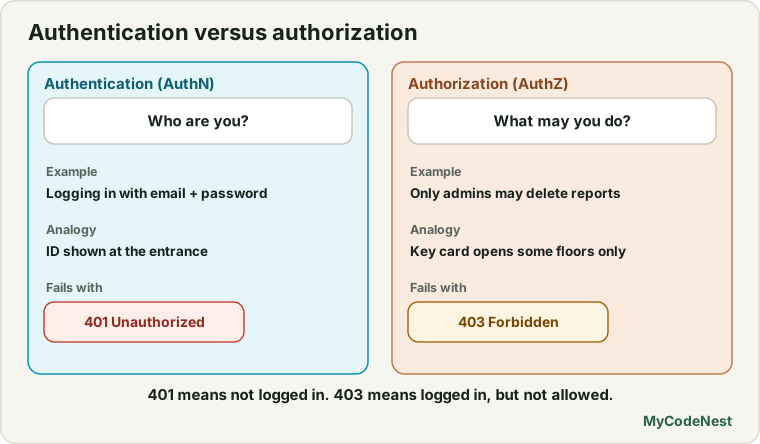
(The name 401 Unauthorized is confusing: it really means “not authenticated”.) Keep these two ideas apart. Your app must handle both failures differently: a 401 sends the user to the login page, and a 403 shows “you do not have access”.
How a login works
Here is the common flow for a web app with a cookie session:
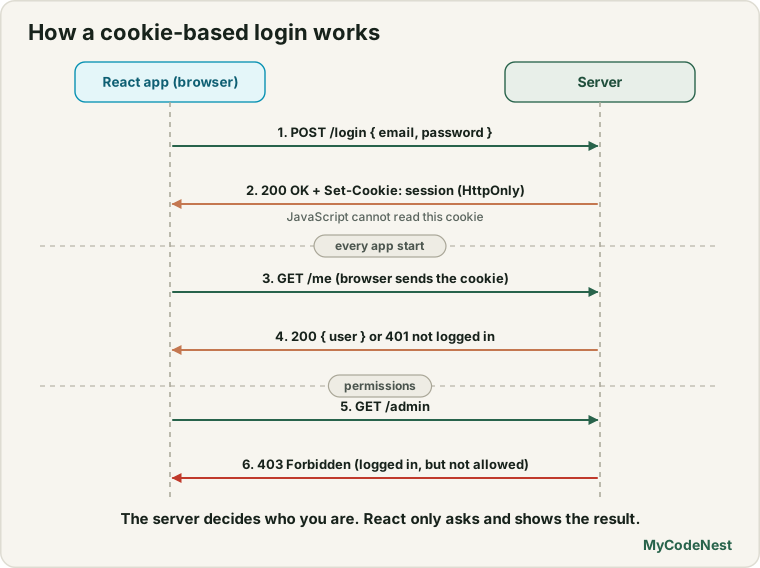
Notice what React does not do: it never sees the password again after sending it, it never reads the cookie (HttpOnly forbids it), and it never decides who is allowed to do what. React’s job is to show the right screens based on what the server says.
The most important step for React is the last one: the app asks the server who the user is, every time it starts. This is how a login survives a page refresh. (In the last lesson, the login state lived in memory and vanished on reload.)
Our practice “server”
We do not have a real backend in this course, so we use a fake server that runs inside the browser. It answers after a short delay, like a real network call. It lets you learn the React side with code that is easy to swap for real fetch calls later.
Warning: this fake server is for learning only. It stores plain-text passwords in JavaScript, which is something you must never do in a real app. A real server keeps passwords as hashes, and the browser never sees user data that it should not see. The fake server also keeps the “session” in
sessionStorageso that a reload keeps you logged in. A real server uses anHttpOnlycookie instead.
Create src/api/fakeServer.js:
export class ApiError extends Error {
  constructor(status, message) {
    super(message);
    this.name = "ApiError";
    this.status = status;
  }
}

const users = [
  { id: 1, email: "[email protected]", password: "admin123", name: "Ada", role: "admin" },
  { id: 2, email: "[email protected]", password: "user123", name: "Uma", role: "user" },
];

let reports = [
  { id: 1, title: "Sales Q1" },
  { id: 2, title: "Sales Q2" },
  { id: 3, title: "Team survey" },
];

const SESSION_KEY = "fake-session";

function delay(ms = 150) {
  return new Promise((resolve) => setTimeout(resolve, ms));
}

function publicUser(user) {
  return { id: user.id, name: user.name, email: user.email, role: user.role };
}

function currentUser() {
  const id = Number(sessionStorage.getItem(SESSION_KEY));
  return users.find((user) => user.id === id) ?? null;
}

export async function login(email, password) {
  await delay();
  const user = users.find((item) => item.email === email && item.password === password);
  if (!user) {
    throw new ApiError(401, "Wrong email or password");
  }
  sessionStorage.setItem(SESSION_KEY, String(user.id));
  return publicUser(user);
}

export async function logout() {
  await delay(50);
  sessionStorage.removeItem(SESSION_KEY);
}

export async function getCurrentUser() {
  await delay(100);
  const user = currentUser();
  return user ? publicUser(user) : null;
}

export async function getReports() {
  await delay();
  if (!currentUser()) {
    throw new ApiError(401, "Please log in");
  }
  return reports;
}

export async function deleteReport(id) {
  await delay();
  const user = currentUser();
  if (!user) {
    throw new ApiError(401, "Please log in");
  }
  if (user.role !== "admin") {
    throw new ApiError(403, "Only admins can delete reports");
  }
  reports = reports.filter((report) => report.id !== id);
}

export function expireSession() {
  sessionStorage.removeItem(SESSION_KEY);
}
Look at how the server thinks:
loginreturns a user without the password (publicUser) and fails with the same message whether the email or the password was wrong. A real server does the same, so attackers cannot find out which emails exist.getCurrentUseris the “who am I?” call. It returns the user, ornullwhen nobody is logged in.getReportsanddeleteReportcheck the session on the server side. ReaddeleteReportcarefully: the server itself checks the role and refuses with403, no matter what the React app does. This is the most important idea of the lesson.expireSessionsimulates a session that ends (for example after a timeout) so we can practise handling it.
If you later have a real backend, each function becomes a fetch call. For example, the login would look like this:
const response = await fetch("/api/login", {
  method: "POST",
  headers: { "Content-Type": "application/json" },
  body: JSON.stringify({ email, password }),
  credentials: "include",
});
credentials: "include" tells the browser to send and accept cookies. (If your API runs on another address, the server must also allow it with CORS settings that name your site. A common simple setup during development is to let the Vite dev server forward /api to the backend, so the browser sees only one address.)
The AuthProvider with a loading state
Replace src/auth/AuthContext.jsx (from the last lesson) with:
import { createContext, useContext, useEffect, useState } from 'react';
import { getCurrentUser, login as apiLogin, logout as apiLogout } from '../api/fakeServer.js';

const AuthContext = createContext(null);

export function AuthProvider({ children }) {
  const [auth, setAuth] = useState({ status: "loading", user: null });

  useEffect(() => {
    let ignore = false;

    getCurrentUser()
      .then((user) => {
        if (!ignore) {
          setAuth(user ? { status: "authenticated", user } : { status: "anonymous", user: null });
        }
      })
      .catch(() => {
        if (!ignore) {
          setAuth({ status: "anonymous", user: null });
        }
      });

    return () => {
      ignore = true;
    };
  }, []);

  async function login(email, password) {
    const user = await apiLogin(email, password);
    setAuth({ status: "authenticated", user });
  }

  async function logout() {
    await apiLogout();
    setAuth({ status: "anonymous", user: null });
  }

  function handleUnauthorized() {
    setAuth({ status: "anonymous", user: null });
  }

  const value = { ...auth, login, logout, handleUnauthorized };

  return <AuthContext value={value}>{children}</AuthContext>;
}

export function useAuth() {
  const context = useContext(AuthContext);
  if (context === null) {
    throw new Error("useAuth must be used inside an AuthProvider");
  }
  return context;
}
The key idea is the three-way status:
status |
Meaning |
|---|---|
"loading" |
We are still asking the server who the user is |
"authenticated" |
A user is logged in (user is set) |
"anonymous" |
Nobody is logged in |
Why not just user === null for “not logged in”? Because during the first moments after the page opens, user is null before we know the answer. If a guard treated that as “logged out”, a logged-in user who refreshed a private page would be thrown to the login page for a split second (or permanently). A separate "loading" status lets the guard wait. This follows the one-status-instead-of-several-flags rule from the state structure lesson.
Other details:
- The Effect has an
ignoreflag in its cleanup, as you learned for race conditions (andStrictModeruns it twice in development). Only the last run may update the state. loginthrows if the server refuses. The form that called it catches the error and shows the message.handleUnauthorizedis for the moment when any later request answers401: the session ended, so we mark the user as logged out. The guard then sends them to the login page.
The guards
Replace src/components/RequireAuth.jsx:
import { Navigate, Outlet, useLocation } from 'react-router';
import { useAuth } from '../auth/AuthContext.jsx';

function RequireAuth() {
  const { status } = useAuth();
  const location = useLocation();

  if (status === "loading") {
    return <p>Checking your session...</p>;
  }

  if (status === "anonymous") {
    return <Navigate to="/login" replace state={{ from: location }} />;
  }

  return <Outlet />;
}

export default RequireAuth;
While the app checks the session, the guard shows a short message and waits. Only a definite "anonymous" causes a redirect.
Now a second guard for role-based pages. Create src/components/RequireRole.jsx:
import { Outlet } from 'react-router';
import { useAuth } from '../auth/AuthContext.jsx';

function RequireRole({ role }) {
  const { user } = useAuth();

  if (user.role !== role) {
    return (
      <>
        <title>No access | My Site</title>
        <h1>No access</h1>
        <p>Your account does not have permission to see this page.</p>
      </>
    );
  }

  return <Outlet />;
}

export default RequireRole;
RequireRole is placed inside RequireAuth, so user always exists here. It shows a “no access” message (the user is logged in, so a login redirect would make no sense). This is the page-level version of a 403.
The login page
Replace src/pages/Login.jsx:
import { useState } from 'react';
import { useLocation, useNavigate } from 'react-router';
import { useAuth } from '../auth/AuthContext.jsx';

function Login() {
  const { login } = useAuth();
  const navigate = useNavigate();
  const location = useLocation();

  const [email, setEmail] = useState("");
  const [password, setPassword] = useState("");
  const [error, setError] = useState(null);
  const [submitting, setSubmitting] = useState(false);

  const from = location.state?.from?.pathname ?? "/reports";

  async function handleSubmit(event) {
    event.preventDefault();
    setError(null);
    setSubmitting(true);

    try {
      await login(email, password);
      navigate(from, { replace: true });
    } catch (err) {
      setError(err.message);
      setSubmitting(false);
    }
  }

  return (
    <form onSubmit={handleSubmit}>
      <title>Log in | My Site</title>
      <h1>Log in</h1>
      {location.state?.from && <p>Please log in to continue.</p>}

      <label htmlFor="email">Email</label>
      <input
        id="email"
        type="email"
        autoComplete="username"
        value={email}
        onChange={(event) => setEmail(event.target.value)}
        required
      />

      <label htmlFor="password">Password</label>
      <input
        id="password"
        type="password"
        autoComplete="current-password"
        value={password}
        onChange={(event) => setPassword(event.target.value)}
        required
      />

      {error && <p role="alert">{error}</p>}

      <button type="submit" disabled={submitting}>
        {submitting ? "Logging in..." : "Log in"}
      </button>

      <p>Demo accounts: [email protected] / admin123, [email protected] / user123</p>
    </form>
  );
}

export default Login;
This is a normal controlled form with the pieces you know: a submitting flag to prevent double clicks, an error message shown with role="alert", and a try/catch around the call. The autoComplete values help password managers fill the form. After a successful login, navigate(from, { replace: true }) returns the user to the page they wanted (or /reports by default).
A page with role-based actions
Create src/pages/Reports.jsx. This page loads data that needs a login, and shows a Delete button only to admins:
import { useEffect, useEffectEvent, useState } from 'react';
import { useAuth } from '../auth/AuthContext.jsx';
import { getReports, deleteReport, expireSession } from '../api/fakeServer.js';

function Reports() {
  const { user, handleUnauthorized } = useAuth();
  const [reports, setReports] = useState([]);
  const [status, setStatus] = useState("loading");
  const [message, setMessage] = useState(null);
  const [attempt, setAttempt] = useState(0);

  const onUnauthorized = useEffectEvent(() => handleUnauthorized());

  useEffect(() => {
    let ignore = false;

    getReports()
      .then((data) => {
        if (!ignore) {
          setReports(data);
          setStatus("success");
        }
      })
      .catch((error) => {
        if (ignore) {
          return;
        }
        if (error.status === 401) {
          onUnauthorized();
        } else {
          setStatus("error");
        }
      });

    return () => {
      ignore = true;
    };
  }, [attempt]);

  async function handleDelete(id) {
    setMessage(null);
    try {
      await deleteReport(id);
      setReports((current) => current.filter((report) => report.id !== id));
    } catch (error) {
      if (error.status === 401) {
        handleUnauthorized();
      } else {
        setMessage(error.message);
      }
    }
  }

  const isAdmin = user.role === "admin";

  if (status === "loading") {
    return <p>Loading reports...</p>;
  }

  if (status === "error") {
    return <p role="alert">Could not load the reports.</p>;
  }

  return (
    <>
      <title>Reports | My Site</title>
      <h1>Reports</h1>
      <p>Logged in as {user.name} ({user.role})</p>
      {message && <p role="alert">{message}</p>}
      <ul>
        {reports.map((report) => (
          <li key={report.id}>
            {report.title}
            {isAdmin && <button onClick={() => handleDelete(report.id)}>Delete</button>}
          </li>
        ))}
      </ul>
      <button onClick={() => setAttempt((n) => n + 1)}>Reload reports</button>
      <button onClick={expireSession}>Expire my session (demo)</button>
    </>
  );
}

export default Reports;
Two things deserve attention.
Handling 401 in one place. Any request can fail with 401 when the session ends (the cookie expired, the user logged out in another tab). In both the loading Effect and the delete handler, a 401 calls handleUnauthorized. The provider sets status to "anonymous", and RequireAuth redirects to the login page, which then says Please log in to continue. After logging in again, the user returns to the page they were on. (We use useEffectEvent, which you learned in the Effect events lesson, so the Effect can call the latest handleUnauthorized without listing it as a dependency.)
Showing the Delete button only to admins is a convenience. Look at handleDelete: when the server answers 403, the page shows the message. The button’s visibility is just good UX, so a normal user is not offered an action that will fail. The real check is in deleteReport on the server.
Finally an admin-only page. Create src/pages/Admin.jsx:
function Admin() {
  return (
    <>
      <title>Admin | My Site</title>
      <h1>Admin area</h1>
      <p>Only users with the admin role see this page.</p>
    </>
  );
}

export default Admin;
Wiring it up
Update the menu component src/components/AuthStatus.jsx so it shows the right links for each kind of user:
import { NavLink } from 'react-router';
import { useAuth } from '../auth/AuthContext.jsx';

function AuthStatus() {
  const { status, user, logout } = useAuth();

  if (status === "loading") {
    return null;
  }

  if (!user) {
    return <NavLink to="/login">Log in</NavLink>;
  }

  return (
    <span>
      <NavLink to="/reports">Reports</NavLink>{" "}
      {user.role === "admin" && <NavLink to="/admin">Admin</NavLink>}{" "}
      Hi {user.name} <button onClick={logout}>Log out</button>
    </span>
  );
}

export default AuthStatus;
In src/App.jsx, import Reports, Admin and RequireRole, and put the new routes inside the RequireAuth group (next to dashboard and account), with the admin page inside a second guard:
<Route path="reports" element={<Reports />} />
<Route element={<RequireRole role="admin" />}>
  <Route path="admin" element={<Admin />} />
</Route>
Routes can be guarded in layers: everything inside RequireAuth needs a login, and everything inside RequireRole also needs the admin role.
What happens in the browser
We tested this code, step by step, in a browser simulation:
- Open
/reportslogged out. For a moment you seeChecking your session..., then you are sent to/login, with the messagePlease log in to continue. - Wrong password. The form shows
Wrong email or passwordand stays on the login page. The button comes back after the request, so you can try again. - Log in as
[email protected]. You land on/reports(the page you wanted), see the three reports, and no Delete buttons. There is no Admin link. Opening/adminby typing it shows No access. - Log out, log in as
[email protected]. Now each report has a Delete button, and there is an Admin link. Click Delete on a report and it disappears. The Admin page opens normally. - Reload the page while logged in. You see
Checking your session...briefly, and then the reports, without ever seeing the login page. The session survived because the app asked the server who you are. - Click
Expire my session (demo), thenReload reports. The server answers401, and the app sends you to the login page. - Log out. Opening
/reportssends you to/loginagain.
The server is the real guard
Here is the proof that hiding buttons is not security. We took the normal user (the one who sees no Delete buttons) and called the server function directly, as if someone used the browser console to bypass the interface:
deleteReport(1) as [email protected]  →  ApiError 403: "Only admins can delete reports"
deleteReport(1) while logged out      →  ApiError 401: "Please log in"
Both attempts were refused by the server, even though the interface never offered the button. In a real app, anyone can send any request with any tool. So the rule is:
React hides things to keep the interface tidy. The server refuses things to keep the system safe.
Every action that changes or reads private data must be checked on the server: “Is this user logged in? Is this user allowed to do this to this item?” (For example, a user may edit their own notes but not other people’s.)
Common mistakes
1. Using user === null as “logged out” at startup. The first render has no answer yet. Use a "loading" status and wait.
2. Doing authorization only in React. Hidden buttons and guarded routes are not protection. The server must check on every request.
3. Keeping passwords or secrets in frontend code. Only our fake practice server does this, and only to teach. Real servers store password hashes.
4. Telling attackers too much. Do not say “this email does not exist”. Use one message: Wrong email or password.
5. Not handling 401 after login. Sessions end. A single place that reacts to 401 keeps the app consistent.
6. Confusing 401 and 403. 401 means log in. 403 means you are logged in but not allowed.
7. Leaving the old login state after logout. Clear the user in state, and make the server end the session.
8. Forgetting credentials: "include" with real cookies. Without it the browser may not send or accept the session cookie on cross-origin requests.
9. Flashing the login page on every refresh. That is the missing loading state.
10. Trusting the user object from the browser. If the server asks “what role are you?” and believes the answer, anyone can claim to be an admin. The server must look up the role itself.
Practice
- Build the fake server,
AuthProvider, guards,LoginandReports. Log in as both demo users and compare what each one sees on the reports page. - Predict, then check: Log in as
[email protected]on/reports, then reload the browser tab. What do you see during the first moment? What would happen ifRequireAuthtreateduser === nullas “logged out” instead of usingstatus? - Try the wrong password three times. Does your error message tell you whether the email exists? Why is that good?
- In the browser console (or in a small test button), call
deleteReport(1)while logged in as the normal user. What does the server answer? What does this tell you about hiding the Delete button? - Debug: After clicking
Expire my session (demo)andReload reports, the page showsCould not load the reports.instead of going to the login page. Which status check is missing or wrong? - Add a Reports > New report feature for admins only: a form that adds a report. Where must the role be checked, in the form or in the server function? Do both.
- Make the
Loginpage redirect already logged-in users to/reports. UsestatusandNavigate. What should the page show whilestatusis"loading"? - Write down how you would change
logininfakeServer.jsinto a realfetchcall, and what the server must send back so that the next request knows who you are.
Recap
- Authentication is “who are you?” (
401when missing). Authorization is “what may you do?” (403when forbidden). - In a cookie session, the server sets an
HttpOnlycookie, the browser sends it automatically, and React never reads it. - When the app starts, ask the server “who am I?”. Use a three-way
status:"loading","authenticated","anonymous". Guards wait during"loading", so users do not flash through the login page. - Build the login form with submitting, error and redirect back (
location.state.from) behaviour. Use a generic error message. - Guard pages in layers:
RequireAuthfor login,RequireRolefor permissions. - Handle
401in one place (log the user out in state), and show403as “no access”. - The server enforces access. Hidden buttons and guarded routes are only UX. We proved it: the server refused a delete from a normal user with
403even without the button. - Never put real passwords or secrets in frontend code.
- Next you will combine routing, forms, API data and context in Project 4, a multi-page notes app with a login.
Frequently asked questions
What is the difference between authentication and authorization?
Authentication verifies who a user is, for example by checking their password. Authorization decides what that user is allowed to do, for example whether they can delete a report. A user can be authenticated and still not authorized for an action.
What is the difference between 401 and 403?
401 means the request has no valid login: the user is not authenticated or the session ended, so the app should send them to the login page. 403 means the user is logged in but does not have permission, so the app should show an “access denied” message instead.
Why do I need a loading status for authentication?
When the app starts, it does not yet know whether the user is logged in, because it must ask the server. If you treat “not known yet” as “logged out”, logged-in users get redirected to the login page on every refresh. A loading status makes the guards wait for the real answer.
Is hiding a button for non-admins enough?
No. It improves the interface, but anyone can send requests with other tools. The server must check the user’s role on every request. If it only trusts the interface, anyone can perform the action.
Where should the session be stored?
The safest common choice is an HttpOnly, Secure, SameSite cookie set by the server, because JavaScript on the page cannot read it. In React, you do not store the session at all. You only keep the user object that the server returns from a “who am I?” call.
Should I build my own login system?
For real products, it is usually safer to use a trusted authentication service or a well-reviewed library on your backend, because password storage, resets, rate limiting and many other details are easy to get wrong. This lesson teaches the React side, which is the same whichever system you use.
See also: React Security Fundamentals, Protected Routes, React Context, Effect Events and You Might Not Need an Effect