Production-Ready API Handling: Races, Pagination and Retries
Handle real-world API problems in React: race conditions, request cancellation, timeouts, safe retries, pagination, debounced search and simple caching.
What you will learn
A demo that loads data once on a fast connection is easy. A real app has to deal with slow networks, flaky servers, impatient users who click fast, and lists with thousands of items. This lesson is about the techniques that make data loading dependable:
- Race conditions and cancelling requests you no longer need
- Timeouts, and retrying failed requests safely (and when not to retry)
- Pagination, so you load a page of data at a time
- Debounced search, so typing does not flood the server
- Keeping the old data on screen while the next page loads
- Simple caching, so going back is instant
You should know fetching data, CRUD with APIs, the AbortController, and the useDebounce Hook from the custom Hooks lesson.
The practice API
We will use DummyJSON, a free fake API with a products list that supports exactly what we need. Open this address to see it:
https://dummyjson.com/products?limit=3&skip=0&select=title,priceThe answer looks like this:
{
  "products": [ { "id": 1, "title": "...", "price": 9.99 }, ... ],
  "total": 194,
  "skip": 0,
  "limit": 3
}
The important parts:
limitis how many items you want, andskipis how many items to jump over. Together they give you pages.totalis how many items exist in all. You need it to know how many pages there are.selectpicks only the fields you need, which keeps the response small./products/search?q=phonesearches by text, with the samelimitandskip.
(The numbers in your browser may differ a little, because the data is maintained by the service.)
Problem 1: race conditions and cancelling
You met this problem in the cleanup lesson: answers can arrive out of order, so an old, slow answer can overwrite a newer one. There are two ways to prevent it:
| Technique | What it does | Good for |
|---|---|---|
Ignore flag (let ignore = false) |
The request keeps running, but its answer is thrown away | Simple cases, or when you cannot cancel |
AbortController |
Cancels the request itself, and the answer is never used | Best choice: saves bandwidth and server work |
We will use AbortController everywhere in this lesson. The cleanup of each Effect aborts the request for the previous URL, so only the answer for the current URL can reach the screen.
Problem 2: a fetch helper with timeout and retries
Networks fail. A request can hang for a long time, the server can answer 500, or the Wi-Fi can drop for a second. A good helper deals with this in one place. Create src/api/http.js:
export class HttpError extends Error {
  constructor(status) {
    super(`Request failed with status ${status}`);
    this.name = "HttpError";
    this.status = status;
  }
}

function sleep(ms, signal) {
  return new Promise((resolve, reject) => {
    if (signal?.aborted) {
      reject(signal.reason);
      return;
    }
    const id = setTimeout(resolve, ms);
    signal?.addEventListener(
      "abort",
      () => {
        clearTimeout(id);
        reject(signal.reason);
      },
      { once: true }
    );
  });
}

function isRetryable(error) {
  if (error instanceof HttpError) {
    return error.status >= 500 || error.status === 429;
  }
  return true;
}

export async function fetchJson(url, { signal, retries = 2, retryDelay = 300, timeout = 8000 } = {}) {
  for (let attempt = 0; ; attempt++) {
    const timeoutSignal = AbortSignal.timeout(timeout);
    const combined = signal ? AbortSignal.any([signal, timeoutSignal]) : timeoutSignal;

    try {
      const response = await fetch(url, { signal: combined });
      if (!response.ok) {
        throw new HttpError(response.status);
      }
      return await response.json();
    } catch (error) {
      if (signal?.aborted) {
        throw error;
      }
      if (attempt >= retries || !isRetryable(error)) {
        throw error;
      }
      await sleep(retryDelay * 2 ** attempt, signal);
    }
  }
}

const cache = new Map();

export async function cachedFetchJson(url, options = {}, maxAge = 30000) {
  const hit = cache.get(url);
  if (hit && Date.now() - hit.time < maxAge) {
    return hit.data;
  }
  const data = await fetchJson(url, options);
  cache.set(url, { data, time: Date.now() });
  return data;
}

export function clearCache() {
  cache.clear();
}
This file does a lot, so let us take it apart.
HttpError
A small class that remembers the status code. We need it to decide whether a retry makes sense. (class and extends are covered in the prototypes and classes lesson and the class inheritance lesson.)
The timeout
AbortSignal.timeout(8000) creates a signal that aborts by itself after 8 seconds. Without it, fetch can wait for a very long time on a bad connection, and the user stares at Loading... forever. When the time is up, fetch rejects with an error named TimeoutError. In our test, a server that answered after 200 ms and a timeout of 50 ms ended with a TimeoutError.
Combining two signals
We have two reasons to abort: the caller cancels (the component went away), or the timeout fires. AbortSignal.any([a, b]) creates one signal that aborts when either of them does. (It is supported in all current major browsers.)
Retries with backoff
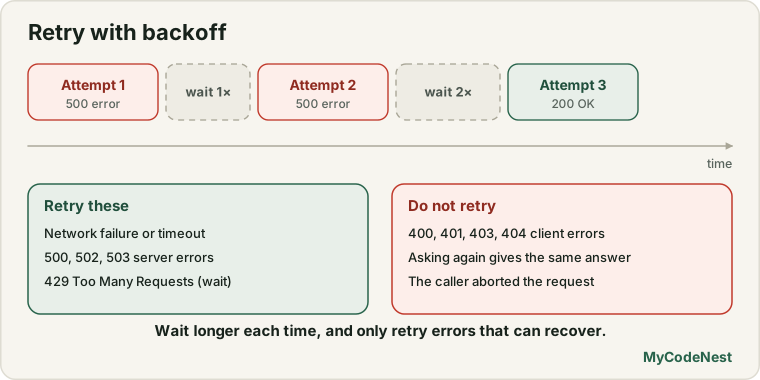
The loop tries up to retries + 1 times. After a failure, it waits and tries again. The wait doubles each time: retryDelay * 2 ** attempt gives 300 ms, then 600 ms, and so on. This is called exponential backoff, and it gives a struggling server time to recover instead of hammering it.
In our test, a server that failed the first two requests with 500 and then recovered gave the right answer on the third request, and the code never showed an error to the user.
What to retry, and what not to
isRetryable decides:
| Failure | Retry? | Why |
|---|---|---|
| Network failure or timeout | Yes | Probably temporary |
500, 502, 503 (server errors) |
Yes | The server may recover |
429 Too Many Requests |
Yes, after waiting | The server asks you to slow down |
400, 401, 403, 404 (client errors) |
No | Asking again gives the same answer |
| The caller aborted | No | The user does not want it any more |
We tested the 404 case: there was one request and the error was thrown immediately, with no retry. We also tested cancelling while waiting between retries: the helper stopped at once with an AbortError. That is the job of the signal we pass to sleep.
Important: this helper is only for reading (
GET). Never retryPOSTrequests blindly. If the server created your item but the answer got lost, a retry would create a second item. Retrying a write is only safe when the server supports an idempotency key or the operation is idempotent, such asPUTorDELETE. Keep the simplerequesthelper from the CRUD lesson for writes.
Problem 3: simple caching
If the user goes to page 2 and back to page 1, why ask the server for page 1 again? cachedFetchJson remembers each answer in a Map, keyed by URL, for 30 seconds. We tested it: asking for the same URL twice produced one request, and after clearCache() a new request was made.
This is a very small cache, and you should know its limits:
- Two components asking for the same URL at the same moment still send two requests (no sharing of requests in progress).
- Nothing is ever removed, so memory grows.
- After you change data (create, update, delete), the cached copy is stale and you must clear it yourself.
These are the reasons data-fetching libraries exist. The next lesson shows one. For now, the small cache teaches the idea.
The hook: useApi
Now a Hook that uses the helper, like useFetch from the last lesson, with one new feature: it keeps the previous data while a new request is loading. Create src/hooks/useApi.js:
import { useState, useEffect } from 'react';
import { cachedFetchJson } from '../api/http.js';

export function useApi(url) {
  const [attempt, setAttempt] = useState(0);
  const [result, setResult] = useState({ key: null, status: "loading", data: null, error: null });
  const key = url + "#" + attempt;

  useEffect(() => {
    const controller = new AbortController();

    cachedFetchJson(url, { signal: controller.signal })
      .then((data) => setResult({ key, status: "success", data, error: null }))
      .catch((error) => {
        if (error.name === "AbortError") {
          return;
        }
        setResult((current) => ({ key, status: "error", data: current.data, error }));
      });

    return () => controller.abort();
  }, [url, key]);

  function retry() {
    setAttempt((n) => n + 1);
  }

  const isCurrent = result.key === key;

  return {
    status: isCurrent ? result.status : "loading",
    data: result.data,
    error: isCurrent ? result.error : null,
    isStale: !isCurrent && result.data !== null,
    retry,
  };
}
What is different from useFetch:
- It calls
cachedFetchJson, so it gets retries, a timeout and the cache for free. datais always the latest data we have, even when it belongs to the previous URL. While page 2 loads,datastill holds page 1.isStaleistruein that situation: “we are loading, and what you see is old.” The component can use it to dim the old content instead of replacing it with a blankLoading.... This is the stale-while-loading pattern, and it makes pagination feel smooth.
Problem 4: pagination and search
Create src/components/ProductExplorer.jsx:
import { useState } from 'react';
import { useApi } from '../hooks/useApi.js';
import { useDebounce } from '../hooks/useDebounce.js';

const BASE_URL = "https://dummyjson.com";
const PAGE_SIZE = 10;

function ProductExplorer() {
  const [query, setQuery] = useState("");
  const [page, setPage] = useState(1);
  const debouncedQuery = useDebounce(query.trim(), 300);

  const skip = (page - 1) * PAGE_SIZE;
  const params = `limit=${PAGE_SIZE}&skip=${skip}&select=title,price`;
  const url = debouncedQuery
    ? `${BASE_URL}/products/search?q=${encodeURIComponent(debouncedQuery)}&${params}`
    : `${BASE_URL}/products?${params}`;

  const { status, data, error, isStale, retry } = useApi(url);

  const totalPages = data ? Math.max(1, Math.ceil(data.total / PAGE_SIZE)) : 1;

  function handleQueryChange(event) {
    setQuery(event.target.value);
    setPage(1);
  }

  return (
    <section>
      <label htmlFor="search">Search products</label>
      <input id="search" type="search" value={query} onChange={handleQueryChange} />

      {status === "error" ? (
        <div role="alert">
          <p>Could not load products: {error.message}</p>
          <button onClick={retry}>Try again</button>
        </div>
      ) : data === null ? (
        <p>Loading products...</p>
      ) : data.products.length === 0 ? (
        <p>No products found.</p>
      ) : (
        <ul aria-busy={status === "loading"} style={{ opacity: isStale ? 0.5 : 1 }}>
          {data.products.map((product) => (
            <li key={product.id}>
              {product.title} - ${product.price}
            </li>
          ))}
        </ul>
      )}

      <nav aria-label="Pagination">
        <button onClick={() => setPage((p) => p - 1)} disabled={page <= 1}>
          Previous
        </button>
        <span>Page {page} of {totalPages}</span>
        <button onClick={() => setPage((p) => p + 1)} disabled={page >= totalPages}>
          Next
        </button>
      </nav>
    </section>
  );
}

export default ProductExplorer;
Replace src/App.jsx with:
import ProductExplorer from './components/ProductExplorer.jsx';

function App() {
  return (
    <main>
      <h1>Products</h1>
      <ProductExplorer />
    </main>
  );
}

export default App;
How pagination works
pageis state.skipis calculated: page 1 skips 0, page 2 skips 10, page 3 skips 20.- The URL is built from the state, so changing the page changes the URL, which makes
useApifetch the new page. This is the derived data idea again: the request is a function of the state. totalPagescomes from the server’stotal:Math.ceil(total / PAGE_SIZE). With 194 items and 10 per page, that is 20 pages.- Previous is disabled on page 1, and Next is disabled on the last page. We tested both limits against a server with 53 products: it showed
Page 1 of 6, and on page 6 the Next button was disabled. - The
setPage((p) => p + 1)uses the updater form, so quick clicks add up correctly.
How the search works
queryis what the user types.debouncedQueryis the same text, but it only updates 300 ms after the user stops typing, thanks to theuseDebounceHook you built earlier. The request usesdebouncedQuery, so typing does not send one request per letter.- We typed
l,la,lapquickly. Only one search request was sent (forlap), instead of three. - The text goes through
encodeURIComponentbefore it enters the URL. This is essential: a user can type spaces,&or#, which would break or change your URL. (You can also build query strings withURLSearchParams.) - When the text changes,
handleQueryChangealso callssetPage(1). A new search should start on the first page. We do this in the event handler, not in an Effect, following the “you might not need an Effect” lesson.
Stale while loading
Click Next. For a moment, the old list stays on screen at half opacity (isStale), and the list has aria-busy="true" so assistive technology knows it is updating. Then the new page replaces it. In our test, the old items stayed visible during the request, and the new ones replaced them right after. Compare this with showing Loading... and an empty page for every click: that flashes and feels slow.
The component handles all the states in a chain of conditions: error first, then the very first load (data === null), then an empty result, then the list. Notice that if an error happens on page 3, we show the error, not the old data from page 2, because status === "error" is checked first.
Race protection in action
Imagine the user clicks Next twice quickly, with page 2 answering slowly and page 3 answering fast. We tested exactly that. The page ended on page 3, and the slow answer for page 2 never replaced it, because the Effect cleanup aborted the request for page 2 when the URL changed to page 3.
Caching in action
Go to page 2, then click Previous. Page 1 appears at once, with no new request, because cachedFetchJson still has it. We counted requests: page 1, page 2, and back to page 1 made only two network requests.
Showing loading well
A few small habits make loading feel better:
- Keep old content visible while new content loads (the
isStalepattern). - Use
aria-busy(and, for important messages,role="status"orrole="alert") so screen reader users know what is happening. - Show a retry button on errors, and a friendly message.
- For the first load, a skeleton (grey boxes that look like the content) can be nicer than text. It is optional.
Common mistakes
1. Not cancelling or ignoring old requests. Race conditions show wrong data, and they are hard to reproduce.
2. No timeout. The user waits forever on a hanging connection.
3. Retrying everything. Do not retry 400, 401, 403 or 404. Do not retry a POST blindly.
4. Retrying without waiting. Instant retries can overload a struggling server. Use backoff.
5. Forgetting encodeURIComponent for text typed by the user.
6. Searching on every keystroke. Debounce the input.
7. Forgetting to reset to page 1 when the search or a filter changes.
8. Not handling the last page. Always disable Next when page >= totalPages.
9. Blanking the list while loading the next page. Keep the old data and dim it.
10. Caching without invalidation. After you change data, the cached copy is stale. Clear it, or use a library.
Practice
- Build
http.js,useApi.jsandProductExplorer.jsxand use the app. Watch the Network tab while you click Next, Previous and Next again. How many requests are made? - Predict, then check: Type
phonequickly into the search box. How many search requests do you expect to see in the Network tab? Test it, then change the debounce delay to1000and compare. - In DevTools, throttle the network to Slow 3G and click Next quickly three times. Does the page ever show the wrong page of data?
- Add a page size
select(5, 10, 20). What must change in the URL and intotalPages? Does the page need to reset to 1? - Debug: A learner’s app crashes with
Cannot read properties of null (reading 'products')on the first load. Which check inProductExplorerprevents this, and what isdatabefore the first answer arrives? - Use the browser’s Offline setting. What does the user see? How long does it take, given the retries and the delay? Calculate the total waiting time for
retries = 2andretryDelay = 300. - Add a
console.log("fetching", url)tofetchJsonand click around. Use it to confirm that cached pages do not cause new requests, and that an aborted request still starts (and is then cancelled). - Think: Why is it dangerous to put
POSTrequests throughfetchJsonwith retries? Describe the exact situation in which the user ends up with two orders.
Recap
- Prevent race conditions by aborting the old request in the Effect cleanup. An
AbortControlleralso saves bandwidth. - Use
AbortSignal.timeoutso requests cannot hang forever, andAbortSignal.anyto combine it with the caller’s signal. - Retry network errors, timeouts,
5xxand429, with exponential backoff. Never retry4xxerrors, and never blindly retryPOST. - Use
limitandskipfor pagination, and calculatetotalPagesfromtotal. Disable Previous and Next at the ends. - Debounce search input, wrap user text in
encodeURIComponent, and reset to page 1 when the query changes. - Keep the previous data while the next page loads (
isStale) instead of blanking the screen. - A small
Mapcache makes revisiting pages instant, but it needs invalidation and does not share in-flight requests. - Next you will learn a library that does caching, sharing, retries and refreshing for you: TanStack Query.
Frequently asked questions
What is a race condition in data fetching?
It happens when two requests are in flight and the older one finishes last, so its answer overwrites the newer one. Cancelling the old request with AbortController in the Effect cleanup makes sure only the current request can update the screen.
Which errors should I retry?
Retry temporary problems: network failures, timeouts, 5xx server errors and 429 Too Many Requests. Do not retry 4xx errors such as 400, 401, 403 and 404, because asking again gives the same answer. Always wait between retries, and use a limited number of attempts.
Why is retrying a POST request dangerous?
If the server received your first POST and created the item, but the response was lost, a retry creates a second item. Safe retries for writes need an idempotency key or an idempotent operation. Reads (GET) are safe to retry.
What is exponential backoff?
It is a retry strategy where the wait time doubles after every failure: for example 300 ms, 600 ms, 1200 ms. It gives an overloaded server time to recover and avoids many clients hammering it at the same moment.
How do I know how many pages there are?
Most paginated APIs return the total number of items (here total). Divide it by the page size and round up: Math.ceil(total / PAGE_SIZE). Some APIs return a next link or a hasMore flag instead.
Should I build my own cache?
A tiny cache is good for learning. For real apps, use a library such as TanStack Query (next lesson), which handles shared requests, expiry, refreshing and invalidation correctly, so you do not have to.
See also: Fetch Data in React, CRUD with APIs, Custom Hooks, JavaScript Debounce and Throttle