React Security Fundamentals: XSS, Unsafe HTML and Exposed Secrets
Learn the basics of React security: how XSS works, why dangerouslySetInnerHTML is risky, unsafe URLs, why Vite env variables are public, and safe token storage.
What you will learn
Security can feel scary, but the most common frontend problems come from just a few mistakes, and React already protects you from many of them. This lesson teaches the basics that every React developer must know:
- XSS (cross-site scripting): what it is, why React is mostly safe, and the exact places where it is not.
- Unsafe HTML and unsafe URLs, and how to handle them.
- Why secrets must never go in your React code, and how Vite environment variables really work.
- Where to keep login tokens, in simple terms.
- Dependencies, and a short list of other good habits.
There is no new library to learn here, and the mistakes are easy to avoid once you know them.
The most important rule
Everything in the browser belongs to the user, not to you.
The user can open DevTools, read all your JavaScript, change variables, edit the page, and send any request they like. So:
| Think of the browser as… | Which means… |
|---|---|
| Public | Never put secrets in your frontend code. |
| Changeable by the user | Never trust checks done only in the browser (guards, form validation, hidden buttons). The server must check again. |
| A place where other people’s text appears | Treat everything typed by users (comments, names, URLs) as untrusted. |
You met the second point in the protected routes lesson. This lesson covers the other two.
Cross-site scripting (XSS)
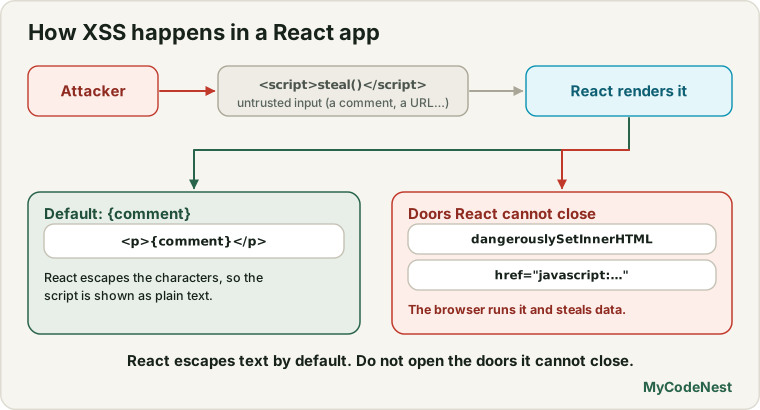
XSS happens when an attacker gets their JavaScript to run on your page. Imagine a comment box on your site. An attacker posts this as a “comment”:
<img src="x" onerror="stealYourLoginToken()">If your page puts that text into the HTML as markup, the browser creates a real <img> element, the image fails to load, and the onerror code runs, with all the power of your site: it can read the user’s data, send requests as the user, and change the page. That is XSS. Every visitor who sees the comment is affected.
React protects you by default
Here is the good news. When you put a value in JSX with curly braces, React escapes it: special characters such as < and > are turned into harmless text. We tested this with the attacker’s text:
const evil = '<img src="x" onerror="alert(1)"><b>bold</b>';

function Comment() {
  return <div>{evil}</div>;
}
The result in the page is the text <img src="x" onerror="alert(1)"><b>bold</b>, shown literally. No <img> element was created at all. (In our test, the number of image elements was 0.) This is why React apps are much safer than pages built by gluing strings together with innerHTML. You learned in the JSX lesson that “React escapes values”. Now you know why that matters.
The doors React cannot close
React cannot protect you when you open a door for raw HTML or code. Here are the dangerous ones:
| Danger | Why | Safer way |
|---|---|---|
dangerouslySetInnerHTML |
Inserts a string as real HTML | Do not use it for untrusted text. If you must, sanitize first |
element.innerHTML = ... on a ref |
The same problem, without React’s help | Use JSX, or textContent |
href or src taken from user input |
javascript: URLs can run code |
Allow only http: and https: |
eval() and new Function() |
Runs any string as code | Never use them with user data |
| Third-party scripts and widgets | They run with full power on your page | Only add trusted ones |
Let us look at the two you will meet most.
dangerouslySetInnerHTML
React gives this prop a scary name on purpose. It inserts a string as real HTML:
function Comment({ html }) {
  return <div dangerouslySetInnerHTML={{ __html: html }} />;
}
With the attacker’s text, our test showed:
Escaped (normal JSX):            0 <img> elements created
dangerouslySetInnerHTML:         1 <img> element created, with the onerror attribute present
The attacker’s code is now live in your page. (In a real browser, the onerror code would run as soon as the broken image failed to load.)
You sometimes need real HTML, for example for a blog post written in a rich text editor. In that case, sanitize the HTML first. A sanitizer removes everything dangerous and keeps the safe tags. The most widely used library is DOMPurify:
npm install dompurifyimport DOMPurify from 'dompurify';
function Comment({ html }) {
const clean = DOMPurify.sanitize(html);
return <div dangerouslySetInnerHTML={{ __html: clean }} />;
}We tested it with the same attacker text. The result was <img src="x"><b>bold</b>. The onerror attribute was removed, and the harmless <b> stayed. DOMPurify is a third-party package, so check its documentation for the current version and options.
A few more rules:
- Sanitize on the way out (when you display), and keep the server in mind too: servers should also clean or reject dangerous content.
- If the content is plain text, do not use HTML at all. Use normal JSX curly braces.
- If you display Markdown, use a Markdown library that sanitizes, or pass its output through a sanitizer.
Unsafe URLs
Links and images can carry code in a special kind of address, a javascript: URL:
<a href="javascript:alert(1)">Click me</a>Clicking such a link used to run the code. This matters whenever the address comes from a user (a “website” field in a profile, a link in a comment). React 19 protects you here too. We tested it: React did not put the dangerous address into the page. It replaced it with a harmless stand-in that throws an error saying that React has blocked a javascript: URL. But you should not rely on the library alone. Check user-supplied URLs yourself and allow only safe protocols:
function safeUrl(value) {
  try {
    const url = new URL(value);
    return url.protocol === "https:" || url.protocol === "http:" ? url.href : null;
  } catch {
    return null;
  }
}
new URL(value) parses the address (see the URL lesson) and throws for text that is not an address. Then we accept only http: and https:. We tested it with these inputs:
| Input | safeUrl returns |
|---|---|
https://example.com/a?b=1 |
the address |
http://example.com |
the address |
javascript:alert(1) |
null |
data:text/html,<script>1</script> |
null |
not a url |
null |
Use it like this:
function Website({ value }) {
  const url = safeUrl(value);
  return url ? <a href={url}>Visit website</a> : <span>No website</span>;
}
When a link opens a new tab with target="_blank", also add rel="noopener noreferrer". Modern browsers already treat _blank safely, but the attribute is a good habit that protects older browsers and avoids leaking the referring page.
Secrets do not belong in the frontend
This is the most common serious mistake of beginners: putting an API key or password into React code (or into a .env file), thinking it is hidden. It is not.
How Vite environment variables work
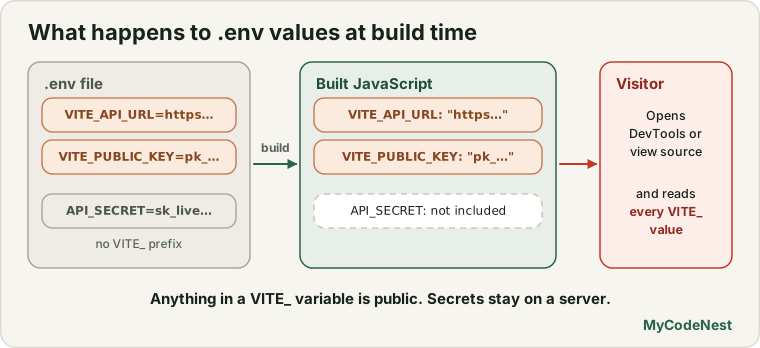
Vite lets you put settings in a file called .env in your project root:
VITE_API_URL=https://api.example.com
API_SECRET=sk_live_SUPER_SECRET
Vite has a strict rule: only variables whose names start with VITE_ are made available to your code, as import.meta.env.VITE_API_URL. The rule exists to stop you from exposing other variables by accident. But the variables that do start with VITE_ are copied into your JavaScript bundle, so they are public.
We tested this with a real build. We created a .env file with four variables, built the project, and searched the output JavaScript for each value:
| Variable | Is the value in the built JavaScript? |
|---|---|
VITE_API_URL |
Yes |
VITE_PUBLIC_KEY |
Yes |
VITE_LOCAL_ONLY (from .env.local) |
Yes |
API_SECRET (no VITE_ prefix) |
No |
DB_PASSWORD (no VITE_ prefix) |
No |
The built code literally contained a list with the names and the values of the three VITE_ variables, such as VITE_API_URL next to https://api.example.com. Anyone who opens your site can read them in the downloaded JavaScript (for example in the browser’s Network or Sources tab).
So there are two kinds of values:
| Kind | Examples | Can go in VITE_ variables? |
|---|---|---|
| Public configuration | The base URL of your API, a public analytics ID, a “publishable” key that the service designed for browsers | Yes |
| Secrets | Secret API keys, database passwords, private signing keys, admin tokens | Never |
The VITE_ prefix is a label for “this is safe to publish”. Never add VITE_ to a secret to make it “work”. If you do, you have published it.
What to do instead
If you need a secret to talk to a service, do not call that service directly from the browser. Call your own backend instead. The backend holds the secret, makes the request, and returns only the result. The browser never sees the key.
Wrong:   browser (has the secret key)  →  third-party service
Right:   browser  →  your backend (has the secret key)  →  third-party service
Keep your .env out of Git
Another fact from our test: the .gitignore that Vite creates ignores files that end in .local (such as .env.local), but it does not ignore a plain .env file. If you put sensitive values in .env and commit it, they go into your repository’s history for good. Habits that help:
- Put local, personal values in
.env.local(ignored by default), or add.envto.gitignoreyourself. - Commit a file like
.env.examplewith fake values, so teammates know which variables exist. - If a real secret was ever committed, change (rotate) it. Deleting the file later does not remove it from history.
Tokens and sessions: where to keep them
After a user logs in, your app needs a way to prove who they are on later requests. This is usually a session cookie or a token. Where you keep it matters. (The next lesson builds a full login. Here is the short overview.)
| Where | How JavaScript sees it | Main risk |
|---|---|---|
localStorage or sessionStorage |
Any script on the page can read it | An XSS attack can steal it and use it anywhere |
| In memory (a JavaScript variable or state) | Only your code | Lost on refresh, and still readable if XSS happens |
An HttpOnly cookie set by the server |
JavaScript cannot read it at all | The browser sends it automatically, so you need protection against CSRF (see below) |
For most apps, the safest simple choice is a session cookie that the server sets with the HttpOnly, Secure and SameSite attributes. HttpOnly means that even if an XSS bug exists, the script cannot read the cookie. If you must keep a token in the browser, know that localStorage is exposed to XSS, so everything in this lesson about preventing XSS becomes even more important.
CSRF (cross-site request forgery) is a related attack: because browsers send cookies automatically, another website could trick the browser into sending a request to your server with the user’s cookie. Servers defend with the SameSite cookie attribute and with special tokens. It is mainly the server’s job, but you should know that cookies need that protection.
CORS is often misunderstood. It is a browser rule that decides which websites may read responses from your API. It protects users, not your server. It does not stop anyone from calling your API with other tools. Your server must protect itself with authentication and authorization.
Dependencies are code you did not write
A typical React project has hundreds of packages in node_modules. Each one runs with the same power as your own code, so they are part of your security.
- Run
npm auditnow and then. It checks your installed packages against a list of known problems. After you install packages, a healthy project prints:found 0 vulnerabilities. (The command needs thepackage-lock.jsonthatnpm installcreates.) If it reports problems,npm audit fixcan update many of them safely. - Commit
package-lock.json, so everybody gets the same versions. - Install fewer packages, and think before adding one: is it well known, maintained and really needed? Be careful with packages whose names look like a popular one with a small typo.
- Keep packages updated, especially the ones that touch user input or HTML.
- Do not run commands from untrusted sources.
Other good habits
- Use HTTPS everywhere. Browsers also block many features on plain HTTP.
- Validate on the server. Browser validation (like your forms) is for helping users. The server must check everything again.
- Do not log secrets or personal data with
console.log. The console is visible to the user, and sometimes to monitoring tools. - Show safe error messages.
Could not log inis better than a long technical message that reveals how your system works. - Add a Content Security Policy (CSP). This is a setting (usually an HTTP header set by your host) that tells the browser which scripts it may run. If an XSS bug slips through, a strict CSP can still stop the attack. It is an extra layer, not a replacement for clean code.
- Keep third-party scripts to a minimum, such as ad and tracking scripts. They run with full power on your pages.
- Ask for the least access you need. Give users, tokens and keys only the permissions they must have.
A short checklist
Before you publish, ask:
- Does any user text reach
dangerouslySetInnerHTML,innerHTMLoreval? If yes, is it sanitized? - Do user-supplied URLs go through a check that allows only
http:andhttps:? - Is any real secret in my code, my
VITE_variables or a committed.env? - Does my server check login and permissions on every request, and not just my routes?
- Where is my login token kept, and what happens if XSS occurs?
- Did I run
npm audit, and am I using as few packages as possible?
Common mistakes
1. Using dangerouslySetInnerHTML with user text. The classic XSS door. Use normal JSX, or sanitize first.
2. Using innerHTML through refs. It bypasses React’s protection.
3. Putting secrets in VITE_ variables. They are published in your JavaScript.
4. Committing .env. The Vite template does not ignore it. Use .env.local or fix .gitignore.
5. Trusting a user’s URL. Allow only http: and https:.
6. Trusting browser-side checks. Route guards, hidden buttons and form validation can all be bypassed. The server must enforce rules.
7. Storing long-lived tokens in localStorage without understanding that XSS can read them.
8. Believing CORS protects your API. It controls browsers, not other clients.
9. Never updating packages. Old versions collect known vulnerabilities.
10. Logging sensitive data. Tokens and personal data do not belong in console.log.
Practice
- Render the attacker text
<img src="x" onerror="alert(1)"><b>bold</b>once with normal JSX curly braces and once withdangerouslySetInnerHTML. Open DevTools Elements and compare. How many<img>elements exist in each case? - Predict, then check: Sanitize the same text with DOMPurify before using
dangerouslySetInnerHTML. What does the HTML look like now? Which attribute disappeared? - Write the
safeUrlfunction and test it with five addresses: two good ones (https://...),javascript:alert(1),not a url, and an address with spaces. What does each return? - Create a
.env.localfile withVITE_API_URL=https://api.example.comandAPI_SECRET=abc123. Print both withimport.meta.env. Runnpm run build. Open the file indist/assetsand search forabc123andapi.example.com. What do you find? - Debug: A learner stored
VITE_STRIPE_SECRET_KEYin their.envfile so their React app could call a payment service. What is wrong, and what should they build instead? - Debug: A profile page has
<a href={user.website}>. A user sets their website tojavascript:alert(document.cookie). What protections exist, and what should you add yourself? - Run
npm auditin your project. What does it say? Find out whatnpm audit fixwould do, without running it, by reading the message. - Think: List two things that an
HttpOnlycookie protects against, and one thing it does not protect against, compared with keeping a token inlocalStorage.
Recap
- The browser is public and changeable by the user. Never put secrets in it, and never trust checks done only there.
- XSS is an attacker’s script running on your page. React escapes JSX values, so normal JSX is safe.
- The dangerous doors:
dangerouslySetInnerHTML,innerHTML, user-controlledhref/src,eval, and third-party scripts. - If you must show HTML, sanitize it with DOMPurify. For URLs, allow only
http:andhttps:. React 19 blocksjavascript:URLs, but do not rely on that alone. - Vite
VITE_variables are public: they are copied into your bundle. Variables without the prefix are left out. Never put secrets in the frontend. Call your own backend, which holds the secret. - The Vite template ignores
*.localbut not.env. Use.env.local, and never commit secrets. - Prefer
HttpOnlycookies for sessions.localStoragetokens are exposed to XSS. CORS does not protect your API. - Run
npm audit, commit the lockfile, and install fewer packages. - Next you will build a real login system and learn the difference between authentication and authorization.
Frequently asked questions
Is React safe from XSS?
React is safe by default for normal JSX, because it escapes values before inserting them in the page. It is not safe when you bypass it, for example with dangerouslySetInnerHTML, innerHTML, eval, unchecked javascript: URLs, or unsafe third-party scripts. The safety depends on avoiding those doors.
When can I use dangerouslySetInnerHTML?
When you really need to display HTML, such as a rich-text article, and you have sanitized it first with a library like DOMPurify. For plain text, use normal JSX instead. The name is a warning that you are responsible for the safety of the HTML.
Are .env variables secret in Vite?
Variables that start with VITE_ are copied into your JavaScript bundle, so they are public. Variables without the prefix are not exposed to your code, but you still should not rely on a frontend project for secrets. Keep real secrets on a server.
Where should I store my login token?
The safest common choice is a session cookie set by the server with HttpOnly, Secure and SameSite, because JavaScript cannot read it. Tokens in localStorage can be stolen by an XSS attack. If you must keep a token in the browser, limit its lifetime and work hard to prevent XSS.
Does CORS protect my API?
No. CORS is a browser rule that decides which websites may read your API’s responses in a browser. Any other client, such as a script or a command-line tool, ignores it. Your API must protect itself with authentication, authorization and validation.
What does npm audit do?
It checks the packages in your lockfile against a database of known security problems and reports any that affect your project, with their severity. npm audit fix tries to update the affected packages safely. Running it regularly is a simple and effective habit.
See also: Protected Routes, JSX in React, JavaScript URL and URLSearchParams, JavaScript Browser Storage