useRef in React: Refs, Focus and the DOM
Learn useRef: store values without re-rendering, focus inputs, use ref as a prop in React 19, ref callbacks, and stable ids with useId.
What you will learn
React wants you to describe the UI with state, and let React handle the DOM. But sometimes you need to step outside that: put the cursor in an input, remember a timer id, or measure an element. For these jobs, React gives you an escape hatch: refs.
In this lesson you will learn what useRef is and how it differs from state, the two main uses (a box for values and access to DOM elements), the React 19 way to pass a ref to your own components, ref callbacks, and the useId Hook for generating stable, unique ids for labels and form fields.
You should know useState and useEffect.
What is a ref?
A ref is a plain object with one property, current:
{ current: 0 }You create it with useRef:
import { useRef } from 'react';

const clicks = useRef(0);   // { current: 0 }
It is like a box attached to your component. React remembers the same box between renders, so what you put in it survives. But there is one crucial difference from state:
Changing
ref.currentdoes not cause a re-render.
State (useState) |
Ref (useRef) |
|
|---|---|---|
| Remembered between renders | Yes | Yes |
| Changing it re-renders the component | Yes | No |
| How you change it | Setter function | Just assign: ref.current = 5 |
| Use it for | Anything shown on screen | Things the screen does not depend on |
A ref does not update the screen
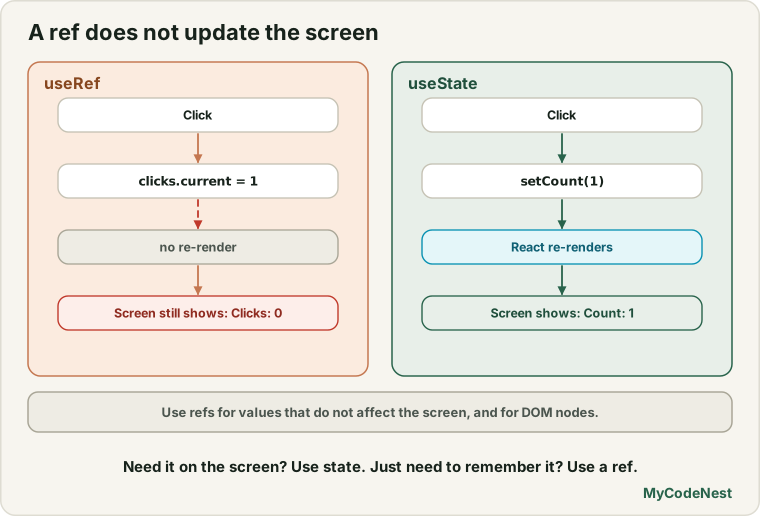
Let us prove it. This component counts clicks in a ref and also tries to show the number:
import { useRef } from 'react';

function RefCounter() {
  const clicks = useRef(0);

  function handleClick() {
    clicks.current = clicks.current + 1;
    console.log("clicks = " + clicks.current);
  }

  return (
    <div>
      <button onClick={handleClick}>Click</button>
      <p>Shown: {clicks.current}</p>
    </div>
  );
}
Click three times. The console shows clicks = 1, clicks = 2, clicks = 3, but the page still says:
Shown: 0The value changed, but React did not re-render, so the screen was not updated. If something else makes the component render later (for example a state change), the page suddenly shows 2 or 3. In our test, after two ref changes the page showed 0, and after an unrelated re-render it showed 2.
This leads to the most important rule:
Do not use a ref for anything you display. If the screen needs it, use state. Refs are for values that the rendered output does not depend on.
Also, avoid reading or writing ref.current during rendering (in the middle of your component body). Do it in event handlers and Effects. That keeps your component pure, the rule from the rendering lesson.
Use 1: remembering values without re-rendering
The most common use is storing something that is not part of the UI, such as the id of a timer. A stopwatch needs setInterval to start and clearInterval to stop, so it must remember the id between clicks:
import { useState, useRef } from 'react';

function Stopwatch() {
  const [seconds, setSeconds] = useState(0);
  const intervalRef = useRef(null);

  function start() {
    if (intervalRef.current !== null) return;   // already running
    intervalRef.current = setInterval(() => {
      setSeconds((s) => s + 1);
    }, 1000);
  }

  function stop() {
    clearInterval(intervalRef.current);
    intervalRef.current = null;
  }

  return (
    <div>
      <p>{seconds} seconds</p>
      <button onClick={start}>Start</button>
      <button onClick={stop}>Stop</button>
    </div>
  );
}

export default Stopwatch;
How it works:
secondsis state, because the screen shows it.intervalRefis a ref, because the interval id is never displayed. Nobody needs a re-render when it changes.- Start saves the id. The check at the top ignores extra clicks, so two Start clicks cannot create two timers.
- Stop reads the id from the ref and clears the timer.
In a test, Start was clicked twice, the count rose normally, Stop stopped it, and no more ticks happened afterwards. Why not a normal variable like let id? Because a variable inside the component is created fresh on every render and would be lost. A ref survives.
Use 2: reaching a DOM element
The second use is to get the real DOM element. Give an element a ref prop, and React puts the element in ref.current after rendering:
import { useRef } from 'react';

function FocusForm() {
  const inputRef = useRef(null);

  function handleClick() {
    inputRef.current.focus();
  }

  return (
    <div>
      <input ref={inputRef} />
      <button onClick={handleClick}>Focus the input</button>
    </div>
  );
}

export default FocusForm;
Step by step:
useRef(null)creates{ current: null }.<input ref={inputRef} />tells React: “after you create this input, put the DOM element intoinputRef.current.”- In the click handler,
inputRef.currentis the real<input>element, so we call the normal DOM method.focus()on it.
Click the button, and the cursor jumps into the input. In our test, document.activeElement really was the input afterwards.
Use this for things that React props cannot express, such as:
.focus()and.select()on an input.scrollIntoView()to scroll to an element.play()and.pause()on a<video>or<audio>- measuring size with
.getBoundingClientRect()
inputRef.current is null until React has attached the element. That is why you use it in event handlers and Effects (which run after rendering), and not in the body of your component. For example, to focus an input when the component appears:
useEffect(() => {
  inputRef.current.focus();
}, []);
Do not change the DOM that React manages. Using a ref to read, focus or measure is fine. But if you change text or remove elements that React created, React’s picture of the page and the real page disagree, and you get errors.
Passing a ref to your own component (React 19)
You can put ref on a normal HTML element. What about your own component? In React 19, ref is just a normal prop for function components, so your component can receive it and pass it to an element inside:
function MyInput({ ref, label, ...props }) {
  return (
    <label>
      {label}
      <input ref={ref} {...props} />
    </label>
  );
}

function Form() {
  const nameRef = useRef(null);

  return (
    <div>
      <MyInput ref={nameRef} label="Name" />
      <button onClick={() => nameRef.current.focus()}>Focus</button>
    </div>
  );
}
MyInput takes ref from its props, like any other prop, and hands it to the real <input>. In our test, clicking the button focused the input, and React printed no warnings.
If you read older tutorials, you will see a wrapper called forwardRef, which was needed before React 19. It still works in existing code, but for new components you no longer need it. Just accept ref as a prop.
Ref callbacks and cleanup
Instead of a ref object, you can pass a function to ref. React calls it when the element is attached. In React 19, that function can return a cleanup function, which React calls when the element is removed:
function Box({ show }) {
  return show ? (
    <div
      ref={(node) => {
        console.log("attach " + node.tagName.toLowerCase());
        return () => console.log("detach");
      }}
    >
      Hi
    </div>
  ) : null;
}
When the box appears, the console shows attach div. When show becomes false, it shows detach. This is useful when each element needs setup and teardown, such as observing its size with a browser observer.
Creating stable ids with useId
Forms need id attributes so that <label htmlFor> can link to the right input. Hard-coding ids breaks when you use a component twice: two inputs would share the same id. Random numbers do not work either, because the id must be the same on every render.
useId creates a unique, stable id for each use:
import { useId } from 'react';

function LoginFields() {
  const emailId = useId();
  const passwordId = useId();

  return (
    <div>
      <label htmlFor={emailId}>Email</label>
      <input id={emailId} />

      <label htmlFor={passwordId}>Password</label>
      <input id={passwordId} type="password" />
    </div>
  );
}
We rendered two copies of this component. All four ids were different (they look like _r_0_, _r_1_, _r_2_, _r_3_ in React 19.3), and each label was linked to its own input. The exact format can change between React versions, so never depend on it. Treat it as an opaque unique string.
Two rules:
- Use
useIdfor accessibility attributes and form fields (htmlFor,aria-describedby). - Do not use it for list keys. Keys must come from your data.
Refs or state?
| You want to… | Use |
|---|---|
| Show a value on screen and update it | State |
| Remember a value (timer id, previous value) that does not affect the screen | Ref |
| Focus, scroll to, play or measure an element | Ref to the DOM element |
| Trigger a re-render when a value changes | State |
A ref is an escape hatch. Most of your components will never need one. Reach for state first.
Common mistakes
1. Showing a ref value on screen and expecting updates. {count.current} is only refreshed when something else re-renders. Use state for displayed values.
2. Reading or writing ref.current during rendering. Use handlers and Effects.
3. Using ref.current before it is attached. It is null during the first render. Use it in an Effect or event handler.
4. Changing DOM that React manages. Use refs to focus, scroll and measure, not to rewrite React’s elements.
5. Forgetting .current. inputRef.focus() is an error. Write inputRef.current.focus().
6. Using a normal variable instead of a ref for a timer id. A variable is reset on every render, so the id is lost.
7. Adding a ref to the dependency array. Refs do not trigger re-renders and are stable, so they do not belong in the array.
8. Using useId for list keys. Keys must come from your data.
Practice
-
Build the
RefCounterand watch the page and the console while you click. Then add a second button that doessetTick(t => t + 1)(withuseState) and see when the displayed number updates. -
Predict, then check: In the
RefCounter, what does the page show after three clicks? What changes after you click the unrelated re-render button? -
Build the
Stopwatchwith Start and Stop. Add a Reset button that stops the timer and sets the seconds to0. -
Build a form with a text input and a button Focus the input. Then make the input focus automatically when the page loads, using an Effect and a ref.
-
Debug: The button does nothing and the console shows an error. Fix it.
const inputRef = useRef(null); <button onClick={() => inputRef.focus()}>Focus</button> -
Create a
MyInputcomponent that acceptsrefas a prop and passes it to an<input>. Use it in a parent and focus it with a button. -
Build a
SignupFieldscomponent withuseIdfor an email and a password field. Render it twice on the same page and check in DevTools that all four ids are different. -
Think: You want to remember the previous value of a prop so you can show “was 5, now 8”. Would you use state or a ref? Explain why, and say when the ref is updated.
Recap
- A ref is
{ current: value }, kept between renders. Changing it does not re-render. - Use refs for values the screen does not show: timer ids, previous values, flags.
- Attach a ref to an element with
ref={myRef}to reach the DOM forfocus(),scrollIntoView(),play()and measuring.currentisnulluntil React attaches it. - Read and write refs in event handlers and Effects, not during rendering.
- In React 19,
refis a normal prop for function components. You no longer needforwardReffor new code. - Ref callbacks can return a cleanup function in React 19.
useIdgives unique, stable ids for labels and ARIA attributes. Never use it for keys.- Refs are an escape hatch. Use state first.
- Next you will learn
useReducer, a cleaner way to manage state with many actions.
Frequently asked questions
What is the difference between useRef and useState?
Both keep a value between renders. Changing state re-renders the component, so state is for values shown on screen. Changing a ref’s current does not re-render, so a ref is for values that the screen does not depend on, and for reaching DOM elements.
Why is ref.current null at first?
React attaches the DOM element after it has rendered and updated the screen. During the first render the element does not exist yet. Read ref.current in an event handler or an Effect, which run later.
Do I still need forwardRef in React 19?
Not for new code. Function components can receive ref as a normal prop and pass it on. forwardRef is still supported in existing code, but you can leave it out when writing new components.
Can I use a ref to change the text of an element?
You can, but you should not for elements that React renders, because React will not know about the change and may overwrite it or get confused. Change what is shown through state and let React update the DOM. Use refs for actions like focusing or measuring.
Should a ref be in a dependency array?
No. A ref object is stable, and changing current does not trigger anything, so it does not belong in the array of an Effect.
What is useId for?
It generates a unique, stable id string for each place you call it, so you can link labels to inputs and use ARIA attributes even when the same component is shown many times. It is not meant for list keys.
See also: useState in React, useEffect Basics, HTML Forms Basics, JavaScript DOM Introduction