Code Splitting in React with lazy() and Suspense
Master code splitting in React using lazy() and Suspense: reduce bundle size, load route and heavy components on demand, and measure bundle savings.
What you will learn
When you build a React single-page application with Vite, all your components, utilities, and packages are typically bundled into one or two large JavaScript files. As your app grows—adding rich text editors, charts, admin panels, and multi-page routing—the initial download size expands, causing slower page loads and higher First Contentful Paint times for mobile users.
In The use API and Suspense for Data, you saw how <Suspense> handles loading fallbacks for async data.
In this lesson, you will learn how to use <Suspense> for code:
- What code splitting is and how dynamic imports work in JavaScript.
- How to load components on demand using
React.lazy(). - How to implement route-based code splitting with React Router.
- How to lazy-load heavy non-critical UI (like markdown editors, modal dialogues, or charting libraries).
- How to avoid layout shifts using skeleton fallbacks and verify bundle splits in Vite’s build output.
What is Code Splitting?
In a standard Vite React build, an import statement at the top of a file is static:
// Static import: Included in the main bundle from day one
import HeavyChart from './HeavyChart.jsx';
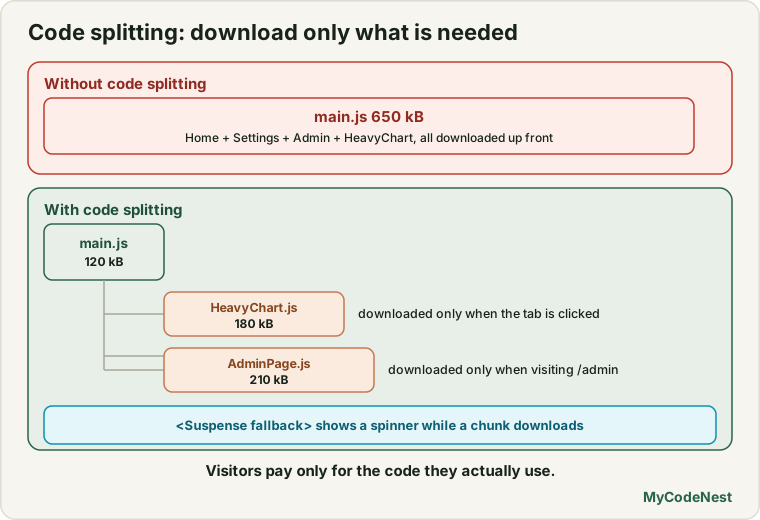
Even if HeavyChart is only rendered when a user clicks a “View Analytics” tab, every visitor still downloads the entire chart library code on their very first visit to your homepage.
Code splitting is the practice of splitting that single monolithic bundle into multiple smaller chunks that are downloaded only when requested:
Dynamic Imports in JavaScript
Code splitting relies on JavaScript’s native dynamic import() statement. Unlike static imports, import() returns a Promise that resolves to the module:
// Dynamic import returns a promise
import('./utils/math.js').then((math) => {
  console.log(math.add(5, 10));
});
Modern bundlers like Vite (powered by Rolldown and Oxc) automatically recognize dynamic import() calls and create a separate JavaScript file (chunk) in the dist/ directory.
Component Code Splitting with React.lazy()
React.lazy() takes a function that calls a dynamic import() and returns a React component that you can render like any other component:
import { lazy, Suspense, useState } from 'react';

// 1. Define the lazy-loaded component
const HeavyMarkdownEditor = lazy(() => import('./HeavyMarkdownEditor.jsx'));

export function PostEditor() {
  const [showEditor, setShowEditor] = useState(false);

  return (
    <div className="editor-container">
      <h2>Write an Article</h2>

      {!showEditor ? (
        <button onClick={() => setShowEditor(true)} className="btn-open">
          Open Rich Editor
        </button>
      ) : (
        /* 2. Wrap the lazy component in a Suspense boundary */
        <Suspense fallback={<div className="editor-skeleton">Loading editor assets...</div>}>
          <HeavyMarkdownEditor />
        </Suspense>
      )}
    </div>
  );
}
How this works under the hood:
- When
showEditorisfalse, the browser has not downloadedHeavyMarkdownEditor.jsx. - When the user clicks “Open Rich Editor”, React attempts to render the lazy component.
- The dynamic import promise starts fetching the chunk over the network.
- Because the promise is pending, the
<Suspense>boundary catches it and displays the fallback (<div className="editor-skeleton">). - When the chunk arrives and executes, React swaps the fallback for the real
HeavyMarkdownEditor. - If the user closes and re-opens the editor, the chunk is already cached in memory, so it displays immediately without loading.
Route-Based Code Splitting
The most impactful place to introduce code splitting in any application is at the route level (building upon React Router Basics):
// AppRoutes.jsx
import { lazy, Suspense } from 'react';
import { Routes, Route } from 'react-router';
import Layout from './components/Layout.jsx';

// Core entry routes (frequently visited) can be static or lazy
const HomePage = lazy(() => import('./pages/HomePage.jsx'));
const NotesListPage = lazy(() => import('./pages/NotesListPage.jsx'));

// Heavy secondary routes should always be lazy
const AnalyticsDashboard = lazy(() => import('./pages/AnalyticsDashboard.jsx'));
const AccountSettings = lazy(() => import('./pages/AccountSettings.jsx'));

export function AppRoutes() {
  return (
    <Routes>
      <Route path="/" element={<Layout />}>
        <Route
          index
          element={
            <Suspense fallback={<PageSkeleton />}>
              <HomePage />
            </Suspense>
          }
        />
        <Route
          path="notes"
          element={
            <Suspense fallback={<PageSkeleton />}>
              <NotesListPage />
            </Suspense>
          }
        />
        <Route
          path="dashboard"
          element={
            <Suspense fallback={<PageSkeleton />}>
              <AnalyticsDashboard />
            </Suspense>
          }
        />
        <Route
          path="settings"
          element={
            <Suspense fallback={<PageSkeleton />}>
              <AccountSettings />
            </Suspense>
          }
        />
      </Route>
    </Routes>
  );
}

function PageSkeleton() {
  return (
    <div className="page-skeleton" aria-busy="true">
      <div className="skeleton-line title" />
      <div className="skeleton-line paragraph" />
      <div className="skeleton-line paragraph" />
    </div>
  );
}
Now, a user who only reads public notes never downloads the heavy analytics charting libraries or account settings code!
Best Practices for Fallback UIs
A poor fallback UI can cause annoying Cumulative Layout Shift (CLS), damaging user experience and Core Web Vitals. Follow these guidelines:
- Match Dimensions: Ensure your skeleton fallback occupies roughly the same height and width as the component it replaces.
- Prevent Content Jumping: If replacing a 400px chart, set your fallback to
style={{ minHeight: '400px' }}. - Use Meaningful Placeholders: Avoid full-screen blocking spinners when only a single widget on the page is loading. Keep the navigation and headers interactive.
Verifying Code Splitting in Vite
When you run npm run build in your project, Vite displays the output chunk breakdown.
Before code splitting:
dist/index.html                   0.82 kB
dist/assets/index-Bf92xla1.js   582.40 kB │ gzip: 168.12 kB
After route & component splitting:
dist/index.html                   0.82 kB
dist/assets/index-a92c10b1.js    84.10 kB │ gzip:  24.50 kB (Core shell)
dist/assets/Home-D190vla2.js     14.20 kB │ gzip:   4.10 kB (Home chunk)
dist/assets/Notes-X89110b3.js    28.50 kB │ gzip:   8.20 kB (Notes chunk)
dist/assets/Dashboard-Cc901.js  320.10 kB │ gzip:  89.40 kB (Charts chunk)
The initial bundle sent to new visitors dropped from 582 kB to 84 kB—an 85% reduction in initial payload!
Common mistakes
1. Declaring lazy() inside a component function
React.lazy() must be declared at the module level (outside of any component).
// Incorrect: Re-declares the lazy component on every render!
function BrokenPage() {
  const Modal = lazy(() => import('./Modal.jsx'));
  return <Suspense><Modal /></Suspense>;
}

// Correct: Declare once at top of file
const Modal = lazy(() => import('./Modal.jsx'));
function WorkingPage() {
  return <Suspense><Modal /></Suspense>;
}
2. Forgetting the <Suspense> wrapper
If a lazy component is rendered without a <Suspense> ancestor, React throws an uncaught error: A component suspended while rendering, but no fallback UI was specified.
3. Over-splitting tiny components
Do not lazy-load 5-line utility components or simple buttons (const Button = lazy(...)). The HTTP request overhead to fetch a 1 kB file is slower than including it in the parent bundle. Reserve code splitting for routes, rich editors, charts, and heavy interactive widgets.
Practice
- Inspect a multi-route app. Convert two non-essential routes (such as an “About” or “Terms” page) to use
React.lazy()with a<Suspense>fallback. - Run
npm run buildin your project and verify that Vite generated new separate.jsfiles for those routes. - Build a
LazyModalcomponent that only downloads the modal dialog code when the user clicks an “Open Settings” button. - Simulate a slow 3G network in Chrome DevTools (Network tab -> Slow 3G) and observe the
<Suspense>skeleton fallback as the chunk downloads. - Create an intentional network error by changing the import path to a non-existent file, and verify that an Error Boundary catches the load failure.
- Design a skeleton fallback that matches the exact layout of a card list to eliminate layout shifts during lazy loading.
Recap
- Code splitting divides large bundles into smaller on-demand chunks, dramatically reducing initial page load times.
React.lazy()dynamically imports a component when it is first rendered.- Lazy components must always be wrapped inside a
<Suspense fallback={...}>boundary. - The two highest-impact use cases for lazy loading are routes and heavy third-party libraries (charts, editors, date pickers).
- In the next lesson, you will learn how to keep interfaces smooth during intensive state updates using
useTransitionanduseDeferredValue.
Frequently asked questions
Does React.lazy work with named exports?
React.lazy() requires the module to have a default export (export default MyComponent). If your module uses a named export (export function MyComponent()), you can re-export it in the dynamic import: lazy(() => import('./MyComponent.js').then(module => ({ default: module.MyComponent }))).
What happens if the user's internet disconnects while downloading a lazy chunk?
The dynamic import promise rejects. You should wrap your lazy components with an Error Boundary so the user sees a friendly “Failed to load page. Check your connection” message with a retry button instead of a white screen.
Can I prefetch a lazy chunk before the user clicks?
Yes! You can trigger the dynamic import on hover: <button onMouseEnter={() => import('./HeavyModal.jsx')}>. By the time the user clicks, the chunk is already cached in browser memory.
Is code splitting supported during local development (Vite dev server)?
Yes. In development, Vite serves files as native ES modules, so dynamic imports fetch individual modules on demand just as they will in production.
Should I lazy load images with React.lazy?
No. React.lazy() is strictly for JavaScript components and code chunks. For images, use the native HTML browser attribute <img loading="lazy" />.
See also: The use API and Suspense for Data, React Router Basics, How React Renders