useEffect Cleanup and Dependency Arrays Explained
Learn useEffect cleanup, why StrictMode runs Effects twice, and how to fix stale closures, object dependencies and race conditions.
What you will learn
In the previous lesson your Effects changed the page title: something that needs no tidying up. But many Effects start something: a timer, an event listener, a connection to a server. If you never stop it, the timer keeps ticking after the component is gone, the listener stays attached, and you get bugs and memory leaks.
In this lesson you will learn how to write cleanup functions, why StrictMode runs your Effects twice (and why that is a gift), and how to avoid the three most common Effect bugs: stale values in a timer, objects as dependencies, and race conditions with slow responses.
The cleanup function
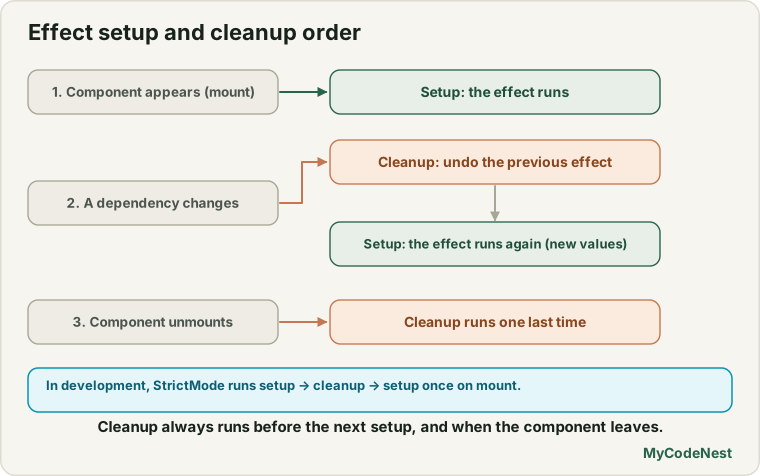
An Effect can return a function. React calls it a cleanup function, and calls it at two moments:
- Before the Effect runs again, to undo the previous run.
- When the component is removed from the screen (unmounted).
Here is a component that “connects” to a chat room. We log to the console so we can see exactly what React does:
import { useEffect } from 'react';

function ChatRoom({ roomId }) {
  useEffect(() => {
    console.log("connect " + roomId);

    return () => {
      console.log("disconnect " + roomId);
    };
  }, [roomId]);

  return <p>Room: {roomId}</p>;
}

export default ChatRoom;
What the console shows as the component lives its life:
connect general              ← component appears with roomId = "general"

disconnect general           ← roomId changes to "travel": clean up the old one...
connect travel               ← ...then start the new one

disconnect travel            ← component is removed from the screen
Notice the order when roomId changes: cleanup first (with the old value), then the Effect runs again with the new value. The cleanup always belongs to the previous run, so it can undo exactly what that run started.
The pairing rule: every Effect that starts something should return a cleanup that stops it. Subscribe and unsubscribe, connect and disconnect, start and clear.
Why StrictMode runs Effects twice
Remember <StrictMode> in main.jsx? In development, when a component first appears, React runs this sequence:
connect general        ← Effect runs
disconnect general     ← cleanup runs immediately (on purpose)
connect general        ← Effect runs again
We tested this with StrictMode turned on, and that is exactly what happened.
Why would React do such a strange thing? It is a test. React wants to check: “if this component is removed and shown again, does it still work?” That really happens in real apps, for example when the user navigates away and back, or when React reuses components in the future. If your Effect has a proper cleanup, the extra run changes nothing: it connects, disconnects, connects again, and the final state is correct. If you forgot the cleanup, you would end up with two connections and see it immediately.
So, when you see an Effect run twice in development:
- Do not remove
StrictMode, and do not add a hack to run once. - Do write the cleanup that makes the second run harmless.
This only happens in development. In the production build, the Effect runs once.
Cleanup examples
A timer
A clock that ticks every 10 milliseconds (we use a short time to test it quickly; in a real app it would be 1000):
import { useState, useEffect } from 'react';

function Clock() {
  const [seconds, setSeconds] = useState(0);

  useEffect(() => {
    const id = setInterval(() => {
      setSeconds((s) => s + 1);
    }, 1000);

    return () => clearInterval(id);
  }, []);

  return <p>Seconds: {seconds}</p>;
}
setInterval returns an id. The cleanup passes it to clearInterval. In our test, we removed the component and waited: no more ticks happened. Without the cleanup, the timer would keep running forever, and React would try to update a component that no longer exists.
An event listener on window
import { useEffect } from 'react';

function KeyLogger() {
  useEffect(() => {
    function handleKey(event) {
      console.log("key " + event.key);
    }

    window.addEventListener("keydown", handleKey);
    return () => window.removeEventListener("keydown", handleKey);
  }, []);

  return <p>Press a key</p>;
}
Press a and the console shows key a. After the component is removed, pressing b shows nothing, because the cleanup removed the listener. Note that removeEventListener needs the same function that was added, which is why we give the handler a name and keep it inside the Effect. (See the event listeners lesson.)
A summary of pairs
| The Effect starts… | The cleanup should… |
|---|---|
setInterval(...) |
clearInterval(id) |
setTimeout(...) |
clearTimeout(id) |
addEventListener(...) |
removeEventListener(...) |
| A subscription or connection | Unsubscribe or disconnect |
| A request whose answer might arrive too late | Ignore (or cancel) that answer (see below) |
Effects that only read or set something, like document.title, usually need no cleanup.
Bug 1: the stale value in a timer
Here is a timer that tries to count up, but uses the state directly:
function StaleTimer() {
  const [count, setCount] = useState(0);

  useEffect(() => {
    const id = setInterval(() => setCount(count + 1), 1000);
    return () => clearInterval(id);
  }, []);

  return <p>{count}</p>;
}
It shows 0, then 1, and then stays at 1 forever. In our test (with a fast 15 ms timer instead of 1000), after 120 ms the correct version had counted to 7 while this one still showed 1.
Why? The Effect runs once (the array is []), in the render where count is 0. The function inside setInterval remembers that old 0. Every tick, it calculates 0 + 1 and sets the state to 1. This is called a stale closure: a function holding on to an old value.
You also left count out of the array even though the Effect reads it. That broke the golden rule from the previous lesson.
There are two fixes:
Fix A: use the updater function. Do not read count at all. Say “add one to whatever the current value is”:
useEffect(() => {
  const id = setInterval(() => setCount((c) => c + 1), 1000);
  return () => clearInterval(id);
}, []);
Now the Effect does not use any reactive value, so [] is honest. This is the best fix. (You met updater functions in the state updating lesson.)
Fix B: list count in the array. Then the timer is stopped and restarted after every change. It works, but it is wasteful for a timer:
}, [count]);Bug 2: objects and functions as dependencies
React compares dependencies with Object.is. For numbers and strings, equal values are the same. But objects and functions you create inside the component are new on every render, so they are never equal to the previous one:
function ChatRoom({ roomId }) {
  const options = { roomId };            // a new object on every render

  useEffect(() => {
    console.log("effect runs");
  }, [options]);                          // so this runs after every render
  // ...
}
We re-rendered the component three times and the Effect ran three times, even though roomId never changed. The options object looked the same but was a different object each time.
The fix is to depend on the simple values, or to create the object inside the Effect:
useEffect(() => {
  const options = { roomId };            // created inside: not a dependency
  console.log("connect with", options);
}, [roomId]);                             // depends on the string only
Rule of thumb: prefer primitive dependencies (strings, numbers, booleans). If you need an object, create it inside the Effect.
Bug 3: the race condition
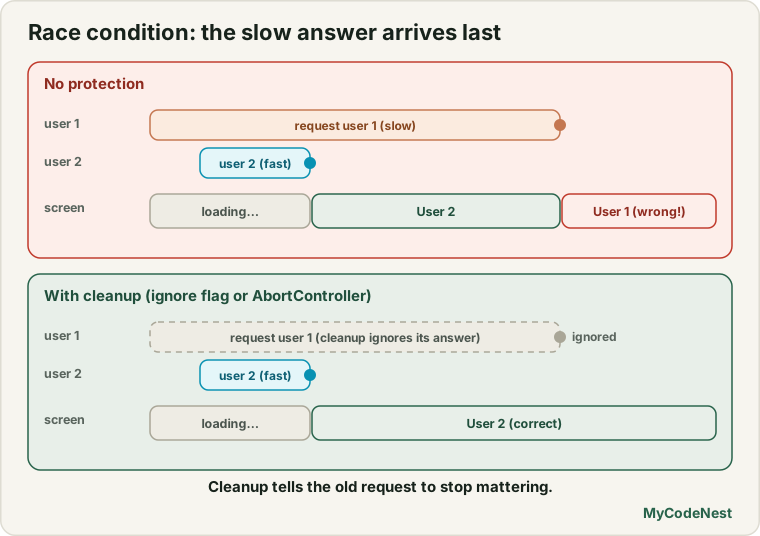
This bug appears when an Effect starts something asynchronous, such as asking a server for data. Imagine a profile page that loads a user when the id prop changes:
function Profile({ id }) {
  const [name, setName] = useState("loading");

  useEffect(() => {
    fetchUser(id).then((result) => setName(result));
  }, [id]);

  return <p>{name}</p>;
}(fetchUser stands for any function that returns a promise. In real apps it uses fetch, which you will learn soon.)
Now the user clicks quickly from user 1 to user 2. Suppose user 1’s answer is slow (60 ms) and user 2’s answer is fast (10 ms). In our test:
1. Request for user 1 starts (slow)
2. Request for user 2 starts (fast)
3. User 2's answer arrives  → page shows "User 2"
4. User 1's answer arrives  → page shows "User 1"   ← WRONG!
The final text was User 1, but the page is supposed to show user 2. The old, slower response arrived last and overwrote the newer one. Answers do not always arrive in the order you asked. This is a race condition, and it is one of the most common bugs in real apps.
The fix uses a cleanup function and a simple flag:
function Profile({ id }) {
  const [name, setName] = useState("loading");

  useEffect(() => {
    let ignore = false;
    setName("loading");

    fetchUser(id).then((result) => {
      if (!ignore) {
        setName(result);
      }
    });

    return () => {
      ignore = true;
    };
  }, [id]);

  return <p>{name}</p>;
}
How it works:
- Each run of the Effect has its own
ignorevariable, starting asfalse. - When
idchanges, React calls the cleanup of the previous run, which sets itsignoretotrue. - When user 1’s late answer finally arrives, that run’s
ignoreistrue, so it does nothing.
In our test, the page ended with User 2, the correct result. The same cleanup also protects you if the component is removed before the answer arrives.
The data-fetching lesson builds on this idea and also shows how to cancel the request itself with an AbortController (see the AbortController lesson).
One Effect, one job
Each Effect should synchronise one thing. If your component needs to set the title and also listen for key presses, write two Effects, each with its own dependencies and its own cleanup. Do not combine unrelated work into one. Separate Effects are easier to read, and each can re-run only when its own values change.
useEffect(() => {
  document.title = `(${remaining}) My Tasks`;
}, [remaining]);

useEffect(() => {
  function handleKey(event) { /* ... */ }
  window.addEventListener("keydown", handleKey);
  return () => window.removeEventListener("keydown", handleKey);
}, []);
Common mistakes
1. Starting something without cleaning it up. Timers, listeners and connections keep running after the component is gone. Always return a cleanup.
2. Removing StrictMode to avoid the double run. The double run is a test that finds missing cleanups. Fix the cleanup instead.
3. Using state directly inside a long-lived timer. The closure goes stale. Use the updater function, or list the value.
4. Putting an object or function that is created in the component into the array. The Effect re-runs every render. Use primitive values, or move the object inside the Effect.
5. Forgetting the race condition. Whenever an Effect starts async work that depends on props or state, ignore late answers.
6. A cleanup that does not match. removeEventListener with a different function does nothing. Keep the same function.
7. Using a cleanup to “undo” a state change. Cleanups are for stopping outside things, not for resetting state.
8. One giant Effect. Split unrelated work into separate Effects.
Practice
-
Build the
ChatRoomwithconsole.login the Effect and in the cleanup. ChangeroomIdfrom a button and read the order of the logs. -
Predict, then check: With
StrictModeinmain.jsx, what do you see in the console whenChatRoomfirst appears? Write your prediction before you test. -
Build a
Clockthat adds one every second usingsetInterval. Add aconsole.log("tick")inside the interval and a Remove clock button in the parent (using state and&&). Click the button and check in the console that the ticks stop. -
Build a component that listens for the
Escapekey onwindowand logsEscape pressed. Add the cleanup. Then remove the component and pressEscapeagain. -
Debug: This counter jumps to
1and stays there. Give two ways to fix it.useEffect(() => { const id = setInterval(() => setCount(count + 1), 1000); return () => clearInterval(id); }, []); -
Debug: An Effect that depends on
[options]runs after every render.optionsis{ roomId, serverUrl }created in the component. Rewrite it so it only runs whenroomIdorserverUrlchanges. -
Write an Effect that sets
document.titleto a custom text on mount and restores the old title in the cleanup. (Hint: readdocument.titlebefore you change it.) -
Think: A search page runs an Effect on every
querychange and calls a server. Explain a race condition that could show the results for the wrong search, and how anignoreflag prevents it.
Recap
- Return a cleanup function from an Effect to stop what it started:
clearInterval,removeEventListener, unsubscribe, disconnect. - React runs cleanup before the Effect re-runs (with the old values) and when the component is removed.
- In development,
StrictModeruns the Effect, its cleanup and the Effect again on mount. It is a test of your cleanup. Keep it on. - Stale closures: a long-lived function remembers old values. Use the updater function (
setCount((c) => c + 1)). - Objects and functions created in the component change every render. Prefer primitive dependencies, or create the object inside the Effect.
- Race conditions: use an
ignoreflag in the cleanup so a slow, old answer cannot overwrite a newer one. - One Effect should synchronise one thing.
- Next you will learn
useEffectEventand, more importantly, when you do not need an Effect at all.
Frequently asked questions
When does the cleanup function run?
React runs it before the Effect runs again, using the values from the previous render, and when the component is removed from the screen. It does not run when the Effect runs for the first time.
Why does my Effect run twice in development?
StrictMode mounts your component, runs its Effect, runs the cleanup, and runs the Effect again. It does this to prove that your Effect can be stopped and restarted without problems. If your Effect has a correct cleanup, nothing visible changes. In production it runs once.
Do all Effects need a cleanup?
No. Only Effects that start something that continues, such as timers, listeners, subscriptions or requests whose answers can arrive late. An Effect that just sets document.title does not need one.
What is a stale closure?
It is a function that kept the value of a variable from an older render. In a timer created with an empty dependency array, the callback always sees the first value of count. Using the updater form of the state setter avoids the problem.
What is a race condition in an Effect?
It happens when two asynchronous operations are in flight at the same time and the older one finishes last, overwriting the newer result. A cleanup that sets an ignore flag makes the old operation do nothing when it finishes.
Why can I not put an object in the dependency array?
You can, but an object created in the component body is a new object on every render, so React thinks it changed each time and re-runs the Effect. Depend on the primitive values inside it instead, or create the object inside the Effect.
See also: useEffect Basics, Updating State, JavaScript AbortController, JavaScript Event Listeners