Choosing State Structure: Derived Data and Single Source of Truth
Learn how to structure React state well: avoid contradictions, duplicates and redundant state, derive values during render, and keep props out of state.
What you will learn
You now know how to use state and where to put it. This lesson is about something that is harder to see but makes a huge difference: how to shape your state.
Many React bugs have one root cause: state that is designed badly. The screen shows sending and sent at the same time. A name is updated in one place but not in another. A value never changes after the parent changes a prop. In this lesson you will learn five simple rules that prevent these bugs. For each rule you will see the problem, the real result, and the fix.
You should know useState, updating state and lifting state up.
The goal
Keep your state small and simple, and describe the minimum that React needs to remember. Everything else can be calculated from it. The smaller and more honest your state, the fewer ways it can go wrong.
Rule 1: avoid contradictory state
Here is a form that tracks whether it is sending or has sent a message, with two booleans:
import { useState } from 'react';

function ContactForm() {
  const [isSending, setIsSending] = useState(false);
  const [isSent, setIsSent] = useState(false);

  function handleSend() {
    setIsSending(true);
    setIsSent(true);   // a mistake: both are true now
  }

  return (
    <div>
      <p>{isSending ? "sending" : ""} | {isSent ? "sent" : ""}</p>
      <button onClick={handleSend}>Send</button>
    </div>
  );
}
After one click, the page shows:
sending | sentThat is impossible in real life: a message cannot be both sending and already sent. Two booleans allow four combinations (false/false, true/false, false/true, true/true), but only three states make sense. Every extra combination is a bug waiting to happen, because it is easy to forget to turn one flag off when you turn another one on.
Fix: use one status variable that can only hold one value at a time:
import { useState } from 'react';

function ContactForm() {
  const [status, setStatus] = useState("typing");   // "typing", "sending" or "sent"

  return (
    <div>
      <p>{status}</p>
      <button onClick={() => setStatus("sending")}>Send</button>
      <button onClick={() => setStatus("sent")}>Finish</button>
    </div>
  );
}
The page starts with typing. Click Send and it shows sending. Click Finish and it shows sent. There is no way to be in two states at once. If you still like having isSending, calculate it:
const isSending = status === "sending";
const isSent = status === "sent";
Rule: if two pieces of state always change together or can never both be true, merge them into one.
Rule 2: avoid redundant state
If a value can be calculated from other state or props, do not store it in state. Here is a name form:
import { useState } from 'react';

function NameForm() {
  const [firstName, setFirstName] = useState("Aisha");
  const [lastName, setLastName] = useState("Khan");

  const fullName = firstName + " " + lastName;

  return (
    <div>
      <input value={firstName} onChange={(e) => setFirstName(e.target.value)} />
      <input value={lastName} onChange={(e) => setLastName(e.target.value)} />
      <p>{fullName}</p>
    </div>
  );
}
Change the first input to Ravi, and the page shows Ravi Khan. fullName is an ordinary variable, calculated again on every render. It is always correct because it can never be out of date.
The wrong way would be a third useState for fullName, which you would have to remember to update in two places. That is redundant state. You already saw this idea with the “tasks left” counter and the filtered list in the to-do project.
Rule: if you can calculate it during rendering, do not put it in state.
Rule 3: avoid duplicated state
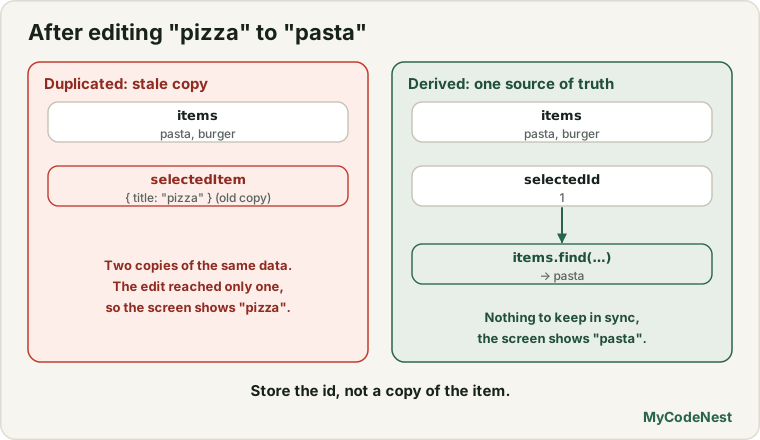
This rule is the one that causes the nastiest bugs. Imagine a list of snacks. The user can edit each name and choose one snack. A common first attempt stores the selected object in state:
import { useState } from 'react';

const initialItems = [
  { id: 1, title: "pizza" },
  { id: 2, title: "burger" },
];

function SnackList() {
  const [items, setItems] = useState(initialItems);
  const [selectedItem, setSelectedItem] = useState(items[0]);   // a copy of an item

  function handleChange(id, title) {
    setItems(items.map((item) => (item.id === id ? { ...item, title } : item)));
  }

  return (
    <div>
      {items.map((item) => (
        <div key={item.id}>
          <input value={item.title} onChange={(e) => handleChange(item.id, e.target.value)} />
          <button onClick={() => setSelectedItem(item)}>Choose</button>
        </div>
      ))}
      <p>You picked {selectedItem.title}.</p>
    </div>
  );
}
Choose the first snack, then edit its name to pasta. What you see:
[pasta] [Choose]
[burger] [Choose]
You picked pizza.
The input says pasta, but the message still says pizza. The same snack now exists in two places: inside items and as a separate copy in selectedItem. When you edit items, the copy does not change. This is duplicated state.
Fix: store only the id of the selected item, and look up the real object each time:
function SnackList() {
  const [items, setItems] = useState(initialItems);
  const [selectedId, setSelectedId] = useState(1);

  const selectedItem = items.find((item) => item.id === selectedId);

  function handleChange(id, title) {
    setItems(items.map((item) => (item.id === id ? { ...item, title } : item)));
  }

  return (
    <div>
      {items.map((item) => (
        <div key={item.id}>
          <input value={item.title} onChange={(e) => handleChange(item.id, e.target.value)} />
          <button onClick={() => setSelectedId(item.id)}>Choose</button>
        </div>
      ))}
      <p>You picked {selectedItem.title}.</p>
    </div>
  );
}
Now when you edit the name to pasta, the message says You picked pasta. There is only one copy of the snack, so they cannot disagree.
Rule: do not copy an object into a second piece of state. Store an id (or an index) and look the object up in the original data.
Rule 4: do not mirror props in state
A subtle form of duplicated state is copying a prop into state:
function Message({ messageColor }) {
  const [color, setColor] = useState(messageColor);   // copies the prop once
  return <p style={{ color }}>Hello</p>;
}
useState(messageColor) uses the prop only on the first render. If the parent later changes messageColor from "blue" to "red", the message stays blue, because the state was set once and never updated. A real test shows this: the text starts blue, the parent changes the prop to red, and the text is still blue.
Fix: use the prop directly:
function Message({ messageColor }) {
  return <p style={{ color: messageColor }}>Hello</p>;
}
Copying a prop into state is only correct when you want it to be just an initial value that the component then controls itself. In that case, name the prop to show it, such as initialColor:
function ColorPicker({ initialColor }) {
  const [color, setColor] = useState(initialColor);
  // ...
}
Rule: if a prop should always be reflected, use the prop. If it is only a starting value, call it
initial....
Rule 5: group related state, and keep it flat
Group values that always change together into one object. Two numbers for a pointer position are easier to handle as one:
// Two states that change together
const [x, setX] = useState(0);
const [y, setY] = useState(0);

// Better: one state
const [position, setPosition] = useState({ x: 0, y: 0 });
But do not group unrelated values just to have fewer useState calls. Separate state for isOpen and name is fine.
Also, avoid deeply nested state. Updating state.user.address.city requires copying every level (as you saw in the updating state lesson). A flatter shape, or an array of items with id values that refer to each other, is much easier to update.
// Deeply nested: hard to update
{ trip: { places: [ { id: 1, name: "Delhi", children: [ ... ] } ] } }

// Flat: each place is a simple item
[
  { id: 1, name: "Delhi", parentId: 0 },
  { id: 2, name: "Agra",  parentId: 1 },
]
A quick way to check your state
Before you add a useState, ask these questions:
| Question | If yes, then… |
|---|---|
| Can two pieces of state contradict each other? | Merge them (for example into one status). |
| Can I calculate it from other state or props? | Do not store it. Calculate it while rendering. |
| Is it a copy of something that already exists in state? | Store an id or an index instead. |
| Is it a prop that I copy once? | Use the prop directly, or rename it initial.... |
| Is it deeply nested? | Make it flatter. |
Resetting state with a key (a preview)
Sometimes you want a component’s state to start fresh when something changes, for example a message draft when you switch to a different recipient. React has a simple tool for this: the key prop. When a component’s key changes, React throws away its state and starts over:
<MessageDraft key={recipientId} recipientId={recipientId} />You will see exactly how this works, and why, in the lesson on component identity and state preservation. For now, remember that a key is not only for lists.
Common mistakes
1. Several booleans for one process. isLoading, isError, isSuccess together can all be true. Use one status.
2. Storing a calculated value. Totals, counts, filtered lists and full names should be calculated, not stored.
3. Copying an object into state. Edit the original, and the copy is stale. Store an id.
4. Mirroring a prop. useState(props.value) ignores later prop changes.
5. Forgetting to update one of several linked states. If you must change two values together, you probably need one object or one status.
6. Deeply nested objects. They are painful to update. Flatten them.
7. Putting everything in one giant object. Unrelated values get tangled. Group only what changes together.
Practice
-
A video player has
isPlaying,isPausedandisStoppedbooleans. Show how it can be replaced with onestatus, and write the three calculated booleans you could derive from it. -
Build a
NameFormwithfirstNameandlastNameinputs and afullNameshown below. Make surefullNameis not stored in state. -
Predict, then check: Build the first (duplicated)
SnackList. Choose the first snack and edit its name. What does the message say? Then fix it withselectedIdand compare. -
A cart stores
itemsand alsototalPricein state. Explain what can go wrong, and rewritetotalPriceas a calculated value usingreduce(). -
Debug: The preview color never changes when the parent picks a new color. Fix it.
function Preview({ color }) { const [currentColor, setCurrentColor] = useState(color); return <div style={{ background: currentColor }}>Preview</div>; } -
Debug: A feedback form shows
Thank you!and theSendbutton at the same time, becauseisSentandisSendingare both true. Rewrite the state using onestatuswith the values"typing","sending"and"sent". -
A list of tasks stores
tasksandcompletedCount. RemovecompletedCountfrom state and calculate it. -
Rewrite two states
xandyfor a draggable box as onepositionstate, including the code to change onlyx.
Recap
- Good state is small, honest and simple. Everything else is calculated.
- Avoid contradictions: merge related flags into one
status. - Avoid redundancy: do not store what you can calculate while rendering.
- Avoid duplication: store an
id, not a copy of an object. - Do not mirror props in state, unless the prop is only an initial value (name it
initial...). - Group state that changes together, and keep nested state flat.
- A changed
keymakes React reset a component’s state (explained in a later lesson). - Next you will learn how React works behind the scenes: what JSX becomes, and what React and React DOM each do.
Frequently asked questions
What is derived state?
Derived state is a value that you calculate from existing state or props, such as fullName from firstName and lastName. You do not need useState for it. You compute it as a normal variable during rendering, so it is always up to date.
When is a copy of a prop in state acceptable?
When the prop is only the starting value, and the component should then manage the value itself, for example the default text of a form field. Name the prop initialValue or similar so the intent is clear.
Why is one status better than several booleans?
Several booleans allow impossible combinations such as sending and sent at the same time. A single status can hold only one value, so impossible states cannot happen, and your UI logic becomes a simple comparison.
Is calculating values on every render slow?
Not for normal amounts of data. Simple filters, sums and string joins take a tiny fraction of a millisecond. Only if you measure a real problem should you think about optimisation, which has its own lesson later.
Should I use one useState with an object or many separate ones?
Use separate state for independent values, and one object for values that always change together, such as the fields of a form or the coordinates of a point. The goal is to make updates easy and keep the state free of contradictions.
Why does storing an id solve the duplicate problem?
The id never changes when the item’s content changes, and the real object exists in only one place. You look it up when you need it, so you always read the latest version.
See also: useState in React, Lifting State Up, Updating Objects and Arrays in State, Build a To-Do List App