How React Works Behind the Scenes: React, React DOM and JSX
Understand what happens behind the scenes in React: the react and react-dom packages, what JSX compiles to, React elements, and how createRoot renders your app.
What you will learn
You can already build real apps with React. This lesson lifts the lid and shows what React actually does with the code you write. Understanding this removes a lot of mystery: why a component is a function, why JSX needs a build tool, why there are two packages called react and react-dom, and what happens from the moment the browser opens your page until you see the first screen.
Nothing here is hard. We will follow your code step by step, and you can check every step yourself in your own project.
The big picture
Here is the journey of a React app in one picture:
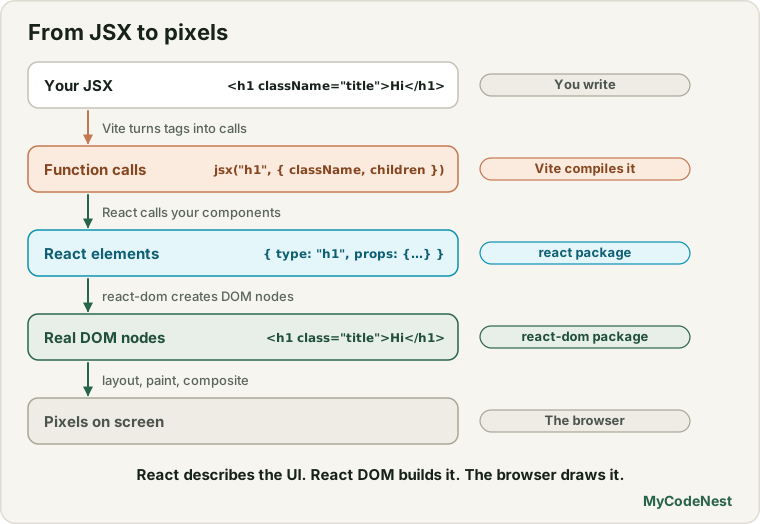
Let us walk through each step.
Two packages: react and react-dom
Open package.json in your Vite project. In dependencies you will find two packages:
"dependencies": {
  "react": "^19.2.8",
  "react-dom": "^19.2.8"
}
They have different jobs:
| Package | Its job | You use it for |
|---|---|---|
react |
The core: components, Hooks (useState, useEffect…), JSX support, the code that creates React elements |
Everything you write in components |
react-dom |
The bridge to the browser: turns React’s description of the UI into real DOM elements and updates them | createRoot in main.jsx, and a few extras later (portals, form status) |
Why split them? Because React itself does not know about web pages. The same react package powers other platforms, such as React Native for mobile apps, which uses a different “renderer” instead of react-dom. Your components and Hooks work the same way everywhere. Only the last step, drawing on the screen, is different.
Keep the versions equal.
reactandreact-domare released together. Using different versions can cause strange errors. Install or update them together.
Step 1: JSX becomes JavaScript
Browsers do not understand JSX. Before your code runs, Vite converts it into ordinary JavaScript. Take this component:
function Hello({ name }) {
  return (
    <section className="card">
      <h1>Hello, {name}!</h1>
      <p>Welcome</p>
    </section>
  );
}
For the production build, Vite turns it into this (shortened and tidied):
import { jsx, jsxs } from "react/jsx-runtime";

function Hello({ name }) {
  return jsxs("section", {
    className: "card",
    children: [
      jsxs("h1", { children: ["Hello, ", name, "!"] }),
      jsx("p", { children: "Welcome" }),
    ],
  });
}
Every JSX tag became a function call:
- The first argument is the type: a string like
"section"for an HTML element, or a function for your own component. - The second argument is an object of props. The nested content becomes the special
childrenprop. jsxis used when there is one child, andjsxswhen there are several.
This is why JSX needs a build step: <h1> is not valid JavaScript, but jsx("h1", {...}) is. It is also why you do not need import React from 'react' at the top of each file: the build tool adds the import of react/jsx-runtime for you. (In development mode, Vite uses jsxDEV from react/jsx-dev-runtime, which adds extra debugging information such as the file name and line number. It works the same way.)
You can see the same result in your own project: run npm run build and look at the JavaScript file in dist/assets. It is minified (squeezed into very short names), so it is hard to read, but the idea is the same.
Step 2: calls create React elements
What do jsx(...) and jsxs(...) return? A React element: a small, plain JavaScript object that describes what you want on the screen. It is not a DOM node and it does not draw anything.
You can print one yourself. In any component, add:
console.log(<h1 className="title">Hi</h1>);The console shows something like this (React 19.3):
{
  $$typeof: Symbol(react.transitional.element),
  type: "h1",
  key: null,
  props: { className: "title", children: "Hi" },
  ...
}
The important fields are:
| Field | Meaning |
|---|---|
$$typeof |
A special marker so React can tell “this is a real React element” |
type |
"h1" for an HTML element, or your component function for a component |
key |
The key you gave it (or null) |
props |
The attributes and children |
There are some other internal fields too, which exist mainly for development tools. Never read or change them. Treat an element as a read-only snapshot.
For your own components, type is the function itself. The element for <Hello name="Aisha" /> is roughly:
{ type: Hello,   // the function you wrote
  props: { name: "Aisha" } }
An element is like a blueprint or an order slip: it says what should be built, but the building happens later. Elements are very cheap to create, which is why React can make thousands of them on every render without trouble.
Step 3: React calls your components
Now we reach the key idea. You never call your components yourself. React does it.
When React finds an element whose type is a function, it calls that function with the element’s props, and the function returns more elements. React repeats this until there are only HTML-type elements left ("section", "h1", "p"…).
For <Hello name="Aisha" />:
1. React sees an element with type = Hello
2. React calls Hello({ name: "Aisha" })
3. Hello returns a "section" element with an "h1" and a "p" inside
4. Those are all HTML types, so the description is complete:

   <section class="card">
     <h1>Hello, Aisha!</h1>
     <p>Welcome</p>
   </section>
This is the reason for two rules you already learned:
- Component names must start with a capital letter, so JSX can tell
Hello(a function in your code) from"section"(an HTML tag). - You write
<Hello />, notHello(). If you call it yourself, React cannot manage it (for example, it cannot give it state).
The result of calling all components is a tree of elements, and your whole app is this tree. When state changes, React calls the affected components again, and gets a new tree. The next lessons are about what React does with the two trees.
Step 4: React DOM builds the real DOM
React elements are only descriptions. Making real HTML elements is the job of react-dom. It uses the browser’s own DOM methods (like document.createElement and appendChild, which you know from the DOM lessons) to create elements, set attributes and attach everything to the page.
So React does not replace the browser’s DOM. It drives it, and avoids you having to write all those DOM calls by hand.
How your app starts: createRoot and render
Now you can fully understand src/main.jsx:
import { StrictMode } from 'react'
import { createRoot } from 'react-dom/client'
import './index.css'
import App from './App.jsx'

createRoot(document.getElementById('root')).render(
  <StrictMode>
    <App />
  </StrictMode>,
)
Here is the full story, from opening the page to the first screen:
- The browser loads
index.html. It contains an empty<div id="root"></div>and a script tag pointing tomain.jsx. - The browser runs your JavaScript (a bundle made by Vite).
document.getElementById('root')finds the empty div. This is the container.createRoot(container)creates a React root: a connection between React and that container. React now owns everything inside it..render(<App />)tells React: “this is the UI I want inside that root.”- React calls
App(), then calls every component inside it, as described above, until it has the full tree of elements. react-domcreates the matching DOM elements and puts them inside<div id="root">.- The browser draws them. You see your app.
This is the initial render. Afterwards, every time state changes, React runs a part of this process again, but only updates what changed. That is the topic of the next lessons.
You call createRoot once for the whole app. Inside, you never call it again.
What happens after React: the browser
When React finishes updating the DOM, the browser takes over. A short recap (see How the browser draws a page for more details):
- The browser builds the DOM (structure) and the CSSOM (styles).
- It combines them to work out what is visible.
- Layout: it calculates the size and position of every box.
- Paint: it fills in colours, text and borders.
- Compositing: it combines painted layers into the final image on screen.
React is only responsible for the DOM. Everything after that is the same as for any web page. This is why a slow page can come from React work (many components rendering) or from the browser work (huge layouts, heavy images), and why you need DevTools to find out which.
Development and production
The same code runs in two modes:
Development (npm run dev) |
Production (npm run build) |
|
|---|---|---|
| Speed | Slower, with extra checks | Optimised and small |
| Warnings | Many helpful warnings (missing keys, wrong props) | Removed |
StrictMode extra checks |
Active | Not active |
| Code | Readable, with file names and line numbers | Minified |
If you see a warning only in development, do not ignore it. It is trying to save you from a bug that would show up later.
See it yourself
You can inspect both worlds in the browser:
- React DevTools (a browser extension for Chrome, Edge and Firefox) shows the component tree:
App,TodoList,TodoItem… with their props and state. - The browser’s Elements panel shows the DOM tree:
main,ul,li… Only real HTML elements appear there.
Compare them for your to-do app. The component tree has your own component names, but the DOM has none of them. Components are a way to organise your code. They do not exist in the page.
Common mistakes and misunderstandings
1. “JSX is HTML.” It is JavaScript. It becomes function calls, and the result is an object, not HTML text.
2. “A React element is a DOM node.” An element is a plain description object. React DOM creates the DOM node later.
3. “Components appear in the page.” Only the HTML elements they return appear. Your component names are visible only in React DevTools.
4. Calling a component like a normal function. Hello({ name: "Aisha" }) inside another component skips React’s management. Use <Hello name="Aisha" />.
5. Mixing different versions of react and react-dom. Keep them the same.
6. Calling createRoot more than once on the same container. Create the root once and render into it. (If you need to change the UI, change the state.)
7. Expecting React to do the painting. React updates the DOM, and the browser does layout, paint and compositing.
Practice
- Open
package.jsonin your Vite project. Write down the versions ofreactandreact-dom. Why should they match? - In a component, add
console.log(<h1 className="title">Hi</h1>). Open the console and find thetype,propsandkeyfields. What isprops.children? - Predict, then check: Log the element for
<ProfileCard name="Aisha" />(your component from earlier lessons). What is itstype? Is it a string or a function? - Write by hand what
<ul><li>One</li><li>Two</li></ul>compiles to, usingjsxandjsxscalls. (Hint: theulhas two children, so it usesjsxs.) - Draw the component tree and the DOM tree for your to-do app (from the project lesson). Which components have no visible trace in the DOM?
- Debug: A learner writes
<div>{Greeting()}</div>instead of<div><Greeting /></div>. What is the difference, and what could break later? - Put a
console.log("App rendered")at the top of yourAppfunction. Reload the page and count how many times it prints in development. Explain the number you see. (You will learn why in the next lessons.) - Find the Elements panel in DevTools and locate
<div id="root">. What is inside it, and what was inside it inindex.htmlbefore React ran?
Recap
- The
reactpackage is the core (components, Hooks, elements).react-domconnects React to the browser’s DOM. Keep their versions equal. - Vite compiles JSX into function calls (
jsxandjsxsfromreact/jsx-runtime). That is why you do not import React in every file. - Those calls create React elements: plain, read-only objects with
type,propsandkey. They describe the UI. They are not DOM nodes. - React calls your components, and repeats until only HTML elements remain. That creates a tree of elements.
createRoot(container).render(<App />)starts the app: React renders the tree, and React DOM creates real DOM nodes inside#root.- After React updates the DOM, the browser does layout, paint and compositing.
- Next you will learn when and why React renders again: trigger, render and commit.
Frequently asked questions
Why are there two packages, react and react-dom?
react contains the parts that are the same on every platform: components, Hooks and elements. react-dom contains the code that draws on a web page. Other platforms, such as React Native, use react with a different renderer, so splitting them lets React work in many places.
Do I need to import React in every file?
No. Modern tools use the automatic JSX runtime. They add the import of react/jsx-runtime for you when they compile JSX. You only import what you use directly, such as useState or createRoot.
What exactly is a React element?
It is a plain JavaScript object that describes what should appear on the screen: its type (an HTML tag name or a component function), its props and its key. It is cheap to create, read-only, and it is not a real DOM node.
Is a component the same as an element?
No. A component is a function you write. An element is the object you get when you use that component in JSX. <Hello /> creates an element whose type is the Hello function. React later calls the function to find out what it renders.
Does React replace the DOM?
No. React uses the real browser DOM. It creates and updates DOM nodes for you, so you do not write that code by hand, but the page you see is built from the normal DOM, styled by normal CSS.
Where can I see this process for myself?
Log an element with console.log(<h1>Hi</h1>), look at the compiled output in dist/assets after npm run build, and compare React DevTools (component tree) with the Elements panel (DOM tree) in your browser.
See also: Project Structure, JSX in React, How the Browser Draws a Page, JavaScript DOM Introduction