State Management in React: Context, Reducers and External Stores
Master React state choices: learn when to use useState, useReducer, Context, and external stores like Zustand and useSyncExternalStore.
What you will learn
In earlier lessons, you learned how to manage local state with useState, manage complex state transitions with useReducer, and share data down component trees with React Context.
However, when developers build medium-to-large applications, a common architectural question arises: where should state live, and which tool should manage it?
Reaching prematurely for massive global state libraries adds unnecessary boilerplate and bundle weight. On the other hand, forcing high-frequency updates into React Context can cause severe UI lag and sluggish typing.
In this lesson, you will learn how to make informed state architecture decisions:
- The State Decision Matrix: how to match state characteristics to the simplest effective tool.
- When to upgrade from
useStatetouseReducerfor multi-step workflows. - Why React Context is meant for low-velocity global data, not frequent streaming updates.
- How to implement the Context Splitting Strategy to prevent unnecessary re-renders.
- What “tearing” means during concurrent rendering, and how
useSyncExternalStoresolves it. - An overview of modern external store libraries like Zustand and Redux Toolkit.
The State Decision Matrix
Before installing any external library, evaluate your state against its scope and update frequency:
| State Type | Characteristics | Recommended Tool |
|---|---|---|
| Local Component State | Needed by one component or its direct children (form inputs, modal toggles, accordion open state) | useState, useReducer |
| Lifted Shared State | Shared between 2 or 3 sibling components in the same section | Lift state to common parent |
| Low-Velocity Global State | Read widely across the app, changes infrequently (authenticated user profile, active theme, locale) | React Context |
| High-Velocity Global State | Frequent updates read by different parts of the UI (cart quantities, audio player, live notifications) | External Store (Zustand, Jotai) |
| Server Cache State | Data originating from remote backend APIs (caching, background revalidation, loading states) | Data fetching tools (TanStack Query, React 19 use) |
| URL State | Filter selections, active tab index, search queries, pagination page | URL Search Params (useSearchParams) |
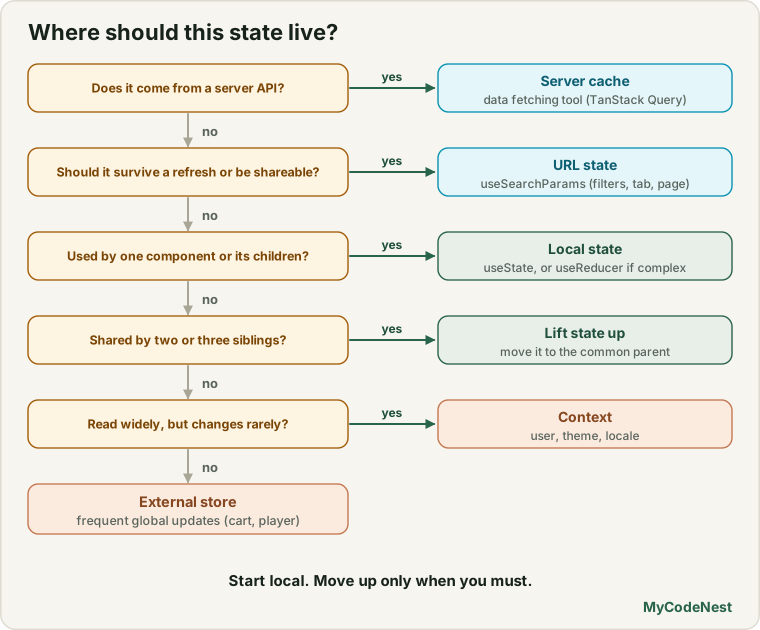
When to Choose useReducer Over useState
When component state transitions become complex—especially when the next state depends on multiple previous values or involves interrelated fields—useReducer offers significant advantages over multiple useState calls:
- Centralised Business Logic: All state transitions live in a pure reducer function outside your React component.
- Simplified Testing: The reducer function is a pure JavaScript function that can be unit tested without mounting React components.
- Optimised Props: Handlers pass a stable
dispatchfunction down the tree instead of multiple callback closures.
Complex Multi-Step Form with useReducer
import React, { useReducer } from 'react';

const initialState = {
  step: 1,
  username: '',
  email: '',
  preferences: { newsletter: false, notifications: true },
  error: null,
};

function checkoutReducer(state, action) {
  switch (action.type) {
    case 'SET_FIELD':
      return { ...state, [action.field]: action.value, error: null };
    case 'TOGGLE_PREFERENCE':
      return {
        ...state,
        preferences: {
          ...state.preferences,
          [action.key]: !state.preferences[action.key],
        },
      };
    case 'NEXT_STEP':
      if (state.step === 1 && (!state.username || !state.email)) {
        return { ...state, error: 'Please fill in all required fields.' };
      }
      return { ...state, step: state.step + 1, error: null };
    case 'PREV_STEP':
      return { ...state, step: Math.max(1, state.step - 1), error: null };
    case 'RESET':
      return initialState;
    default:
      return state;
  }
}

export function MultiStepWizard() {
  const [state, dispatch] = useReducer(checkoutReducer, initialState);

  return (
    <div className="wizard-card">
      <h2>Step {state.step} of 3</h2>
      {state.error && <p className="error-text" role="alert">{state.error}</p>}

      {state.step === 1 && (
        <fieldset>
          <legend>Personal Information</legend>
          <label htmlFor="user-name">Username:</label>
          <input
            id="user-name"
            value={state.username}
            onChange={(e) => dispatch({ type: 'SET_FIELD', field: 'username', value: e.target.value })}
          />

          <label htmlFor="user-email">Email:</label>
          <input
            id="user-email"
            type="email"
            value={state.email}
            onChange={(e) => dispatch({ type: 'SET_FIELD', field: 'email', value: e.target.value })}
          />
        </fieldset>
      )}

      {state.step === 2 && (
        <fieldset>
          <legend>Preferences</legend>
          <label>
            <input
              type="checkbox"
              checked={state.preferences.newsletter}
              onChange={() => dispatch({ type: 'TOGGLE_PREFERENCE', key: 'newsletter' })}
            />
            Subscribe to newsletter
          </label>
        </fieldset>
      )}

      <div className="button-group">
        {state.step > 1 && (
          <button type="button" onClick={() => dispatch({ type: 'PREV_STEP' })}>
            Back
          </button>
        )}
        {state.step < 3 ? (
          <button type="button" onClick={() => dispatch({ type: 'NEXT_STEP' })}>
            Next
          </button>
        ) : (
          <button type="button" onClick={() => dispatch({ type: 'RESET' })}>
            Finish
          </button>
        )}
      </div>
    </div>
  );
}
Understanding React Context: Use Cases and Limitations
React Context is designed for dependency injection and low-velocity global state, not frequent data streaming.
The Render Trap of React Context
Whenever the value passed to a <Context.Provider> changes reference, every component that consumes that context re-renders, even if it only accesses an unchanged property on the value object:
// Problem: If user changes, a component consuming ONLY theme still re-renders!
<AppContext.Provider value={{ user, theme, setTheme, setUser }}>
  <App />
</AppContext.Provider>
Context Splitting Strategy
To prevent unnecessary re-renders, split monolithic context objects into separate providers:
- Split by Domain: Have a dedicated
ThemeContextand a separateAuthContext. - Split State from Dispatch: Components that only trigger actions (like clicking a logout button) consume the dispatch context and never re-render when state changes.
import React, { createContext, useContext, useReducer } from 'react';

const StateContext = createContext(null);
const DispatchContext = createContext(null);

export function NotificationProvider({ children }) {
  const [items, dispatch] = useReducer((state, action) => {
    switch (action.type) {
      case 'ADD':
        return [...state, action.payload];
      case 'REMOVE':
        return state.filter((item) => item.id !== action.id);
      default:
        return state;
    }
  }, []);

  return (
    <StateContext.Provider value={items}>
      <DispatchContext.Provider value={dispatch}>
        {children}
      </DispatchContext.Provider>
    </StateContext.Provider>
  );
}

// Hook that triggers re-render when items change
export function useNotifications() {
  const context = useContext(StateContext);
  if (!context) throw new Error('useNotifications must be used within NotificationProvider');
  return context;
}

// Hook that NEVER causes re-render when items change (dispatch is stable)
export function useNotificationDispatch() {
  const context = useContext(DispatchContext);
  if (!context) throw new Error('useNotificationDispatch must be used within NotificationProvider');
  return context;
}
Understanding “Tearing” and useSyncExternalStore
In React 18 and React 19, React uses Concurrent Rendering. This means React can start rendering a component tree, pause in the middle to let the browser handle a user tap or animation, and then resume rendering where it left off.
Now imagine an external data store (like a global variable or browser window API) updates during that pause:
1. React starts rendering Component A (reads store value: "Red")
2. [React yields main thread for user scroll event]
3. External store receives an update from a WebSocket (value changes to: "Blue")
4. React resumes rendering Component B (reads store value: "Blue")
The resulting UI displays a visual glitch: Component A shows “Red” while Component B shows “Blue” for the exact same data! This visual inconsistency is called tearing (like a torn photograph where two halves don’t match).
React provides the built-in Hook useSyncExternalStore to safely subscribe to external stores without tearing:
// A simple external vanilla JavaScript store
export function createStore(initialValue) {
  let state = initialValue;
  const listeners = new Set();

  return {
    getState: () => state,
    setState: (updater) => {
      state = typeof updater === 'function' ? updater(state) : updater;
      listeners.forEach((listener) => listener());
    },
    subscribe: (listener) => {
      listeners.add(listener);
      return () => listeners.delete(listener); // Cleanup
    },
  };
}
Consuming the Store with useSyncExternalStore
import React, { useSyncExternalStore } from 'react';
import { createStore } from './createStore';

export const counterStore = createStore(0);

export function CounterDisplay() {
  // Subscribes cleanly to external state without tearing or missing concurrent updates
  const count = useSyncExternalStore(
    counterStore.subscribe,
    counterStore.getState
  );

  return (
    <div>
      <p>Store count: {count}</p>
      <button
        type="button"
        onClick={() => counterStore.setState((n) => n + 1)}
      >
        Increment
      </button>
    </div>
  );
}
All major third-party store libraries (Zustand, Redux Toolkit, Jotai) use useSyncExternalStore under the hood.
Overview of External Store Libraries
When application state is high-velocity or deeply nested, external libraries provide selector-based subscriptions and minimal boilerplate.
1. Zustand: Minimalist and Selector-Driven
Zustand has emerged as the most popular state store for modern React due to its concise API, lack of boilerplate, and automatic selector-based subscriptions:
// store/useCartStore.js (Zustand overview)
import { create } from 'zustand';

export const useCartStore = create((set) => ({
  items: [],
  addItem: (item) => set((state) => ({ items: [...state.items, item] })),
  clearCart: () => set({ items: [] }),
}));
Component consumption with selectors (re-renders only when itemCount changes):
function CartBadge() {
  // Selector subscription: Only re-renders if items.length changes!
  const itemCount = useCartStore((state) => state.items.length);
  return <span>Items: {itemCount}</span>;
}
2. Redux Toolkit (RTK): Standard for Enterprise Codebases
Redux Toolkit is the official, opinionated toolset for Redux development. It includes Immer for immutable draft updates, RTK Query for server caching, and predictable action logging with browser devtools:
- Best for: Large enterprise applications with strict auditing requirements, multi-team workflows, or existing Redux codebases.
- Trade-offs: Higher learning curve and slightly larger bundle footprint than Zustand.
Architecture Summary: How to Choose
Is the state needed by distant components across the app?
│
├── NO  ──> Use useState or useReducer (Keep state local)
│
└── YES ──> Does it come from a backend API?
             │
             ├── YES ──> Use TanStack Query or React 19 `use` (Server Cache)
             │
             └── NO  ──> Does it update frequently (>1 time per second)?
                          │
                          ├── YES ──> Use Zustand or External Store
                          │
                          └── NO  ──> Is it broad app config (Theme, Auth)?
                                       │
                                       ├── YES ──> Use React Context (Split providers)
                                       └── NO  ──> Store in URL Search Params
Common mistakes
1. Putting all application state in a single global store
Beginners often put everything into a global store (form input text, modal open booleans, search field drafts). This makes components harder to reuse in isolation. Keep temporary UI state strictly local with useState.
2. Using React Context for high-frequency updates
Putting a timer, mouse cursor coordinates, or rapid typing state into React Context causes every component consuming that context to re-render constantly, dropping frame rates. Use an external store with selectors instead.
3. Storing derived state in React state
// Incorrect: Storing redundant state
const [items, setItems] = useState([]);
const [totalPrice, setTotalPrice] = useState(0);

// Correct: Calculate derived values on the fly!
const [items, setItems] = useState([]);
const totalPrice = items.reduce((sum, item) => sum + item.price, 0);
Always calculate derived values during rendering instead of maintaining synchronized state variables.
Practice
- Refactor a component with five separate
useStatecalls into a single cohesiveuseReducerwith a typed action union. - Build a custom
useOnlineStatushook usinguseSyncExternalStoresubscribed towindow.addEventListener('online')andwindow.addEventListener('offline'). - Create a split context pattern (
CartStateContextandCartDispatchContext) and prove withconsole.logthat buttons using onlydispatchdo not re-render when items are added. - Set up a simple Zustand store with persist middleware to synchronize shopping cart items to
localStorage. - Compare the network and render characteristics of storing search input in
useStateversus keeping it in URL query parameters withuseSearchParams.
Recap
- Always match your state solution to state scope and velocity; avoid jumping immediately to heavy global libraries.
useReducercentralises complex multi-step transitions into pure, easily testable functions.- React Context is ideal for low-velocity dependency injection (auth, theme); split contexts by domain and separate state from dispatch to minimize re-renders.
- “Tearing” is a visual mismatch caused when an external store updates while React concurrent rendering is paused.
useSyncExternalStoreis React’s official bridge for safely subscribing to stores outside React without concurrent tearing.- External libraries like Zustand offer selector-based subscriptions and minimal boilerplate for high-velocity global state.
Frequently asked questions
Is Redux obsolete in modern React?
No. Classic Redux (with manual switch statements and action creators) is outdated, but modern Redux Toolkit (RTK) is very active and common in large enterprises. However, for most greenfield projects, lighter solutions like Zustand combined with TanStack Query provide everything needed with significantly less boilerplate.
Why not use React Context for everything?
React Context does not have built-in selector subscriptions. If a context holds an object with 15 properties and one property changes, every component calling useContext() on that provider will evaluate a re-render. For frequent updates (such as animations, typing, or audio streaming), this degrades responsiveness.
How does useSyncExternalStore prevent tearing?
When React renders concurrently, it can yield execution to the browser. If an external store changes during that pause, useSyncExternalStore detects that the snapshot returned by getSnapshot has changed and forces a synchronous re-render to ensure all components receive the exact same data version.
Can I mix multiple state management strategies in the same app?
Yes, and you should. A professional application routinely uses useState for dropdowns, URL params for table filters, React Context for themes, TanStack Query for server data, and Zustand for the shopping cart. Matching the tool to the state type yields the cleanest architecture.
What is the difference between client state and server cache state?
Client state is owned entirely by the browser (such as whether a modal is open or which tab is active). Server cache state is remote data stored in a database (such as user profiles or product catalogs) that has been temporarily fetched and cached on the client. Server cache requires background refetching, cache invalidation, and deduping.
See also: useState Basics, useReducer in React, React Context, React App Architecture