Custom Hooks in React: Reuse Stateful Logic
Learn custom Hooks in React: useToggle, useLocalStorage, useWindowWidth and useDebounce, the rules to follow, and a to-do app that saves to localStorage.
What you will learn
You have used the built-in Hooks: useState, useEffect, useRef, useReducer and useContext. In the last lesson you even wrote one of your own, useAuth, without us explaining it. Now it is time.
A custom Hook is a function that uses other Hooks to package some logic so you can reuse it in many components. In this lesson you will learn when to extract one, the rules to follow, and you will build four useful Hooks: useToggle, useLocalStorage, useWindowWidth and useDebounce. At the end, you will use useLocalStorage to make your to-do app remember its tasks after a page reload.
You should know useState, useEffect and cleanup.
The problem: repeated logic
Imagine three components that all need to know whether the browser window is wide or narrow. Each one would repeat the same state, Effect and cleanup:
const [width, setWidth] = useState(window.innerWidth);

useEffect(() => {
  function handleResize() {
    setWidth(window.innerWidth);
  }
  window.addEventListener("resize", handleResize);
  return () => window.removeEventListener("resize", handleResize);
}, []);
Copying this into every component is error-prone, and any fix has to be made in many places. With a function you would extract it. But this code uses Hooks, and you can only call Hooks inside components or inside other Hooks. The answer: put it into a custom Hook.
What is a custom Hook?
A custom Hook is just a JavaScript function with two features:
- Its name starts with
use, followed by a capital letter:useToggle,useWindowWidth. - It calls other Hooks inside (such as
useStateoruseEffect).
That is all. There is nothing special to register. The use prefix tells React and code checkers: “this function follows the rules of Hooks”.
Your first custom Hook: useToggle
Many components need an on/off value: a menu, a dialog, a “show details” panel. Here is the pattern you already know:
const [open, setOpen] = useState(false);
function toggle() {
  setOpen((value) => !value);
}
Extract it. Create src/hooks/useToggle.js:
import { useState } from 'react';

export function useToggle(initial = false) {
  const [on, setOn] = useState(initial);

  function toggle() {
    setOn((value) => !value);
  }

  return [on, toggle];
}
Now any component can use it:
import { useToggle } from '../hooks/useToggle.js';

function Panel({ name }) {
  const [open, toggle] = useToggle();

  return (
    <div>
      <button onClick={toggle}>{name}</button>
      <span>{open ? "open" : "closed"}</span>
    </div>
  );
}

function App() {
  return (
    <>
      <Panel name="A" />
      <Panel name="B" />
    </>
  );
}
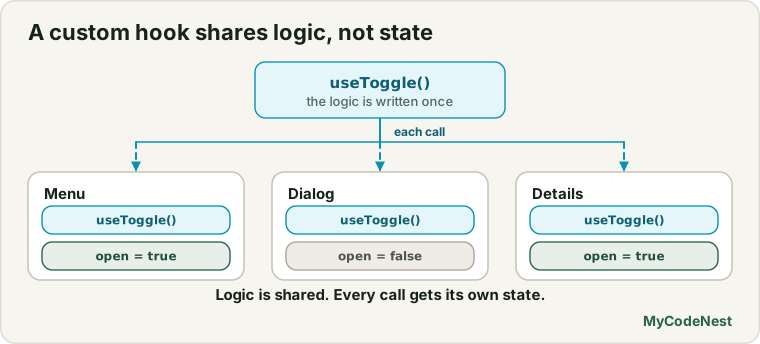
Click panel A’s button: it shows open, and panel B still shows closed. We tested this, and it brings us to the most important fact about custom Hooks:
Custom Hooks share logic, not state. Every time a component calls
useToggle(), it gets its own, separate state. Two panels using the same Hook do not affect each other.
It is the same as calling useState twice: each call is independent. A custom Hook is just a way to name and reuse a group of Hook calls.
useLocalStorage: state that survives a reload
State disappears when the page reloads. The browser’s localStorage keeps data. (See the browser storage lesson for the basics.) A useLocalStorage Hook combines both: it works like useState, but remembers the value. Create src/hooks/useLocalStorage.js:
import { useState, useEffect } from 'react';

export function useLocalStorage(key, initialValue) {
  const [value, setValue] = useState(() => {
    try {
      const saved = localStorage.getItem(key);
      return saved !== null ? JSON.parse(saved) : initialValue;
    } catch {
      return initialValue;
    }
  });

  useEffect(() => {
    try {
      localStorage.setItem(key, JSON.stringify(value));
    } catch {
      // ignore errors (private mode, storage full)
    }
  }, [key, value]);

  return [value, setValue];
}
This is the most complete Hook so far, so let us read it carefully.
The initial value uses a function. useState(() => { ... }) passes a function instead of a value. This is called a lazy initial state. React runs the function only once, on the first render. This matters because reading localStorage is slow compared to normal code, and we do not want to do it on every render. (A plain useState(readFromStorage()) would read it on every render and then throw the result away.) In development with StrictMode, React calls this initialiser twice to check that it is pure. We saw exactly that: 1 call normally and 2 in StrictMode. Reading is harmless, so that is fine.
Reading safely. localStorage only stores strings, so we save with JSON.stringify and read with JSON.parse (see the JSON lesson). If the stored text is broken, JSON.parse throws an error. The try / catch falls back to the initial value. We tested this: with the stored text {bad json, the Hook returned the initial value instead of crashing.
Writing with an Effect. Saving to localStorage is a side effect, so it goes in an Effect. It runs on the first render, and every time key or value changes.
The return value is [value, setValue], exactly like useState. So you can use it as a drop-in replacement:
function NameBox() {
  const [name, setName] = useLocalStorage("name", "");

  return <input value={name} onChange={(e) => setName(e.target.value)} />;
}
Type Aisha. Then reload the page: the input still says Aisha. In our test, we typed a name, removed the component, rendered it again, and the value was still there.
Make the to-do app remember its tasks
Now let us fix the question from the to-do project: “Will my tasks disappear when I refresh?” Replace useState for todos with useLocalStorage. Open src/App.jsx and replace it with:
import { useState } from 'react';
import './App.css';
import { useLocalStorage } from './hooks/useLocalStorage.js';
import TodoForm from './components/TodoForm.jsx';
import TodoList from './components/TodoList.jsx';
import TodoFooter from './components/TodoFooter.jsx';

const initialTodos = [
  { id: 1, title: "Learn JSX", done: true },
  { id: 2, title: "Learn props", done: true },
  { id: 3, title: "Build a to-do app", done: false },
];

function App() {
  const [todos, setTodos] = useLocalStorage("todos", initialTodos);
  const [filter, setFilter] = useState("all");

  function addTodo(title) {
    setTodos([...todos, { id: crypto.randomUUID(), title, done: false }]);
  }

  function toggleTodo(id) {
    setTodos(todos.map((todo) => todo.id === id ? { ...todo, done: !todo.done } : todo));
  }

  function deleteTodo(id) {
    setTodos(todos.filter((todo) => todo.id !== id));
  }

  function clearCompleted() {
    setTodos(todos.filter((todo) => !todo.done));
  }

  const visibleTodos = todos.filter((todo) => {
    if (filter === "active") return !todo.done;
    if (filter === "done") return todo.done;
    return true;
  });
  const remaining = todos.filter((todo) => !todo.done).length;

  return (
    <main className="todo-app">
      <h1>My Tasks</h1>
      <TodoForm onAdd={addTodo} />
      <TodoList todos={visibleTodos} onToggle={toggleTodo} onDelete={deleteTodo} />
      <TodoFooter
        remaining={remaining}
        hasCompleted={todos.length > remaining}
        filter={filter}
        onFilterChange={setFilter}
        onClearCompleted={clearCompleted}
      />
    </main>
  );
}

export default App;
Only two things changed from the original:
useState(initialTodos)becameuseLocalStorage("todos", initialTodos). The rest of the component works as before.- The id of a new task now comes from
crypto.randomUUID()instead of a counter. This is essential. In the old version,nextIdstarted at4on every page load. After a reload, the saved list might already contain a task with id4, and the new task would get the same id, which breaks keys and toggling. A random unique id avoids the problem. (This is the “create the id when you create the item” rule from the lists lesson.)
Add a task, tick another, and reload the page. Everything is still there. We tested exactly this: after adding a task, the saved list was restored when the app was mounted again.
The filter is still plain useState, so it resets to all on reload. That is a design choice. Use useLocalStorage for it too if you want it saved.
useWindowWidth: a Hook with cleanup
Now the Hook from the beginning of the lesson. Create src/hooks/useWindowWidth.js:
import { useState, useEffect } from 'react';

export function useWindowWidth() {
  const [width, setWidth] = useState(window.innerWidth);

  useEffect(() => {
    function handleResize() {
      setWidth(window.innerWidth);
    }

    window.addEventListener("resize", handleResize);
    return () => window.removeEventListener("resize", handleResize);
  }, []);

  return width;
}
Use it in any component:
function ResponsiveNote() {
  const width = useWindowWidth();

  return <p>{width >= 768 ? "wide" : "narrow"} ({width}px)</p>;
}
In a browser, drag the window narrower, and the text switches from wide to narrow. In our test, starting at 1000 pixels showed wide (1000), and after the window became 500 pixels, narrow (500). The cleanup removes the listener when the component goes away, as you learned in the cleanup lesson. For layout, remember that CSS media queries are usually better. This Hook is for when the JavaScript needs to know the size.
useDebounce: wait until the user stops
When a user types in a search box, you do not want to react to every keystroke, especially if each one would trigger a slow task such as a server request. Debouncing means waiting until the user pauses. (See debounce and throttle.) Create src/hooks/useDebounce.js:
import { useState, useEffect } from 'react';

export function useDebounce(value, delay = 300) {
  const [debounced, setDebounced] = useState(value);

  useEffect(() => {
    const id = setTimeout(() => setDebounced(value), delay);
    return () => clearTimeout(id);
  }, [value, delay]);

  return debounced;
}
How it works: every time value changes, the Effect starts a timer. If value changes again before the timer ends, the cleanup cancels the old timer and a new one starts. Only when the value stays the same for the whole delay does setDebounced run.
function Search() {
  const [text, setText] = useState("");
  const debouncedText = useDebounce(text, 300);

  useEffect(() => {
    console.log("search for:", debouncedText);
  }, [debouncedText]);

  return <input value={text} onChange={(e) => setText(e.target.value)} />;
}
We typed r, re and rea quickly. Right after typing, debouncedText was still empty. After a short pause, it became rea. The “search” ran only for the empty starting text and for rea, not for r and re. The input itself stays instant, because it uses text. Only the search waits for debouncedText.
Rules for custom Hooks
- Start the name with
use.useToggle, nottoggle. This lets React and code checkers know to apply the rules of Hooks. - Call Hooks only at the top level of the Hook, never inside conditions or loops. The rules are the same as for components.
- Only call a custom Hook from a component or another Hook. Not from a normal function, an event handler or a class.
- Each call gets its own state. Hooks share logic, not data. If you need to share state between components, use context.
- Return what makes sense. Return an array when users will usually rename the values (
const [open, toggle] = useToggle()), and an object when there are many values and order should not matter.
When to extract a custom Hook
Create one when:
- the same group of Hooks appears in two or more components (like the resize listener),
- a component has a clear self-contained piece of logic that you can name (
useDebounce), or - you want to hide complexity and make the component read more simply.
Do not make a Hook for every little thing. A wrapper that has no Hooks inside should be a normal function. And avoid vague “lifecycle” Hooks like useMount that only run code once: the ideas of mounting and unmounting hide what the Effect is really synchronising, and they break the rules of dependencies.
In the data fetching lesson, you will build a useFetch Hook that handles loading, errors and race conditions in one place.
Common mistakes
1. Forgetting the use prefix. A function named toggle that calls useState will not be recognised by code checkers, and mistakes slip through.
2. Expecting shared state. Two components calling useToggle do not share a value. Use context or lift state to share.
3. Calling Hooks conditionally. if (enabled) { useDebounce(...) } breaks the rules. Always call it, and handle the condition inside or after.
4. Not handling a corrupt or missing stored value. Always wrap JSON.parse in try / catch.
5. Reading localStorage on every render. Pass a function to useState (lazy initial state) so it runs only once.
6. Using a counter for ids when data is saved. After a reload, the counter restarts and creates duplicate ids. Use crypto.randomUUID().
7. Forgetting cleanup in a Hook. A Hook that adds a listener or timer must return a cleanup, just like a component.
8. Storing sensitive data in localStorage. It is readable by any script on the page. Never store passwords or secret tokens in it.
Practice
- Create
useToggleand use it for a Show details button in a profile card. Render two cards and check that they toggle independently. - Create
useLocalStorageand use it for aNameBoxinput. Type a name, reload the page, and check that it stays. - Predict, then check: In your
useLocalStorage, put aconsole.log("read storage")inside the function passed touseState. How many logs appear on the first render, in development? Why? What happens on later renders? - Make your to-do app persistent with
useLocalStorage. Add a task, reload, and confirm that it is still there. Then change youraddTodoback to a counter id and see what can go wrong after a reload with several tasks. - Debug: The app crashes on load after you edit the saved value by hand in DevTools. The Hook has no
try/catch. Add it so a corrupt value falls back to the initial one. - Create
useWindowWidthand showwideornarrowin a component. Resize the window and check. Open the console and make sure no errors appear when you navigate away. - Use
useDebouncein your product search project from the last lesson, so that the filtering uses a debouncedquery. (The search box should stay instant; only the list waits.) Is that useful for a small local list? When would it matter more? - Create a
useOnlineStatusHook that returnstrueorfalseby listening to theonlineandofflineevents onwindow. Show a banner when the user is offline.
Recap
- A custom Hook is a function whose name starts with
useand that calls other Hooks. It lets you reuse stateful logic. - Custom Hooks share logic, not state. Each call has its own state.
useToggle,useLocalStorage,useWindowWidthanduseDebounceare common examples.useLocalStorageuses a lazy initial state (a function passed touseState),JSON.parse/JSON.stringify, atry/catch, and an Effect to save.- If you save data, do not use a counter for ids. Use
crypto.randomUUID(). - Follow the rules: the
useprefix, top-level calls, and only calling Hooks from components and Hooks. Remember cleanup. - Extract a Hook when logic repeats or when a self-contained piece of logic deserves a name.
- Next you will learn how to load data from a server with
fetch, including loading and error states.
Frequently asked questions
What is a custom Hook in React?
A custom Hook is a function whose name starts with use and that calls other Hooks, such as useState or useEffect. It packages logic so you can reuse it in many components, while each component using it keeps its own state.
Do custom Hooks share state between components?
No. Each component that calls a custom Hook gets its own separate state. A custom Hook shares only the logic. To share the same state between components, lift it to a parent or use context.
Why must a custom Hook name start with use?
The prefix tells React and code checking tools that the function follows the rules of Hooks, so they can warn you about mistakes such as calling it inside a condition. It is also a clear signal to other developers.
What is lazy initial state?
It means passing a function to useState, like useState(() => readFromStorage()). React calls it only on the first render instead of reading the value on every render. It is the right choice when computing the starting value is slow or has side-effect-free work such as reading storage.
Is localStorage safe for storing data?
It is fine for harmless preferences and app data, such as a theme or a to-do list. It is not safe for secrets. Any script that runs on your page can read it, so never put passwords or private tokens there.
When should I not create a custom Hook?
When there are no Hooks inside, a plain function is enough. Also avoid Hooks that only wrap “run once when the component appears”, because they hide what the Effect is synchronising and make dependencies hard to check. Extract a Hook when the logic is repeated or clearly deserves a name.
See also: React Context, useEffect Cleanup and Dependencies, Browser Storage, JavaScript JSON