useEffectEvent and When You Do Not Need an Effect
Learn when to use useEffectEvent and when you do not need useEffect: derived data, key resets, event handlers, effect chains and parent updates.
What you will learn
Effects are powerful, and that is exactly why beginners overuse them. A large share of the Effects found in beginner code are not needed. They make components slower, harder to read and full of bugs.
This lesson has two parts:
useEffectEvent: a newer tool that solves a real problem: an Effect that needs to read the latest value of something without re-running when that value changes.- You might not need an Effect: the five most common cases where an Effect is the wrong tool, and what to use instead.
You should know useEffect and cleanup and dependencies.
Part 1: useEffectEvent
The problem
Imagine a chat room component. It connects to the room, and when the connection is ready, it shows a notification in the current theme (light or dark). Written with what you know so far:
import { useEffect } from 'react';

function ChatRoom({ roomId, theme }) {
  useEffect(() => {
    console.log("connect " + roomId);
    console.log("notify (theme: " + theme + ")");
    return () => console.log("disconnect " + roomId);
  }, [roomId, theme]);

  return <p>{roomId}</p>;
}
The Effect reads theme, so by the golden rule, theme must be in the array. But watch what happens when the user switches from light to dark:
disconnect general
connect general
notify (theme: dark)
The app disconnected and reconnected to the chat room just because the theme changed. That is bad: the connection only depends on roomId. The theme is only needed to show a notification.
You cannot fix this by removing theme from the array. That would break the golden rule, and the notification would show an old theme. The right fix is to split the code in two kinds:
- Reactive code that should re-run when something changes: connecting to
roomId. - Non-reactive code that should always see the latest values but should not cause a re-run: showing the notification.
The solution: an Effect Event
React provides useEffectEvent for the second kind. (It was added in React 19.2, so it is available in React 19.3, the version this course uses.)
import { useEffect, useEffectEvent } from 'react';

function ChatRoom({ roomId, theme }) {
  const onConnected = useEffectEvent(() => {
    console.log("notify (theme: " + theme + ")");
  });

  useEffect(() => {
    console.log("connect " + roomId);
    onConnected();
    return () => console.log("disconnect " + roomId);
  }, [roomId]);

  return <p>{roomId}</p>;
}
Let us look at what changed:
useEffectEvent(fn)wraps the notification code.onConnectedis an Effect Event: a function that always sees the latest props and state, but is not reactive.- The Effect calls
onConnected()when the connection is ready. themeis no longer in the array, andonConnectedis not in the array either. Effect Events are never listed as dependencies.
Our test with this component produced:
mount:                      connect general, notify (theme: light)
theme light → dark:         (nothing happens: no reconnect)
room general → travel:      disconnect general, connect travel, notify (theme: dark)
Switching the theme does nothing to the connection. Switching the room reconnects, and the notification uses the latest theme (dark), not the old one.
Rules for Effect Events
- Call them only from inside Effects (or from other Effect Events). Not in event handlers, and not during rendering.
- Do not pass them to other components or Hooks, and do not store them. They are meant to stay inside the Effect.
- Do not add them to the dependency array.
- Use them for logic that belongs to an Effect but should not decide when the Effect runs. Do not use them just to silence a warning about a missing dependency. If a value really should make the Effect re-run, keep it in the array.
A good test: ask “should this value cause the Effect to run again?” If yes, it is a dependency. If it is only read when the Effect runs for another reason, an Effect Event fits.
Part 2: you might not need an Effect
Now the more important half. Before you write useEffect, ask: “Am I synchronising with something outside React?” (a server, a timer, the browser, a third-party widget). If not, you probably do not need an Effect. Here are the five common cases.
Case 1: calculating data from props or state
A very common beginner pattern: store a filtered list in state, and update it in an Effect.
function FilterBad({ items }) {
  const [query, setQuery] = useState("");
  const [visible, setVisible] = useState(items);   // extra state

  useEffect(() => {
    setVisible(items.filter((item) => item.includes(query)));
  }, [items, query]);

  return (
    <div>
      <input value={query} onChange={(e) => setQuery(e.target.value)} />
      <p>{visible.join(", ")}</p>
    </div>
  );
}
It works, but wastefully. Typing one letter causes two renders: first with the new query but the old list on screen, then the Effect sets visible, which renders again. We measured it: 2 renders per keystroke.
Just calculate it during rendering:
function FilterGood({ items }) {
  const [query, setQuery] = useState("");
  const visible = items.filter((item) => item.includes(query));   // calculated

  return (
    <div>
      <input value={query} onChange={(e) => setQuery(e.target.value)} />
      <p>{visible.join(", ")}</p>
    </div>
  );
}
1 render per keystroke, less code, and visible can never be out of date. This is the idea from the state structure lesson: do not store what you can calculate. In the product search project, you did exactly this.
Rule: if you can calculate it from props and state, calculate it while rendering. No state, no Effect.
Case 2: resetting state when a prop changes
Another common pattern is an Effect that clears state when a prop changes:
function Draft({ userId }) {
  const [text, setText] = useState("");

  useEffect(() => {
    setText("");           // reset when the user changes
  }, [userId]);
  // ...
}
This renders once with the old text for the new user, and then again after the reset. The simpler way is to give the component a key:
<Draft key={userId} userId={userId} />When the key changes, React creates a fresh component with fresh state. No Effect needed. The component identity lesson explains why this works.
Case 3: things that happen because of a user action
If something should happen when the user clicks, put it in the event handler, not in an Effect that watches for a result.
// Not good: an Effect reacting to a flag set by the click
function BuyButton({ productId }) {
  const [bought, setBought] = useState(false);

  useEffect(() => {
    if (bought) {
      sendPurchaseToServer(productId);
    }
  }, [bought, productId]);

  return <button onClick={() => setBought(true)}>Buy</button>;
}
This is roundabout, and easy to break (it can fire again if productId changes while bought is true). Do it directly:
function BuyButton({ productId }) {
  function handleClick() {
    sendPurchaseToServer(productId);
  }

  return <button onClick={handleClick}>Buy</button>;
}
Here the cause is clear: the user clicked. The event handler knows exactly what happened, which an Effect cannot know.
Test: can you say “when the user does X, do Y”? Then Y belongs in the handler for X.
Case 4: chains of Effects
Do not build a chain where one Effect sets state, which triggers another Effect, which sets more state:
useEffect(() => { setGoldCardCount(c => c + 1); }, [card]);
useEffect(() => { if (goldCardCount > 3) setRound(r => r + 1); }, [goldCardCount]);
useEffect(() => { if (round > 5) setIsGameOver(true); }, [round]);
Every link causes an extra render, and the logic is hard to follow. Instead, calculate what you can during rendering, and do the rest in one event handler that sets all the state it needs at once. (React batches those updates into one render.)
Case 5: telling the parent about a change
Do not use an Effect to call a parent’s callback whenever state changes:
// Not good
useEffect(() => {
  onChange(isOn);
}, [isOn, onChange]);
This runs one render too late, after the child has already painted. Instead, call the parent function in the same event handler that changes the state:
function handleClick() {
  const next = !isOn;
  setIsOn(next);
  onChange(next);
}
Even better, consider lifting the state up to the parent, so there is only one owner of the data.
So when do you need an Effect?
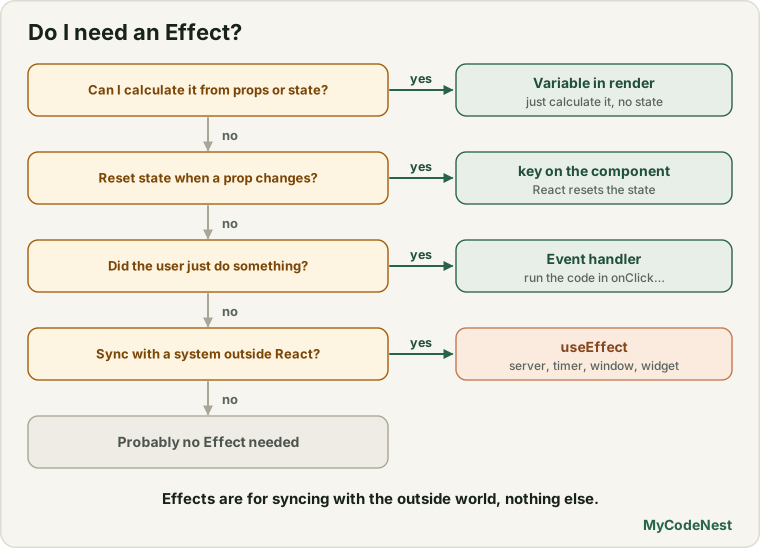
Effects are for synchronising with systems outside React:
- Connecting to a server or WebSocket, and disconnecting.
- Setting up timers and browser event listeners on
windowordocument. - Controlling a third-party widget (a map, a chart library) that React does not manage.
- Changing browser things such as the document title.
- Fetching data when a component appears or a parameter changes. This is valid, but it needs cleanup against race conditions (last lesson). The data lessons show a cleaner setup, and libraries can do much of the work for you.
A quick decision table
| Situation | Use |
|---|---|
| A value can be calculated from props or state | A variable during rendering |
| State should reset when a prop (like an id) changes | A key on the component |
| Something should happen because the user did something | An event handler |
| Several states must change together | One handler, or a reducer (next lessons) |
| A child must tell its parent about a change | Call the parent’s function in the handler, or lift state up |
| Syncing with a timer, listener, server or widget | An Effect, with cleanup |
| An Effect needs the latest value but should not re-run for it | useEffectEvent |
Common mistakes
1. Putting calculated values in state and updating them in an Effect. Calculate them during rendering.
2. Resetting state with an Effect. Use a key.
3. Reacting to a click with a flag and an Effect. Do the work in the click handler.
4. Chaining Effects. Combine the logic into one handler or calculate during rendering.
5. Calling a parent’s callback from an Effect. Call it in the event handler instead.
6. Using useEffectEvent to hide a missing dependency. If the value should make the Effect re-run, list it.
7. Calling an Effect Event from a handler or passing it down. Effect Events are for Effects only.
8. Adding the Effect Event to the dependency array. Never list it.
Practice
-
Rewrite this component so it has no Effect:
function Greeting({ firstName, lastName }) { const [fullName, setFullName] = useState(""); useEffect(() => { setFullName(firstName + " " + lastName); }, [firstName, lastName]); return <h2>{fullName}</h2>; } -
Predict, then check: Build
FilterBadandFilterGoodwith aconsole.log("render")in each. How many logs do you see for a single keystroke in each version? -
A
ProfilePageshows<Comment userId={id} />, and the comment text stays when the user switches profiles. Fix it without an Effect. -
A learner sends a form to the server inside an Effect that watches a
submittedstate. Rewrite it with an event handler. -
Debug: A chat component reconnects every time the theme changes. Use
useEffectEventto stop that, and write down what goes in the dependency array. -
Build a
ChatRoomlike the one in this lesson. Logconnect,disconnectandnotify (theme: ...). Change the theme and then the room. Does the log match the lesson? -
Explain in two sentences why calling a parent’s
onChangeinside an Effect is worse than calling it inside the event handler. -
For each task, say whether you would use an Effect: (a) sorting a list for display, (b) changing
document.title, (c) clearing a form when the user selects another contact, (d) opening a WebSocket connection, (e) sending a message when the user clicks Send.
Recap
useEffectEvent(added in React 19.2) lets an Effect read the latest props and state without re-running when they change.- Call Effect Events only inside Effects. Do not pass them around, and never list them as dependencies.
- Use it for non-reactive logic only. If a value should re-trigger the Effect, keep it in the array.
- You might not need an Effect when you can: calculate during rendering, reset with a
key, use an event handler for user actions, combine chained updates into one handler, or call the parent in the handler. - Use Effects to synchronise with the outside world: servers, timers, listeners, widgets and the browser.
- Fewer Effects mean fewer renders and fewer bugs.
- Next you will learn
useRef, which lets you keep values and reach DOM elements without re-rendering.
Frequently asked questions
What is useEffectEvent for?
It creates a function that always sees the latest props and state but does not make the Effect re-run when they change. It is for logic inside an Effect that should respond to the current values at the moment the Effect fires, such as showing a notification in the current theme.
Is useEffectEvent stable?
Yes. It was added in React 19.2 and is available in React 19.3, which this course uses. Make sure the react package in your project is at least that version.
Can I use useEffectEvent to remove a dependency I do not want?
Not for that reason. It is meant for logic that is genuinely non-reactive. If a value should make the Effect run again, it must stay in the dependency array. Hiding it makes the Effect use stale data or miss updates.
Is fetching data in an Effect wrong?
No, it is a valid use, because a server is something outside React. But you must handle cleanup so that a late response cannot overwrite a newer one. Many real projects use a data-fetching library or framework features for this, which later lessons discuss.
How do I know if I really need an Effect?
Ask whether you are synchronising with something outside React. If you are only transforming data you already have, or reacting to a user’s click, you do not need an Effect. Use a variable calculated during rendering, a key, or an event handler.
Why are chains of Effects bad?
Each link causes an extra render and a delay, the logic is spread over several places, and the order of updates becomes hard to predict. Doing the work in one event handler, or calculating during rendering, is simpler and faster.
See also: useEffect Basics, Effect Cleanup and Dependencies, Choosing State Structure, Component Identity