useEffect in React: Run Side Effects After Rendering
Learn useEffect step by step: what side effects are, when Effects run, how the dependency array works, and how to sync a component with the outside world.
What you will learn
So far, your components have done two jobs: calculate what to show (rendering) and respond to the user (event handlers). But some things a component needs are neither. It might need to change the browser tab title, start a timer, listen for a key press on the whole window, or connect to a server because it is on the screen, not because the user clicked something.
React has a tool for this: useEffect. In this lesson you will learn what an Effect is, exactly when it runs, how the dependency array controls it, and the rule that keeps Effects correct. The next lessons cover cleanup, and when you should not use an Effect.
You should know how React renders, because everything here follows from the idea that rendering must be pure.
The problem: where do side effects go?
In the rendering lesson you learned that a component must be pure: it only calculates JSX from props and state. It must not change anything outside itself while rendering.
A side effect is anything that reaches outside the component:
- changing the page title (
document.title) - starting or stopping a timer
- adding an event listener to
window - sending a network request
- reading from or writing to a library that React does not control
You cannot put these in the middle of your component body, because React may call that function many times, and at any moment. So React offers two safe places:
| Place | Use it when… |
|---|---|
| Event handler | the side effect happens because the user did something (click, type, submit) |
Effect (useEffect) |
the side effect happens because the component appeared or changed on screen |
An Effect lets you synchronise your component with something outside React. That is the best way to think about it: not “run code at a certain time”, but “keep this outside thing matching my component”.
Your first Effect
Here is a button that shows its click count, and keeps the browser tab title in sync:
import { useState, useEffect } from 'react';

function TitleCounter() {
  const [count, setCount] = useState(0);

  useEffect(() => {
    document.title = `Clicks: ${count}`;
  });

  return <button onClick={() => setCount(count + 1)}>Clicks: {count}</button>;
}

export default TitleCounter;
Render this component, look at the browser tab, and click the button. The tab title starts as Clicks: 0 and becomes Clicks: 1, Clicks: 2 and so on.
Let us understand it:
useEffectis a Hook, so you import it from'react', and you call it at the top level of your component (the rules of Hooks apply).- It takes a function: the Effect. React runs this function for you.
- Inside, we change
document.title. This is a side effect, and it now lives in a safe place.
When does an Effect run?
This is the most important thing to understand. An Effect does not run during rendering. It runs after React has finished rendering and has updated the screen (the commit step you learned about).
To see this, we can log to the console from both places:
function TitleCounter() {
  const [count, setCount] = useState(0);
  console.log("render " + count);

  useEffect(() => {
    document.title = `Clicks: ${count}`;
    console.log("effect " + count);
  });

  return <button onClick={() => setCount(count + 1)}>Clicks: {count}</button>;
}
The console prints, in this order:
render 0
effect 0          ← when the page loads

render 1
effect 1          ← after the first click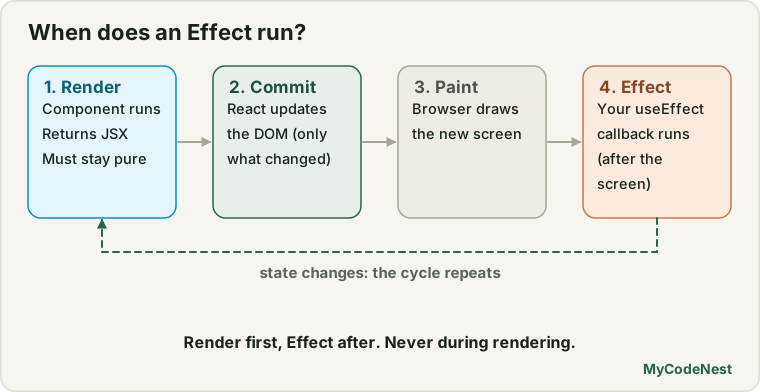
Every time: render first, Effect after. The rendering is a pure calculation. Then, once the new screen is ready, React runs the Effect to bring the outside world up to date.
In development,
StrictModeruns Effects an extra time on purpose (once more when the component first appears). The next lesson explains why. If you see doubled logs while following along, that is the reason.
The dependency array
In the example above, the Effect runs after every render. That is wasteful if the Effect only needs to react to some values. You control this with the dependency array, the optional second argument:
useEffect(() => {
  // the Effect
}, [dependency1, dependency2]);
There are three forms. We tested each one with a component that has two buttons: one changes count, the other changes an unrelated other value. We clicked each button once, and this is what happened:
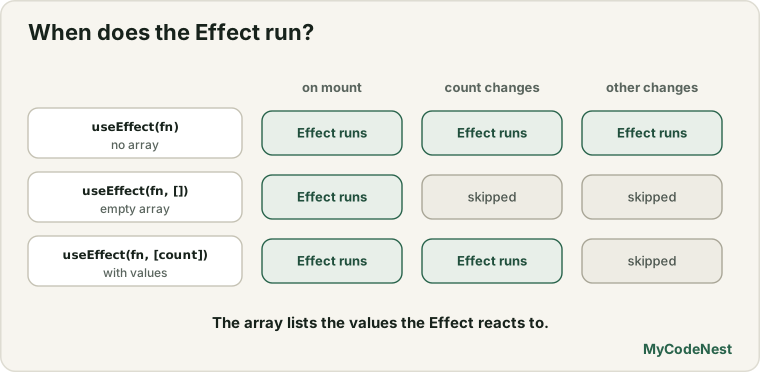
| Second argument | When the Effect runs | Result in our test |
|---|---|---|
None (useEffect(fn)) |
After every render | Ran after both clicks (2 times), plus once on mount |
Empty array (useEffect(fn, [])) |
Only once, after the first render | Ran on mount only, never again |
With values (useEffect(fn, [count])) |
After the first render, and again when any listed value changes | Ran on mount and for the count click only, not for other |
So [count] means “run this Effect when count changes”. React compares each value with its previous value. If none of them changed, the Effect is skipped.
Here is our title example, improved to run only when count changes:
useEffect(() => {
  document.title = `Clicks: ${count}`;
}, [count]);
The golden rule: list every value you use
How do you know what to put in the array? The answer is simple and has no exceptions:
Every reactive value that the Effect reads must be in the dependency array.
“Reactive values” are props, state, and any variable or function you declare inside the component. They can change between renders, so an Effect that uses them must re-run when they change. If you leave one out, the Effect keeps using an old copy of it, and you get bugs that are hard to find.
You do not choose dependencies to control when the Effect runs. You describe what the Effect uses, and React decides when to re-run it. If you feel you need to leave a value out, the fix is almost never to lie in the array. It is to change the code (the next two lessons show how).
Values that are not reactive do not go in the array: imports, constants declared outside the component, and refs (you will meet refs soon).
Many code checkers include a rule (often called exhaustive-deps) that warns when your array is incomplete. Listen to it.
A realistic example: the to-do app title
Let us use an Effect in the to-do app so that the browser tab always shows how many tasks are left. In src/App.jsx, import useEffect:
import { useState, useEffect } from 'react';Then, after the line that calculates remaining, add:
const remaining = todos.filter((todo) => !todo.done).length;

useEffect(() => {
  document.title = `(${remaining}) My Tasks`;
}, [remaining]);
Now the tab title shows (1) My Tasks at the start. Tick a task, and it becomes (0) My Tasks. Add a task, and it changes again. The Effect uses remaining, so remaining is its only dependency.
Why an Effect here and not code in the click handlers? Because there are many ways the count can change (add, toggle, delete, clear completed). Instead of updating the title in four places, you say once: “the title should match remaining”, and React keeps them in sync. That is synchronisation.
Effects and event handlers: which one?
Use this rule of thumb:
- If code should run because of a specific user action, put it in the event handler. Example: sending a message when the user clicks Send.
- If code should run because the component is shown or its data changed, and you want to keep something in sync, use an Effect. Example: keeping the tab title equal to the unread count.
A common mistake is putting a user-triggered action in an Effect. If you can say “when the user clicks X, do Y”, then Y belongs in the click handler.
What cannot go in an Effect callback
Two small rules about the function you pass to useEffect:
- It cannot be
async.useEffect(async () => {...})returns a promise, but React expects the function to return nothing or a cleanup function (the next lesson). React warns you. If you needawait, define an async function inside the Effect and call it. You will see this in the data-fetching lessons. - It runs only in the browser. Effects do not run when a page is rendered on a server, so they are a safe place for code that needs
windowordocument.
Common mistakes
1. Forgetting the dependency array. Without it, the Effect runs after every render. If it also changes state, it can create an endless loop: the Effect sets state, the state change renders again, and the Effect runs again. Always think about the second argument.
2. Leaving out a dependency. The Effect then uses stale values. List everything the Effect reads.
3. Lying to the array to “fix” a loop. Adding [] to silence a repeating Effect usually hides a real bug. Fix the cause instead.
4. Using an Effect for something an event handler should do. If a click causes it, handle it in the click.
5. Making the Effect callback async. Use an inner async function.
6. Calculating values in an Effect. If you set state inside an Effect just to hold a value that you can calculate from props and state, you are making extra work (the third lesson in this section shows why).
7. Expecting the Effect to run before the screen updates. It runs after the commit.
8. Ignoring StrictMode double runs. If your Effect breaks when it runs twice, it needs a cleanup. See the next lesson.
Practice
-
Build the
TitleCounterand watch the browser tab while you click. Then addconsole.logcalls in the component body and in the Effect. In what order do they appear? -
Predict, then check: You have two buttons that change
countandother. The Effect has[count]as its dependencies. Which button causes the Effect to run again? Test it. -
Add the tab-title Effect to your to-do app, so it shows
(n) My Tasks. What is the only dependency? -
Debug: The tab title is stuck on the first number. What is wrong?
useEffect(() => { document.title = `Clicks: ${count}`; }, []); -
Create a component with a text input and an Effect that sets
document.titletoHello, <name>as you type. What belongs in the array? -
Debug: A learner wants to send a message when the user clicks Send, so they set a
shouldSendstate totrueand send the message in an Effect that depends on it. Explain a simpler way, and why it is better. -
Write an Effect with
[]that logsHello from the browseronce. Open the console. How many times do you see it in development, and why might that be more than once? (You will learn the reason in the next lesson.) -
List three examples of side effects, and for each say whether you would put it in an event handler or in an Effect.
Recap
- A side effect reaches outside the component: the page title, timers, listeners, network requests.
- Never run side effects during rendering. Put them in an event handler (caused by the user) or in an Effect (caused by the component being on screen).
useEffect(fn, deps)runsfnafter React has updated the screen.- No array: runs after every render.
[]: runs once.[a, b]: runs whenaorbchanges. - Golden rule: every reactive value the Effect reads must be in the array. You describe what the Effect uses. You do not pick when it runs.
- The Effect callback must not be
async. Effects only run in the browser. - Think of an Effect as synchronising the component with something outside React.
- Next you will learn cleanup: how to stop what an Effect started.
Frequently asked questions
What is a side effect in React?
A side effect is anything a component does that reaches outside itself, such as changing the document title, starting a timer, subscribing to an event or fetching data. React wants rendering to be pure, so side effects go in event handlers or in Effects.
When does useEffect run?
After React has rendered the component and updated the screen. With no dependency array it runs after every render. With [] it runs after the first render. With values in the array it runs after the first render and again whenever one of those values changes.
Why must I list all dependencies?
Because the Effect uses the values from the render in which it was created. If a value changes and is not in the array, the Effect keeps using the old one, which causes stale data bugs. Listing every value keeps the Effect in sync with your component.
What is the difference between an Effect and an event handler?
An event handler runs because the user did something specific, such as clicking a button. An Effect runs because the component was shown or because some of its data changed, and its job is to keep something outside React in sync with it.
Can I use async directly in useEffect?
No. The function you pass must return nothing or a cleanup function, but an async function always returns a promise. Write an async function inside the Effect and call it there instead.
Why does my Effect run twice in development?
StrictMode deliberately runs Effects one extra time when a component first appears, to check that your Effect can be stopped and started again safely. This only happens in development. The next lesson explains how to write Effects that handle it.
See also: How React Renders, Handling Events in React, Build a To-Do List App, JavaScript DOM Introduction