Integration Tests and API Mocking in React
Master integration testing and API mocking in React: mock network requests with MSW v2, test end-to-end component flows, and verify error recovery states.
What you will learn
Unit tests verify small, isolated pieces of code like a single button or utility function. However, the most critical bugs in web applications occur when multiple systems interact: a user enters data into a form, submits it, sends an HTTP request to a backend API, receives a JSON response, updates state, and renders an updated list.
Integration testing verifies that these interconnected components work together seamlessly without making real HTTP requests over the internet.
In this lesson, you will learn:
- The distinction between unit tests, integration tests, and end-to-end tests.
- How to set up MSW (Mock Service Worker v2) to intercept network requests at the network layer.
- How to test complete user flows: submitting forms, showing optimistic UI or loaders, and rendering API results.
- How to test server errors (500 internal server error, 404 not found) and verify fallback UI recovery.
- Best practices for keeping mock handlers maintainable across test suites.
Why mock network requests at the network layer?
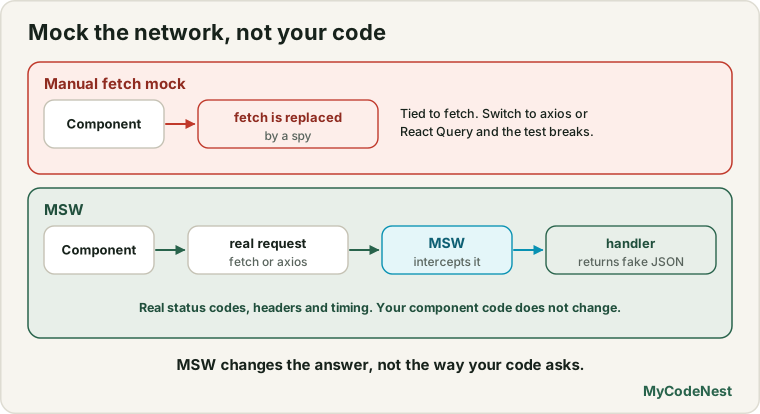
When testing code that calls fetch() or axios, developers often reach for vi.spyOn(globalThis, 'fetch'):
// Fragile manual fetch mock
vi.spyOn(globalThis, 'fetch').mockResolvedValue({
  ok: true,
  json: async () => [{ id: '1', title: 'Learn React' }],
});
While this works for simple cases, manual fetch mocking has major drawbacks:
- It tightly couples tests to whether you use
fetch,axios, or a library like React Query. - It fails to simulate real network behaviors like query parameters, headers, and status codes cleanly.
- Multiple tests can accidentally overwrite the spy, creating hard-to-diagnose race conditions.
Mock Service Worker (MSW v2) solves this by intercepting requests at the network level. Your React code calls fetch('/api/todos') exactly as it does in production, but MSW catches the request and returns a simulated response.
Setting up MSW v2 with Vitest
1. Install MSW
npm install -D msw2. Define API handlers (src/mocks/handlers.js)
Handlers define which endpoints to intercept and what responses to return using MSW’s http and HttpResponse APIs:
// src/mocks/handlers.js
import { http, HttpResponse } from 'msw';

export let mockTodos = [
  { id: '1', title: 'Buy groceries', completed: false },
  { id: '2', title: 'Learn Vitest', completed: true },
];

export const handlers = [
  // Intercept GET /api/todos
  http.get('/api/todos', () => {
    return HttpResponse.json(mockTodos);
  }),

  // Intercept POST /api/todos
  http.post('/api/todos', async ({ request }) => {
    const newTodo = await request.json();
    const createdItem = {
      id: String(Date.now()),
      title: newTodo.title,
      completed: false,
    };
    mockTodos.push(createdItem);
    return HttpResponse.json(createdItem, { status: 201 });
  }),
];
3. Create mock server (src/mocks/node.js)
For Node.js / jsdom test environments, create a mock server using setupServer:
// src/mocks/node.js
import { setupServer } from 'msw/node';
import { handlers } from './handlers';

export const server = setupServer(...handlers);
4. Wire the server into Vitest setup (src/test/setup.js)
Ensure the mock server starts before tests run, resets its handlers between tests, and shuts down after all tests finish:
// src/test/setup.js
import '@testing-library/jest-dom/vitest';
import { cleanup } from '@testing-library/react';
import { beforeAll, afterEach, afterAll } from 'vitest';
import { server } from '../mocks/node';

beforeAll(() => server.listen({ onUnhandledRequest: 'error' }));

afterEach(() => {
  cleanup();
  server.resetHandlers(); // Resets runtime handlers overrides
});

afterAll(() => server.close());
Building a feature to test: Todo Feature
Here is an integrated feature component that fetches existing items and provides a form to add new ones:
// src/components/TodoFeature.jsx
import { useState, useEffect } from 'react';

export function TodoFeature() {
  const [todos, setTodos] = useState([]);
  const [input, setInput] = useState('');
  const [loading, setLoading] = useState(true);
  const [error, setError] = useState(null);
  const [submitting, setSubmitting] = useState(false);

  useEffect(() => {
    let active = true;
    fetch('/api/todos')
      .then((res) => {
        if (!res.ok) throw new Error('Failed to load todos');
        return res.json();
      })
      .then((data) => {
        if (active) {
          setTodos(data);
          setLoading(false);
        }
      })
      .catch((err) => {
        if (active) {
          setError(err.message);
          setLoading(false);
        }
      });
    return () => { active = false; };
  }, []);

  const handleAdd = async (e) => {
    e.preventDefault();
    if (!input.trim() || submitting) return;

    setSubmitting(true);
    try {
      const res = await fetch('/api/todos', {
        method: 'POST',
        headers: { 'Content-Type': 'application/json' },
        body: JSON.stringify({ title: input.trim() }),
      });
      if (!res.ok) throw new Error('Could not create todo');
      const newItem = await res.json();
      setTodos((prev) => [...prev, newItem]);
      setInput('');
    } catch (err) {
      setError(err.message);
    } finally {
      setSubmitting(false);
    }
  };

  if (loading) return <p role="status">Loading todos...</p>;
  if (error) return <div role="alert" className="error">{error}</div>;

  return (
    <section aria-labelledby="todo-title">
      <h2 id="todo-title">Todo Tasks</h2>

      <form onSubmit={handleAdd} aria-label="Add new todo">
        <label htmlFor="todo-input">Task description</label>
        <input
          id="todo-input"
          value={input}
          onChange={(e) => setInput(e.target.value)}
          placeholder="New task..."
        />
        <button type="submit" disabled={submitting}>
          {submitting ? 'Adding...' : 'Add Task'}
        </button>
      </form>

      <ul>
        {todos.map((item) => (
          <li key={item.id}>{item.title}</li>
        ))}
      </ul>
    </section>
  );
}
Writing the integration test suite
Now we write tests that exercise the full component lifecycle: loading data, submitting form inputs, observing DOM additions, and simulating server failures:
// src/components/TodoFeature.test.jsx
import { describe, it, expect, beforeEach } from 'vitest';
import { render, screen } from '@testing-library/react';
import userEvent from '@testing-library/user-event';
import { http, HttpResponse } from 'msw';
import { server } from '../mocks/node';
import { TodoFeature } from './TodoFeature';

describe('TodoFeature integration tests', () => {
  it('loads and displays initial todos from the API', async () => {
    render(<TodoFeature />);

    // 1. Initial loading state appears
    expect(screen.getByRole('status')).toHaveTextContent(/loading todos/i);

    // 2. Both mock todos appear on screen
    expect(await screen.findByText('Buy groceries')).toBeInTheDocument();
    expect(screen.getByText('Learn Vitest')).toBeInTheDocument();

    // 3. Loading state disappeared
    expect(screen.queryByRole('status')).not.toBeInTheDocument();
  });

  it('submits a new todo item and appends it to the rendered list', async () => {
    const user = userEvent.setup();
    render(<TodoFeature />);

    // Wait for initial load
    expect(await screen.findByText('Buy groceries')).toBeInTheDocument();

    const input = screen.getByLabelText(/task description/i);
    const submitBtn = screen.getByRole('button', { name: /add task/i });

    // Type new task and click submit
    await user.type(input, 'Write integration tests');
    await user.click(submitBtn);

    // Verify new item appears in the list
    expect(await screen.findByText('Write integration tests')).toBeInTheDocument();

    // Input field cleared after successful post
    expect(input).toHaveValue('');
  });

  it('displays an error alert when the API fails with a 500 status', async () => {
    // Override the GET handler specifically for this test case
    server.use(
      http.get('/api/todos', () => {
        return new HttpResponse(null, { status: 500 });
      })
    );

    render(<TodoFeature />);

    // Should catch the failure and render the error alert
    const alert = await screen.findByRole('alert');
    expect(alert).toHaveTextContent(/failed to load todos/i);
    expect(screen.queryByText('Buy groceries')).not.toBeInTheDocument();
  });
});
Testing API mutation errors
What happens when initial loading succeeds, but submitting a new item fails? You can selectively override the http.post handler:
it('displays error message when adding a task fails on the server', async () => {
  server.use(
    http.post('/api/todos', () => {
      return HttpResponse.json({ message: 'Database connection error' }, { status: 500 });
    })
  );

  const user = userEvent.setup();
  render(<TodoFeature />);

  // Wait for initial list
  expect(await screen.findByText('Buy groceries')).toBeInTheDocument();

  // Attempt to add
  await user.type(screen.getByLabelText(/task description/i), 'Failing item');
  await user.click(screen.getByRole('button', { name: /add task/i }));

  // Assert error message displays
  const alert = await screen.findByRole('alert');
  expect(alert).toHaveTextContent(/could not create todo/i);
});
Common mistakes
1. Forgetting server.resetHandlers() in test teardown
If you override a route using server.use(...) inside a test and do not reset handlers after each test, the failed mock will persist into unrelated subsequent tests, causing baffling failures.
2. Mocking fetch directly alongside MSW
Do not mix vi.spyOn(globalThis, 'fetch') with MSW. MSW already installs a global fetch interceptor. Spying on fetch directly can bypass MSW entirely or introduce conflicting stubs.
3. Asserting on network payloads instead of user UI
Remember the core principle: your tests should verify what the user sees. Don’t just assert expect(fetch).toHaveBeenCalledWith(...). Assert that the new item rendered in the document, or that the error message is visible to the user.
Practice
- Set up MSW v2 in a Vite React sandbox with a GET endpoint
/api/articlesreturning three mock blog posts. - Build an
<ArticleList />component that queries this endpoint, and write an integration test verifying all three titles render. - Add a delete button next to each article. Wire up MSW’s
http.delete('/api/articles/:id')handler and write a test confirming that clicking delete removes the item from the DOM. - Implement an optimistic UI update: simulate a 1-second delayed network response using MSW’s
delay()and verify that the UI shows the new state before the server responds. - Write an integration test for search pagination: when clicking the “Next Page” button, verify that
/api/articles?page=2is called and page 2 items display.
Recap
- Integration tests verify that user interactions, components, state management, and network calls work together harmoniously.
- MSW (Mock Service Worker v2) intercepts requests at the network layer using
http.get()andhttp.post(), preserving real browser fetch semantics. - Use
server.use()inside individual test cases to simulate special conditions like HTTP 500 errors or network timeouts. - Always include
server.resetHandlers()in your Vitest setup to keep test suites isolated and deterministic.
Frequently asked questions
How does MSW work in Node / jsdom without a real browser Service Worker?
In Node.js test environments (like Vitest or Jest), MSW uses `@mswjs/interceptors` to intercept Node's low-level `ClientRequest` and global `fetch` calls. In a real browser, MSW uses a Service Worker file (`mockServiceWorker.js`). The handler syntax is identical in both.How do I simulate slow network connections with MSW?
You can import `delay` from `msw` and call `await delay(1500)` inside your mock handler function before returning `HttpResponse.json(...)`. This is great for testing skeletons and loading spinners.Should I test validation errors with MSW or purely client-side?
Both! Test client-side input validation (e.g. required field empty) without triggering a network request, and test server-side validation responses (e.g. HTTP 422 with a JSON array of server error messages) with MSW.Can MSW mock GraphQL endpoints as well as REST?
Yes. MSW provides a first-class `graphql` API (`graphql.query('GetUsers', ...)` and `graphql.mutation(...)`) alongside `http`.See also: