React App Architecture: Folder Structure and Code Organisation
Master scalable React architecture: feature-based folder organization, clean separation of UI and business logic, barrel files, and dependency rules.
What you will learn
When you first learned React in Setting Up a React Project with Vite and Project Structure, storing all components in a single src/components/ folder felt fast and natural. However, as applications scale to dozens of routes, hundreds of components, and multiple developers, flat structures quickly break down.
Developers waste time hunting through massive directories, circular dependency bugs appear without warning, and editing a single checkout button accidentally breaks the homepage.
In this lesson, you will learn how professional engineering teams structure large-scale React codebases:
- Why organizing files by technical type creates cognitive overload as apps grow.
- How to structure projects using Feature-Based Architecture (grouping by business domain).
- How to isolate feature internals using Public API Boundaries and barrel exports.
- How to enforce the Three-Tier Separation between Network Data, State Logic, and Presentational UI.
- How to establish strict Unidirectional Dependency Rules to prevent circular imports.
- How to configure clean Path Aliases (
@/) in Vite.
The Problem: Grouping by Technical Type
In early tutorials, files are almost always grouped by their technical role:
src/
├── components/
│   ├── Button.jsx
│   ├── CartDrawer.jsx
│   ├── Header.jsx
│   ├── ProductCard.jsx
│   └── UserProfile.jsx
├── hooks/
│   ├── useAuth.js
│   ├── useCart.js
│   └── useProducts.js
└── services/
    ├── authService.js
    ├── cartService.js
    └── productService.js
Think of this like organizing your kitchen by material instead of function: putting all metal objects (forks, pans, blenders) in one room, and all plastic objects (cups, spatulas, storage containers) in another. Whenever you want to cook a simple dinner, you must walk between three different rooms.
In software, grouping solely by technical type creates four major roadblocks:
- Context Scattering: When working on the shopping cart, you must simultaneously edit
components/CartDrawer.jsx,hooks/useCart.js, andservices/cartService.js. - Unclear Deletion (Dead Code Accumulation): If a product manager decides to remove the product review feature, can you safely delete
hooks/useReviews.js? Without grepping the entire codebase, you cannot tell who depends on it. - Naming Collisions: Generic names like
Card.jsx,List.jsx, orItem.jsxconflict when different features need customized versions. - Poor Mental Mapping: Looking at the folder list tells you that the project uses React components, but tells you nothing about what business problem the application actually solves.
Feature-Based Architecture: Group by Domain
The industry-standard solution is Feature-Based Architecture (often described as vertical slice architecture). In this pattern, files that change together live together.
Here is a typical production architecture:
src/
├── assets/          # Static shared images, brand logos, font files
├── components/      # Truly generic, domain-agnostic UI primitives (Button, Modal, Input)
├── config/          # Global application constants, route path constants, env wrappers
├── context/         # Truly global React contexts (ThemeContext, AuthContext)
├── hooks/           # Domain-agnostic reusable hooks (useDebounce, useMediaQuery)
├── layouts/         # Page shells (AppShell, DashboardLayout, AuthLayout)
├── lib/             # Third-party library clients and initialisation (axiosClient, supabase)
├── routes/          # Page entry routes and router configuration
├── types/           # Global TypeScript definitions and shared schemas
├── utils/           # Pure, stateless helper functions (formatCurrency, formatDate)
└── features/        # Business domain vertical slices
    ├── auth/
    ├── cart/
    ├── checkout/
    └── products/
The Anatomy of a Feature Folder
Inside src/features/, each directory represents a distinct business domain. A complete feature module contains its own private UI, logic, network requests, and types:
src/features/cart/
├── api/             # Network calls, fetch wrappers, query functions
│   ├── getCart.js
│   └── updateQuantity.js
├── components/      # UI components private to this feature
│   ├── CartDrawer.jsx
│   ├── CartItemRow.jsx
│   └── CartSummary.jsx
├── context/         # Feature-specific state context (if required)
│   └── CartContext.jsx
├── hooks/           # Feature-specific custom hooks
│   ├── useCart.js
│   └── useCartCalculations.js
├── utils/           # Domain calculations (discounts, taxes)
│   └── calculateCartTotal.js
└── index.js         # The Public API boundary (barrel file)
Notice the immediate benefits:
- Everything related to the shopping cart lives inside one folder.
- If you need to delete the shopping cart feature in the future, you delete the
src/features/cart/folder and you are done. - Multiple features can have their own
Summary.jsxwithout naming collisions because they are scoped to their respective feature folders.
Public API Boundaries and Barrel Files
A fundamental rule of modular architecture is: features must not reach into each other’s private internal files.
Instead, each feature provides a single entry point called a barrel file (index.js or index.ts). Only items exported from index.js are considered public:
// src/features/cart/index.js
// Only export what the rest of the application is allowed to consume:
export { CartDrawer } from './components/CartDrawer';
export { CartProvider, useCart } from './context/CartContext';
When another part of your application (such as a page in src/routes/) needs to use the cart, it imports exclusively from the feature root:
// Clean: Imports from the public module boundary
import { CartDrawer, useCart } from '@/features/cart';

// Bad: Deep internal import leaks private implementation details
import { CartItemRow } from '@/features/cart/components/CartItemRow';
Why is this so important? Because it allows you to refactor CartItemRow.jsx, rename files, or rearrange sub-folders inside src/features/cart/ without worrying that you might accidentally break another screen in your application.
The Three-Tier Separation: Data, Logic, and UI
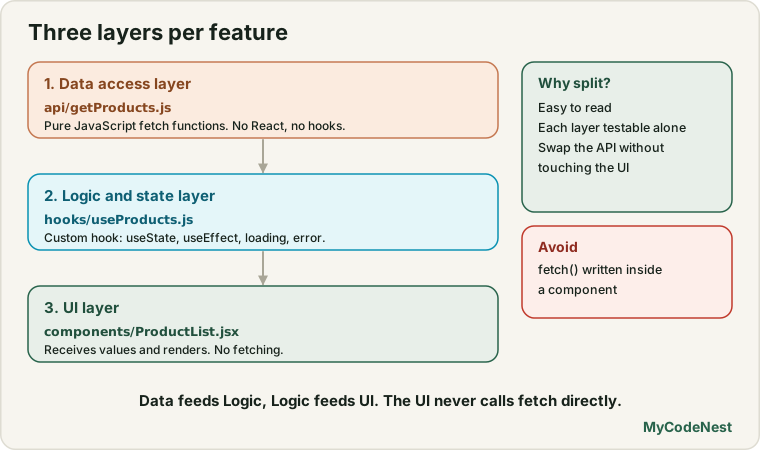
To keep components readable and easy to test, separate each feature into three distinct layers:
+-------------------------------------------------------------+
| 1. Data Access Layer (api/getProducts.js)                   |
|    Pure JavaScript fetch functions. No React, no hooks.     |
+------------------------------+------------------------------+
                               |
                               v
+-------------------------------------------------------------+
| 2. Logic & State Layer (hooks/useProducts.js)               |
|    React custom hook managing useState, useEffect, errors.  |
+------------------------------+------------------------------+
                               |
                               v
+-------------------------------------------------------------+
| 3. Presentational UI Layer (components/ProductList.jsx)     |
|    Pure component receiving props or hook return values.    |
+-------------------------------------------------------------+
Let us look at each layer in real code:
1. Data Access Layer: Pure API Function
The API layer is responsible solely for network communication. It knows nothing about React, JSX, or browser state:
// src/features/products/api/getProducts.js
export async function getProducts(category) {
  const query = category ? `?category=${encodeURIComponent(category)}` : '';
  const response = await fetch(`/api/products${query}`);

  if (!response.ok) {
    throw new Error(`Failed to fetch products: ${response.statusText}`);
  }

  return response.json();
}
Because getProducts is a regular async JavaScript function, you can write unit tests for it in Vitest without mounting any React components.
2. Logic & State Layer: Custom Hook
The custom hook coordinates React state, loading flags, error handling, and effect lifecycles (building upon Custom Hooks):
// src/features/products/hooks/useProducts.js
import { useState, useEffect } from 'react';
import { getProducts } from '../api/getProducts';

export function useProducts(selectedCategory) {
  const [products, setProducts] = useState([]);
  const [isLoading, setIsLoading] = useState(true);
  const [error, setError] = useState(null);

  useEffect(() => {
    let ignore = false;
    setIsLoading(true);
    setError(null);

    getProducts(selectedCategory)
      .then((data) => {
        if (!ignore) {
          setProducts(data);
          setIsLoading(false);
        }
      })
      .catch((err) => {
        if (!ignore) {
          setError(err.message);
          setIsLoading(false);
        }
      });

    return () => {
      ignore = true;
    };
  }, [selectedCategory]);

  return { products, isLoading, error };
}
3. Presentational UI Layer: Component
The component focuses on rendering accessible markup and handling user interaction:
// src/features/products/components/ProductList.jsx
import React from 'react';
import { useProducts } from '../hooks/useProducts';

export function ProductList({ category, onSelectProduct }) {
  const { products, isLoading, error } = useProducts(category);

  if (isLoading) {
    return <div role="status" aria-live="polite">Loading products...</div>;
  }

  if (error) {
    return <div role="alert" className="error-banner">{error}</div>;
  }

  if (products.length === 0) {
    return <p>No products found in this category.</p>;
  }

  return (
    <ul className="product-grid" aria-label="Product catalog">
      {products.map((product) => (
        <li key={product.id} className="product-card">
          <h3>{product.title}</h3>
          <p className="price">${product.price.toFixed(2)}</p>
          <button
            type="button"
            onClick={() => onSelectProduct(product)}
          >
            View Details
          </button>
        </li>
      ))}
    </ul>
  );
}
Notice how clean ProductList is. It contains zero raw fetch() calls and zero complex state juggling. If the API endpoint changes from REST to GraphQL tomorrow, only getProducts.js changes; ProductList.jsx remains completely untouched.
Unidirectional Dependency Rules
To prevent spaghetti dependencies where everything imports everything else, establish strict unidirectional boundaries:
                  [ Route Pages (src/routes/) ]
                                |
                                v
               [ Feature Modules (src/features/) ]
                     /                     \
                    v                       v
     [ Shared Primitives ]           [ Shared Utilities ]
(src/components/) (src/utils/)- Shared Primitives Cannot Import Features:
src/components/Button.jsxmust never import anything fromsrc/features/. Primitives must remain completely domain-agnostic. - Features Cannot Import Each Other’s Private Files:
src/features/checkout/may import public exports fromsrc/features/cart/index.js, but it must never importsrc/features/cart/components/CartItemRow.jsx. - Pages Orchestrate Features: Route entry files inside
src/routes/compose features together and pass coordinates or navigation events between them.
Configuring Path Aliases in Vite
Long relative paths like import { Button } from '../../../components/Button' are fragile. Moving a file breaks its imports.
Configure path aliases in vite.config.js and jsconfig.json (or tsconfig.json) to use clean root-relative paths:
vite.config.js
import { defineConfig } from 'vite';
import react from '@vitejs/plugin-react';
import path from 'path';

export default defineConfig({
  plugins: [react()],
  resolve: {
    alias: {
      '@': path.resolve(__dirname, './src'),
    },
  },
});
jsconfig.json / tsconfig.json
{
  "compilerOptions": {
    "baseUrl": ".",
    "paths": {
      "@/*": ["src/*"]
    }
  }
}
Now you can import from any file cleanly:
import { Button } from '@/components/Button';
import { useAuth } from '@/features/auth';
import { formatCurrency } from '@/utils/formatCurrency';
Common mistakes
1. Creating premature feature folders for tiny apps
# Avoid: Over-engineering a 3-page marketing website
src/features/home-hero/components/HeroTitle.jsx
src/features/home-hero/hooks/useHeroTitle.js
If an application only has 4 simple components, creating feature folders adds needless nested folders. Start with standard src/components/ and refactor into feature modules when distinct business areas emerge.
2. Deep-importing internal files across features
// Incorrect: Reaching into private internals of another feature
import { ItemPrice } from '@/features/cart/components/ItemPrice';

// Correct: Import from the public boundary
import { useCart } from '@/features/cart';
Bypassing the barrel file tightly couples two independent features. If the cart team renames ItemPrice, your code breaks silently.
3. Putting domain-specific logic in src/components/
// Incorrect: src/components/OrderSummary.jsx (Has business logic!)
// Correct:   src/features/orders/components/OrderSummary.jsx
Only place generic UI widgets (like Button, Modal, Tabs, Input) in src/components/. If a component knows what an “Order”, “Cart”, or “Patient” is, it belongs in a feature folder.
Practice
- Inspect a previous project you built (such as the Notes CRUD App) and list which files belong to shared UI primitives versus the notes feature module.
- Configure the
@/path alias in your local Vite setup and refactor three nested../../relative imports into root alias imports. - Take a component that contains a
fetch()call, auseStatecall, and a<ul>list, and refactor it into the three-tier pattern: API function, custom hook, and presentational component. - Create a barrel file
src/features/auth/index.jsthat publicly exports anAuthFormcomponent and auseAuthhook while keeping internal sub-components private. - Identify a circular dependency in a codebase by tracing imports where File A imports File B and File B imports File A, and resolve it by extracting the shared code into a utility file.
Recap
- Grouping files by technical type breaks down as applications grow; feature-based architecture groups files by business domain.
- Each feature folder contains its own private components, hooks, network API functions, and utilities.
- Barrel files (
index.js) define public API boundaries, hiding internal implementation details from the rest of the application. - The three-tier pattern separates data fetching (pure JavaScript), state logic (custom hooks), and UI rendering (presentational components).
- Unidirectional dependency flow ensures shared primitives never import feature code, preventing circular dependency cycles.
- Vite path aliases (
@/) eliminate fragile nested relative import paths.
Frequently asked questions
When should a component live in src/components versus src/features/?
A component belongs in src/components/ if it is completely domain-agnostic and could be published to an open-source UI library (such as Button, Modal, Dropdown, or Tooltip). If the component contains domain knowledge (like order numbers, user profiles, or cart totals), it belongs inside its respective feature folder.
What is a barrel file?
A barrel file is an index.js file at the root of a folder that rolls up exports from several internal files into a single public interface. It allows external consumers to import multiple items from a single path without knowing the internal file structure.
What is a circular dependency and how do I prevent it?
A circular dependency occurs when Module A imports Module B, and Module B directly or indirectly imports Module A. This can cause bundler errors or runtime undefined values during module initialization. You prevent circular dependencies by following unidirectional dependency rules: shared helpers never import higher-level features, and shared types or utilities are extracted into separate standalone files.
Does having barrel files hurt bundler tree-shaking?
Modern bundlers like Vite (powered by Rolldown and Oxc) accurately tree-shake ES module exports as long as the barrel files contain pure re-exports without side effects. Ensure package.json specifies "sideEffects": false (or lists specific CSS files) so unused exports are cleanly eliminated from production bundles.
Where should route page components live?
Route entry components typically live in src/routes/ or src/pages/. Page components should remain thin orchestration layers: they read URL parameters, apply page layouts, and compose feature components together.
See also: Setting Up a React Project with Vite, Project Structure, Custom Hooks in React, State Management in React