Update Objects and Arrays in React State Safely
Learn how to update React state correctly: updater functions, snapshots, and immutable updates for objects and arrays using spread, map and filter.
What you will learn
In the useState lesson you stored a number and a boolean. Real apps store objects (a user profile) and arrays (a list of tasks). Here beginners hit the most confusing bug in React: you change the state, but the screen does not update.
In this lesson you will learn why that happens, the golden rule of state (never change it, replace it), how to use the updater function when the new value depends on the old one, and the exact patterns for adding, removing and editing items in objects and arrays.
Rule 1: state is a snapshot
When a component renders, it gets a snapshot of its state. Inside that render, count is fixed. Calling setCount does not change the count variable you are holding. It asks React for a new render with a new value.
Look at this handler:
import { useState } from 'react';

function TripleBad() {
  const [count, setCount] = useState(0);

  function handleClick() {
    setCount(count + 1);
    setCount(count + 1);
    setCount(count + 1);
  }

  return <button onClick={handleClick}>Count: {count}</button>;
}
You might expect Count: 3 after one click. It shows Count: 1. In this render, count is 0, so all three lines say setCount(0 + 1). Each one asks for 1.
The updater function
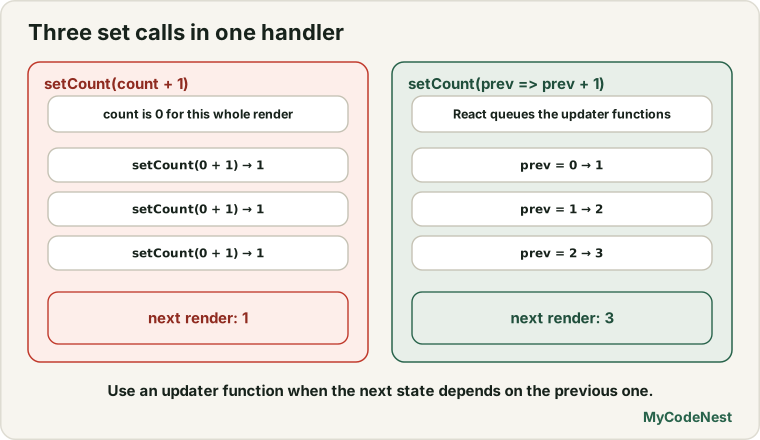
When the new state depends on the previous state, pass a function to the setter instead of a value. React calls it with the latest value:
function TripleGood() {
  const [count, setCount] = useState(0);

  function handleClick() {
    setCount((prev) => prev + 1);
    setCount((prev) => prev + 1);
    setCount((prev) => prev + 1);
  }

  return <button onClick={handleClick}>Count: {count}</button>;
}
After one click it shows Count: 3. React queues the three updater functions and runs them in order: 0 → 1 → 2 → 3. Each prev is the result of the one before.
Use the updater form when the next value is calculated from the previous one: counters, toggles (setOpen((prev) => !prev)), and adding to lists. You will see it often. For a simple update from a click, setCount(count + 1) is fine.
Rule 2: never mutate state
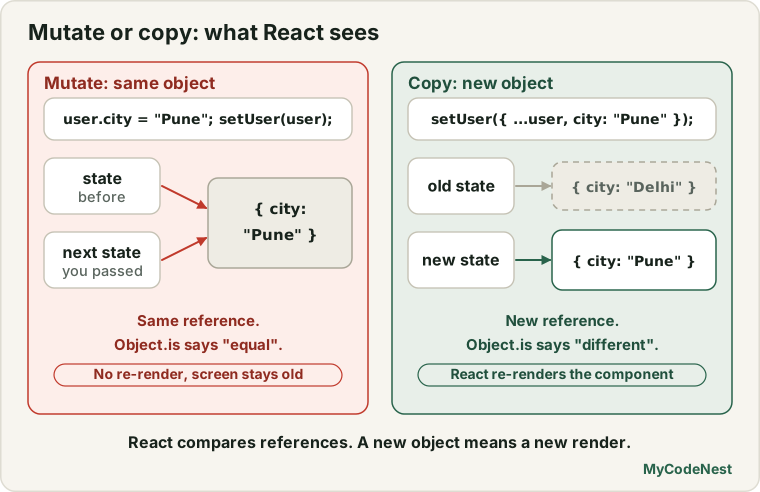
State can hold objects and arrays, but React compares the old and new state to decide if it should redraw. It compares references (see the value vs reference lesson). If you change an object in place, the reference stays the same, so React thinks nothing changed.
function BrokenProfile() {
  const [profile, setProfile] = useState({ name: "Aisha", city: "Delhi" });

  function handleMove() {
    profile.city = "Mumbai";   // mutates the existing object
    setProfile(profile);       // same object: React sees no change
  }

  return (
    <div>
      <p>{profile.name} / {profile.city}</p>
      <button onClick={handleMove}>Move</button>
    </div>
  );
}
Click Move and the page still shows Aisha / Delhi. The object was changed in memory, but React never re-rendered, because it was given the same object.
The fix is to create a new object and pass that:
setProfile({ ...profile, city: "Mumbai" });The golden rule: treat state as read-only. To change it, build a new copy with the change, and give that copy to the setter.
Updating objects
Use the spread operator (...) from the spread lesson to copy all the properties, then override the ones that change:
import { useState } from 'react';

function ProfileEditor() {
  const [profile, setProfile] = useState({
    name: "Aisha",
    city: "Delhi",
    skills: ["HTML"],
  });

  return (
    <div>
      <p>{profile.name} / {profile.city} / {profile.skills.join(", ")}</p>

      <button onClick={() => setProfile({ ...profile, city: "Mumbai" })}>
        Move
      </button>

      <button
        onClick={() => setProfile({ ...profile, skills: [...profile.skills, "CSS"] })}
      >
        Add skill
      </button>
    </div>
  );
}
At the start the page shows Aisha / Delhi / HTML. Click Move and it becomes Aisha / Mumbai / HTML. Click Add skill and it becomes Aisha / Mumbai / HTML, CSS.
In { ...profile, city: "Mumbai" }, the spread copies name, city and skills, then city: "Mumbai" replaces the old city. Order matters: the changed property must come after the spread.
Nested objects need a copy at every level that changes. The spread is only a shallow copy:
setUser({
  ...user,
  address: { ...user.address, city: "Mumbai" },
});
If you find yourself nesting deeply, it is a sign to keep your state flatter (a topic of a later lesson).
Updating arrays
Arrays follow the same rule: do not change the array, create a new one. Some array methods change the original and should be avoided on state. Others return a new array and are safe.
| Task | Avoid (changes the array) | Use (returns a new array) |
|---|---|---|
| Add | push, unshift |
[...items, newItem] |
| Remove | pop, shift, splice |
items.filter(...) |
| Replace or edit | items[i] = x |
items.map(...) |
| Sort or reverse | sort, reverse on the state itself |
[...items].sort(...) (copy first) |
Let us build a task list that uses all three common updates: add, toggle and delete.
import { useState } from 'react';

function TaskList() {
  const [tasks, setTasks] = useState([
    { id: 1, title: "Learn JSX", done: true },
    { id: 2, title: "Learn props", done: false },
  ]);

  function addTask() {
    setTasks([...tasks, { id: Date.now(), title: "New task", done: false }]);
  }

  function toggleTask(id) {
    setTasks(
      tasks.map((task) =>
        task.id === id ? { ...task, done: !task.done } : task
      )
    );
  }

  function deleteTask(id) {
    setTasks(tasks.filter((task) => task.id !== id));
  }

  return (
    <div>
      <button onClick={addTask}>Add task</button>
      <ul>
        {tasks.map((task) => (
          <li key={task.id}>
            <span>{task.done ? "[x] " : "[ ] "}{task.title}</span>
            <button onClick={() => toggleTask(task.id)}>Toggle</button>
            <button onClick={() => deleteTask(task.id)}>Delete</button>
          </li>
        ))}
      </ul>
      <p>{tasks.filter((task) => !task.done).length} left</p>
    </div>
  );
}

export default TaskList;
The first screen looks like this:
[Add task]
[x] Learn JSX        [Toggle] [Delete]
[ ] Learn props      [Toggle] [Delete]
1 left
Now try it:
- Click Add task. A third row
[ ] New taskappears and the counter says2 left. - Click Toggle next to Learn props. Its box becomes
[x]and the counter says1 left. - Click Delete next to Learn JSX. That row disappears.
How each function works:
- Add:
[...tasks, newTask]builds a new array with all the old tasks and one more at the end. To add at the start, write[newTask, ...tasks]. - Toggle (edit one item):
tasks.map(...)goes through every task. For the matchingidit returns a new object withdoneflipped ({ ...task, done: !task.done }), and every other task is returned unchanged. - Delete:
tasks.filter(...)keeps every task whoseidis not the one we want to delete. - The left count is not stored in state. It is calculated from
taskson every render. This is the “calculate it, do not store it” idea from the previous lesson. Date.now()gives a simple unique number for the new task. In real apps, a safer choice iscrypto.randomUUID(). Create the id when you create the item, never while rendering, so that it stays the same (see keys).
If you need a refresher on map, filter and the spread syntax, see the array methods lesson.
Why does React insist on this?
Replacing state instead of changing it has real benefits:
- React can tell instantly whether something changed, by comparing references.
- Old versions of the data are not destroyed, which makes bugs easier to track.
- Features such as undo, comparing changes and performance improvements later become simple.
It may feel strange at first. After a few exercises, ... and map will feel natural.
Common mistakes
1. Mutating an object or array in state. profile.city = "Mumbai" or tasks.push(task) followed by setTasks(tasks) does not update the screen. Create a new copy.
2. Putting the spread after the change. { city: "Mumbai", ...profile } lets the old city overwrite your change. Spread first, then change.
3. Forgetting to copy before sort() or reverse(). They change the original array. Use [...tasks].sort(...).
4. Calling the setter several times with the same stale value. setCount(count + 1) three times gives +1. Use the updater function setCount((prev) => prev + 1).
5. Forgetting to return the unchanged item in map(). In tasks.map(...), the “else” case must return task. Otherwise those items become undefined and the page crashes.
6. Only changing a nested value. setUser({ ...user, address: { city: "Mumbai" } }) loses the other address fields. Copy the inner object too: { ...user.address, city: "Mumbai" }.
7. Generating a new key or id on every render. Create ids when the item is created, not inside the JSX.
8. Storing something you can calculate. Do not keep a second state value for the “left” count. Calculate it from tasks.
Practice
-
Create a
Counterwith a button +3 that increases the count by 3 using three updater calls:setCount((prev) => prev + 1). -
Predict, then check: With
const [count, setCount] = useState(0), what will the screen show after one click on a button that callssetCount(count + 1)twice? What if it usessetCount((prev) => prev + 1)twice? -
Build a
ProfileEditorwith state{ name: "Aisha", city: "Delhi" }. Add two buttons: one that changes the city to"Mumbai"and one that changes the name to"Ravi". Make sure each button keeps the other property. -
Debug: The profile never updates. Fix it.
function handleBirthday() { user.age = user.age + 1; setUser(user); } -
Build a
SkillListwith state["HTML", "CSS"]. Add a button that adds"JavaScript"at the end, and another button that adds"Git"at the start. -
Extend the
TaskListfrom this lesson with a Clear completed button. Usefilter()to remove every task wheredoneistrue. -
Debug: After clicking Sort A-Z, the list sorts but sometimes React does not re-render. What is wrong, and how do you fix it?
function handleSort() { setNames(names.sort()); } -
Build a shopping cart: state is an array of
{ id, name, quantity }. Add a + button next to each item that increases only that item’s quantity, usingmap().
Recap
- State is a snapshot for each render. A setter does not change the variable you already hold.
- Use the updater function
setX((prev) => ...)when the new value depends on the old one. - Never mutate state. Always create a new object or array and pass it to the setter.
- Objects:
{ ...obj, key: newValue }. Copy every nested level that changes. - Arrays: add with
[...items, item], remove withfilter(), edit withmap(), sort a copy. - Avoid
push,pop,splice,sortandreversedirectly on state. - Calculate values such as totals and counts instead of storing them.
- Next you will connect state to form inputs.
Frequently asked questions
Why does my state not update when I change an object?
You probably mutated the existing object and passed the same reference back to the setter. React compares references and sees no change, so it does not re-render. Create a new object with the spread operator and pass that instead.
When do I need the updater function?
Use it when the new state depends on the previous state, and especially when you update the same state several times in one handler. For a single, simple update, passing the new value directly also works.
Is the spread operator a deep copy?
No, it makes a shallow copy. The top-level properties are copied, but nested objects and arrays are still shared with the original. That is why you spread each nested level that you change.
Is it slow to copy arrays and objects all the time?
For the sizes you meet in normal apps, no. JavaScript copies small objects and arrays very quickly, and the safety you gain is worth it. Only very large data sets need special care, and that comes much later.
Can I use push() if I call setState afterwards?
It is a bad idea. The mutation changes the existing array, and passing it back gives React the same reference. Use [...items, newItem] instead. It is clearer and always works.
Should I put everything in one big state object?
Not usually. Several small pieces of state (name, email, isOpen) are simpler to update than one big object. Use one object when the values always change together, such as the fields of a form.
See also: useState in React, Value vs Reference, JavaScript Destructuring, Spread and Rest, map, filter and reduce