Conditional Rendering in React: if, Ternary and &&
Learn how to show or hide UI in React with if statements, the ternary operator, && and null, and how to avoid the common 0 bug.
What you will learn
Real interfaces change depending on conditions. A Log in button becomes a Log out button. A Sold out label replaces Add to cart. An empty list shows a friendly message. A notification badge appears only when there is something new.
In React, you do not need any special syntax for this. You use the JavaScript you already know, such as if statements and the ternary operator, to decide what a component returns. In this lesson you will learn the four common patterns and the one bug that surprises almost every beginner.
All examples here use props to supply the conditions. In the state lessons, you will use the same patterns with values that change when the user clicks.
The idea
A component is a function that returns JSX. So the question “what should be shown?” is answered by normal JavaScript logic inside that function:
condition true  → return this JSX
condition false → return that JSX (or nothing)
Recall from the JSX lesson that true, false, null and undefined render nothing. That is what makes these patterns work.
Pattern 1: if with an early return
Use if before the return when the whole component should change or disappear.
function Notification({ count }) {
  if (count === 0) {
    return null;
  }

  return <p className="notification">You have {count} new messages</p>;
}

export default Notification;
Returning null means “render nothing”. Use it like this:
<Notification count={0} />
<Notification count={3} />
The first renders nothing at all. The second shows You have 3 new messages. This early return keeps the main JSX clean, because the “nothing to show” case is handled first and gets out of the way.
You can also return different JSX for different cases:
function Greeting({ isLoggedIn, name }) {
  if (isLoggedIn) {
    return <h2>Welcome back, {name}!</h2>;
  }

  return <h2>Please log in.</h2>;
}
<Greeting isLoggedIn={true} name="Aisha" /> shows Welcome back, Aisha!. With isLoggedIn={false} it shows Please log in.
Pattern 2: the ternary operator ? :
The ternary operator is an expression, so it works inside JSX, in the middle of other markup. Its shape is condition ? valueIfTrue : valueIfFalse.
function StockBadge({ inStock }) {
  return <p>{inStock ? "In stock" : "Sold out"}</p>;
}
<StockBadge inStock={true} /> shows In stock, and inStock={false} shows Sold out.
You can switch between two pieces of JSX too:
function AuthButton({ isLoggedIn }) {
  return (
    <div>
      {isLoggedIn ? <button>Log out</button> : <button>Log in</button>}
    </div>
  );
}
Use the ternary when there are two outcomes. If you start nesting ternaries inside ternaries, the code becomes hard to read. Switch to if statements or a variable instead.
Pattern 3: the logical AND &&
When you want to show something or nothing, use &&:
function StockBadge({ inStock, discount }) {
  return (
    <p>
      {inStock ? "In stock" : "Sold out"}
      {discount > 0 && <span> ({discount}% off)</span>}
    </p>
  );
}
How it works: in JavaScript, a && b gives b if a is truthy, and gives a itself if a is falsy. Here:
- If
discount > 0istrue, the result is the<span>, which is shown. - If it is
false, the result isfalse, which React renders as nothing.
<StockBadge inStock={true} discount={15} />
<StockBadge inStock={false} discount={0} />
The first shows In stock (15% off). The second shows only Sold out, with no discount part.
The 0 bug
There is one trap. Look at this code:
function MessageCount({ items }) {
  return <div>{items.length && <p>You have messages</p>}</div>;
}
If items is an empty array, items.length is 0. The expression 0 && ... gives 0, and React does render the number zero. The page shows a lonely 0 instead of nothing.
The fix is to make the condition a real boolean:
{items.length > 0 && <p>You have messages</p>}Rule of thumb: put a comparison (> 0, === 5) or Boolean(value) on the left of &&, never a bare number that can be zero. (The reason is explained in the type coercion lesson.)
Pattern 4: store JSX in a variable
When the logic is longer, compute what to show before the return:
function OrderStatus({ status }) {
  let message;

  if (status === "shipped") {
    message = <p>Your order is on the way.</p>;
  } else if (status === "delivered") {
    message = <p>Your order has arrived.</p>;
  } else {
    message = <p>We are preparing your order.</p>;
  }

  return <section>{message}</section>;
}
JSX is just a value, so you can store it in a variable, then place the variable in the return. For many fixed cases, an object lookup is even shorter:
const messages = {
  shipped: "Your order is on the way.",
  delivered: "Your order has arrived.",
};

function OrderStatus({ status }) {
  return <p>{messages[status] ?? "We are preparing your order."}</p>;
}
The ?? operator gives the text on the right when the value on the left is null or undefined (see the nullish coalescing lesson).
Showing an empty state for a list
Conditional rendering and lists work together. A good list component handles the case with no items:
function ProductList({ products }) {
  if (products.length === 0) {
    return <p>No products found.</p>;
  }

  return (
    <ul>
      {products.map((product) => (
        <li key={product.id}>{product.name}</li>
      ))}
    </ul>
  );
}
With an empty array, the page shows No products found. With three products, it shows the list. Giving users a clear message is better than a blank space. (Rendering lists is covered in the lists and keys lesson.)
Which pattern should I use?
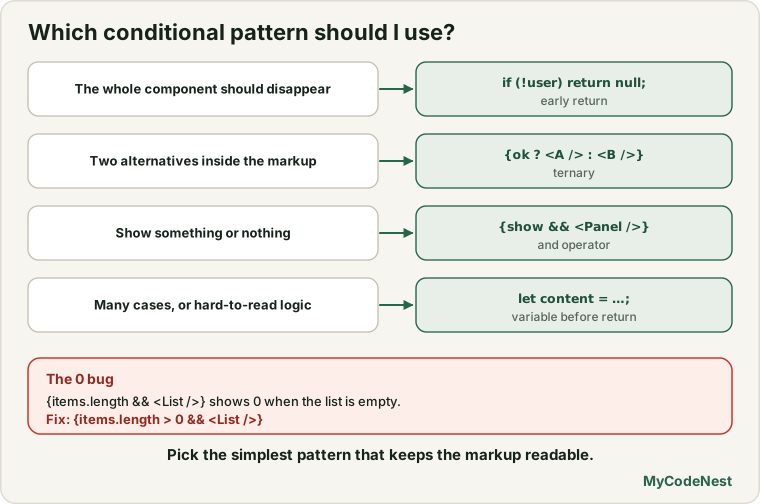
| Situation | Best pattern |
|---|---|
| The whole component should disappear or be replaced | if with an early return (or return null) |
| Two alternatives inside the markup | Ternary ? : |
| Show something or nothing | condition && <Element /> |
| Many cases, or logic that is hard to read | A variable (or object lookup) before the return |
Hiding is different from not rendering
return null (or && with a false condition) means the element does not exist in the page at all. That is different from hiding it with CSS (display: none), where the element still exists but is invisible. Not rendering is usually what you want: the element is not in the page, so it costs nothing and cannot be reached by mistake, for example through the browser’s developer tools or a script. A component that is only hidden with CSS is still rendered and keeps doing its work. Use CSS hiding only when you really need the element to stay in the page, for example for a smooth animation.
Common mistakes
1. The 0 bug. {items.length && <List />} shows 0 when the list is empty. Use items.length > 0 &&.
2. Using if inside JSX. This is a syntax error:
return (
  <div>
    {if (isLoggedIn) { <p>Hi</p> }}
  </div>
);
Statements are not allowed in braces. Use a ternary, &&, or do the if before the return.
3. Forgetting the : null in a ternary. {isOpen ? <Menu /> } is a syntax error. A ternary needs both sides. Write {isOpen ? <Menu /> : null}, or use &&.
4. Nested ternaries. a ? b : c ? d : e is hard to read. Use if statements or a variable.
5. Comparing with the wrong operator. = assigns a value, === compares. if (status = "shipped") is a bug. Use ===.
6. Returning undefined by accident. If an if branch forgets to return, the component renders nothing, and React does not show an error.
7. Hiding sensitive content only with CSS. Content that is hidden with CSS is still in the page. If something must not be visible, do not render it.
Practice
-
Create a
Notificationcomponent that takes acountprop. Returnnullwhen the count is0, andYou have N new messagesotherwise. Test with0and3. -
Create a
StockBadgethat showsIn stockorSold outusing a ternary and aninStockprop. -
Add a
discountprop toStockBadge. Show(15% off)only when the discount is greater than0, using&&. -
Predict, then check: What does the page show for
<MessageCount items={[]} />with the buggy code from this lesson? Fix it so it shows nothing. -
Debug: This code gives a syntax error. Fix it with a ternary and then again with
&&.function Welcome({ isMember }) { return <p>{if (isMember) "Welcome back" else "Join us"}</p>; } -
Create a
UserGreetingthat takesisLoggedInandname. Show a welcome message when logged in, and aPlease log inmessage when not. Use an earlyreturn. -
Create an
OrderStatuscomponent with three statuses:pending,shippedanddelivered. Use a variable or an object lookup to choose the message. -
Update your
ProductListfrom the lists lesson so it showsNo products found.when the array is empty. Test by passing[].
Recap
- Conditional rendering is plain JavaScript: decide what the component returns.
ifwith an earlyreturn(orreturn null) is best for whole-component decisions.- The ternary
a ? b : cworks inside JSX for two alternatives. &&shows something or nothing. Beware the0bug: useitems.length > 0 &&.- You can store JSX in a variable, or look it up in an object, for longer logic.
true,false,nullandundefinedrender nothing.- Not rendering an element is different from hiding it with CSS.
- Next you will style your components with CSS files, inline styles and CSS Modules.
Frequently asked questions
How do I use an if statement inside JSX?
You cannot put statements inside the braces of JSX, because braces accept only expressions. Either write the if before the return and store the result in a variable, return early from the function, or use an expression such as a ternary or && inside the JSX.
What is the difference between && and the ternary operator?
condition && <Element /> shows the element or nothing. condition ? <A /> : <B /> chooses between two alternatives. Use && when there is nothing to show in the false case, and the ternary when there are two outcomes.
Why does my page show 0?
Your condition on the left of && is the number 0, which is falsy, so && returns 0 itself and React displays it. Compare the number to make a real boolean, for example count > 0 && ....
Does return null cause an error?
No. Returning null is the standard way for a component to render nothing. It is perfectly safe.
Should I hide elements with CSS or not render them?
Usually, do not render them. An element that is not rendered is not in the page at all, so it costs nothing. A component that is only hidden with CSS is still rendered and still does its work. Use CSS hiding only when you need the element to stay in the page, for example for a smooth animation.
Can I show different components depending on a value?
Yes. Components are just JSX values. You can use an if or an object lookup to choose which component to return, for example const Page = pages[name] and then return <Page /> after checking that it exists.
See also: JavaScript Conditions, JavaScript Operators, Type Coercion, Rendering Lists and Keys