useFormStatus and useOptimistic: Better Form UX
Build responsive React 19 forms with useFormStatus and useOptimistic: disable buttons in deep children and show instant UI updates before server confirmation.
What you will learn
In the previous lesson, you learned how Actions and useActionState simplify form handling by providing isPending and server response states directly at the form level.
However, real-world user interfaces face two common challenges:
- Prop drilling status to nested buttons: Submit buttons are often nested deep inside toolbars, cards, or custom design system components. Passing
isPendingdown several component layers is cumbersome. - Perceived latency: When a user likes a post, posts a comment, or checks a task, waiting 500ms to 2 seconds for the server before updating the screen feels sluggish and unresponsive.
React 19 solves both problems with two specialized hooks:
useFormStatus(fromreact-dom): Lets any child component read the pending status and form data of its parent<form>without prop drilling.useOptimistic: Instantly shows the expected next state while the async action is still running in the background, automatically rolling back if the action fails.
In this lesson, you will learn how both hooks work and combine them to create lightning-fast form experiences.
Reading Form Status with useFormStatus
The useFormStatus hook provides status information about the nearest parent <form> element.
import { useFormStatus } from 'react-dom';

function SubmitButton() {
  const { pending, data, method, action } = useFormStatus();

  return (
    <button type="submit" disabled={pending} className="btn-primary">
      {pending ? "Saving changes..." : "Save"}
    </button>
  );
}
Notice where useFormStatus is imported from: react-dom, not react. This is because forms and HTML elements are part of the web DOM specification.
What useFormStatus returns
The hook returns an object with four properties:
pending: A boolean.trueif the parent<form>is currently submitting an action,falseotherwise.data: AFormDataobject containing the data being submitted while pending, ornullif idle.method: The HTTP method string (e.g.,'get'or'post').action: A reference to the action function currently running on the parent form.
The Golden Rule of useFormStatus
Important:
useFormStatusmust be called from a component that is rendered inside a<form>. It cannot read the status of a form rendered in the same component.
// Incorrect: useFormStatus cannot read status of a form in the same component
function BrokenForm() {
  const { pending } = useFormStatus(); // Always returns false!

  return (
    <form action={someAction}>
      <button disabled={pending}>Submit</button>
    </form>
  );
}

// Correct: Extract the button into a child component
function SubmitButton() {
  const { pending } = useFormStatus(); // Reads the parent <form>!
  return <button disabled={pending}>{pending ? "Submitting..." : "Submit"}</button>;
}

function WorkingForm() {
  return (
    <form action={someAction}>
      <input name="email" />
      <SubmitButton />
    </form>
  );
}
Because useFormStatus behaves like an internal Context, it looks up the component tree to find its nearest parent <form>.
Instant Feedback with useOptimistic
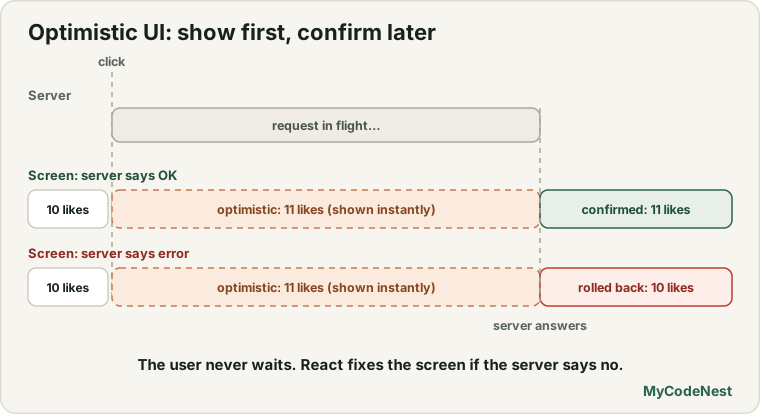
When you click “Like” on social media or hit “Send” in a chat app, the app doesn’t freeze or show a loading spinner—it shows the new like or message immediately. If the network fails, it quietly reverts or displays a retry warning.
This pattern is called Optimistic UI.
React 19 introduces the useOptimistic hook to make optimistic updates declarative and safe:
import { useOptimistic } from 'react';

const [optimisticState, setOptimistic] = useOptimistic(
  currentState,
  updateFn
);
Let’s understand how it works:
currentState: The actual verified state (for example, fromuseState,useActionState, or a prop).updateFn: A pure reducer function(currentState, optimisticValue) => nextOptimisticState. It calculates what the state should look like while the action is pending.optimisticState: The state your component renders. While no action is running, it equalscurrentState. While an action runs, it equals the value computed byupdateFn.setOptimistic: A function called inside your action to trigger the optimistic calculation.
As soon as the async action completes, React automatically discards the optimistic value and renders the verified return value of the action.
Complete Example: Optimistic Comment Thread
Let’s build a comment box where submitted comments appear instantly in the list before the server responds.
1. The component structure
// CommentApp.jsx
import { useState, useOptimistic } from 'react';
import { useFormStatus } from 'react-dom';

// Reusable submit button using useFormStatus
function SubmitButton() {
  const { pending } = useFormStatus();

  return (
    <button type="submit" disabled={pending} className="btn-send">
      {pending ? "Posting..." : "Post Comment"}
    </button>
  );
}

export function CommentApp() {
  // Verified list of comments confirmed by server
  const [comments, setComments] = useState([
    { id: 1, text: "React 19 Actions look amazing!", isSending: false },
    { id: 2, text: "useOptimistic makes apps feel so fast.", isSending: false }
  ]);

  // Optimistic layer on top of verified comments
  const [optimisticComments, setOptimisticComments] = useOptimistic(
    comments,
    (currentList, newCommentText) => [
      ...currentList,
      {
        id: Date.now(), // Temporary client id
        text: newCommentText,
        isSending: true // Highlight that it's still syncing
      }
    ]
  );

  async function handleSendComment(formData) {
    const text = formData.get("comment")?.trim();
    if (!text) return;

    // 1. Instantly show optimistic comment on screen
    setOptimisticComments(text);

    // 2. Perform background server request (simulated 1.5s network delay)
    try {
      const savedComment = await saveCommentToApi(text);

      // 3. Update real verified state with server-generated ID
      setComments((prev) => [...prev, savedComment]);
    } catch (err) {
      alert("Failed to send comment: " + err.message);
      // Notice: If saveCommentToApi fails, React automatically discards
      // the optimistic comment because setComments was not called!
    }
  }

  return (
    <div className="comment-box">
      <h3>Discussion</h3>

      <ul className="comment-list">
        {optimisticComments.map((c) => (
          <li key={c.id} className={c.isSending ? "comment-syncing" : ""}>
            <span>{c.text}</span>
            {c.isSending && <small className="sync-badge"> (Sending...)</small>}
          </li>
        ))}
      </ul>

      <form action={handleSendComment} className="comment-form">
        <input
          name="comment"
          type="text"
          placeholder="Write your thought..."
          autoComplete="off"
          required
        />
        <SubmitButton />
      </form>
    </div>
  );
}

// Simulated backend API
async function saveCommentToApi(text) {
  await new Promise((resolve) => setTimeout(resolve, 1500));
  return { id: Math.random(), text, isSending: false };
}
Trace what happens:
- The user types
"Hello world"and clicks Post Comment. handleSendCommentstarts and callssetOptimisticComments("Hello world").- React immediately re-renders
optimisticCommentswith the new item markedisSending: true. The user sees their comment appear with zero delay. - Concurrently,
<SubmitButton />renders withpending: trueviauseFormStatus, showing"Posting...". - The 1.5-second network request completes.
setCommentsstores the real server response. - The action ends. React transitions smoothly from the temporary optimistic item to the confirmed comment.
If the network call throws an error, the catch block runs, setComments is skipped, and React rolls back the optimistic comment automatically when the action finishes.
Combining useActionState and useFormStatus
useActionState and useFormStatus work together cleanly:
- Use
useActionStatein the form’s owner component to manage return data, errors, and top-level action logic. - Use
useFormStatusin deep child components (like custom design-system buttons and input wrappers) so they don’t need props drilled through cards or sections.
// Design System: Accessible Submit Button
export function PrimarySubmit({ children = "Submit" }) {
  const { pending } = useFormStatus();

  return (
    <button type="submit" disabled={pending} aria-busy={pending}>
      {pending ? <span className="spinner" /> : children}
    </button>
  );
}
Common mistakes
1. Importing useFormStatus from 'react'
useFormStatus is exported from 'react-dom', whereas useOptimistic and useActionState are in 'react'. Writing import { useFormStatus } from 'react' throws a named export error: SyntaxError: The requested module 'react' does not provide an export named 'useFormStatus'.
2. Calling useFormStatus in the same component that renders <form>
Always remember: useFormStatus looks up the tree to find its parent <form>. If <form> and useFormStatus are in the same component, pending will always evaluate to false.
3. Calling setOptimistic outside an Action
setOptimistic can only be invoked while an Action or transition is running (inside <form action={...}> or a startTransition callback). Calling it in standard event handlers throws: An optimistic state update occurred outside a transition or action.
4. Mutating state inside the optimistic update function
The second argument to useOptimistic must be a pure reducer function that returns a new array or object. Never write currentList.push(...).
Practice
- Create a
SaveButtoncomponent that usesuseFormStatusto show a spinning SVG icon when the parent form is pending. - Build an “Upvote” button for a community post using
useOptimistic. When clicked, the upvote counter should increment by 1 immediately while a mock 1000ms API call completes. - Test error handling with
useOptimistic: make your mock API reject 50% of the time (Math.random() < 0.5). Observe how React rolls back the optimistic value automatically when an error occurs. - Extract an input field into an
InputWrappercomponent that reads{ pending }fromuseFormStatusand adds a subtle loading pulse animation while submitting. - Build a shopping cart item list with a “Delete” button next to each product. When clicked, remove the item optimistically from the list.
- Compare the user experience of a standard form with a blocking spinner versus an optimistic form. Note the difference in perceived speed.
Recap
useFormStatus(fromreact-dom) provides{ pending, data, method, action }for the nearest parent<form>.useFormStatusmust be rendered in a child component inside<form>, avoiding prop drilling for submit buttons.useOptimistic(fromreact) enables instant UI updates by rendering a temporary optimistic state while an async action runs.- If the action succeeds, verified state replaces the optimistic value. If it fails, React automatically discards the optimistic state and rolls back.
- Next, you will discover how React 19 handles async data loading with the groundbreaking
useAPI and<Suspense>.
Frequently asked questions
Why is useFormStatus in react-dom instead of react?
Because form submission, FormData, and <form> elements are specific to web browsers and the DOM. Core React is platform-agnostic (it also runs on mobile via React Native), so web DOM specifics live in react-dom.
Can useOptimistic be used with React Query or SWR?
Yes. While libraries like TanStack Query have their own optimistic update options, React’s built-in useOptimistic is simpler and integrates natively with React Transitions and Actions without extra cache manipulation code.
Does useFormStatus work with multiple forms on the same page?
Yes. Each component calling useFormStatus inspects only its nearest ancestor <form>. Multiple independent forms operate without interfering with one another.
What happens if a user submits a form twice rapidly while using useOptimistic?
Because React 19 Actions execute as transitions, React coordinates consecutive actions cleanly. Each setOptimistic call derives from the current optimistic state queue until all actions resolve.
Can I read form field values with useFormStatus?
Yes! The returned data property is the active FormData object. You can call data.get('email') inside your child component to inspect what is currently being submitted.
See also: Form Actions and useActionState, useEffect Cleanup and Dependencies, Project 4: Multi-Page Notes App