useReducer in React: Manage Complex State
Learn useReducer step by step: write a pure reducer, dispatch actions, refactor a to-do app, and decide when useReducer is better than useState.
What you will learn
Look back at the App component of your to-do app. It has four handler functions (addTodo, toggleTodo, deleteTodo, clearCompleted), and each one calls setTodos in its own way. With four handlers this is fine. In a bigger component with fifteen ways to change the same state, the update logic ends up scattered across the file, and it gets hard to see all the ways the state can change.
React has a Hook for this situation: useReducer. It lets you move all the update logic into one function outside the component. In this lesson you will learn how a reducer works, how to refactor the to-do app to use one, the rules a reducer must follow, and how to choose between useReducer and useState.
You should know useState and how to update arrays and objects in state.
The idea: a kitchen with order slips
Think of a restaurant:
- The customer (your event handler) does not walk into the kitchen and cook. They tell the waiter what they want.
- The order slip (an action) says what happened: “table 4 ordered pasta”.
- The kitchen (the reducer) takes the current situation and the order slip, and decides what happens next.
- The result is the new situation (the new state).
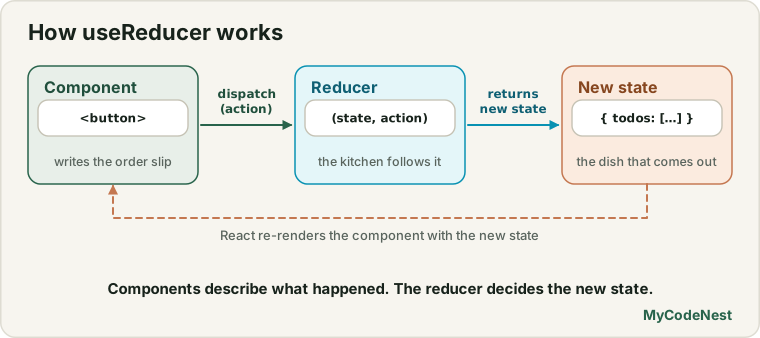
With useReducer, your handlers stop saying how to change the state. They only say what happened. One central function (the reducer) decides how the state changes.
Event handler  --dispatch(action)-->  reducer(state, action)  -->  new state  -->  re-render
 "what happened"                       "how it changes"
A first example: a counter
Here is the simplest possible reducer:
import { useReducer } from 'react';

function counterReducer(count, action) {
  switch (action.type) {
    case "incremented":
      return count + 1;
    case "decremented":
      return count - 1;
    case "reset":
      return 0;
    default:
      throw new Error("Unknown action: " + action.type);
  }
}

function Counter() {
  const [count, dispatch] = useReducer(counterReducer, 0);

  return (
    <div>
      <p>{count}</p>
      <button onClick={() => dispatch({ type: "incremented" })}>+</button>
      <button onClick={() => dispatch({ type: "decremented" })}>-</button>
      <button onClick={() => dispatch({ type: "reset" })}>Reset</button>
    </div>
  );
}

export default Counter;
Let us go through it:
useReducer(counterReducer, 0)takes two arguments: the reducer function and the initial state.- It returns a pair, like
useState: the current state (count) and a function calleddispatch. - Calling
dispatch({ type: "incremented" })sends an action to the reducer. An action is a plain object that describes what happened. By convention it has atype, and it can carry extra data. - React calls
counterReducer(currentCount, action). Whatever the reducer returns becomes the new state, and the component re-renders. - The
switchhandles each action type. Thedefaultcase throws an error, so a typo such as"incrementd"is caught immediately instead of being ignored.
We tested this: clicking +, +, - showed 1, and Reset showed 0.
Name actions after what happened, not what to do.
"incremented"or"added"describes an event. A name like"set_count_to_5"describes a setter, which defeats the purpose.
Refactoring the to-do app
Now the real benefit. We move the four update functions into a reducer. First, create a new file, src/todoReducer.js:
export function todoReducer(todos, action) {
  switch (action.type) {
    case "added":
      return [...todos, { id: action.id, title: action.title, done: false }];
    case "toggled":
      return todos.map((todo) =>
        todo.id === action.id ? { ...todo, done: !todo.done } : todo
      );
    case "deleted":
      return todos.filter((todo) => todo.id !== action.id);
    case "cleared":
      return todos.filter((todo) => !todo.done);
    default:
      throw new Error("Unknown action: " + action.type);
  }
}
Every line inside is something you already know: the same [...todos, item], map and filter from the to-do project. They just live in one place now. Read it from top to bottom and you can see every way the list can change.
Next, replace src/App.jsx with:
import { useReducer, useState } from 'react';
import './App.css';
import { todoReducer } from './todoReducer.js';
import TodoForm from './components/TodoForm.jsx';
import TodoList from './components/TodoList.jsx';
import TodoFooter from './components/TodoFooter.jsx';

let nextId = 4;

const initialTodos = [
  { id: 1, title: "Learn JSX", done: true },
  { id: 2, title: "Learn props", done: true },
  { id: 3, title: "Build a to-do app", done: false },
];

function App() {
  const [todos, dispatch] = useReducer(todoReducer, initialTodos);
  const [filter, setFilter] = useState("all");

  function addTodo(title) {
    dispatch({ type: "added", id: nextId++, title });
  }

  function toggleTodo(id) {
    dispatch({ type: "toggled", id });
  }

  function deleteTodo(id) {
    dispatch({ type: "deleted", id });
  }

  function clearCompleted() {
    dispatch({ type: "cleared" });
  }

  const visibleTodos = todos.filter((todo) => {
    if (filter === "active") return !todo.done;
    if (filter === "done") return todo.done;
    return true;
  });
  const remaining = todos.filter((todo) => !todo.done).length;

  return (
    <main className="todo-app">
      <h1>My Tasks</h1>
      <TodoForm onAdd={addTodo} />
      <TodoList todos={visibleTodos} onToggle={toggleTodo} onDelete={deleteTodo} />
      <TodoFooter
        remaining={remaining}
        hasCompleted={todos.length > remaining}
        filter={filter}
        onFilterChange={setFilter}
        onClearCompleted={clearCompleted}
      />
    </main>
  );
}

export default App;
What changed, and what did not:
- The other files (
TodoForm,TodoList,TodoItem,TodoFooter) are untouched. The app looks and behaves exactly as before. We ran the same checks (add, toggle, filter, clear, delete) against the refactored version and every one gave the same result as theuseStateversion. todosnow comes fromuseReducer. Thefilteris still plainuseState, because it is a single simple value. You can mix both in one component.- Each handler is now one line: it only says what happened.
dispatch({ type: "toggled", id })is a sentence: “the todo with this id was toggled”. - The id is created in the handler (
id: nextId++), not inside the reducer. That is important, as the next section explains.
The rules of a reducer
A reducer must be a pure function, just like a component (see the rendering lesson):
- Same inputs, same output. Given the same
stateandaction, it always returns the same result. - Never change the state you receive. Do not
push, do not assign to properties. Return a new array or object ([...todos, x],map,filter,{ ...todo, done: true }). - No side effects. Do not fetch data, start timers, read
localStorage, or callMath.random()orDate.now()inside a reducer.
That last point is why the new id is created in the handler and passed in the action. If the reducer generated ids with nextId++, it would not be pure.
React enforces this in development. With StrictMode on, React calls your reducer twice for every action, to expose impure code. We measured it: one click on + called the reducer once in a normal run and twice in StrictMode, and the counter still showed 1, because a pure reducer gives the same result both times. If your reducer had a hidden side effect, you would see strange results straight away.
useState or useReducer?
Both do the same job. Here is how to choose:
useState |
useReducer |
|
|---|---|---|
| Code size | Less code to start | More code at the beginning (a reducer and actions) |
| Several handlers changing the same state | Logic is scattered | Logic is in one place |
| Complex update logic (many cases) | Gets messy | Clearer |
| Finding every way the state can change | Search all handlers | Read the reducer |
| Testing | Test the component | You can test the reducer as a plain function |
| Simple values (a toggle, a text input) | Perfect | Overkill |
A practical rule: start with useState. Switch to useReducer when you notice that many handlers update the same piece of state, or when the update logic becomes hard to follow.
Passing dispatch down
Because dispatch is a single function, you can pass just that to a child instead of a handler for every action:
<TodoList todos={visibleTodos} dispatch={dispatch} />The child then calls dispatch({ type: "toggled", id }) itself. This reduces the number of props. Combined with Context, which is the next lesson, you can even make dispatch available to the whole app without passing it through every layer.
Common mistakes
1. Mutating the state in the reducer. todos.push(...) or todo.done = true changes the old state. Return new arrays and objects.
2. Forgetting to return in a case. The reducer returns undefined, and your state becomes undefined. Every case must return the new state.
3. Doing side effects in the reducer. No fetching, no timers, no Math.random(). Create ids and times in the handler and put them in the action.
4. Forgetting default. Without it, a typo in an action name silently does nothing. Throw an error in default.
5. Wrong action shape. dispatch("added") (a string) instead of dispatch({ type: "added" }) makes action.type undefined.
6. Calling the reducer yourself. You only call dispatch. React calls the reducer.
7. Naming actions as setters. Use "added", "toggled", "deleted", which describe what happened.
8. Using useReducer for one simple value. A single boolean or string is easier with useState.
Practice
-
Build the counter with
useReducerand the three actions. Add an"added"action that adds a number given in the action (dispatch({ type: "added", amount: 5 })). -
Refactor your to-do app to use
todoReducer. Run through add, toggle, filter, clear and delete, and check that nothing changed for the user. -
Predict, then check: Put
console.log("reducer called")at the top oftodoReducer. How many logs appear for a single click on a checkbox in a normal render? What about withStrictModeon inmain.jsx? Explain the difference. -
Add an
"edited"action totodoReducerthat changes thetitleof one todo, and an Edit button inTodoItemthat dispatches it (you can usewindow.promptto get the new title for now). -
Debug: After adding a todo, the whole list disappears. Find the bug.
case "added": todos.push({ id: action.id, title: action.title, done: false }); -
Debug: The reducer for a shopping cart uses
Date.now()for the item id. Why is this a problem, and where should the id be created? -
Write a
cartReducerwith the actions"added"(adds{ id, name, quantity: 1 }),"quantity_increased"(by id) and"removed"(by id). Show a small cart UI that uses it. -
Think: You have a single
isOpenboolean for a dropdown. Would you useuseReducer? Explain your answer.
Recap
useReducer(reducer, initialState)returns[state, dispatch].- A reducer is a function
(state, action) => newStatethat decides how the state changes. It lives outside the component. - An action is a plain object describing what happened, usually
{ type: "added", ... }. - Handlers only dispatch actions. The reducer holds all the update logic in one place.
- Reducers must be pure: same inputs, same output, no mutation, no side effects. In development,
StrictModecalls them twice to check. - Create ids, timestamps and random values in the handler, and put them in the action.
- Start with
useState. ChooseuseReducerwhen many handlers update the same state or the logic is complex. dispatchcan be passed to children, and, with Context, to the whole app.- Next you will learn Context, which shares data like this without passing props through every layer.
Frequently asked questions
What is a reducer in React?
A reducer is a function that takes the current state and an action, and returns the next state. useReducer uses it to update state. It must be pure: it does not change its inputs and does not do side effects.
What is an action in useReducer?
An action is a plain object that describes something that happened, such as { type: "toggled", id: 3 }. You send it with dispatch, and the reducer decides how the state changes because of it.
When should I use useReducer instead of useState?
When several event handlers update the same state in different ways, or when the update logic is complex. A reducer puts all the logic in one place, which makes it easier to read, debug and test. For simple values, useState is better.
Why is my reducer called twice?
In development, StrictMode calls reducers twice to check that they are pure. If a reducer gives the same result both times, nothing visible changes. It only happens in development.
Is useReducer the same as Redux?
They share the same idea: actions and reducers. But useReducer is built into React and manages state for one component (and its children, if you pass it down). Redux is a separate library for managing state across a whole app.
Can I use both useState and useReducer in one component?
Yes. Use useReducer for the complex state and useState for simple values. In the refactored to-do app, todos uses a reducer and filter uses useState.
See also: useState in React, Updating Objects and Arrays in State, Build a To-Do List App, How React Renders