useState in React: Make Components Interactive
Learn React state with useState: why normal variables do not update the screen, how to build a counter and a toggle, and the rules of Hooks.
What you will learn
At the end of the events lesson, you saw that a click handler can run code, but the page does not change. In this lesson you fix that. You will learn what state is, how to add it to a component with the useState Hook, how React redraws the screen when state changes, and the simple rules every Hook must follow.
State is the idea that makes React apps interactive. Almost everything you build from here on, such as counters, toggles, forms and to-do lists, uses it.
The problem: a normal variable does not work
Let us try to build a counter with an ordinary variable:
function NaiveCounter() {
  let count = 0;

  function handleClick() {
    count = count + 1;
    console.log("count is", count);
  }

  return <button onClick={handleClick}>Count: {count}</button>;
}

export default NaiveCounter;
Click the button twice and look at the page and the console:
Page:     Count: 0
Console:  count is 1
          count is 2
The variable did change, but the page still says Count: 0. There are two reasons:
- React does not know the variable changed. A normal variable is invisible to React, so it does not redraw the screen.
- Even if React redrew the component, it would run the function again from the top, and
let count = 0would reset the value to0.
A component needs two things: a place to remember a value between renders, and a way to tell React to redraw when it changes. That is exactly what state gives you.
What is state?
State is data that a component remembers, and that can change over time. When state changes, React re-renders the component: it calls your function again, using the new value, and updates the page to match.
Think of a scoreboard. The numbers on it are the state. When a team scores, someone updates the number, and the board is redrawn to show it. You do not paint the digits by hand.
The useState Hook
React gives you the useState function to add state to a component. Functions like it are called Hooks, and their names always start with use.
import { useState } from 'react';

function Counter() {
  const [count, setCount] = useState(0);

  return <button onClick={() => setCount(count + 1)}>Count: {count}</button>;
}

export default Counter;
Click the button three times. The page now shows Count: 1, then Count: 2, then Count: 3. Let us go through it:
import { useState } from 'react';brings the Hook in from React. You must import it in every file that uses it.useState(0)creates a piece of state with the initial value0.useStatereturns an array of two items. We use array destructuring to name them:const [count, setCount] = ....countis the current value of the state.setCountis the setter function. Calling it changes the value and tells React to re-render.
{count}shows the current value in the button.setCount(count + 1)asks React to change the state to the next number.
By convention, name the pair [thing, setThing]: [count, setCount], [isOpen, setIsOpen], [name, setName].
What happens when you click
Here is the full cycle, step by step:
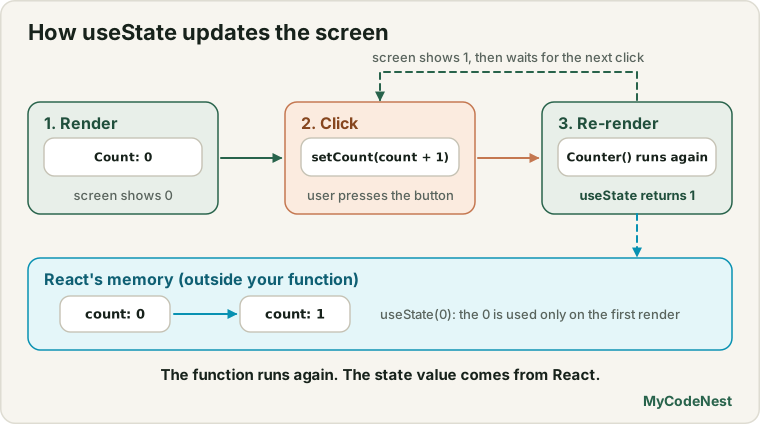
Notice that the function runs again on every state change, but useState(0) does not reset the value. The 0 is used only on the very first render. After that, React gives you the remembered value.
State belongs to each component instance
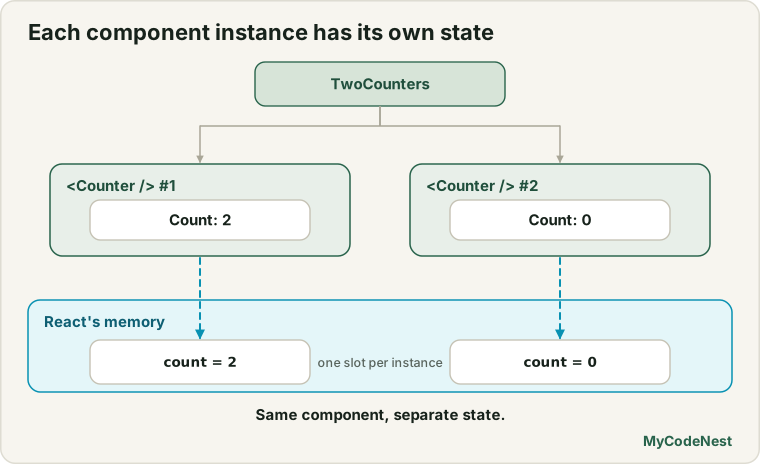
Every time you use a component, it gets its own state. Two counters do not affect each other:
function TwoCounters() {
  return (
    <>
      <Counter />
      <Counter />
    </>
  );
}
Click the first button twice and the page shows:
Count: 2
Count: 0
The second counter keeps its own 0. This is why you can reuse a component many times and each copy stays independent. Compare this with props, which are passed in by the parent. State is created and owned inside the component.
A realistic use case: show and hide details
State is not only for numbers. A very common use is a boolean that decides what is visible. Here is a profile card with a Show details toggle:
import { useState } from 'react';

function ProfileDetails() {
  const [showDetails, setShowDetails] = useState(false);

  return (
    <article>
      <h3>Aisha Khan</h3>
      <button onClick={() => setShowDetails(!showDetails)}>
        {showDetails ? "Hide details" : "Show details"}
      </button>
      {showDetails && <p>Frontend learner from Delhi.</p>}
    </article>
  );
}

export default ProfileDetails;
At first, the page shows the name and a button that says Show details. Click it, and the button text changes to Hide details and the paragraph Frontend learner from Delhi. appears. Click again and it disappears.
Here you combine three ideas you already know:
- State
showDetailsstarts asfalse. !showDetailsflips the value (truebecomesfalseand the other way round).- The ternary and
&&from the conditional rendering lesson show the right UI for the current state.
What can state hold?
State can hold any JavaScript value:
const [count, setCount] = useState(0);              // number
const [name, setName] = useState("");               // string
const [isOpen, setIsOpen] = useState(false);        // boolean
const [tasks, setTasks] = useState([]);             // array
const [user, setUser] = useState({ name: "Aisha" }); // object
Changing arrays and objects needs a little care, which the next lesson covers.
State, props or a normal variable?
| Use… | When the value… |
|---|---|
| Props | comes from the parent and the component only reads it |
| State | belongs to the component, changes over time, and the screen must update when it changes |
| A normal variable | can be calculated from props or state on every render (for example const total = price * quantity) |
A good question to ask: “Does the screen need to change when this value changes, and can I not calculate it from other values?” If yes to both, use state.
The rules of Hooks
Hooks have two rules. React depends on them, and code checkers (linters) such as the one included in the Vite template warn you if you break them.
- Call Hooks only at the top level of your component. Do not call them inside
ifstatements, loops, or nested functions. - Call Hooks only from React components (or from your own custom Hooks, which you will learn later). Not from ordinary functions.
function Bad({ isOpen }) {
  if (isOpen) {
    const [count, setCount] = useState(0);   // wrong: inside a condition
  }
}

function Good({ isOpen }) {
  const [count, setCount] = useState(0);     // correct: top level
  // ...
}
React remembers state by the order in which Hooks are called. If the order changes between renders, state gets mixed up. Calling Hooks at the top level keeps the order the same every time.
Common mistakes
1. Changing the variable directly. count = count + 1 does nothing for the screen. Always call the setter: setCount(count + 1).
2. Calling the setter during render. This causes an endless loop:
<button onClick={setCount(count + 1)}>Add</button>React stops it with Too many re-renders. React limits the number of renders to prevent an infinite loop. You called the setter immediately, which triggers a re-render, which calls it again. Pass a function instead: onClick={() => setCount(count + 1)}.
3. Forgetting to import useState. You get useState is not defined. Add import { useState } from 'react';.
4. Calling a Hook inside a condition or loop. This breaks the rules of Hooks. Move it to the top of the component.
5. Expecting the new value right after calling the setter.
function handleClick() {
  setCount(count + 1);
  console.log(count);   // still the OLD value
}
The state value you hold in count is a snapshot for this render. The new value appears in the next render. The next lesson explains this in detail.
6. Using state for everything. If a value can be calculated from props or other state, make it a normal variable. Less state means fewer bugs.
7. Mixing up the pair order. const [setCount, count] = useState(0) swaps the two names. The value always comes first, the setter second.
Practice
-
Build a
CounterwithuseState(0). Click it five times and check the display. -
Extend it with three buttons: +1, -1 and Reset. The reset button sets the count back to
0. -
Predict, then check: You render two
<Counter />components and click the first one three times. What does each show? Test your answer. -
Build a
LikeButtonthat showsLikewhen the statelikedisfalseandLikedwhen it istrue. Clicking the button toggles it. Add a heart symbol if you like. -
Build a
ProfileDetailscard (like the one in this lesson) that shows and hides a paragraph. -
Debug: The counter never changes on the page. What is the bug?
function Counter() { const [count, setCount] = useState(0); return <button onClick={() => { count = count + 1; }}>{count}</button>; } -
Debug: The page crashes with
Too many re-renders. Find the bug and fix it.<button onClick={setOpen(!open)}>Toggle</button> -
Build a
ThemeTogglebutton that switches a heading between the textLight modeandDark mode. Store the mode in state.
Recap
- A normal variable does not update the screen, and it resets on every render. State remembers a value and tells React to redraw.
- Add state with
const [value, setValue] = useState(initial);. ImportuseStatefrom'react'. - Calling the setter updates the state and re-renders the component. The initial value is used only on the first render.
- Each component instance has its own state.
- State can hold numbers, strings, booleans, arrays and objects.
- Use state for values that change and must update the screen. Calculate everything else.
- Rules of Hooks: call them only at the top level of a component, never in conditions, loops or ordinary functions.
- Next you will learn to update objects and arrays in state safely.
Frequently asked questions
What is state in React?
State is data that a component remembers between renders. When state changes through its setter function, React re-renders the component so the screen shows the new value.
What is a Hook?
A Hook is a special function that starts with use and lets a component use React features such as state. useState is the first one you learn. Others, like useEffect and useRef, come in later lessons.
Why does useState return an array?
Returning an array lets you pick your own names with array destructuring: const [count, setCount] = useState(0). If it returned an object, you would be stuck with fixed names for every state variable.
Does the initial value run on every render?
No. React uses the initial value only on the first render. On later renders, useState ignores it and returns the remembered value instead.
Why can I not change state directly like a normal variable?
Because React has no way to know about a direct change, it would not redraw the screen. The setter function both stores the new value and schedules a re-render. It is the only way to update state.
Can a component have more than one piece of state?
Yes. Call useState several times, once for each independent value, for example const [name, setName] = useState("") and const [age, setAge] = useState(0). Just keep every call at the top level of the component.
See also: Handling Events in React, Conditional Rendering, JavaScript Destructuring, JavaScript Variables