CRUD with APIs in React: Create, Update and Delete Data
Learn CRUD with APIs in React: POST, PATCH and DELETE with fetch, pending and error states, avoiding stale state after await, and keeping the UI in sync.
What you will learn
Reading data is only half of a real app. Users also add new things, change them and remove them. Developers call these four jobs CRUD: Create, Read, Update, Delete. In the previous lesson you did the R. Now you will do the other three.
You will learn the HTTP methods behind CRUD, how to send JSON with fetch, how to keep a small api.js file for your requests, how to show pending and error states for actions, how to update your list after each success, and a subtle bug that appears when you use state after an await.
You should know fetch with async/await, HTTP and REST basics, and updating arrays in state.
CRUD and HTTP methods
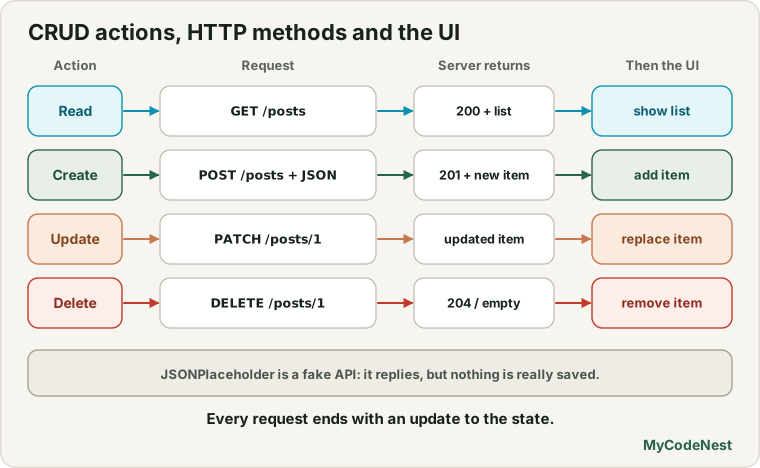
Each CRUD action uses a different HTTP method:
| Action | HTTP method | Example request | What the server usually returns |
|---|---|---|---|
| Read the list | GET |
GET /posts |
A list of posts (status 200) |
| Create a new item | POST |
POST /posts with the new data |
The created item, with its new id (status 201) |
| Update a whole item | PUT |
PUT /posts/1 with the full item |
The updated item |
| Update part of an item | PATCH |
PATCH /posts/1 with only the changes |
The updated item |
| Delete an item | DELETE |
DELETE /posts/1 |
Often an empty object, or status 204 No Content |
Two of these send data to the server: POST, PUT and PATCH include a body. You send it as JSON text, and tell the server what you are sending with the header Content-Type: application/json.
The practice API (and an important warning)
We will keep using JSONPlaceholder. It supports all the methods above, but it is a fake API: it accepts your requests and answers as if they worked, but it does not save anything. If you create a post and then reload the page, it is gone. Its guide explains that created and updated resources are only faked, not really stored, and the server answers POST /posts with the data you sent plus "id": 101.
This has two consequences in our lesson, and both are good practice for real life:
- The update is not stored, so we must update our own list in state from the server’s answer. (With a real API, you often do this too.)
- It returns the same id (
101) for every new post. React keys must be unique, so for new items we create our ownkey. A real API gives each new item its own id.
Step 1: put your requests in one file
Do not scatter fetch calls through your components. Keep them in a small API module. Create src/api/posts.js:
const BASE_URL = "https://jsonplaceholder.typicode.com";

async function request(path, options = {}) {
  const response = await fetch(BASE_URL + path, {
    headers: { "Content-Type": "application/json" },
    ...options,
  });

  if (!response.ok) {
    throw new Error(`Request failed with status ${response.status}`);
  }

  if (response.status === 204) {
    return null;
  }

  return response.json();
}

export function getPosts(signal) {
  return request("/posts?userId=1", { signal });
}

export function createPost(post) {
  return request("/posts", { method: "POST", body: JSON.stringify(post) });
}

export function updatePost(id, changes) {
  return request(`/posts/${id}`, { method: "PATCH", body: JSON.stringify(changes) });
}

export function deletePost(id) {
  return request(`/posts/${id}`, { method: "DELETE" });
}
Let us look at the important parts:
- One
requesthelper does the repeated work: it adds the base URL and the JSON header, checksresponse.ok(you learned why in the last lesson), and parses the answer. ...optionslets each function add its ownmethod,bodyorsignal.JSON.stringifyturns a JavaScript object into the JSON text that goes in the body.status === 204handles an answer with no body. Some servers reply toDELETEwith204 No Content, and callingresponse.json()on an empty body would throw an error. The check returnsnullinstead.- Each exported function has a clear name (
createPost,deletePost). The components do not need to know about URLs or methods. If the address changes, you edit one file.
getPosts asks for /posts?userId=1, which returns only the ten posts that belong to user 1. This makes a nice short list.
Step 2: the form to create a post
src/components/PostForm.jsx:
import { useState } from 'react';

function PostForm({ onCreate, disabled }) {
  const [title, setTitle] = useState("");

  async function handleSubmit(event) {
    event.preventDefault();
    const trimmed = title.trim();
    if (trimmed === "") {
      return;
    }

    const ok = await onCreate(trimmed);
    if (ok) {
      setTitle("");
    }
  }

  return (
    <form onSubmit={handleSubmit}>
      <label htmlFor="new-post">New post title</label>
      <input
        id="new-post"
        value={title}
        onChange={(event) => setTitle(event.target.value)}
      />
      <button type="submit" disabled={disabled}>Add post</button>
    </form>
  );
}

export default PostForm;
This is a normal controlled form with one new idea: onCreate is async and returns true or false. The form waits for the answer (await onCreate(...)) and clears the input only if it worked. If the request fails, the user’s text stays, so they do not have to type it again.
The button is disabled while an action is running. This stops double submits, where an impatient user clicks twice and creates two posts.
Step 3: one post, with edit and delete
src/components/PostItem.jsx:
import { useState } from 'react';

function PostItem({ post, disabled, working, onSave, onDelete }) {
  const [isEditing, setIsEditing] = useState(false);
  const [draft, setDraft] = useState(post.title);

  async function handleSave() {
    const ok = await onSave(post.id, draft.trim());
    if (ok) {
      setIsEditing(false);
    }
  }

  if (isEditing) {
    return (
      <li>
        <input
          value={draft}
          onChange={(event) => setDraft(event.target.value)}
          aria-label="Post title"
        />
        <button onClick={handleSave} disabled={disabled || draft.trim() === ""}>
          {working ? "Saving..." : "Save"}
        </button>
        <button
          onClick={() => {
            setDraft(post.title);
            setIsEditing(false);
          }}
          disabled={disabled}
        >
          Cancel
        </button>
      </li>
    );
  }

  return (
    <li>
      <span>{post.title}</span>
      {post.isDemo ? (
        <em> (demo only, not saved on the server)</em>
      ) : (
        <>
          <button onClick={() => setIsEditing(true)} disabled={disabled}>Edit</button>
          <button onClick={() => onDelete(post.id)} disabled={disabled}>
            {working ? "Deleting..." : "Delete"}
          </button>
        </>
      )}
    </li>
  );
}

export default PostItem;
Notes:
isEditinganddraftare local state of one row. Nobody else needs to know that a row is in edit mode.- Save waits for the parent (
await onSave(...)) and leaves edit mode only on success. disabledis true while any action is running (so the user cannot start two at once).workingis true only for this row, to showSaving...orDeleting....- Posts you just created (
post.isDemo) have no Edit or Delete, because the fake server never stored them. Real API items would have both buttons.
Step 4: the manager
src/components/PostManager.jsx owns the list and talks to the API:
import { useState, useEffect } from 'react';
import { getPosts, createPost, updatePost, deletePost } from '../api/posts.js';
import PostForm from './PostForm.jsx';
import PostItem from './PostItem.jsx';

function PostManager() {
  const [posts, setPosts] = useState([]);
  const [status, setStatus] = useState("loading");
  const [busyId, setBusyId] = useState(null);
  const [actionError, setActionError] = useState(null);

  useEffect(() => {
    const controller = new AbortController();

    getPosts(controller.signal)
      .then((data) => {
        setPosts(data.map((post) => ({ ...post, key: post.id })));
        setStatus("success");
      })
      .catch((error) => {
        if (error.name === "AbortError") {
          return;
        }
        setStatus("error");
      });

    return () => controller.abort();
  }, []);

  async function runAction(id, action, failureMessage) {
    setBusyId(id);
    setActionError(null);
    try {
      await action();
      return true;
    } catch (error) {
      setActionError(`${failureMessage} (${error.message})`);
      return false;
    } finally {
      setBusyId(null);
    }
  }

  function handleCreate(title) {
    return runAction("new", async () => {
      const created = await createPost({ title, body: "Written in React", userId: 1 });
      setPosts((current) => [
        { ...created, key: crypto.randomUUID(), isDemo: true },
        ...current,
      ]);
    }, "Could not add the post");
  }

  function handleSave(id, title) {
    return runAction(id, async () => {
      const updated = await updatePost(id, { title });
      setPosts((current) =>
        current.map((post) => (post.id === id ? { ...post, ...updated } : post))
      );
    }, "Could not save the post");
  }

  function handleDelete(id) {
    return runAction(id, async () => {
      await deletePost(id);
      setPosts((current) => current.filter((post) => post.id !== id));
    }, "Could not delete the post");
  }

  if (status === "loading") {
    return <p>Loading posts...</p>;
  }

  if (status === "error") {
    return <p role="alert">Could not load the posts. Please try again later.</p>;
  }

  const disabled = busyId !== null;

  return (
    <section>
      <h2>Posts ({posts.length})</h2>
      <PostForm onCreate={handleCreate} disabled={disabled} />
      {actionError && <p role="alert">{actionError}</p>}
      <ul>
        {posts.map((post) => (
          <PostItem
            key={post.key}
            post={post}
            disabled={disabled}
            working={busyId === post.id}
            onSave={handleSave}
            onDelete={handleDelete}
          />
        ))}
      </ul>
    </section>
  );
}

export default PostManager;
Replace src/App.jsx with:
import PostManager from './components/PostManager.jsx';

function App() {
  return (
    <main>
      <h1>Post Manager</h1>
      <PostManager />
    </main>
  );
}

export default App;
How it works
Let us follow each action. All three share the helper runAction, which does the same four things:
setBusyId(id)marks which action is running (and disables the buttons).setActionError(null)clears an old error message.- It awaits the request. If the request succeeds, the function returns
true. If it throws, thecatchshows an error message and returnsfalse. - The
finallyblock runs either way and clearsbusyId, so the buttons come back.
The list in state is changed only after the server says OK. This is called a pessimistic update: we wait for confirmation before changing the screen, so the screen never shows something that failed. (Showing the change first and undoing it if the request fails is an optimistic update. React 19 has a Hook for it, useOptimistic, which a later lesson covers.)
What you see in the browser
- At the start:
Loading posts..., thenPosts (10)and ten rows, each with Edit and Delete buttons. - Create: type
Hello from Reactand press Add post. APOSTrequest is sent with the body{ "title": "Hello from React", "body": "Written in React", "userId": 1 }. When the answer arrives, the new post appears at the top with the note(demo only, not saved on the server), the heading saysPosts (11), and the input is cleared. - Create another: it also appears, and there are no duplicate key warnings in the console, because each new item gets its own
key. - Edit: click Edit on a post. The row becomes an input. Change the text and click Save. A
PATCHrequest with{ "title": "..." }is sent, and when it returns, the row shows the new title. - Delete: click Delete on a post. A
DELETErequest is sent, and then the row disappears and the heading count drops by one. - Reload the page: everything is back to the original ten posts, because the fake API never saved your changes.
We tested all of these steps against a local server that follows the same response shapes as JSONPlaceholder. The POST body, the PATCH body, and the DELETE request all matched the description above, and two new posts did not produce duplicate keys.
Errors and double clicks
We also tested failure. When the server answered a DELETE with a 500 error, the page showed Could not delete the post (Request failed with status 500) in an alert, and the post was still in the list, because we only remove it after success. After the server recovered, clicking Delete again worked. While a request was running, the buttons were disabled, and a double click on Delete sent only one request.
The stale list trap
Look closely at how we update the list after an await:
setPosts((current) => current.filter((post) => post.id !== id));We pass a function (the updater form from the state updating lesson), not posts.filter(...). This matters a lot after an await. The posts variable in your handler is a snapshot from the render when the handler was created. While the request runs, the list may have changed. If you write:
await deletePost(id);
setPosts(posts.filter((post) => post.id !== id));   // uses the old snapshot
you overwrite those newer changes. We tested a version where two deletes overlapped (post 1 finished first, post 2 finished later). With posts.filter(...) the final list was 1,3: post 1 came back from the dead. With the updater function, the list was correctly 3. In our final code the buttons are disabled during an action, which makes overlap unlikely, but the updater form costs nothing and protects you.
Rule: after an
await, update state with the updater functionsetX((current) => ...).
Which method should I use to update: PUT or PATCH?
PATCHsends only the fields that changed. It is usually the right choice for a small edit, such as changing a title.PUTreplaces the whole item, so you send every field. Use it when you have the full object.
Some servers support only one of them. Read your API’s documentation. Also notice that GET, PUT and DELETE are idempotent: doing them twice has the same effect as doing them once. POST is not: posting twice creates two items. This is why you should never retry a POST automatically without a safeguard, which the production lesson will explain.
Validation and security
- Validate before you send, as in the form validation lesson. In our form, an empty title is not sent.
- The server must validate too. Never trust the browser alone.
- Real APIs usually need authentication, for example an
Authorizationheader with a token. You will learn how to handle that safely in the security and authentication lessons.
Common mistakes
1. Forgetting the JSON header. Without Content-Type: application/json, many servers cannot read the body.
2. Forgetting JSON.stringify on the body. You must send text, not a JavaScript object.
3. Changing the screen before the server answers (and not undoing it on failure). The UI then shows things that never happened. Update after success, or do a proper optimistic update with rollback.
4. Using a stale list after await. Use setX((current) => ...).
5. Not disabling buttons while a request is running. Double clicks create duplicates or conflicting changes.
6. Calling response.json() on an empty 204 response. Check for 204 first.
7. Clearing the form before the request succeeds. The user loses their text if it fails. Clear it only on success.
8. Forgetting error messages. A silent failure looks like the button is broken. Always show what went wrong.
9. Assuming a fake API saves data. JSONPlaceholder does not. Reloading gives you the original data.
10. Duplicate React keys because the server returns the same id for new items. Use unique keys.
Practice
-
Build the
src/api/posts.jsfile and open the Network tab in DevTools while you add a post. Find thePOSTrequest and look at its payload and its status. What does the response body contain? -
Add a Cancel button to the edit mode (the lesson has one). Test editing a title, cancelling, and editing again. Is the old title still in the input? Why?
-
Predict, then check: Use the browser’s Offline setting in DevTools and click Delete. What does the page show? Is the post still in the list?
-
Add a character counter to the title input in
PostForm(12 / 80). Is it new state? -
Debug: A learner’s
handleDeleteruns this code. After deleting two posts quickly, a deleted post comes back. Why, and how do you fix it?async function handleDelete(id) { await deletePost(id); setPosts(posts.filter((post) => post.id !== id)); } -
Debug: Deleting a post gives
Unexpected end of JSON inputin the console. The server answers204 No Content. Which line inrequesthandles this? -
Add a Mark as important feature: a checkbox in each row that sends
PATCH /posts/:idwith{ "important": true }and updates the list with the server’s answer. Show a small star next to important posts. -
Think: Why does the form clear the input after
await onCreate(...)and only when it returnstrue? What would the user experience be if it cleared the input first and the request failed?
Recap
- CRUD means Create, Read, Update, Delete, using
POST,GET,PUTorPATCH, andDELETE. - Send data with
method,body: JSON.stringify(data)and the headerContent-Type: application/json. - Keep requests in an API module with one
requesthelper that checksresponse.ok, handles204, and parses JSON. - Track a busy state so you can disable buttons and show
Saving..., and prevent double submits. - Update the list after success (pessimistic update) and show an error message on failure. Keep the form text if the request fails.
- After an
await, use the updater formsetPosts((current) => ...)to avoid stale lists. - JSONPlaceholder is fake: it does not save data and repeats id
101. Real APIs return unique ids and store the data. POSTis not idempotent, so do not retry it blindly.- Next you will learn production techniques: race conditions, pagination, retries, debounced search and caching.
Frequently asked questions
What is the difference between PUT and PATCH?
PUT replaces the whole resource, so you send all its fields. PATCH changes only the fields you send. For a small edit such as a new title, PATCH is usually simpler. Which one an API supports depends on the server, so check its documentation.
Why do I need the Content-Type header?
It tells the server what format the body is in. Most JSON APIs expect application/json. Without it, the server may ignore the body or reject the request.
Should I update the UI before or after the server answers?
Updating after the answer (a pessimistic update) is the simplest and safest, because the screen never shows something that failed. Updating first (an optimistic update) feels faster but you must undo the change if the request fails. React 19 offers useOptimistic for that, covered in a later lesson.
Why did my created post disappear after reloading?
JSONPlaceholder is a fake API. It answers as if the data was saved, but it does not store anything. With a real backend, the new item would still be there after a reload.
Why use setPosts((current) => ...) after an await?
Because the posts variable in your handler is a snapshot from an older render. By the time the request finishes, the list may have changed. The updater function receives the latest list, so you never overwrite newer changes.
Is it safe to call the API directly from React?
You can call a public or properly secured API from the browser. But never put secret keys in your React code, because every user can read them. Anything that needs a secret should go through your own backend. The security lesson covers this in detail.
See also: Fetch Data in React, HTTP and REST Basics, JavaScript JSON, React Forms and Controlled Inputs