React Props: Pass Data to Components
Learn how React props work: pass data to components, read and destructure props, set default values, and why props are read-only.
What you will learn
At the end of the first component lesson, your two profile cards were identical because the name and goal were written directly inside the component. A real app needs one card design that can show different people. React solves this with props.
In this lesson you will learn what props are, how to pass them, how to read them with destructuring, how to give them default values, and the most important rule about them: props are read-only.
What are props?
Props (short for properties) are the inputs of a component. You pass them when you use the component, and the component receives them like arguments in a function call.
Think of a coffee machine. The machine (the component) is always the same. You choose what goes in: the type of coffee, the size, the amount of sugar (the props). The result changes with the input.
In JSX, props look like HTML attributes:
<ProfileCard name="Aisha Khan" goal="Build a React to-do app" />Here ProfileCard receives two props: name and goal.
Receiving props in a component
React collects all the props into one object and passes it as the first argument of your component function. By convention, we call it props:
function ProfileCard(props) {
  return (
    <article className="profile-card">
      <h3>{props.name}</h3>
      <p>Goal: {props.goal}</p>
    </article>
  );
}
If you use <ProfileCard name="Aisha Khan" goal="Build a React to-do app" />, then inside the component props is the object:
{ name: "Aisha Khan", goal: "Build a React to-do app" }and props.name reads one value from it. This is ordinary JavaScript object access, as in the objects lesson.
Destructuring props
Writing props. every time gets repetitive. Since props are an object, you can destructure it right in the function’s parameter list. (See the destructuring lesson for a refresher.)
function ProfileCard({ name, goal }) {
  return (
    <article className="profile-card">
      <h3>{name}</h3>
      <p>Goal: {goal}</p>
    </article>
  );
}
The curly braces in ({ name, goal }) pull the two values out of the props object. This is the style you will see in most React code, and we use it from now on.
Pass different data to each card
Now update src/components/ProfileCard.jsx. We add a role prop and show the first letter of the name in the round avatar:
import './ProfileCard.css';

function ProfileCard({ name, role = "Learner", goal }) {
  return (
    <article className="profile-card">
      <div className="profile-card__avatar">{name.charAt(0)}</div>
      <h3>{name}</h3>
      <p>{role}</p>
      <p>Goal: {goal}</p>
    </article>
  );
}

export default ProfileCard;
Then use it three times in src/App.jsx, each time with its own data:
import ProfileCard from './components/ProfileCard.jsx';

function App() {
  return (
    <>
      <h1>Our Learners</h1>
      <ProfileCard name="Aisha Khan" role="Frontend learner" goal="Build a React to-do app" />
      <ProfileCard name="Ravi Patel" goal="Learn Node.js" />
      <ProfileCard name="Maria Lopez" role="Designer" goal="Design a portfolio site" />
    </>
  );
}

export default App;
Expected result: three cards. The first has an A avatar, the name Aisha Khan, the line Frontend learner and Goal: Build a React to-do app. The second has an R avatar and the name Ravi Patel. The third has an M. The same component now shows three different people.
Notice the second card: we did not pass a role, yet it shows Learner. That comes from a default value.
Default values
You can give a prop a default value with = in the destructuring, just like default parameters in a normal function:
function ProfileCard({ name, role = "Learner", goal }) {
  // ...
}
If the parent does not pass role, or passes undefined, React uses "Learner". A default is useful for optional props, so every card does not need every prop.
Good to know: a default is used only when the value is
undefined. If a parent passesnullor an empty string"", the default is not used.
Passing values that are not strings
A plain attribute value in quotes is always a string. To pass a number, a boolean, an array, an object or a function, use curly braces:
<ProfileCard
  name="Aisha Khan"
  age={24}
  isOnline={true}
  skills={["HTML", "CSS", "JavaScript"]}
  address={{ city: "Delhi", country: "India" }}
/>| Written as | The component receives |
|---|---|
age="24" |
the string "24" |
age={24} |
the number 24 |
isOnline={true} |
the boolean true |
isOnline (no value) |
the boolean true (shorthand) |
skills={["HTML", "CSS"]} |
an array |
Mixing these up is a very common source of bugs. "24" + 1 gives "241", while 24 + 1 gives 25 (see type coercion).
Spreading an object into props
If you already have an object whose keys match the prop names, you can pass all of them at once with the spread operator:
const person = { name: "Maria Lopez", role: "Designer", goal: "Design a portfolio site" };

<ProfileCard {...person} />
This is the same as writing name={person.name} role={person.role} goal={person.goal}. It is handy, but do not overuse it: when you pass many unknown props, it becomes hard to see what a component really needs.
Props are read-only
This is the most important rule in this lesson:
A component must never change its own props.
Props belong to the parent. Think of a restaurant order: the waiter brings you a plate. You can eat what is on it, but you must not rewrite the kitchen’s order slip. In code, this means you must not do this:
function ProfileCard({ name }) {
  name = name.toUpperCase();     // reassigning a prop: avoid
  return <h3>{name}</h3>;
}
and especially not this, which changes an object that belongs to the parent:
function SkillList({ skills }) {
  skills.push("React");          // mutates the parent's array: wrong
  return <p>{skills.length}</p>;
}
Instead, create a new value from the prop and use that:
function ProfileCard({ name }) {
  const displayName = name.toUpperCase();
  return <h3>{displayName}</h3>;
}
When a component needs to change something over time, it uses state, which you will meet in the state lessons after events. For now, remember: props come in, UI goes out, and props are never modified.
Data flows one way: down
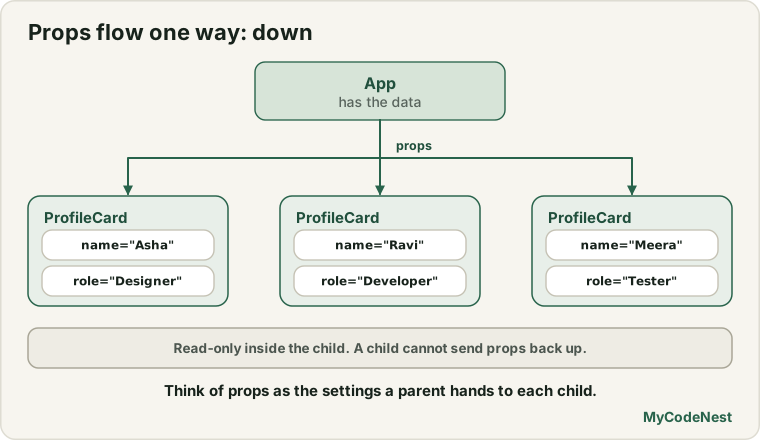
Props travel in one direction: from a parent component down to its children.
App          (has the data)
└── ProfileCard   (receives name, role, goal as props)
A child cannot send props back up. Later you will see how a parent passes a function as a prop so a child can notify it. For now, picture data as water flowing down a series of pipes.
A realistic use case: a product card
Props are everywhere in real apps. Here is a small product card that you could reuse for a whole shop:
function ProductCard({ name, price, rating = 4 }) {
  return (
    <article className="product-card">
      <h3>{name}</h3>
      <p>Price: ${price.toFixed(2)}</p>
      <p>Rating: {rating} / 5</p>
    </article>
  );
}<ProductCard name="Wireless Mouse" price={24.5} />
<ProductCard name="Mechanical Keyboard" price={89} rating={4.8} />The first card shows Price: $24.50 and Rating: 4 / 5, using the default rating. The second shows Price: $89.00 and Rating: 4.8 / 5. Note price={24.5} uses braces because it is a number. With price="24.5", price.toFixed(2) would fail, because strings do not have a toFixed method.
Common mistakes
1. Forgetting braces for non-string values. age="24" is a string. Use age={24} for a number.
2. Misspelling a prop name. If the parent passes name and the child destructures username, the child gets undefined and shows nothing. Prop names must match exactly, including capital letters.
3. Forgetting to destructure. In function ProfileCard(name, goal), name is the whole props object, not a string. Write function ProfileCard({ name, goal }).
4. Changing props. Reassigning a prop or calling .push() on an array prop changes data that belongs to the parent. Copy it first, or use state.
5. Reading a missing prop. If you call name.charAt(0) and the parent forgot to pass name, the page crashes with an error like Cannot read properties of undefined. Pass the prop, or give it a safe default value.
6. Passing an object and trying to render it. <p>{address}</p> fails if address is an object. Show its properties instead: {address.city}.
7. Putting braces inside quotes. name="{userName}" passes the literal text {userName}. Write name={userName}.
Practice
-
Update
ProfileCardso it takesname,roleandgoalas props. Render three cards with different people. -
Add a
cityprop with the default value"Unknown". Show it in the card. Render one card withoutcityand check the default. -
Predict, then check: For
<ProfileCard name="Ravi Patel" />with the code from this lesson, what do the role line and the goal line show? Which one isundefinedand what appears on the page? -
Create a
ProductCardcomponent withname,priceandrating. Show the price with two decimals. Render two products. -
Debug: The card shows nothing for the name. What is wrong?
function Greeting({ username }) { return <h2>Hello, {username}!</h2>; } <Greeting name="Aisha" /> -
Debug: This page crashes. Why, and how do you fix it?
function Price({ amount }) { return <p>{amount.toFixed(2)}</p>; } <Price amount="19.5" /> -
Create a
Badgecomponent that takes atextprop and an optionalcolorprop with the default"blue", and applies the colour withstyle={{ backgroundColor: color }}. -
Think: A child component needs to show the name in capital letters. Write it without changing the prop.
Recap
- Props are the inputs of a component. They look like attributes in JSX and arrive as one object.
- Destructure them in the parameter list:
function ProfileCard({ name, goal }). - Set defaults with
=:role = "Learner". A default is used only forundefined. - Use quotes for fixed strings and curly braces for numbers, booleans, arrays, objects and variables.
{...object}passes every key of an object as a prop.- Props are read-only. Never reassign them or mutate them. Make a new value instead.
- Data flows down from parent to child.
- Next you will learn how to pass content into a component with the special
childrenprop.
Frequently asked questions
What is the difference between props and variables?
A variable lives inside one component. Props are values handed to a component from outside, by its parent. A component can read its props but not change them, while it can change its own local variables.
Do I have to name the parameter props?
No, it is just a convention. You can name the parameter anything, but most code either uses props or destructures the object right in the parameter list, as ({ name, goal }).
Can I pass a function as a prop?
Yes. A function is a normal JavaScript value, so you can pass it like any other prop, for example onSave={handleSave}. This is how a child tells its parent that something happened. You will use it in the events and state lessons.
Why can't I change a prop inside the component?
Props belong to the parent. If a child changed them, data would change in surprising places and bugs would be hard to find. React expects components to behave like pure functions of their props, which keeps the UI predictable.
What happens if I do not pass a prop?
The prop is undefined inside the component. Either give it a default value, or make sure your code handles undefined, because calling a method such as .toFixed() on it will crash.
Is there a special prop called key or ref?
Yes. key is used by React for lists and is never passed down as a normal prop. You will learn it in the lists lesson. ref is used to reach DOM elements and is covered in the refs lesson.
See also: JSX in React, JavaScript Destructuring, JavaScript Functions, Value vs Reference