Data Fetching Libraries: When to Use TanStack Query
Learn what data fetching libraries solve and how to use TanStack Query: useQuery, caching, staleTime, retries, keepPreviousData pagination and useMutation.
What you will learn
In the last lessons you built your own tools for fetching data: a useFetch Hook, a helper with retries and timeouts, and a small cache. You learned how data loading works, and you also saw how much code a dependable version needs. Data fetching libraries package all of that into a tested tool.
In this lesson you will learn what problem these libraries solve, and then use the most popular one, TanStack Query (it used to be called React Query). You will learn useQuery for reading, useMutation for writing, how its cache, stale time and retries work, and how to build smooth pagination. You will also learn when you do not need a library.
You should know fetching data, production API handling, and useEffect.
This lesson uses a third-party package. TanStack Query is not part of React. It is a separate library that you install in your own project. We wrote the examples for version 5 (we tested version 5.104.5, which works with React 18 and 19). Always check the official documentation for the latest details.
Client state and server state
Two kinds of data live in a React app, and they behave very differently:
| Client state | Server state | |
|---|---|---|
| Examples | Which tab is open, text in an input, a dark mode switch | A list of products, a user profile, comments |
| Who owns it | Your app | The server. You only have a copy |
| Can it become outdated? | No | Yes, anyone can change it at any time |
| Needs loading and error states? | No | Yes |
| Best tool | useState, useReducer, context |
A data fetching library |
useState is great for client state. For server state, you need caching, sharing, refreshing, retries and cancellation. You wrote simple versions of these yourself. A library gives you proper versions.
What a library adds
Here is what you built by hand compared to what TanStack Query does out of the box:
| Problem | DIY (previous lessons) | TanStack Query |
|---|---|---|
| Loading, error and success states | A status state in every hook |
Built in |
| Cancelling old requests | AbortController in every Effect |
Handled for you |
| Race conditions | Abort and keys | Handled for you |
| Cache | A Map with no expiry |
Cache with expiry and automatic clean-up |
| Two components needing the same data | Two requests | One request, shared |
| Showing old data while refreshing | isStale logic |
Built in |
| Refreshing when the user comes back to the tab | Not implemented | Built in |
| Retries with backoff | A custom helper | Built in |
| Updating the cache after a change | Manual | invalidateQueries and setQueryData |
Install and set up
In your project’s terminal:
npm install @tanstack/react-queryThe library needs one object, a QueryClient, which holds the cache. You give it to your whole app with QueryClientProvider, which is a context provider. Replace src/main.jsx:
import { StrictMode } from 'react'
import { createRoot } from 'react-dom/client'
import { QueryClient, QueryClientProvider } from '@tanstack/react-query'
import './index.css'
import App from './App.jsx'

const queryClient = new QueryClient()

createRoot(document.getElementById('root')).render(
  <StrictMode>
    <QueryClientProvider client={queryClient}>
      <App />
    </QueryClientProvider>
  </StrictMode>,
)
Create the QueryClient outside any component (as above), so there is only one cache for the whole app.
Your first query
First, put the API calls in a file. They are plain functions that return promises: the library does not care how you fetch. Create src/api/blog.js:
const BASE_URL = "https://jsonplaceholder.typicode.com";

export const postsQueryKey = ["posts", { userId: 1 }];

async function request(path, options) {
  const response = await fetch(BASE_URL + path, options);
  if (!response.ok) {
    throw new Error(`Request failed with status ${response.status}`);
  }
  return response.json();
}

export function fetchPosts(signal) {
  return request("/posts?userId=1", { signal });
}

export function addPost(post) {
  return request("/posts", {
    method: "POST",
    headers: { "Content-Type": "application/json" },
    body: JSON.stringify(post),
  });
}
Now a component that reads the posts. Create src/components/PostList.jsx:
import { useQuery } from '@tanstack/react-query';
import { fetchPosts, postsQueryKey } from '../api/blog.js';

function PostList() {
  const { data: posts, isPending, isError, error, refetch, isFetching } = useQuery({
    queryKey: postsQueryKey,
    queryFn: ({ signal }) => fetchPosts(signal),
  });

  if (isPending) {
    return <p>Loading posts...</p>;
  }

  if (isError) {
    return (
      <div role="alert">
        <p>Could not load posts: {error.message}</p>
        <button onClick={() => refetch()}>Try again</button>
      </div>
    );
  }

  return (
    <section>
      <h2>Posts</h2>
      <button onClick={() => refetch()} disabled={isFetching}>
        {isFetching ? "Refreshing..." : "Refresh"}
      </button>
      <ul>
        {posts.map((post) => (
          <li key={post.id}>{post.title}</li>
        ))}
      </ul>
    </section>
  );
}

export default PostList;
Compare this with the UserList from the fetching lesson: there is no useState, no useEffect, no AbortController, no status. The Hook does all of it.
The two options
useQuery takes an object with two required options:
queryKey: an array that identifies this data. Think of it as the name tag of the data in the cache. Two queries with the same key share the same cached data.queryFn: the function that fetches the data. It must return a promise, and it should throw an error when the request fails (ourrequesthelper does, thanks toresponse.ok). TanStack Query passes it an object that includes asignal, so you can give it tofetch, and the library cancels requests for you when they are no longer needed.
What it returns
| Value | Meaning |
|---|---|
data |
The result, once it exists |
isPending |
There is no data yet (the first load) |
isError and error |
The request failed (after all retries) |
isFetching |
A request is running right now, including a background refresh |
refetch |
A function to load the data again |
Notice the difference between isPending and isFetching. isPending is only true when you have nothing to show. isFetching is true whenever a request is in progress, even if you already have (older) data on screen. That is why the Refresh button uses isFetching, while the loading message uses isPending.
What you get for free
Let us look at the behaviours we tested.
Shared requests. Create a second component in src/components/PostCount.jsx that shows how many posts there are:
import { useQuery } from '@tanstack/react-query';
import { fetchPosts, postsQueryKey } from '../api/blog.js';

function PostCount() {
  const { data } = useQuery({
    queryKey: postsQueryKey,
    queryFn: ({ signal }) => fetchPosts(signal),
  });

  return <p>{data ? `${data.length} posts` : "Counting..."}</p>;
}

export default PostCount;
Render both PostCount and PostList on the same page. Both use the same queryKey, so TanStack Query makes one network request and gives the answer to both. We tested exactly this: two components, one request. With our own hooks, this would have been two requests.
Retries. By default, a failed query is retried 3 times, with a wait that doubles each time, starting at 1 second (1 s, 2 s, 4 s). During the retries, the component stays in the isPending state, so the user only sees an error after all attempts fail. We tested a server that failed twice and then recovered: the component showed the loading message the whole time, and finally the data, with three requests in total. If you want immediate errors (for example while developing), set retry: false on the query. We tested that too: the error appeared after a single request.
Cancelling. Because we passed signal to fetch, a request whose result nobody needs any more is cancelled for you.
staleTime and gcTime: the two clocks
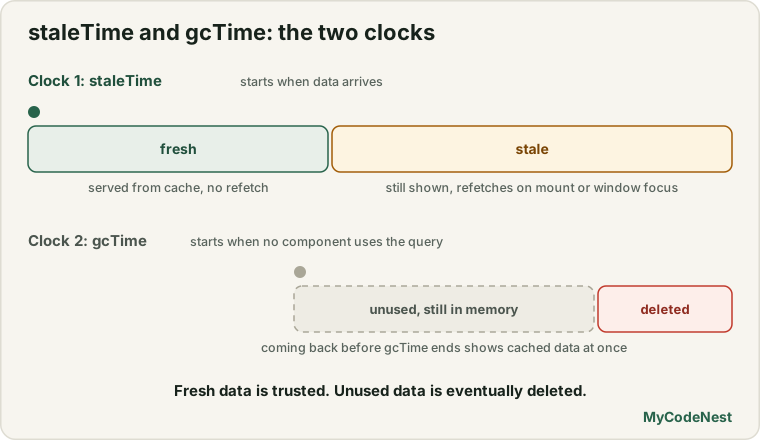
Two options control how long data is trusted and kept. They are the most important settings to understand.
staleTimesays how long data counts as fresh. While data is fresh, TanStack Query serves it from the cache and does not refetch it. After that, it is stale: the library still shows it instantly, but it also refetches in the background when something happens (a component mounts, the window regains focus, the network reconnects). The default is0, so data is stale immediately.gcTime(garbage collection time) says how long unused data stays in memory. When no component uses a query any more, it is deleted after this time. The default is 5 minutes.
data arrives ── staleTime ──► becomes stale (still shown, will refetch when needed)
nobody uses it ── gcTime ──► removed from the cache
With the default staleTime: 0, going back to a page you already visited shows the old data immediately, and also sends a background request to update it. That is usually good for data that changes often. For data that changes rarely, set a longer staleTime:
useQuery({
  queryKey: postsQueryKey,
  queryFn: ({ signal }) => fetchPosts(signal),
  staleTime: 30000,   // trust the data for 30 seconds
});
We measured the difference with a paged list. With the default staleTime, going back to a page you had seen caused a new request in the background. With staleTime: 30000, going back caused no request.
Query keys
The queryKey is more than a name. It is like the dependency array of an Effect: whenever the key changes, TanStack Query loads the data for the new key. Follow these rules:
- A key is always an array:
["posts"], not"posts". - Include every variable that the
queryFnuses:["products", page],["user", userId],["posts", { userId: 1 }]. - Keys are compared by value, so objects inside them are fine, and order inside arrays matters.
This one rule replaces much of the work of the useApi Hook you wrote: change the page in the key, and the right data loads.
Pagination without flashing
For paged lists, add the option placeholderData: keepPreviousData. While the next page loads, the previous page stays on screen instead of disappearing. This is the stale-while-loading pattern you built by hand, in one line. Create src/components/ProductPager.jsx:
import { useState } from 'react';
import { useQuery, keepPreviousData } from '@tanstack/react-query';

const PAGE_SIZE = 10;

async function fetchProducts(page, signal) {
  const skip = (page - 1) * PAGE_SIZE;
  const response = await fetch(
    `https://dummyjson.com/products?limit=${PAGE_SIZE}&skip=${skip}&select=title,price`,
    { signal }
  );
  if (!response.ok) {
    throw new Error(`Request failed with status ${response.status}`);
  }
  return response.json();
}

function ProductPager() {
  const [page, setPage] = useState(1);

  const { data, isPending, isError, error, isPlaceholderData } = useQuery({
    queryKey: ["products", page],
    queryFn: ({ signal }) => fetchProducts(page, signal),
    placeholderData: keepPreviousData,
    staleTime: 30000,
  });

  if (isPending) {
    return <p>Loading products...</p>;
  }

  if (isError) {
    return <p role="alert">Could not load products: {error.message}</p>;
  }

  const totalPages = Math.ceil(data.total / PAGE_SIZE);

  return (
    <section>
      <ul style={{ opacity: isPlaceholderData ? 0.5 : 1 }}>
        {data.products.map((product) => (
          <li key={product.id}>
            {product.title} - ${product.price}
          </li>
        ))}
      </ul>
      <button onClick={() => setPage((p) => p - 1)} disabled={page <= 1}>
        Previous
      </button>
      <span>Page {page} of {totalPages}</span>
      <button
        onClick={() => setPage((p) => p + 1)}
        disabled={isPlaceholderData || page >= totalPages}
      >
        Next
      </button>
    </section>
  );
}

export default ProductPager;
The key line is queryKey: ["products", page]: each page is a separate entry in the cache. isPlaceholderData is true while the old page is shown as a stand-in. We use it to dim the list and to disable Next, so the user cannot skip ahead before the next page has arrived. In our test, the old items stayed visible (dimmed) while page 2 loaded, then the new items replaced them, and visiting a page a second time was instant.
Changing data: useMutation
Queries read data. Mutations change it (create, update, delete). The Hook is useMutation. Create src/components/NewPostForm.jsx:
import { useState } from 'react';
import { useMutation, useQueryClient } from '@tanstack/react-query';
import { addPost, postsQueryKey } from '../api/blog.js';

function NewPostForm() {
  const [title, setTitle] = useState("");
  const queryClient = useQueryClient();

  const mutation = useMutation({
    mutationFn: addPost,
    onSuccess: (created) => {
      queryClient.setQueryData(postsQueryKey, (old = []) => [
        { ...created, id: crypto.randomUUID() },
        ...old,
      ]);
      setTitle("");
    },
  });

  function handleSubmit(event) {
    event.preventDefault();
    const trimmed = title.trim();
    if (trimmed === "") {
      return;
    }
    mutation.mutate({ title: trimmed, body: "Written in React", userId: 1 });
  }

  return (
    <form onSubmit={handleSubmit}>
      <label htmlFor="title">New post title</label>
      <input id="title" value={title} onChange={(event) => setTitle(event.target.value)} />
      <button type="submit" disabled={mutation.isPending}>
        {mutation.isPending ? "Adding..." : "Add post"}
      </button>
      {mutation.isError && <p role="alert">Could not add the post: {mutation.error.message}</p>}
    </form>
  );
}

export default NewPostForm;
How it works:
useMutationtakes amutationFn: the function that sends the change (addPost).- It returns a
mutationobject.mutation.mutate(data)starts the request. - The object has the same kind of state flags as queries:
isPending,isError,error. We use them to disable the button and show a message. These replace thebusyIdandactionErrorstate from the CRUD lesson. onSuccessruns after the server confirms. Here, it updates the cached list, andPostList(andPostCount) update automatically, because they read from the same cache entry. We tested it: after adding a post, both the list and the count (11 posts) changed.
Unlike queries, mutations are not retried by default, because repeating a write can be dangerous (as you learned about POST). We tested it: a failing mutation sent one request and showed the error.
Two ways to update the screen after a change
setQueryDatawrites a new value directly into the cache (as above). We use it because JSONPlaceholder is a fake API: if we asked the server for the list again, our new post would not be there.invalidateQueriesmarks cached data as stale and refetches it from the server. This is what you normally do with a real API, because the server’s answer is the truth:
const mutation = useMutation({
  mutationFn: addPost,
  onSuccess: () => {
    queryClient.invalidateQueries({ queryKey: ["posts"] });
  },
});
The key ["posts"] matches every query whose key starts with "posts", including ["posts", { userId: 1 }]. Queries that are on screen right now are refetched immediately. Queries nobody is using are only marked as stale, and refetched the next time a component uses them. We tested it with the list on screen: after the mutation succeeded, the posts were requested again from the server automatically (one extra request). Because JSONPlaceholder does not store new posts, the refetched list still had the original ten.
Putting it together
Update src/App.jsx to show everything:
import PostList from './components/PostList.jsx';
import PostCount from './components/PostCount.jsx';
import NewPostForm from './components/NewPostForm.jsx';
import ProductPager from './components/ProductPager.jsx';

function App() {
  return (
    <main>
      <h1>TanStack Query demo</h1>
      <PostCount />
      <NewPostForm />
      <PostList />
      <h2>Products</h2>
      <ProductPager />
    </main>
  );
}

export default App;
Do I need a library?
You probably do when:
- many components read the same server data,
- you need caching, background refreshing, or pagination that feels fast,
- the app has many different requests and mutations.
You may not need one when:
- the app has only one or two simple requests,
- the data is loaded once and never changes,
- you use a framework that already provides data loading (for example, the loaders of React Router).
It is a good idea to understand the basics first, as you did in the last three lessons. Then the library is not magic: you know what it does for you and why each option exists.
Other tools exist for the same job: SWR (a smaller library with a similar idea), RTK Query (part of Redux Toolkit), and the data loading built into frameworks and routers. The ideas you learned here carry over to all of them.
Common mistakes
1. Forgetting QueryClientProvider. Without it, useQuery throws an error saying that no QueryClient was set. Wrap your app in it.
2. Creating new QueryClient() inside a component. A new cache is created on every render, and you lose all cached data. Create it once, outside the component.
3. Not throwing an error when response.ok is false. The library only sees an error if the queryFn throws or rejects. A 404 that you do not turn into an error looks like success.
4. Leaving variables out of the queryKey. If page is not in the key, every page shares one cache entry and the page never changes.
5. Using isFetching for the first load. Use isPending to decide whether to show a loading message, and isFetching for subtle “refreshing” indicators.
6. Being surprised by background refetches. With the default staleTime: 0, data refetches when components mount and when the window regains focus. Set a staleTime for data that rarely changes.
7. Copying server data into useState. The cache is the source of truth. Read data directly instead of storing a second copy.
8. Forgetting to update the cache after a mutation. Use invalidateQueries (real API) or setQueryData, or the screen shows old data.
9. Retrying mutations blindly. Mutations are not retried by default, for a good reason.
10. Reaching for the library too early. For a tiny app, useFetch is fine.
Practice
-
Install TanStack Query and set up
QueryClientProvider. BuildPostListwithuseQuery. Compare it line by line with yourUserListfrom the fetching lesson. What did you not need to write? -
Render
PostListandPostCounttogether and open the Network tab. How many requests for/postsdo you see? Why? -
Predict, then check: In DevTools, switch to another browser tab and come back. Do you see a new request? Then add
staleTime: 60000to the query and try again. What changes? -
Add
retry: falsetoPostListand use a wrong URL such as/postz. How fast does the error appear compared with the default? How long would the default take? -
Build
ProductPagerand click Next several times, then Previous. WithstaleTime: 30000, does going back make a request? RemovestaleTimeand test again. -
Debug: The pager never changes pages: the same ten products stay on screen. This is the query:
useQuery({ queryKey: ["products"], queryFn: ({ signal }) => fetchProducts(page, signal) });What is missing?
-
Build
NewPostFormand check thatPostListandPostCountboth update after you add a post. Then replacesetQueryDatawithinvalidateQueriesand describe what changes with JSONPlaceholder, and why. -
Think: List three reasons why storing the API response in
useStateand also in the query cache is a bad idea.
Recap
- Data from a server is server state: shared, async, and possibly outdated. A library like TanStack Query manages it far better than
useStateanduseEffect. - Install with
npm install @tanstack/react-query, create oneQueryClient, and wrap the app inQueryClientProvider. useQuery({ queryKey, queryFn })returnsdata,isPending,isError,error,isFetchingandrefetch. ThequeryFnmust return a promise and throw on failure.- The
queryKeynames the data in the cache, and should include every variable the request uses. - You get shared requests, cancellation, retries (3 by default, with backoff), and a cache automatically.
staleTime(default0) is how long data is fresh.gcTime(default 5 minutes) is how long unused data stays in memory.placeholderData: keepPreviousDatagives smooth pagination.useMutationchanges data. Update the screen afterwards withsetQueryDataorinvalidateQueries. Mutations are not retried by default.- Understand the basics first, and use a library when the app has real data-fetching needs.
- Next you will put your data skills into a complete project: an API dashboard.
Frequently asked questions
What is TanStack Query?
It is a library for managing server state in React (and other frameworks). It fetches data, caches it, shares it between components, refreshes it in the background, retries failures, and provides state for loading and errors. It was formerly called React Query.
What is the difference between isPending and isFetching?
isPending is true when there is no data yet, so it tells you to show a loading state. isFetching is true whenever a request is running, even when you already have cached data, so it is good for a small “refreshing” indicator.
What does staleTime do?
It sets how long fetched data is treated as fresh. Fresh data is served from the cache without a new request. Stale data is still shown immediately, but it is refetched in the background when a component mounts, the window regains focus or the network reconnects. The default is 0.
Why did my query request the data again when I came back to the page?
With the default staleTime of 0, cached data is stale as soon as it arrives. When the component mounts again, the library shows the cached data right away and refetches it in the background. Increase staleTime if you do not want that.
Should I still learn useEffect data fetching?
Yes. It teaches you what a library does for you: loading states, cancellation, race conditions and caching. It is also fine for tiny apps. Knowing the basics makes the library easier to understand and to debug.
Does TanStack Query replace Redux or context?
It replaces the part of them that stored server data. For client state such as a theme or the contents of a form, you still use useState, useReducer or context. Many apps use both, each for its own kind of state.
See also: Fetch Data in React, Production-Ready API Handling, CRUD with APIs, React Context