Fetch Data in React: Loading, Error and Empty States
Learn data fetching in React with useEffect: loading, error and empty states, response.ok, AbortController cleanup, a retry button and a useFetch hook.
What you will learn
Almost every real app shows data that lives on a server: products, messages, user profiles. The data does not exist when your component first renders. It has to be requested, and that takes time, and sometimes it fails. A good app handles all three situations: loading, success and error, plus the case where the answer is an empty list.
In this lesson you will learn how to fetch data in a React component, how to show each state properly, why response.ok matters, how to stop a request you no longer need with AbortController, how to add a Try again button, and how to move the whole pattern into a reusable useFetch Hook.
You should know the Fetch API and async/await from the JavaScript course, and useEffect with cleanup.
The API we will use
To practise, we need a server that gives us data. JSONPlaceholder is a free fake REST API made for learning. It needs no sign-up and no key. We will use its /users endpoint, which returns a list of 10 users. Open this address in your browser to see the raw JSON:
https://jsonplaceholder.typicode.com/usersEach user is an object like { "id": 1, "name": "...", "email": "...", "company": { "name": "..." }, ... }. A single user is at /users/1. (A public demo API is a free service. It can be slow, or change in the future, so treat it as practice material and never build a real product on it.)
Why data fetching is a side effect
Remember the rule from the Effects lessons: rendering must be pure, and talking to a server is a side effect. So the request goes in an Effect, which runs after the component is on the screen. The result is stored in state, and when the state changes, React renders the new data.
1. Component renders for the first time  → no data yet, show "Loading..."
2. Effect runs                           → starts the request
3. Response arrives                      → setState(data)
4. Component renders again               → shows the list
Three states, not three booleans
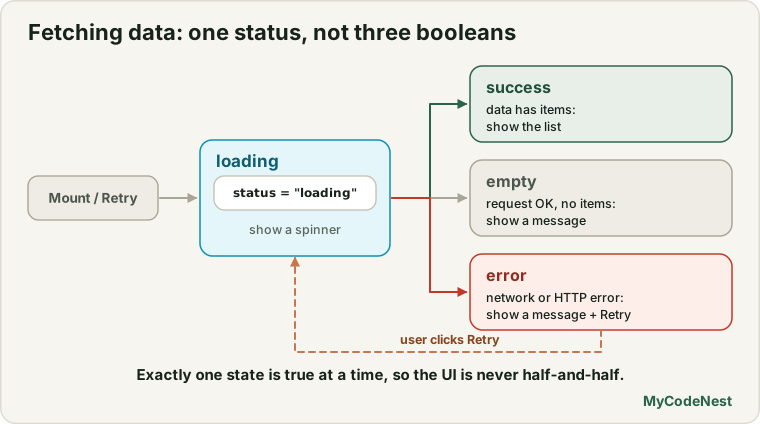
You could track loading with isLoading, errors with isError, and success with isSuccess. But as the state structure lesson taught, several flags allow impossible combinations (loading and error at the same time). Use one status that is exactly one of "loading", "success" or "error".
Your first data component
Create src/components/UserList.jsx:
import { useState, useEffect } from 'react';

function UserList() {
  const [status, setStatus] = useState("loading");
  const [users, setUsers] = useState([]);
  const [error, setError] = useState(null);
  const [attempt, setAttempt] = useState(0);

  useEffect(() => {
    const controller = new AbortController();

    async function loadUsers() {
      try {
        const response = await fetch("https://jsonplaceholder.typicode.com/users", {
          signal: controller.signal,
        });

        if (!response.ok) {
          throw new Error(`Request failed with status ${response.status}`);
        }

        const data = await response.json();
        setUsers(data);
        setStatus("success");
      } catch (err) {
        if (err.name === "AbortError") {
          return;
        }
        setError(err);
        setStatus("error");
      }
    }

    loadUsers();

    return () => controller.abort();
  }, [attempt]);

  function handleRetry() {
    setStatus("loading");
    setError(null);
    setAttempt((n) => n + 1);
  }

  if (status === "loading") {
    return <p>Loading users...</p>;
  }

  if (status === "error") {
    return (
      <div role="alert">
        <p>Could not load users: {error.message}</p>
        <button onClick={handleRetry}>Try again</button>
      </div>
    );
  }

  if (users.length === 0) {
    return <p>No users found.</p>;
  }

  return (
    <ul>
      {users.map((user) => (
        <li key={user.id}>
          {user.name} ({user.email})
        </li>
      ))}
    </ul>
  );
}

export default UserList;
Render <UserList /> in App.jsx. First the page shows Loading users..., and a moment later a list of ten users, for example:
Leanne Graham ([email protected])
Ervin Howell ([email protected])
...
This component has a lot in it. Let us go through it in order.
The state
statusstarts as"loading", because the very first thing the user sees is the waiting state.usersholds the data,errorholds the error object, andattemptis a counter used for the retry button (we will come back to it).
An async function inside the Effect
The Effect callback cannot be async (see the Effects lesson). So we declare an async function loadUsers() inside the Effect and call it right away. This is the standard pattern.
response.ok: the most forgotten line
fetch has a surprising rule: it only rejects (throws an error) when the network itself fails, such as no internet. If the server answers with an error status such as 404 Not Found or 500 Server Error, the promise still succeeds. You must check it yourself:
if (!response.ok) {
  throw new Error(`Request failed with status ${response.status}`);
}
response.ok is true for status codes 200 to 299. We tested this with a wrong address (a typo such as /postz gives a 404): fetch did not throw, but response.ok was false. Without the check, your code would try to read the error body as if it were data.
We throw our own error so that both kinds of problems, network failures and HTTP errors, end up in the same catch block.
Stopping the request with AbortController
Before the request, we create an AbortController and pass its signal to fetch. The Effect’s cleanup calls controller.abort(). This cancels the request in two situations:
- the component is removed while the request is still running, and
- the Effect runs again (here, after a retry).
When a request is aborted, fetch rejects with an error named AbortError. This is not a real error. We caused it on purpose, so the catch block recognises it (err.name === "AbortError") and quietly returns without touching the state. (See the AbortController lesson for details.)
Why do I see two requests in development?
In development, StrictMode runs your Effect, then the cleanup, then the Effect again (as you learned in the cleanup lesson). That means fetch is called twice. If you open the browser’s Network tab, you will usually see two requests, and the first one is marked as cancelled.
We tested exactly what happens. fetch was called two times. The signal of the first call was aborted by the cleanup, and the signal of the second call was not. The page showed the list once, with no duplicates, because the aborted request can never update the state. (An aborted request can be stopped so quickly that it never even reaches the server. In our test the server only saw one request.) In production, StrictMode does nothing, and there is only one request.
The four things to render
After the Effect, the component returns different JSX for each situation. This is the early return pattern from the conditional rendering lesson:
| Situation | What the user sees |
|---|---|
status === "loading" |
Loading users... |
status === "error" |
An error message with a Try again button |
| Success, but the list is empty | No users found. |
| Success with data | The list |
Never forget the empty state. A successful request can return [], and a blank page looks like a bug. We tested it by making the server return an empty list: the page showed No users found.
The retry button
The error state offers a Try again button. Clicking it should run the request again. We do this with the attempt counter, which is in the Effect’s dependency array. The handler resets the screen to "loading" and increases the counter:
function handleRetry() {
  setStatus("loading");
  setError(null);
  setAttempt((n) => n + 1);
}
Changing attempt makes React run the Effect’s cleanup (which aborts the old request) and then run the Effect again. We tested it: with the server set to fail, the page showed Could not load users: Request failed with status 500 and a button. After the server recovered, clicking Try again showed Loading users... and then the list.
Notice that we do not call setStatus("loading") inside the Effect. The reset happens in the event handler, where it belongs.
What about network errors?
If the user is offline, fetch itself rejects. The error message depends on the browser (for example Failed to fetch in Chrome). Our component shows Could not load users: followed by that message, with the same retry button. In a real product, show a friendly sentence instead of the raw message, such as “We could not reach the server. Check your connection and try again.”
Make it reusable: the useFetch Hook
If you copy this component for products, posts and comments, you will repeat 30 lines each time. This is exactly what a custom Hook is for. Create src/hooks/useFetch.js:
import { useState, useEffect } from 'react';

export function useFetch(url) {
  const [attempt, setAttempt] = useState(0);
  const [result, setResult] = useState({ key: null, status: "loading", data: null, error: null });
  const key = url + "#" + attempt;

  useEffect(() => {
    const controller = new AbortController();

    fetch(url, { signal: controller.signal })
      .then((response) => {
        if (!response.ok) {
          throw new Error(`Request failed with status ${response.status}`);
        }
        return response.json();
      })
      .then((data) => setResult({ key, status: "success", data, error: null }))
      .catch((error) => {
        if (error.name === "AbortError") {
          return;
        }
        setResult({ key, status: "error", data: null, error });
      });

    return () => controller.abort();
  }, [url, key]);

  function retry() {
    setAttempt((n) => n + 1);
  }

  if (result.key !== key) {
    return { status: "loading", data: null, error: null, retry };
  }

  return { ...result, retry };
}
There is one clever idea here. The Hook stores each result together with the key of the request it belongs to (the URL plus the retry counter). When the URL changes, the stored result belongs to the old key, so the Hook simply reports "loading" until the new answer arrives. That means we never have to call setStatus("loading") inside the Effect. The loading state is derived from the data, in line with the “calculate it, do not store it” rule.
Now a component becomes tiny. Create src/components/UserCard.jsx:
import { useFetch } from '../hooks/useFetch.js';

function UserCard({ id }) {
  const { status, data: user, error, retry } = useFetch(
    `https://jsonplaceholder.typicode.com/users/${id}`
  );

  if (status === "loading") {
    return <p>Loading...</p>;
  }

  if (status === "error") {
    return (
      <div role="alert">
        <p>Could not load the user: {error.message}</p>
        <button onClick={retry}>Try again</button>
      </div>
    );
  }

  return (
    <article>
      <h3>{user.name}</h3>
      <p>{user.email}</p>
      <p>{user.company.name}</p>
    </article>
  );
}

export default UserCard;
And a picker to switch users. Replace src/App.jsx with:
import { useState } from 'react';
import UserCard from './components/UserCard.jsx';

function App() {
  const [id, setId] = useState(1);

  return (
    <main>
      <h1>Users</h1>
      <div>
        {[1, 2, 3].map((number) => (
          <button key={number} onClick={() => setId(number)} aria-pressed={id === number}>
            User {number}
          </button>
        ))}
      </div>
      <UserCard id={id} />
    </main>
  );
}

export default App;
At first, the page shows Loading..., then user 1’s name, email and company. Click User 2: it briefly shows Loading... again, then user 2. We tested the fast-switching case too: we asked for user 1 on a slow response and user 2 on a fast one, switching in between. The page ended on user 2. The slow answer for user 1 never overwrote it, because the cleanup aborted that request. This is the race condition from the cleanup lesson, solved with AbortController. An error, such as asking for a user that does not exist (/users/999), shows Could not load the user: Request failed with status 404 and the Try again button.
Where this approach reaches its limits
Fetching in an Effect is perfectly fine for learning and for small apps. But notice what is missing:
- No cache. Going back to a page you already visited requests the same data again.
- No sharing. Two components that need the same data make two requests.
- No refreshing. The data is never updated while the user is on the page.
- Boilerplate for every request, and each new feature (pagination, retries) adds more.
The next lessons build up the techniques for real apps, and then introduce a library that handles most of this for you. Frameworks also offer their own data loading, which is a topic for later.
Common mistakes
1. Forgetting response.ok. A 404 or 500 response does not make fetch throw. Check response.ok and throw your own error.
2. Making the Effect callback async. Declare an async function inside it and call it.
3. Forgetting the loading state. The first render has no data. Reading users.map on null crashes with Cannot read properties of null. Start with "loading" and render it.
4. Forgetting the empty state. An empty list should say No users found, not show a blank page.
5. Treating AbortError as a real error. It is expected when you cancel. Ignore it.
6. Using several booleans for status. isLoading and isError can both be true. Use one status.
7. Missing dependencies. If the URL depends on a prop or state, it must be in the dependency array, or the Effect uses an old URL.
8. Calling setState with a loading flag directly in the Effect. Reset the status in the event handler, or derive it as useFetch does.
9. Showing raw technical errors to users. Write a friendly message, and keep the details for the console.
10. Never testing the failure case. Turn off your internet, or use a wrong URL, and check that your error state and retry button work.
Practice
-
Build the
UserListcomponent and watch the Network tab in DevTools. How many requests do you see in development? Which one is marked as cancelled? -
Predict, then check: Change the address to
https://jsonplaceholder.typicode.com/usersx(a typo). What does your page show? What would happen if you removed theresponse.okcheck? -
Test the offline error: in DevTools, set the network to Offline and reload. What message do you see? Replace it with a friendlier sentence of your own.
-
Show a count above the list (
10 users). Is that new state? How do you calculate it? -
Add a text input that filters the user names after they are loaded. Use what you learned in the product search project.
-
Debug: The page shows
Loading users...forever and the console is quiet. A learner wrote this. Find two problems.useEffect(async () => { const response = await fetch("https://jsonplaceholder.typicode.com/users"); setUsers(await response.json()); }, []); -
Create the
useFetchHook and aPostListcomponent that loadshttps://jsonplaceholder.typicode.com/posts?userId=1and shows the post titles, with loading, error and retry. -
Build the
UserPickerfrom this lesson and click the three buttons quickly. Do you ever see the wrong user’s data? Explain why not, in your own words.
Recap
- Fetching data is a side effect. Start the request in an Effect, save the result in state, and render it.
- Use one
status("loading","success","error") instead of several booleans. fetchonly rejects on network failures. Checkresponse.okand throw an error for404and500.- Put an async function inside the Effect. Never make the Effect callback itself
async. - Pass an
AbortControllersignal tofetch, and abort in the cleanup. IgnoreAbortError. - In development,
StrictModecallsfetchtwice. The cleanup aborts the first call. - Always render loading, error (with a retry), empty and success states.
- Extract the pattern into a
useFetchHook that stores each result with the request key, so loading is derived, and so changing the URL cannot show stale data. - Next you will learn how to create, update and delete data on a server.
Frequently asked questions
Why does fetch not throw an error for a 404?
fetch treats any HTTP response as a successful request, because the network call worked. Only a network failure, such as being offline, rejects the promise. That is why you must check response.ok or response.status yourself and throw your own error.
Why do I see two requests in the Network tab?
In development, StrictMode runs your Effect, its cleanup and the Effect again to check that the cleanup is correct. fetch is called twice, and the first call is aborted by the cleanup, so only one result reaches the screen. In production there is only one request.
Do I need AbortController for every request?
It is a good habit, because it prevents stale responses and wasted work. At the very least, you must prevent a late response from overwriting newer state. Aborting the request does this and also saves bandwidth. The next lessons compare it with an “ignore” flag.
Where should I put the API address?
For a quick example, in the component. In a real app, keep the base URL in one place, such as a small api.js file or an environment variable, so you can change it once. You will build that in the next lessons.
Should I use .then() or async/await?
Both work. async/await reads more like normal code and is usually clearer for several steps and for try/catch. The useFetch Hook above uses .then() because the chain is short. Pick one style and stay consistent.
Is fetching in useEffect the best way to load data in React?
It is the basic building block, and it is fine for learning and small apps. For larger apps, a data-fetching library or a framework handles caching, sharing and refreshing for you. The lessons ahead explain when that is worth it.
See also: JavaScript Fetch API, JavaScript async/await, JavaScript AbortController, Effect Cleanup and Dependencies