Deploy a React App: Build, Environment Variables and Hosting
Deploy React apps to production: build optimized bundles with Vite, secure VITE_ environment variables, configure SPA fallback routing, and host for free.
What you will learn
Developing an application on localhost:5173 is only half the journey. Shipping a React application to production requires compiling your source code into optimized static bundles, managing environment variables safely, solving the notorious Single Page Application (SPA) routing 404 issue, and selecting the right cloud hosting provider.
In this lesson, you will learn:
- How Vite creates an optimized production bundle during
npm run build. - How to test production builds locally before deploying using
npm run preview. - How environment variables work in Vite (
import.meta.env) and how to prevent leaking secret keys. - Why refreshing a React Router URL on a static host produces a 404 error, and how rewrite rules fix it.
- How to deploy your application for free to platforms like Vercel, Netlify, Cloudflare Pages, and GitHub Pages.
The Production Build Process
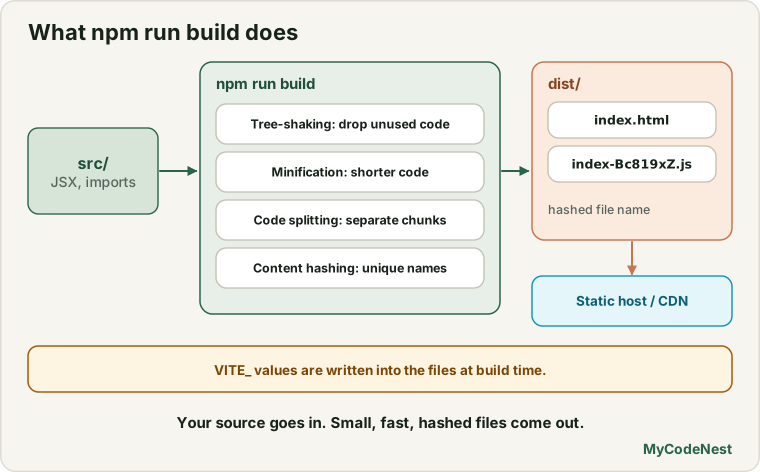
When you run npm run dev, Vite does not bundle your code; it serves ES modules natively on demand for instant hot module replacement (HMR).
When you prepare for production, modern Vite (version 8+) invokes Rolldown (the ultra-fast Rust-based bundler compatible with the Rollup plugin API) and Oxc under the hood:
npm run buildThis command executes several critical optimizations:
- Tree-Shaking: Dead code and unused library exports are stripped completely from the bundle.
- Minification: Whitespace is removed, variables are mangled to single letters, and code is compressed at native Rust speeds with Oxc and Rolldown.
- Code Splitting: Dynamic imports (
React.lazy()) and heavy vendor libraries are split into separate.jschunks for parallel browser downloading. - Content Hashing: Output files receive unique hashes in their filenames (e.g.,
index-Bc819xZ.js). This enables permanent HTTP browser caching (Cache-Control: immutable).
The compiled output is placed inside the dist/ directory:
dist/
├── index.html
└── assets/
    ├── index-Bc819xZ.js
    ├── index-Cc771yW.css
    └── logo-Da112aB.svg
Previewing the production build locally
Never deploy code without running the production preview first:
npm run previewThis starts a lightweight local static web server serving the compiled files from dist/, allowing you to catch bundling glitches or missing assets before pushing to production.
Managing Environment Variables in Vite
React client-side applications run entirely inside the user’s web browser. Therefore:
[!CAUTION] Any environment variable embedded into a client-side React app is publicly readable by anyone who opens DevTools. Never store private database passwords, Stripe secret keys, or API private tokens in React frontend code.
1. The VITE_ prefix rule
To prevent accidentally leaking sensitive system variables, Vite only exposes variables that start with the prefix VITE_:
# .env.development
VITE_API_BASE_URL=http://localhost:4000/api
VITE_ENABLE_DEBUG_LOGS=true
# .env.production
VITE_API_BASE_URL=https://api.mycodenest.com/api
VITE_ENABLE_DEBUG_LOGS=false2. Accessing variables in code
In Vite, environment variables are accessed through import.meta.env rather than Node’s process.env:
// src/services/api.js
const API_BASE = import.meta.env.VITE_API_BASE_URL;

export async function fetchArticles() {
  const response = await fetch(`${API_BASE}/articles`);
  if (!response.ok) {
    throw new Error('Failed to load articles');
  }
  return response.json();
}
3. Built-in Vite environment variables
Vite provides several built-in variables out of the box:
import.meta.env.MODE: Current mode string ("development"or"production").import.meta.env.DEV: Boolean,truein development.import.meta.env.PROD: Boolean,truein production.import.meta.env.BASE_URL: Base public URL fromvite.config.js.
Solving the SPA 404 Routing Problem
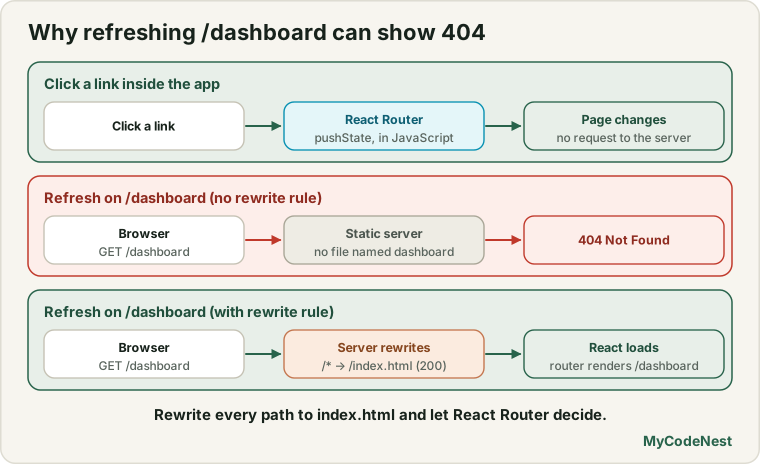
A classic issue in React SPAs occurs when deploying client-side routing (React Router):
- You visit
https://myapp.com/, the server returnsindex.html, and React loads. - You click a link to
/dashboard. React Router intercepts the click and changes the URL without reloading the page. Everything works. - You press Refresh (F5) on
https://myapp.com/dashboard. - The browser asks the web server: “Give me the file named
/dashboard/index.html.” - The static server cannot find a physical file or directory named
dashboardon disk and returns 404 Not Found!
The Solution: URL Rewrites / Fallback Rule
You must configure the web server to rewrite all route requests back to the root index.html, letting React Router inspect the browser path and render the matching component.
Netlify (public/_redirects)
Create a file named public/_redirects:
/* /index.html 200Vercel (vercel.json)
Create vercel.json in your project root:
{
  "rewrites": [
    { "source": "/(.*)", "destination": "/index.html" }
  ]
}
Nginx (nginx.conf)
location / {
  try_files $uri $uri/ /index.html;
}
Modern Hosting Platforms
1. Vercel
Vercel provides seamless zero-config deployment for Vite and React apps:
- Push your repository to GitHub.
- Sign in to vercel.com and click “Add New Project”.
- Import your GitHub repository.
- Vercel automatically detects the Vite framework preset:
- Build Command:
npm run build - Output Directory:
dist
- Build Command:
- Under Environment Variables, add any
VITE_*keys required. - Click Deploy. Every subsequent
git pushwill trigger an automatic preview and production deployment.
2. Netlify
- Link your repository at netlify.com.
- Set Build command to
npm run buildand Publish directory todist. - Add environment variables under Site settings > Environment variables.
- Deploy.
3. GitHub Pages
GitHub Pages serves static sites from a branch or docs/ folder. Because GitHub Pages does not support native SPA rewrites, configure base in vite.config.js:
// vite.config.js
export default defineConfig({
  base: '/my-repo-name/', // required for GitHub Pages project sites
  plugins: [react()],
});
Production Security Best Practices
- Content Security Policy (CSP): Set HTTP security headers to prevent cross-site scripting (XSS) and restrict domains from which scripts and styles can load.
- Never commit
.env.local: Add.env,.env.local, and.env.*.localto.gitignore. Only commit.env.examplecontaining empty dummy keys. - Analyze bundle sizes: Inspect your production bundle using
rollup-plugin-visualizerto catch accidentally imported bloated libraries before shipping.
npm install -D rollup-plugin-visualizer// vite.config.js
import { visualizer } from 'rollup-plugin-visualizer';
export default defineConfig({
plugins: [
react(),
visualizer({ open: true, filename: 'bundle-stats.html' }),
],
});Common mistakes
1. Prefixing private backend secrets with VITE_
#  CATASTROPHIC: This private secret is embedded directly into the browser bundle!
VITE_STRIPE_SECRET_KEY=sk_live_9381283921...

#  CORRECT: Client code only receives public publishable keys
VITE_STRIPE_PUBLISHABLE_KEY=pk_live_831920381...
2. Forgetting the SPA rewrite rule
Deploying without a _redirects or vercel.json file means bookmarks and direct links to sub-routes will display a broken 404 page for users.
3. Deploying without checking npm run build locally
Code that passes in development may fail to compile during the production build due to TypeScript type errors, syntax errors in JSX, or missing imports. Always verify npm run build passes locally before pushing.
Practice
- Run
npm run buildin your project and inspect the generated files inside thedist/directory. Check their file sizes. - Run
npm run previewand test your application thoroughly in a new browser tab to ensure all styles and assets load properly. - Create a
.env.developmentand a.env.productionfile. Configure aVITE_API_URLvariable and log it in your console to observe the difference between modes. - Create the appropriate rewrite rule (
_redirectsorvercel.json) to support deep client-side routes on your hosting provider. - Deploy your React project to Vercel or Netlify and verify that hard-refreshing a nested URL (e.g.
/about) loads correctly.
Recap
npm run buildcompiles, minifies, tree-shakes, and hashes your React assets into static files inside thedist/directory using modern high-performance tooling.- Use
npm run previewto test your production build locally before pushing code live. - Environment variables accessible in React must begin with the
VITE_prefix and are read viaimport.meta.env. - Client bundles are 100% public; never expose private API secrets or credentials in React frontend code.
- Prevent SPA 404 errors by adding URL rewrite rules that redirect all route requests to
index.html.
Frequently asked questions
Why does Vite use `import.meta.env` instead of `process.env`?
Vite is built on native ES modules (ESM). In modern browser environments, `process` is a Node.js global that does not exist in browsers. `import.meta` is the native standard JavaScript mechanism for accessing module-specific metadata.How can I hide my backend API keys if React cannot keep them secret?
You must use a backend server or serverless functions (like Vercel Edge Functions or Netlify Functions) as a proxy. Your React frontend calls your serverless proxy (`/api/pay`), and the serverless function attaches the secret key before communicating with the third-party API.What is content hashing and why does it matter?
Vite includes a cryptographic hash of each file's content in its filename (e.g., `main.a98f12.js`). If the file content doesn't change, the filename stays the same and browsers cache it indefinitely. When you change code and redeploy, the hash changes, forcing browsers to download the fresh version immediately.Can I deploy a Vite React app to traditional shared hosting (like Apache / cPanel)?
Yes. Simply upload the contents of the `dist/` folder to your `public_html` directory via FTP, and add a `.htaccess` file containing rewrite rules to redirect requests to `index.html`.See also: