Project 4: Build a Multi-Page Notes App with CRUD
Build a multi-page React notes app: login, protected routes, context with a reducer, search params, create, edit and delete, and server ownership checks.
What you will build
This is the biggest project so far, and it brings together almost everything from the routing, data and authentication lessons. You will build a notes app where each person logs in and sees only their own notes.
Your finished app will have:
- A login page and a protected area, using the guards from the last lesson.
- A notes list with search that lives in the URL (
/notes?q=meeting). - A new note page, and a note page where you can edit and delete.
- Shared state with context and a reducer, so the list and the note pages always agree.
- Validation in the form, and validation again on the server.
- Ownership checks on the server: you can never read or change another person’s note, even if you try.
- Notes that survive a page reload.
Here is the page structure:
/login                  Log in
/notes                  List of my notes, with search (?q=...)
/notes/new              Write a new note
/notes/:id              Read, edit or delete one note
You need the setup from the previous lessons: React Router with the Layout, the AuthProvider, RequireAuth, Login and fakeServer.js from the authentication lesson. We will add the notes on top.
Plan first
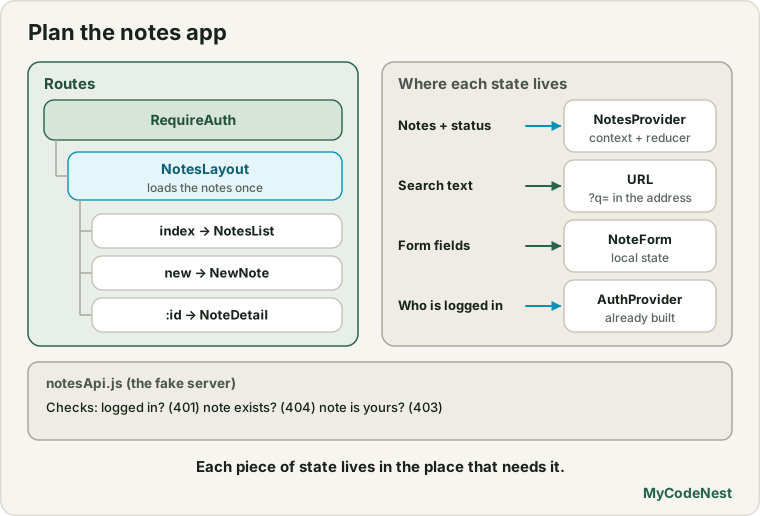
Routes. The notes pages share one provider, so they sit under a layout route inside the RequireAuth group:
RequireAuth (must be logged in)
└── NotesLayout (loads the notes once, shares them)
    ├── index      → NotesList
    ├── new        → NewNote
    └── :id        → NoteDetail
State. Which state do we have, and where does it live?
| State | Where | Why |
|---|---|---|
| The notes and their loading status | NotesProvider (context + useReducer) |
The list page and the note page both need it |
| The search text | The URL (?q=) |
It can be bookmarked, shared and used with Back |
| The text in the form fields | NoteForm (local) |
Nobody else needs it |
| Who is logged in | AuthProvider |
Already built |
The server. A second fake API file for notes, which uses the session from fakeServer.js to know who is asking.
Rules we will enforce. The server checks that you are logged in (401), that the note exists (404), that it belongs to you (403), and that the data is valid (400). The React app reacts to these answers.
Step 1: the notes API (the fake server)
Create src/api/notesApi.js:
import { ApiError, getCurrentUser } from './fakeServer.js';

const STORAGE_KEY = "fake-notes";

function delay(ms = 120) {
  return new Promise((resolve) => setTimeout(resolve, ms));
}

function readAll() {
  const saved = localStorage.getItem(STORAGE_KEY);
  if (saved) {
    return JSON.parse(saved);
  }

  const now = new Date().toISOString();
  const seed = [
    { id: crypto.randomUUID(), ownerId: 1, title: "Roadmap", body: "Plan the next release.", updatedAt: now },
    { id: crypto.randomUUID(), ownerId: 1, title: "Hiring", body: "Interview two designers.", updatedAt: now },
    { id: crypto.randomUUID(), ownerId: 2, title: "Welcome", body: "This is your first note.", updatedAt: now },
    { id: crypto.randomUUID(), ownerId: 2, title: "Shopping list", body: "Milk, bread, rice.", updatedAt: now },
  ];
  writeAll(seed);
  return seed;
}

function writeAll(notes) {
  localStorage.setItem(STORAGE_KEY, JSON.stringify(notes));
}

async function requireUser() {
  const user = await getCurrentUser();
  if (!user) {
    throw new ApiError(401, "Please log in");
  }
  return user;
}

function validate(data) {
  const title = (data.title ?? "").trim();
  if (title === "") {
    throw new ApiError(400, "Title is required");
  }
  if (title.length > 80) {
    throw new ApiError(400, "Title must be 80 characters or fewer");
  }
  return { title, body: (data.body ?? "").trim() };
}

function findOwnedNote(notes, id, user) {
  const note = notes.find((item) => item.id === id);
  if (!note) {
    throw new ApiError(404, "Note not found");
  }
  if (note.ownerId !== user.id) {
    throw new ApiError(403, "This note belongs to someone else");
  }
  return note;
}

export async function listNotes() {
  await delay();
  const user = await requireUser();
  return readAll()
    .filter((note) => note.ownerId === user.id)
    .sort((a, b) => b.updatedAt.localeCompare(a.updatedAt));
}

export async function createNote(data) {
  await delay();
  const user = await requireUser();
  const { title, body } = validate(data);
  const note = { id: crypto.randomUUID(), ownerId: user.id, title, body, updatedAt: new Date().toISOString() };
  writeAll([note, ...readAll()]);
  return note;
}

export async function updateNote(id, data) {
  await delay();
  const user = await requireUser();
  const notes = readAll();
  const existing = findOwnedNote(notes, id, user);
  const { title, body } = validate(data);
  const updated = { ...existing, title, body, updatedAt: new Date().toISOString() };
  writeAll(notes.map((note) => (note.id === id ? updated : note)));
  return updated;
}

export async function deleteNote(id) {
  await delay();
  const user = await requireUser();
  const notes = readAll();
  findOwnedNote(notes, id, user);
  writeAll(notes.filter((note) => note.id !== id));
}
As with the last lesson, this is a practice server that runs in the browser. Notice what it teaches, because a real server does the same things:
- Every function first calls
requireUser(), which answers401when nobody is logged in. findOwnedNoteanswers404for a missing note and403when the note belongs to someone else. The ownership check happens on the server, for every read and change.validatechecks the title again, even though our form will also check it. Never trust the browser alone.- The notes are saved in
localStorage(standing in for a database), so a page reload keeps them. - Each note has an
ownerId, andlistNotesonly returns the notes of the logged-in user. A user can never even see another user’s notes.
Step 2: the notes context with a reducer
Create src/notes/NotesContext.jsx. It loads the notes once when the notes area opens, and shares them with every notes page:
import { createContext, useContext, useEffect, useEffectEvent, useReducer } from 'react';
import { useAuth } from '../auth/AuthContext.jsx';
import {
  listNotes,
  createNote as apiCreateNote,
  updateNote as apiUpdateNote,
  deleteNote as apiDeleteNote,
} from '../api/notesApi.js';

const NotesContext = createContext(null);

function notesReducer(state, action) {
  switch (action.type) {
    case "loaded":
      return { status: "success", notes: action.notes };
    case "failed":
      return { status: "error", notes: [] };
    case "created":
      return { ...state, notes: [action.note, ...state.notes] };
    case "updated":
      return {
        ...state,
        notes: state.notes.map((note) => (note.id === action.note.id ? action.note : note)),
      };
    case "deleted":
      return { ...state, notes: state.notes.filter((note) => note.id !== action.id) };
    default:
      throw new Error("Unknown action: " + action.type);
  }
}

export function NotesProvider({ children }) {
  const { handleUnauthorized } = useAuth();
  const [state, dispatch] = useReducer(notesReducer, { status: "loading", notes: [] });

  const onUnauthorized = useEffectEvent(() => handleUnauthorized());

  useEffect(() => {
    let ignore = false;

    listNotes()
      .then((notes) => {
        if (!ignore) {
          dispatch({ type: "loaded", notes });
        }
      })
      .catch((error) => {
        if (ignore) {
          return;
        }
        if (error.status === 401) {
          onUnauthorized();
        } else {
          dispatch({ type: "failed" });
        }
      });

    return () => {
      ignore = true;
    };
  }, []);

  async function runAction(action) {
    try {
      return await action();
    } catch (error) {
      if (error.status === 401) {
        handleUnauthorized();
      }
      throw error;
    }
  }

  async function createNote(data) {
    const note = await runAction(() => apiCreateNote(data));
    dispatch({ type: "created", note });
    return note;
  }

  async function updateNote(id, data) {
    const note = await runAction(() => apiUpdateNote(id, data));
    dispatch({ type: "updated", note });
    return note;
  }

  async function deleteNote(id) {
    await runAction(() => apiDeleteNote(id));
    dispatch({ type: "deleted", id });
  }

  const value = { ...state, createNote, updateNote, deleteNote };

  return <NotesContext value={value}>{children}</NotesContext>;
}

export function useNotes() {
  const context = useContext(NotesContext);
  if (context === null) {
    throw new Error("useNotes must be used inside a NotesProvider");
  }
  return context;
}
Everything here comes from earlier lessons:
useReducerkeeps all the ways the list can change in one place: loaded, failed, created, updated, deleted. The reducer is pure. The server’s answer (the real note, with its id) goes into the action.- The Effect loads the notes with an
ignoreflag in the cleanup, and usesuseEffectEventto call the latesthandleUnauthorized(see the Effect events lesson). runActionis a small wrapper for all changes. If the server answers401(the session ended), it logs the user out in state, so the guard sends them to the login page. Then it re-throws the error, so the page that asked can show its own message for other errors.- Each action does the request first and only then dispatches. The screen changes after the server says OK (a pessimistic update, from the CRUD lesson).
useNotes()is a custom Hook with a clear error if it is used outside the provider.
Now a small layout route that mounts the provider. Create src/notes/NotesLayout.jsx:
import { Outlet } from 'react-router';
import { NotesProvider } from './NotesContext.jsx';

function NotesLayout() {
  return (
    <NotesProvider>
      <Outlet />
    </NotesProvider>
  );
}

export default NotesLayout;
The provider lives only inside the notes area. It is created when the user enters /notes and removed when they leave. Because the notes pages share one provider, moving between the list and a note does not reload the data.
Step 3: a reusable form
Both “new note” and “edit note” need the same form. Create src/notes/NoteForm.jsx:
import { useState } from 'react';

function NoteForm({ initialTitle = "", initialBody = "", submitLabel, onSubmit }) {
  const [title, setTitle] = useState(initialTitle);
  const [body, setBody] = useState(initialBody);
  const [titleError, setTitleError] = useState(null);
  const [formError, setFormError] = useState(null);
  const [saving, setSaving] = useState(false);

  async function handleSubmit(event) {
    event.preventDefault();
    setFormError(null);

    const trimmed = title.trim();
    if (trimmed === "") {
      setTitleError("Please enter a title.");
      return;
    }
    if (trimmed.length > 80) {
      setTitleError("The title must be 80 characters or fewer.");
      return;
    }
    setTitleError(null);

    setSaving(true);
    try {
      await onSubmit({ title: trimmed, body });
    } catch (error) {
      setFormError(error.message);
    } finally {
      setSaving(false);
    }
  }

  return (
    <form onSubmit={handleSubmit} noValidate>
      <label htmlFor="title">Title</label>
      <input
        id="title"
        value={title}
        onChange={(event) => setTitle(event.target.value)}
        aria-invalid={titleError ? "true" : "false"}
        aria-describedby={titleError ? "title-error" : undefined}
      />
      {titleError && <p id="title-error" role="alert">{titleError}</p>}

      <label htmlFor="body">Note</label>
      <textarea id="body" rows={6} value={body} onChange={(event) => setBody(event.target.value)} />

      {formError && <p role="alert">{formError}</p>}

      <button type="submit" disabled={saving}>
        {saving ? "Saving..." : submitLabel}
      </button>
    </form>
  );
}

export default NoteForm;
This is the form you learned in the forms and validation lessons: controlled fields, an accessible error with aria-invalid and aria-describedby, and a saving flag that prevents double submits. The form does not know what happens on submit. It calls onSubmit (a prop) and waits. If that throws (for example a server error), the form shows the message and keeps the user’s text.
One detail: finally { setSaving(false) } runs even when the save succeeded. If the page has already navigated away, the form is gone and the state update is harmless.
Step 4: the notes list with search in the URL
Create src/notes/NotesList.jsx:
import { Link, useSearchParams } from 'react-router';
import { useNotes } from './NotesContext.jsx';

function NotesList() {
  const { status, notes } = useNotes();
  const [searchParams, setSearchParams] = useSearchParams();
  const query = searchParams.get("q") ?? "";

  if (status === "loading") {
    return <p>Loading your notes...</p>;
  }

  if (status === "error") {
    return <p role="alert">Could not load your notes. Please try again later.</p>;
  }

  const search = query.trim().toLowerCase();
  const visible = notes.filter(
    (note) =>
      note.title.toLowerCase().includes(search) || note.body.toLowerCase().includes(search)
  );

  function handleQueryChange(event) {
    const value = event.target.value;
    setSearchParams(value ? { q: value } : {}, { replace: true });
  }

  return (
    <>
      <title>My notes | Notes</title>
      <h1>My notes</h1>
      <p>
        <Link to="/notes/new">Write a new note</Link>
      </p>

      <label htmlFor="search">Search notes</label>
      <input id="search" type="search" value={query} onChange={handleQueryChange} />

      <p>
        Showing {visible.length} of {notes.length} notes
      </p>

      {notes.length === 0 ? (
        <p>You have no notes yet. Write your first one!</p>
      ) : visible.length === 0 ? (
        <p>No notes match "{query}".</p>
      ) : (
        <ul>
          {visible.map((note) => (
            <li key={note.id}>
              <Link to={`/notes/${note.id}`}>{note.title}</Link>
              <small> {new Date(note.updatedAt).toLocaleDateString()}</small>
              <p>{note.body.slice(0, 80)}</p>
            </li>
          ))}
        </ul>
      )}
    </>
  );
}

export default NotesList;- The search text lives in the URL, read with
useSearchParams. There is nouseStatefor it. The visible list is derived from the notes and the query. setSearchParams(..., { replace: true })replaces the history entry while typing, so every letter does not add a new Back-button step. (It is the right choice for text typed live.)- The page handles all the states: loading, error, no notes at all, no match, and the list.
- Note titles are shown as plain text through JSX, so a note containing
<script>is displayed as text. This is exactly the XSS protection from the security lesson.
Step 5: new note and note page
Create src/notes/NewNote.jsx:
import { Link, useNavigate } from 'react-router';
import NoteForm from './NoteForm.jsx';
import { useNotes } from './NotesContext.jsx';

function NewNote() {
  const { createNote } = useNotes();
  const navigate = useNavigate();

  async function handleSubmit(data) {
    const note = await createNote(data);
    navigate(`/notes/${note.id}`);
  }

  return (
    <>
      <title>New note | Notes</title>
      <h1>New note</h1>
      <NoteForm submitLabel="Create note" onSubmit={handleSubmit} />
      <p>
        <Link to="/notes">Back to my notes</Link>
      </p>
    </>
  );
}

export default NewNote;
After the note is created, the user goes straight to its page. Create src/notes/NoteDetail.jsx:
import { useState } from 'react';
import { Link, useNavigate, useParams } from 'react-router';
import NoteForm from './NoteForm.jsx';
import { useNotes } from './NotesContext.jsx';

function NoteDetail() {
  const { id } = useParams();
  const { status, notes, updateNote, deleteNote } = useNotes();
  const navigate = useNavigate();
  const [confirming, setConfirming] = useState(false);
  const [deleteError, setDeleteError] = useState(null);

  if (status === "loading") {
    return <p>Loading your notes...</p>;
  }

  const note = notes.find((item) => item.id === id);

  if (!note) {
    return (
      <>
        <title>Note not found | Notes</title>
        <h1>Note not found</h1>
        <p>This note does not exist, or it is not yours.</p>
        <Link to="/notes">Back to my notes</Link>
      </>
    );
  }

  async function handleDelete() {
    setDeleteError(null);
    try {
      await deleteNote(note.id);
      navigate("/notes", { replace: true });
    } catch (error) {
      setDeleteError(error.message);
      setConfirming(false);
    }
  }

  return (
    <>
      <title>{`${note.title} | Notes`}</title>
      <h1>Edit note</h1>
      <NoteForm
        key={note.id}
        initialTitle={note.title}
        initialBody={note.body}
        submitLabel="Save changes"
        onSubmit={(data) => updateNote(note.id, data)}
      />

      {deleteError && <p role="alert">{deleteError}</p>}

      {confirming ? (
        <p>
          Delete this note for good?{" "}
          <button onClick={handleDelete}>Yes, delete it</button>{" "}
          <button onClick={() => setConfirming(false)}>Cancel</button>
        </p>
      ) : (
        <button onClick={() => setConfirming(true)}>Delete note</button>
      )}

      <p>
        <Link to="/notes">Back to my notes</Link>
      </p>
    </>
  );
}

export default NoteDetail;
Several lessons meet in this component:
useParamsgives theid(a string, and our ids are strings too, so no conversion is needed).- The note comes from the shared context, so opening a note from the list needs no extra request.
- If no note matches, the page says Note not found. Because the list only contains your notes, this message appears for both a wrong id and for someone else’s note. A user cannot even tell whether another person’s note exists.
key={note.id}on the form resets its fields if you move from one note to another (the identity lesson).- Deleting uses a two-step confirmation with a little state (
confirming), so one click cannot destroy data by accident. After deleting,navigate("/notes", { replace: true })leaves the page of the removed note out of the Back history.
Step 6: connect everything
Update the menu src/components/AuthStatus.jsx to include the notes link:
import { NavLink } from 'react-router';
import { useAuth } from '../auth/AuthContext.jsx';

function AuthStatus() {
  const { status, user, logout } = useAuth();

  if (status === "loading") {
    return null;
  }

  if (!user) {
    return <NavLink to="/login">Log in</NavLink>;
  }

  return (
    <span>
      <NavLink to="/notes">Notes</NavLink>{" "}
      Hi {user.name} <button onClick={logout}>Log out</button>
    </span>
  );
}

export default AuthStatus;
In src/App.jsx, import NotesLayout, NotesList, NewNote and NoteDetail, and put these routes inside the RequireAuth group:
<Route path="notes" element={<NotesLayout />}>
  <Route index element={<NotesList />} />
  <Route path="new" element={<NewNote />} />
  <Route path=":id" element={<NoteDetail />} />
</Route>
In src/pages/Login.jsx, you may also change the default destination to "/notes" (const from = location.state?.from?.pathname ?? "/notes";). Everything inside <Route element={<RequireAuth />}> is protected, including the new routes. The static route notes/new wins over notes/:id, because React Router picks the most specific match.
What happens in the browser
We tested this project with the code exactly as written in this lesson, in a browser simulation. Try these steps:
- Log in as
[email protected]/user123. Open Notes. You see My notes with two notes (WelcomeandShopping list) andShowing 2 of 2 notes. - Search. Type
milk. The address becomes/notes?q=milk, and onlyShopping listis shown (Showing 1 of 2), because the search looks at the note text too. Clear it, and both come back. - New note, empty title. Open Write a new note and press Create note without typing. You see
Please enter a title.and the page stays. Nothing was sent to the server. - New note. Type a title and some text and press Create note. You land on the page of the new note. Go back to My notes: it is at the top, and the count says 3. The list did not need to reload.
- Edit. Change the title and press Save changes. Back in the list, the title is updated.
- Delete. Press Delete note, then Yes, delete it. You return to the list, and the note is gone. Press the browser’s Back button: you do not return to the deleted note’s page.
- Other people’s notes. Log out and log in as
[email protected]/admin123. You see only the admin’s two notes (RoadmapandHiring). Your own notes do not appear. - Reload the page. Your session and your notes are still there.
What the server refused
We also tested the server rules, by calling the notes API directly, like someone bypassing the interface:
updateNote(<another user's note id>, { title: "Hacked" })  →  403 "This note belongs to someone else"
deleteNote(<another user's note id>)                        →  403 "This note belongs to someone else"
updateNote("no-such-id", ...)                               →  404 "Note not found"
createNote({ title: "   " })                                →  400 "Title is required"
createNote(...) after the session expired                   →  401 "Please log in"
Each one was refused by the server, no matter what the interface looked like. When we expired the session and then pressed Save, the app logged the user out and sent them to the login page.
Common mistakes
1. Storing the same notes in two places. The list and the note page must read from one context. Do not copy the notes into local state.
2. Putting the search text in useState. It is lost on reload and cannot be shared. Use the URL.
3. Fetching the whole list again for every page. Load once in the provider and share it.
4. Checking ownership only in React. The 403 rule lives on the server. Hiding other users’ notes in the interface is not enough.
5. Forgetting to validate on the server. The form check is for convenience. The server must check again.
6. Updating the list before the server confirms. If the request fails, the screen shows a change that never happened.
7. Deleting with one click. Add a confirmation step.
8. Losing the user’s text on a failed save. Show the error and keep the fields.
9. Mutating the notes in the reducer. Return new arrays.
10. Not handling 401 in one place. Sessions end. A single wrapper keeps the app consistent.
Practice (extend the project)
- Build the app and log in as both demo users. Compare their lists. Write down which line of code makes sure the admin does not see the user’s notes.
- Predict, then check: Open the URL of one of your notes in the browser, then log out and log in as the other user, and open the same URL. What do you see, and why is it the same message as for a note that never existed?
- Add sorting: a
selectthat sorts the list by title or by date, stored in the URL as?sort=title. Keep the search text when you change the sort. - Add a character counter (
12 / 80) to the title field inNoteForm. - Debug: After deleting a note, pressing Back shows
Note not found. Which option onnavigatewould have avoided that? Where in the code is it? - Debug: Editing a note and then opening a different note shows the old text in the form. Which prop on
NoteFormfixes this, and which lesson explains why? - Add a pinned feature: a checkbox in the note form that stores
pinned: true, and show pinned notes first in the list. What must change in the server API, the reducer and the list? - Replace the fake
localStorageserver with a real backend idea: write down thefetchcalls (method, URL, body, and status codes) that each function innotesApi.jswould become.
Recap
- You built a multi-page app with routing, a protected area, shared context + reducer state, forms, search in the URL and full CRUD.
- Plan first: routes, then which state lives where. Shared data goes in a provider, “what the user is looking at” goes in the URL, form fields stay local.
- Load data once in a layout route’s provider and share it with all child pages.
- Reducers keep the list updates in one place. Server answers go into actions. Changes are applied after the server confirms.
- Forms validate for convenience, and the server validates again.
- Ownership is enforced on the server:
401(log in),403(not yours),404(not found),400(invalid). The interface reacts to these answers. - Handle
401in one place, keep the user’s text on errors, and confirm destructive actions. - You now have the skills to build real multi-page React apps. Next, you will learn the newest React 19 features for forms and data: Actions,
useActionState,useFormStatusanduseOptimistic.
Frequently asked questions
Why use context and a reducer instead of loading notes in each page?
The list page and the note page need the same data. If each page loaded its own copy, they could disagree, and every page change would send a new request. One provider loads the notes once and every page reads the same source of truth. A reducer keeps all changes to the list in one place.
Why is the search text in the URL and not in state?
The URL makes the search shareable, bookmarkable, and compatible with the Back and Forward buttons, and it survives a reload. It also means there is a single source of truth: the list is derived from the notes and the query, with no extra state to keep in sync.
Why does the note page say "not found" for someone else's note?
The server only returns the logged-in user’s notes, so another person’s note is not in the list. Saying “not found” for both cases means the app does not reveal whether a note exists. The server still answers 403 if someone tries to change another person’s note directly.
Why validate in both the form and the server?
The form check gives instant, friendly feedback. The server check is the real protection, because anyone can send requests without using your form. A real app needs both, and they should apply the same rules.
Where does the fake database store the notes?
In localStorage of your browser, so that notes survive a reload. A real app stores them in a database on a server, and the browser never has direct access to other users’ notes. The React code would be almost the same, with fetch calls instead of the fake functions.
How could I make the app faster to use?
You could use optimistic updates, so the list changes at once and rolls back if the server refuses, which the next React 19 lessons cover with useOptimistic. You could also use TanStack Query for caching and background refreshing, instead of the provider and reducer.
See also: Authentication and Authorization, CRUD with APIs, React Context, useReducer in React