The use API and Suspense for Data in React
Master React 19's use API: read promises and context conditionally, eliminate useEffect data fetching boilerplate, and integrate with Suspense.
What you will learn
In Fetching Data in React, you learned how to load API data using the classic pattern:
- Initialize
const [data, setData] = useState(null). - Initialize
const [loading, setLoading] = useState(true). - Wrap your
fetchcall in auseEffecthook. - Add cleanup flags to avoid race conditions.
While this pattern works, it requires substantial boilerplate and can cause component “waterfalls” where child components wait for parents to finish rendering before their own effects start fetching.
React 19 introduces a revolutionary API simply called use.
In this lesson, you will learn:
- What the
useAPI is and why it is technically an API rather than a standard hook. - How
use(promise)unwraps async data directly during rendering. - Why
useis the only React primitive that can be called conditionally insideifstatements and loops. - How to coordinate loading fallbacks with
<Suspense>and handle network failures with Error Boundaries. - How
use(Context)provides a modern, flexible alternative touseContext.
What is the use API?
use is a React function that accepts a Promise or a Context and unrolls its value synchronously during component rendering:
import { use } from 'react';

function UserProfile({ userPromise }) {
  // Unwraps the promise value right inside the component!
  const user = use(userPromise);

  return (
    <div className="profile-card">
      <h2>{user.name}</h2>
      <p>{user.email}</p>
    </div>
  );
}
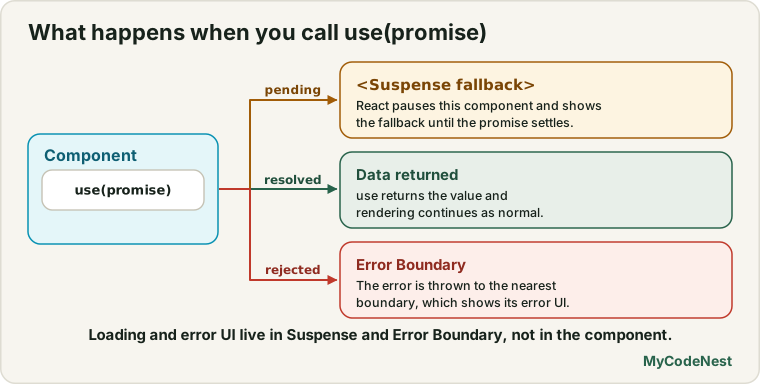
When you pass a promise to use:
- If the promise is pending,
usesuspends the component. React pauses rendering and shows the nearest<Suspense fallback={<Spinner />}>boundary above it. - If the promise resolves, React resumes rendering and returns the resolved data directly into the variable.
- If the promise rejects, React throws the error to the nearest Error Boundary.
Why is use not named useSomething like other hooks?
Unlike standard hooks (useState, useEffect, useMemo), use can be called inside conditional statements and loops!
import { use } from 'react';

function Dashboard({ dataPromise, shouldLoadComments, commentsPromise }) {
  // Correct: Fully valid in React 19!
  const data = use(dataPromise);

  let comments = [];
  if (shouldLoadComments) {
    // Calling `use` inside an `if` block is allowed!
    comments = use(commentsPromise);
  }

  return (
    <div>
      <h1>{data.title}</h1>
      {comments.map((c) => <p key={c.id}>{c.text}</p>)}
    </div>
  );
}
The Rules of Hooks normally forbid calling hooks inside if statements because React tracks hooks in an indexed linked list. Because use handles promise suspension instead of hook state tracking, React permits conditional calls.
The Rule of Stable Promises
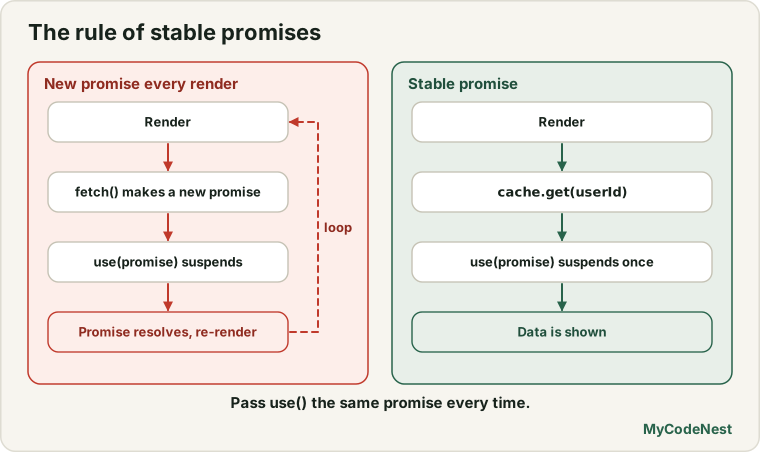
There is one critical rule you must remember when using use(promise):
Crucial Rule: The Promise passed to
use(promise)must be cached or created outside the render cycle. Never create a new promise directly inside the component body!
// Incorrect: Creates an infinite rendering loop!
function UserBad({ userId }) {
  // On EVERY render, fetch creates a brand new promise.
  // React suspends, promise resolves, React re-renders,
  // fetch creates ANOTHER promise, suspends again... forever!
  const user = use(fetch(`/api/users/${userId}`).then(r => r.json()));
  return <h2>{user.name}</h2>;
}
To use use(promise) safely in a plain client-side React app, create the promise outside render or cache it:
// Correct: Cache or pass promise from parent / router loader
const userPromiseCache = new Map();

function getUserPromise(userId) {
  if (!userPromiseCache.has(userId)) {
    userPromiseCache.set(
      userId,
      fetch(`https://jsonplaceholder.typicode.com/users/${userId}`).then(res => res.json())
    );
  }
  return userPromiseCache.get(userId);
}

export function UserProfileContainer({ userId }) {
  const promise = getUserPromise(userId);

  return (
    <Suspense fallback={<p className="loading">Loading user profile...</p>}>
      <UserProfile userPromise={promise} />
    </Suspense>
  );
}

function UserProfile({ userPromise }) {
  const user = use(userPromise);
  return <h3>{user.name} ({user.company?.name})</h3>;
}
Coordinating Fallbacks with <Suspense>
<Suspense> allows you to specify a visual fallback (like a skeleton loader or spinner) while one or more child components are suspended:
import { Suspense } from 'react';

export function NewsPage({ newsPromise, weatherPromise }) {
  return (
    <div className="layout">
      {/* Weather card with its own fast fallback */}
      <Suspense fallback={<div className="skeleton-small">Loading weather...</div>}>
        <WeatherWidget weatherPromise={weatherPromise} />
      </Suspense>

      {/* Main news feed with an article skeleton */}
      <Suspense fallback={<div className="skeleton-large">Loading headlines...</div>}>
        <NewsFeed newsPromise={newsPromise} />
      </Suspense>
    </div>
  );
}
Notice the major architectural benefit: Zero Loading State Management.
In older React code, every component had to maintain if (isLoading) return <Spinner />. With Suspense and use, your components write clean, linear code assuming data is already loaded. The boundary handles the loading screen declaratively.
Reading Context with use(Context)
In React Context, you used useContext(ThemeContext) to read context data.
In React 19, use can also read Context:
import { createContext, use } from 'react';

const ThemeContext = createContext("light");

function ThemedButton() {
  // use(Context) works just like useContext(Context)
  const theme = use(ThemeContext);

  return <button className={`btn-${theme}`}>Click Me</button>;
}
The Superpower: Conditional Context Reading
With useContext, you could never read context conditionally. With use(Context), you can:
function Notification({ showDetails }) {
  let theme = "light";

  if (showDetails) {
    // Correct: Fully valid: only subscribe to ThemeContext when details are open!
    theme = use(ThemeContext);
  }

  return (
    <div className={`notification ${theme}`}>
      Notification banner
    </div>
  );
}
If showDetails is false, the component avoids subscribing to context changes, improving rendering performance.
Handling Errors with Error Boundaries
When a promise passed to use(promise) rejects (for instance, a network error or 404), React treats it like an unhandled exception thrown during rendering.
To catch rejected promises, wrap your suspended components in an Error Boundary:
import { Component, Suspense } from 'react';

class SimpleErrorBoundary extends Component {
  state = { hasError: false, error: null };

  static getDerivedStateFromError(error) {
    return { hasError: true, error };
  }

  render() {
    if (this.state.hasError) {
      return (
        <div className="error-card" role="alert">
          <h4>Could not load data</h4>
          <p>{this.state.error.message}</p>
          <button onClick={() => this.setState({ hasError: false })}>
            Try again
          </button>
        </div>
      );
    }
    return this.props.children;
  }
}

export function SafeDataView({ promise }) {
  return (
    <SimpleErrorBoundary>
      <Suspense fallback={<p>Fetching records...</p>}>
        <DataContent promise={promise} />
      </Suspense>
    </SimpleErrorBoundary>
  );
}

function DataContent({ promise }) {
  const data = use(promise);
  return <div>{data.title}</div>;
}
When structured this way:
Suspensehandles the pending promise state.Error Boundaryhandles the rejected promise state.- Your component handles only the happy path!
Common mistakes
1. Creating promises inside the component body
Never call use(fetch(...)) directly in the component. Every render instantiates a new promise reference, resulting in an infinite re-render loop that will crash the browser.
2. Forgetting the <Suspense> wrapper
If a component calls use(promise) and has no <Suspense> boundary in its parent tree, React throws a fatal error: A component suspended while rendering, but no fallback UI was specified.
3. Mixing up await and use
You cannot make React component functions async:
// Incorrect: React components cannot be async functions in client SPA
async function BadComponent() {
  const data = await fetch('/api/item');
  return <div>{data}</div>;
}

// Correct: Regular function using the `use` API
function GoodComponent({ promise }) {
  const data = use(promise);
  return <div>{data.title}</div>;
}
Practice
- Create a promise that resolves with
{ quote: "Code is like humor. When you have to explain it, it’s bad." }after 1 second. Render it in a component usinguse()and wrap it in a<Suspense>fallback. - Build an accordion card that only reads a
UserContextusinguse(UserContext)when the card is expanded (isOpen === true). - Make a mock promise that rejects with
new Error("Server offline"). Wrap the component in an Error Boundary and verify that the fallback error message displays. - Create a tabs component with two tabs: “Overview” and “Analytics”. Only pass and unwrap the
analyticsPromisewhen the user selects the Analytics tab. - Combine
use(promise)with a search input. When the search query changes, update the promise reference and watch Suspense display the loading fallback automatically. - Compare the lines of code between a standard
useState+useEffectfetch implementation versususe(promise)with<Suspense>.
Recap
- The
useAPI unrolls Promises and Context during rendering. - When reading a Promise,
usepauses component rendering and renders the nearest<Suspense fallback={...}>boundary until the promise resolves. - If the promise rejects, the nearest Error Boundary catches the failure.
usecan be called conditionally insideifstatements and loops, enabling dynamic context subscriptions and lazy data fetching.- Promises passed to
usemust be stable and created outside render or cached to avoid infinite loops. - Next, you will explore the exciting component ergonomics introduced in React 19: ref as a prop, native document metadata, and asset preloading.
Frequently asked questions
Can I use async/await inside React components instead of use()?
In React Server Components (RSC) within frameworks like Next.js, server components can be async. However, in standard client-side React apps (Vite, single-page apps), components must be synchronous functions; the use API is the official way to unwrap promises on the client.
How does the use API differ from TanStack Query (React Query)?
The use API is a low-level primitive for reading promises and suspense integration. Libraries like TanStack Query provide higher-level features: automatic background refetching, cache expiration, garbage collection, and mutation retry queues. In modern React, libraries use use under the hood.
What happens if the promise passed to use() resolves immediately?
If the promise is already resolved before render, use() returns the value synchronously on the very first pass without triggering the <Suspense> fallback at all.
Can I call use() inside custom hooks?
Yes. Custom hooks can freely call use(promise) or use(context). Just like in components, you can even call use() conditionally inside your custom hook.
What is the browser support for React 19 use API?
The use API is built directly into core React 19. It runs in every modern browser that supports ES2020 Promises, with zero browser-specific API restrictions.
See also: useEffect in React, React Context, Fetching Data in React