Error Boundaries in React: Handle Crashes Gracefully
Master React error boundaries: catch runtime JavaScript crashes, render friendly fallback UIs, log diagnostics, and recover with component resets.
What you will learn
In JavaScript, if an uncaught exception is thrown inside a function, the whole script can grind to a halt. In React, a JavaScript error inside a component’s render method or lifecycle previously corrupted React’s internal fiber tree, causing the entire application to unmount and leave a blank white screen for the user.
Imagine a user shopping on an e-commerce site: if an avatar image fails to render or an unexpected null property crashes a review widget, the user shouldn’t be blocked from checking out their cart!
React solves this with Error Boundaries.
In this lesson, you will learn:
- What an Error Boundary is and why it catches crashes in its child component tree.
- How to implement a robust Error Boundary using
static getDerivedStateFromErrorandcomponentDidCatch. - Why Error Boundaries must currently be written as class components (or wrapped in lightweight utilities).
- Where to strategically place Error Boundaries in an application architecture.
- How to provide recovery buttons that allow users to reset crashed components without refreshing the whole page.
What is an Error Boundary?
An Error Boundary is a React component that catches JavaScript errors anywhere in its child component tree, logs the errors, and displays a friendly fallback UI instead of crashing the whole page.
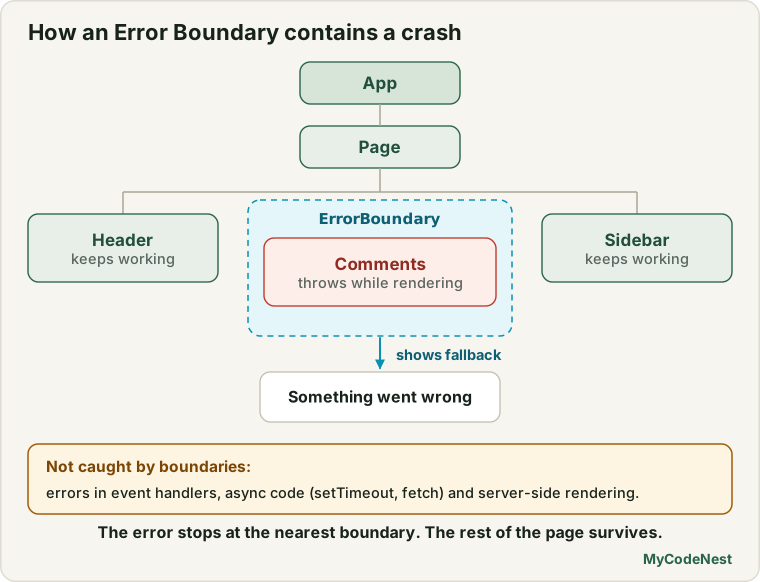
Think of an Error Boundary like a JavaScript try...catch block, but for declarative React components:
Without Error Boundaries:
[ App ]
  └── [ Navbar ]
  └── [ Feed ]
  └── [ CorruptedPost ] (Throws TypeError: Cannot read null)
Result: ENTIRE PAGE CRASHES TO BLANK WHITE SCREEN!

With Error Boundaries:
[ App ]
  └── [ Navbar ] (Works fine!)
  └── [ FeedErrorBoundary ]
        ├── [ CorruptedPost ] Caught!
        └── Shows: "Could not load this post. [Retry]"
  └── [ CheckoutButton ] (User can still check out!)
What Error Boundaries Catch (and Do Not Catch)
Error Boundaries catch errors during:
- Rendering (inside the component JSX return).
- Lifecycle methods (
componentDidMount,componentDidUpdate). - In constructors of child components.
- During promise rejection resolution in React 19’s
use()API.
Error Boundaries do NOT catch:
- Errors inside standard event handlers (e.g. inside
onClick). For event handlers, use regulartry...catch. - Asynchronous code using raw
setTimeoutorrequestAnimationFrame. - Server-side rendering errors prior to hydration.
- Errors thrown inside the Error Boundary itself (it catches errors in its children, not itself).
Building an Error Boundary Component
Currently, React requires Error Boundaries to be class components because the lifecycle hooks getDerivedStateFromError and componentDidCatch have no direct functional hook equivalents:
// ErrorBoundary.jsx
import { Component } from 'react';

export class ErrorBoundary extends Component {
  constructor(props) {
    super(props);
    this.state = { hasError: false, error: null };
  }

  // 1. Update state so the next render shows the fallback UI
  static getDerivedStateFromError(error) {
    return { hasError: true, error };
  }

  // 2. Log error details to an external logging service (e.g., Sentry, Datadog)
  componentDidCatch(error, errorInfo) {
    console.error("ErrorBoundary caught an error:", error, errorInfo.componentStack);
    if (this.props.onError) {
      this.props.onError(error, errorInfo);
    }
  }

  // 3. Reset error state so user can retry
  handleReset = () => {
    this.setState({ hasError: false, error: null });
    if (this.props.onReset) {
      this.props.onReset();
    }
  };

  render() {
    if (this.state.hasError) {
      // Custom fallback prop or default UI
      if (this.props.fallback) {
        return this.props.fallback({
          error: this.state.error,
          resetError: this.handleReset,
        });
      }

      return (
        <div className="error-fallback-card" role="alert">
          <h3>Something went wrong</h3>
          <p className="error-message">{this.state.error?.message || "An unexpected error occurred."}</p>
          <button onClick={this.handleReset} className="btn-retry">
            Try Again
          </button>
        </div>
      );
    }

    return this.props.children;
  }
}
Strategic Placement: Granular vs Top-Level
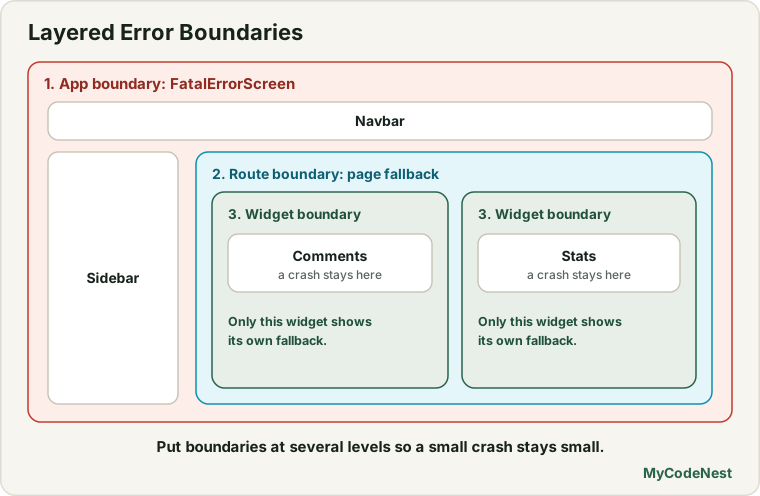
Where should you place Error Boundaries?
A resilient production architecture uses multiple layers:
// App.jsx
export function App() {
  return (
    // 1. Top-Level Safety Net: Catches catastrophic app-wide crashes
    <ErrorBoundary fallback={() => <FatalErrorScreen />}>
      <header className="app-header">
        <Navbar />
      </header>

      <main className="app-main">
        <Sidebar />

        <div className="content-area">
          {/* 2. Feature-Level Boundary: A crash here isolates only the dashboard */}
          <ErrorBoundary>
            <AnalyticsDashboard />
          </ErrorBoundary>

          {/* 3. Widget-Level Boundary: If comments crash, the article remains readable! */}
          <article>
            <ArticleBody />
            <ErrorBoundary fallback={() => <p>Comments are temporarily unavailable.</p>}>
              <CommentSection />
            </ErrorBoundary>
          </article>
        </div>
      </main>
    </ErrorBoundary>
  );
}
By placing boundaries around non-essential widgets (comments, sidebars, charts), a single runtime failure never prevents the user from navigating or completing primary actions.
Resetting Error Boundaries with Keys
What happens if a user clicks “Try Again”, but the component re-renders and crashes immediately because the corrupted state or URL query is unchanged?
You can reset an Error Boundary cleanly by tying its key prop to a changing route or variable (leveraging Component Identity and State Preservation):
import { useLocation } from 'react-router';

function SafeRouteView({ children }) {
  const location = useLocation();

  // Whenever the URL pathname changes, the ErrorBoundary resets automatically!
  return (
    <ErrorBoundary key={location.pathname}>
      {children}
    </ErrorBoundary>
  );
}
When the user clicks a navigation link in the header to visit another page, the boundary’s key changes, automatically clearing the error state and mounting the new route cleanly!
Common mistakes
1. Expecting an Error Boundary to catch errors in onClick
// Incorrect: Error Boundary will NOT catch this!
function BadButton() {
  function handleClick() {
    throw new Error("Clicked!"); // Uncaught in event handler!
  }
  return <button onClick={handleClick}>Click</button>;
}

// Correct: Handle event errors with standard try/catch
function GoodButton() {
  function handleClick() {
    try {
      sendAnalytics();
    } catch (err) {
      console.warn("Analytics failed:", err);
    }
  }
  return <button onClick={handleClick}>Click</button>;
}
2. Forgetting to provide a reset mechanism
An error screen with no “Try again” button forces the user to manually refresh the browser and lose all application state. Always offer a retry button or route link.
3. Placing only one Error Boundary at the root
A single root-level boundary protects against white screens, but forces users to restart the entire app for tiny widget errors. Add boundaries around individual panels and complex features.
Practice
- Create a component called
BuggyCounterthat throwsnew Error("Crashed!")when its count reaches 5. - Wrap
BuggyCounterin anErrorBoundaryand verify that reaching 5 renders the fallback UI while leaving surrounding components untouched. - Add a “Try Again” button to the fallback that resets
hasErrortofalseand resets the counter to 0. - Build a mock
ExternalLoggerthat receiveserrorInfo.componentStackand logs which component in the tree triggered the failure. - Combine an Error Boundary with
<Suspense>and the React 19use(promise)API to handle both loading states and network rejection errors. - Test resetting an Error Boundary automatically by changing a
keyprop on the boundary wrapper.
Recap
- Error Boundaries catch runtime JavaScript errors in their child component tree, preventing full-screen application crashes.
- They are defined using the lifecycle methods
static getDerivedStateFromError(to render fallback UI) andcomponentDidCatch(to log diagnostics). - Error Boundaries catch errors during rendering, lifecycle methods, and
use()promise rejections. - Use granular boundaries around widgets (charts, comments, sidebars) so a local failure does not ruin the rest of the page.
- In the next lesson, you will master Portals and Accessible Modals: rendering modals, tooltips, and dialogs cleanly outside parent layout constraints!
Frequently asked questions
Why isn't there a useErrorBoundary hook in React?
The React team designed error boundaries to be structural components in the component tree, similar to try/catch block scopes. Class components remain the standard for boundary lifecycle hooks, though libraries like react-error-boundary provide popular functional wrappers.
What is componentStack in componentDidCatch?
componentStack is a readable trace showing the hierarchy of React components where the crash occurred (for example: at BuggyWidget at Card at Dashboard), making debugging in production logs much faster than minified JavaScript stack traces.
Can Error Boundaries catch 404 errors?
In React Router, a missing route is typically handled by a catch-all route (<Route path="*" element={<NotFound />} />). However, if an API call throws a 404 error unwrapped by use(promise), an Error Boundary will catch it.
How does React DevTools handle Error Boundaries in development?
In local development (npm run dev), React always displays an error overlay banner so developers immediately see the stack trace. Closing the overlay reveals your custom fallback UI.
Should I put an Error Boundary inside every component?
No. Wrapping every individual button or paragraph creates messy code. Wrap self-contained widgets, cards, routes, and layout panels.
See also: The use API and Suspense for Data, Code Splitting with lazy and Suspense, Component Identity and State Preservation